
In this guide
- What each store charges, in one place
- The free ISBN question
- The zero cost workflow
- What you still pay for, even on the free route
- When free is the wrong choice
- FAQ
- How to publish a book for free across the stores: what costs nothing, and what you still pay for.
- Can you publish a book for free on every store?
- Which self publishing platform is completely free?
- What is the cheapest way to publish a book?
You can publish a book for free on every major store in 2026, not just Amazon. KDP, Kobo Writing Life, Apple Books, and IngramSpark all charge nothing to set up a title and nothing to revise it, and Draft2Digital charges nothing per title either, though new accounts pay a one time $20 activation fee. The stores earn from sales, not from you upfront, so a book that sells nothing costs you nothing in platform fees. The money you might still spend is on the book itself: editing, a cover, and an ISBN if you want your own, and each of those has a free route too.
Key takeaways:
- KDP, Kobo Writing Life, Apple Books, and IngramSpark charge $0 to set up a title and $0 to revise it in 2026.
- Draft2Digital charges $0 per title, but new accounts pay a one time $20 activation fee, and accounts earning under $100 a year pay a $12 annual maintenance fee.
- Every store takes its share from sales: royalties of 70 percent on ebooks at most stores, print costs deducted per sale, and IngramSpark’s 1.875 percent market access fee.
- Free ISBNs exist on KDP, IngramSpark, and Draft2Digital, but each one only works on the store that issued it.
- The genuinely free route is: write it, format it with free tools, design the cover yourself, take the free ISBNs, and upload direct to each store.
What each store charges, in one place
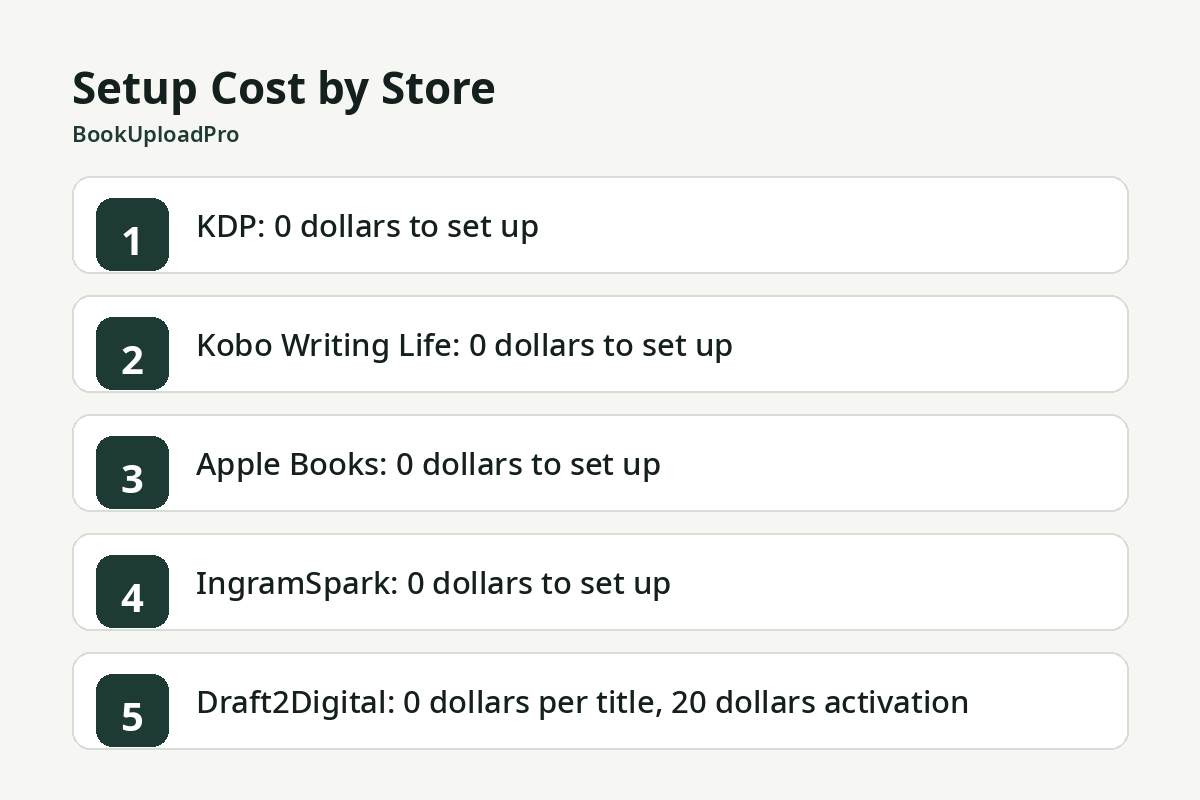
The five main platforms all let you publish without paying them upfront, with one exception. Amazon KDP charges $0 to set up and $0 to revise, for ebook, paperback, and hardcover. Kobo Writing Life charges $0, with no ISBN fee, and pays 70 percent on ebooks priced at $2.99 and up, and 45 percent below that. Apple Books charges $0, with no setup charge to open a publisher account, and pays a flat 70 percent on ebooks at any price, with no delivery fee. IngramSpark charges $0 to set up a title for print, ebook, or both, and revisions have been free since 1 February 2026; what it does charge is a 1.875 percent market access fee on every copy sold through its distribution network, plus the print cost on print sales. Draft2Digital charges $0 per title and includes formatting, file conversion, and a free D2D ISBN, but it takes about 10 percent of the retail price of every sale, and new accounts pay a one time $20 activation fee, with a $12 annual maintenance fee for accounts that earned under $100 in net royalties over the prior 12 months. The full fee comparison with sources is here.
The free ISBN question
An ISBN costs nothing if you take the store’s free one, and $125 if you buy a single ISBN from Bowker in the US, or $295 for ten, as of the last check in November 2026. Ebooks do not need an ISBN at all on any of the big stores, so the free route for an ebook is simply to skip it. For print, KDP, IngramSpark, and Draft2Digital each offer a free ISBN, but each free ISBN names that store as the publisher of record and only works on that store, so a book with a free KDP ISBN and a free IngramSpark ISBN is technically two different editions with two different ISBNs. That is fine for most authors. Buy your own ISBN only if you want one imprint name across every store, or you want bookstores to see your own publisher name rather than a store’s. If you go wide with free ISBNs, keep a note of which ISBN belongs to which store, because the numbers will not match.
The zero cost workflow
The free route has four steps, and none of them needs a paid tool. First, write and edit the manuscript, using free beta readers and a careful self edit if you cannot pay an editor; editing is the one place where spending money genuinely helps, so treat the free route as a trade, not a free lunch. Second, format the files with free tools: Kindle Create for KDP, the Draft2Digital formatter for wide ebooks, and Google Docs or Word for a print PDF, checking the margins against the store’s table. Third, design the cover yourself with Canva or KDP Cover Creator, at 1,600 by 2,560 pixels for the ebook and from the store’s template for print, and test it at thumbnail size. Fourth, upload direct to each store: KDP for Amazon, Kobo Writing Life for Kobo, Apple Books for Authors for Apple, IngramSpark for print distribution, and Draft2Digital for the smaller stores and libraries you do not want to manage one by one. If the Amazon upload stalls, the stage by stage guide is here.
What you still pay for, even on the free route
Free publishing is not free production, and the costs that remain are honest ones. Your time is the biggest: writing, editing, formatting, and uploading across five stores is a real job, and an aggregator like Draft2Digital saves time in exchange for its 10 percent. Print costs are deducted from each paperback sale, so a book that sells costs you its printing with every copy, and author copies you order for yourself are charged at print cost plus shipping. An ISBN you buy is a real cost, as above. Advertising is optional and the easiest place to lose money, so start with none. And a professional edit or cover is the one expense that usually pays for itself in reviews and sales, so if you have a small budget, spend it there rather than on a paid publishing package. The honest budget for a first book, free route and paid route side by side, is here.
When free is the wrong choice
Free is wrong when it costs you the book’s quality or your rights. A paid publishing package that bundles editing, design, and distribution can be good value if you want one company to handle everything, but read the contract: some packages take a share of royalties, lock you into their ISBN, or charge thousands for work you could do yourself in a weekend. Vanity presses, which charge large upfront fees and promise bookstore placement they cannot deliver, are the trap to avoid; a legitimate platform never charges you to list a book. Free is also wrong when the book is image heavy, like a cookbook or a photo book, where professional layout earns its fee. The rule is simple: pay for skill, never pay for access. The stores already give you access for free.
FAQ
How to publish a book for free across the stores: what costs nothing, and what you still pay for.
Set up is free on KDP, Kobo, Apple Books, and IngramSpark, and free per title on Draft2Digital apart from its $20 new account activation fee. Each store takes its share from sales instead. What you still pay for is your time, print costs deducted per sale, author copies, an ISBN if you buy your own, and any editing or cover help you choose to pay for.
Can you publish a book for free on every store?
Yes. KDP, Kobo Writing Life, Apple Books, and IngramSpark charge nothing to set up or revise a title, and Draft2Digital charges nothing per title. Ebooks need no ISBN, and free ISBNs are available for print. The only upfront charge among the five is Draft2Digital’s $20 one time activation fee for new accounts.
Which self publishing platform is completely free?
For ebooks, KDP, Kobo Writing Life, and Apple Books are all completely free to use, with no setup, listing, or revision fees. KDP also pays 70 percent on ebooks priced $2.99 to $12.99, Kobo pays 70 percent at $2.99 and up, and Apple Books pays a flat 70 percent. For print, KDP and IngramSpark are both free to set up, with print costs deducted per sale.
What is the cheapest way to publish a book?
Write it, format it with free tools like Kindle Create or the Draft2Digital formatter, design the cover yourself with Canva or KDP Cover Creator, take the free ISBNs, and upload direct to each store. The total platform cost is zero, or $20 if you use Draft2Digital as a new account. The only costs left are your time, print costs on each paperback sale, and any editing or cover help you decide to pay for.