
In this guide

Here is every fee the five main self publishing platforms charge, in one place, checked against 2026 sources: Amazon KDP, Kobo Writing Life, Apple Books, IngramSpark, and Draft2Digital. The short version is that none of them charges you to set up a title, and the money any of them takes comes out of sales, not out of your pocket upfront. The differences sit in the details: one commission, one market access fee, and one pair of new account fees: https://blog.bookuploadpro.com/how-much-does-it-cost-to-self-publish-a-book/
Key takeaways:
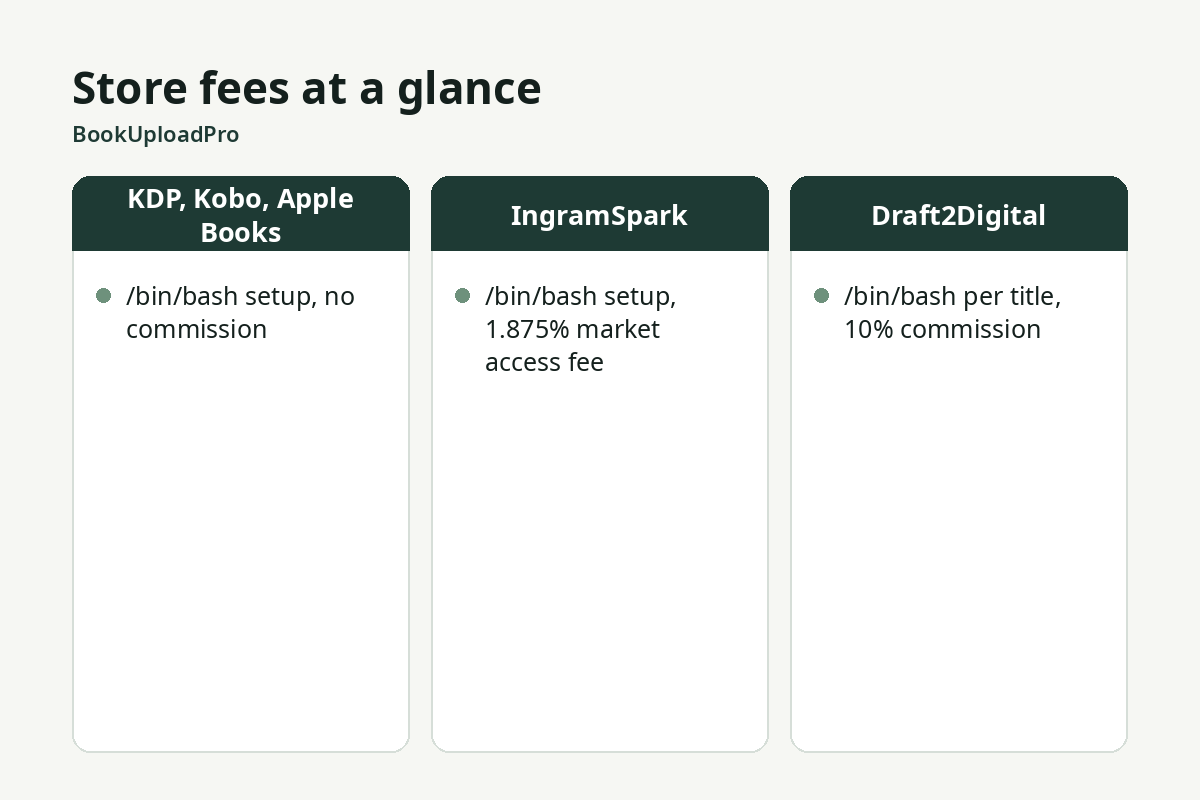
- KDP, Kobo, Apple Books, and IngramSpark charge $0 to set up a title and $0 to revise it. Draft2Digital also charges $0 per title, but new accounts pay a one time $20 activation fee.
- Draft2Digital is the only one of the five that takes a commission: about 10 percent of the retail price of every sale. The other four pay you the store’s royalty and take nothing extra.
- IngramSpark is the only one of the five with a per sale distribution fee: 1.875 percent of the local list price on every copy sold through its network, on top of the print cost.
The five platforms, fee by fee
Amazon KDP: setup $0, revisions free, no distribution fee. KDP pays 70 percent on ebooks priced $2.99 to $9.99, less a delivery fee, and 60 percent of list minus print cost on paperbacks. Print cost for a 300 page 6 by 9 black and white paperback is about $4.60 on KDP’s 2026 tables. A free KDP ISBN is available for print editions. Kobo Writing Life: setup $0, revisions free, no distribution fee, and no ISBN fee. Kobo pays 70 percent on ebooks priced $2.99 and up in most cases, and runs Kobo Plus, which needs no exclusivity. Apple Books: setup $0, revisions free, no distribution fee. Apple pays 70 percent on ebooks, and there is no setup charge to open a publisher account: https://blog.bookuploadpro.com/royalty-mechanics-explained/
IngramSpark: setup $0 for print, ebook, or both, and revisions free since 1 February 2026, when IngramSpark removed its old revision fee. The charge that remains is the market access fee, called the global distribution fee on the rate card: 1.875 percent of the local list price on every copy sold through Ingram’s distribution network. Print cost is separate and comes out of each sale: a 300 page 6 by 9 black and white paperback costs $5.71 to print on the 2026 rate card. A free IngramSpark ISBN is available, and the wholesale discount you set, usually 55 percent, is what bookstores take: https://blog.bookuploadpro.com/ingramspark-paperback-distribution-cost/
Draft2Digital: setup $0 per title, file conversion and formatting included, and a free D2D ISBN. The commission is about 10 percent of the retail price of every sale, so on a typical 70 percent store payout you keep about 60 to 63 percent of the list price. Since 2026 there are two account fees: a one time $20 activation fee for new accounts, and a $12 annual maintenance fee for accounts earning under $100 a year. D2D Print, its paperback service, pays about 45 percent of list price minus the printing cost, with no setup fee: https://blog.bookuploadpro.com/what-is-wide-distribution/
ISBN fees, side by side
A free ISBN costs $0 and names the store as publisher of record: KDP, Draft2Digital, and IngramSpark all offer one for print, and a free ISBN only works on the store that issued it. Your own ISBN from Bowker costs $125 for one, $295 for ten, or $575 for a hundred in the US at 2026 list prices, and it names you as publisher of record and travels with the book to every store. One book needs one ISBN per format, so an ebook and a paperback need two numbers. The 10 pack at $295 already beats buying three singles at $375: https://blog.bookuploadpro.com/same-isbn-every-store/
Revision fees: what changed in 2026
IngramSpark’s February 2026 price change removed revision fees entirely, so fixing a typo in a live IngramSpark title now costs nothing. KDP, Kobo, Apple Books, and Draft2Digital never charged for file updates. The practical result is that updating a book is free everywhere that matters, and the only cost of a revision is your time re-uploading the file to each store. Prepare the corrected files once, then apply them store by store from the same master metadata sheet: https://blog.bookuploadpro.com/aggregator-vs-uploading-yourself/
FAQ
What are the store fees for self publishing?
Setup is free on all five main platforms. The ongoing charges are Draft2Digital’s 10 percent commission, IngramSpark’s 1.875 percent market access fee, and print costs deducted from each paperback sale. Everything else is optional craft spending.
Does KDP charge a setup fee?
No. KDP charges nothing to set up an ebook or paperback, and nothing to revise files. It pays 70 percent on ebooks in the $2.99 to $9.99 band, less a delivery fee, and 60 percent of list minus print cost on paperbacks.
What does Draft2Digital charge in 2026?
About 10 percent of the retail price of every sale, plus a one time $20 activation fee for new accounts and a $12 annual maintenance fee for accounts earning under $100 a year. There is no per title setup charge, and formatting, conversion, and a free ISBN are included.
What does IngramSpark charge in 2026?
Nothing to set up a title and nothing to revise one, both free since the February 2026 price change. Each copy sold through its network pays a 1.875 percent market access fee, and print cost comes out of each sale.
Is there a fee to revise a published book?
No, not on any of the five main platforms in 2026. IngramSpark removed its revision fee on 1 February 2026, and KDP, Kobo, Apple Books, and Draft2Digital do not charge for file updates.