
In this guide
- The PDF standard: PDF/X versus a plain print PDF
- Colour space: CMYK required, RGB tolerated
- Margins and gutter: a flat 0.5 inch versus a sliding scale
- Trim sizes, page counts, and the cover
- The preflight check, and what happens when a file fails
- FAQ
- What formatting does IngramSpark require that KDP does not?
- Does IngramSpark require PDF/X?
- What margins does IngramSpark require?
- Can I use the same interior PDF for KDP and IngramSpark?
IngramSpark requires a stricter print file than KDP in six places that matter when you upload: the PDF standard, the colour space, the margins, the image resolution, the cover template, and the preflight check itself. A file that passes KDP can still fail IngramSpark, while a file built to IngramSpark’s rules almost always passes KDP too. So if you plan to publish the same book on both platforms, format once to the stricter specification and upload the same interior PDF to both.
Key takeaways:
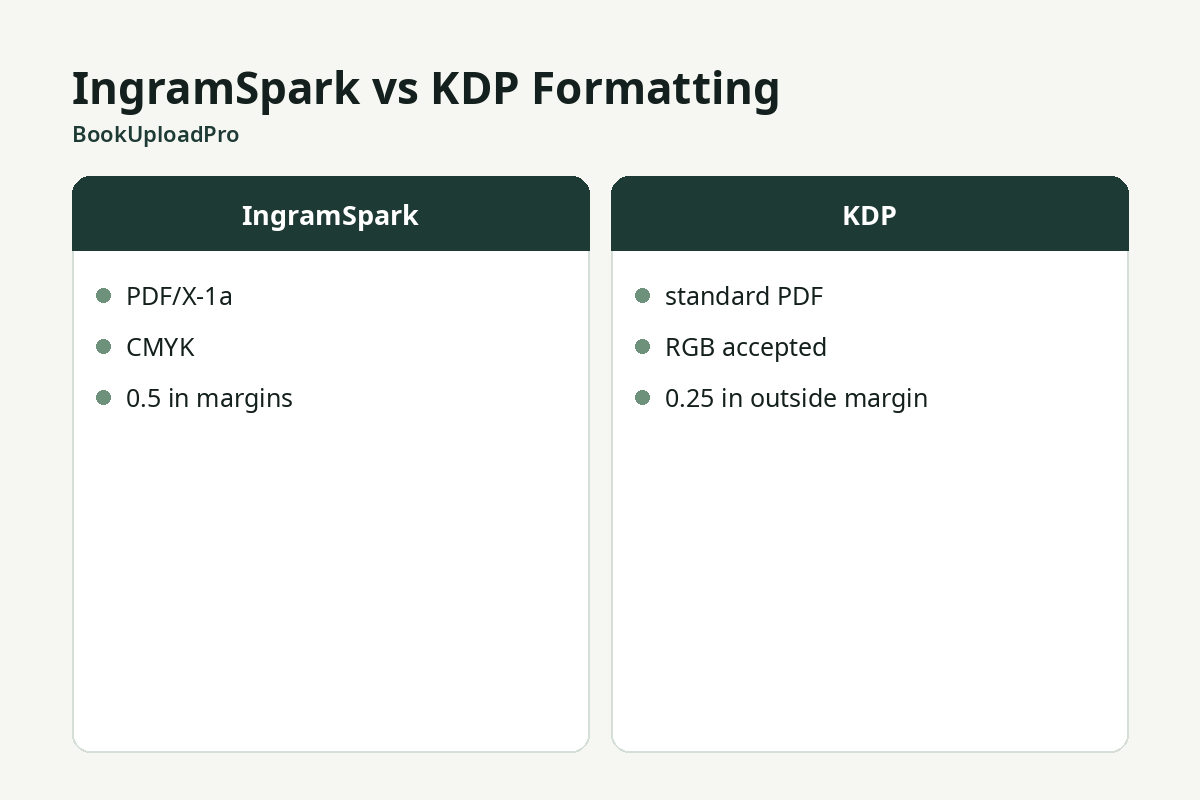
- IngramSpark prefers PDF/X-1a:2001 or PDF/X-3:2002 with all fonts embedded. KDP accepts a standard print-ready PDF and even Word for no-bleed interiors.
- IngramSpark requires CMYK colour and 300 DPI images. KDP accepts RGB and converts it, and treats 300 DPI as a recommendation.
- IngramSpark recommends a minimum 0.5 inch margin on all sides. KDP’s outside minimum is 0.25 inch without bleed, and its gutter scales with page count.
- Both use 0.125 inch bleed on the three outer edges, and both need an even page count.
- IngramSpark revisions are free since February 2026, but you must re-upload the whole interior PDF; partial page swaps are rejected.
The PDF standard: PDF/X versus a plain print PDF
The single biggest difference is the file standard. IngramSpark’s File Creation Guide asks for PDF/X-1a:2001 or PDF/X-3:2002, a print production standard that locks fonts, colour, and transparency into the file so the printer gets exactly what you sent. KDP accepts a standard print-ready PDF and does not enforce PDF/X compliance, and for interiors without bleed it even accepts a Word document. Both platforms want all fonts embedded, so export with font embedding turned on either way; a non-embedded font means the printer substitutes a default, and your layout can break. Export from InDesign, Affinity Publisher, or Word with the PDF/X-1a preset, and you satisfy both platforms in one file.
Colour space: CMYK required, RGB tolerated
IngramSpark requires CMYK colour for print interiors. KDP accepts RGB or CMYK and converts RGB internally, which is more forgiving but means the printed colours can shift from what you saw on screen. If your interior has colour images, charts, or chapter art, convert them to CMYK before export, at 300 DPI at their printed size, and keep black and white interiors in grayscale where appropriate. IngramSpark’s preflight will flag RGB images; KDP will accept them and convert. The practical rule is simple: build in CMYK and both platforms are happy, and the printed book matches the file you approved.
Margins and gutter: a flat 0.5 inch versus a sliding scale
IngramSpark recommends a minimum margin of 0.5 inch (13 mm) from the final trim on all sides for body text, headers, footers, page numbers, and non-bleeding art. KDP is more flexible: its minimum outside margin is 0.25 inch without bleed, and its inside margin, the gutter, scales with page count, from 0.375 inch for books up to 150 pages to 0.875 inch for books over 700 pages. For a dual upload, use the IngramSpark 0.5 inch minimum on the outside edges and set the gutter to at least the KDP minimum for your page count, or 0.5 inch if that is larger. Bleed is the same on both: 0.125 inch on the top, bottom, and outside edges only, never on the bind edge. Both platforms also need an even total page count, so add a blank page at the end if your content ends on an odd page.
Trim sizes, page counts, and the cover
IngramSpark offers a wider range of trim sizes than KDP, but the rule is the same on both: your interior PDF page size must match the chosen trim size exactly, plus bleed on the three outer edges when you use it. A 6 by 9 inch trim with bleed means a page size of 6.125 by 9.25 inches on both platforms. The minimum page counts differ: KDP paperbacks need at least 24 pages and hardcovers 75, while IngramSpark needs at least 18 pages and allows up to 1,200 depending on trim and paper stock. The cover is where the two platforms diverge most in practice: each has its own cover template calculator, because the spine width depends on the paper stock and page count, and the two printers use different stocks. Build the cover from each platform’s own template; do not reuse one cover PDF on the other platform.
The preflight check, and what happens when a file fails
IngramSpark runs a stricter preflight check than KDP, and files that pass KDP regularly fail IngramSpark. Its checks cover the PDF standard, embedded fonts, colour space, image resolution, margins, and bleed, and a failure blocks the upload until you fix the file. KDP’s checks are lighter and its previewer will often accept a file IngramSpark would reject, which is why authors discover the differences only when they try the second platform. Revisions are free on IngramSpark since February 2026, but you must re-upload the entire interior PDF when you change anything; partial page replacements are not accepted. KDP also takes a full file re-upload for changes. So the workflow that works is: format to IngramSpark’s spec, run KDP’s previewer as a second check, fix any warnings there, and only then submit to both.
FAQ
What formatting does IngramSpark require that KDP does not?
IngramSpark prefers PDF/X-1a or PDF/X-3, requires CMYK colour and 300 DPI images, and recommends 0.5 inch margins on all sides. KDP accepts a standard print-ready PDF, accepts RGB colour, treats 300 DPI as a recommendation, and allows a 0.25 inch outside margin without bleed.
Does IngramSpark require PDF/X?
IngramSpark’s File Creation Guide asks for PDF/X-1a:2001 or PDF/X-3:2002 with all fonts embedded, and no crop, registration, or printer marks. KDP accepts a standard print-ready PDF and does not enforce PDF/X compliance.
What margins does IngramSpark require?
IngramSpark recommends a minimum of 0.5 inch (13 mm) from the final trim on all sides for body text, headers, footers, page numbers, and non-bleeding art. KDP’s minimum outside margin is 0.25 inch without bleed, and its gutter scales with page count from 0.375 inch to 0.875 inch.
Can I use the same interior PDF for KDP and IngramSpark?
Yes, if you build it to IngramSpark’s stricter specification: PDF/X-1a with embedded fonts, CMYK colour, 300 DPI images, 0.5 inch margins, and 0.125 inch bleed on the three outer edges. That file almost always passes KDP too. Build the cover separately from each platform’s own template.