KDP Operations Workflow Practical Framework for Scaling
kdp operations workflow: a practical framework for scaling your publishing
Estimated reading time: 12 minutes
Key takeaways:
- A clear kdp operations workflow reduces repetitive work and frees time for writing and marketing.
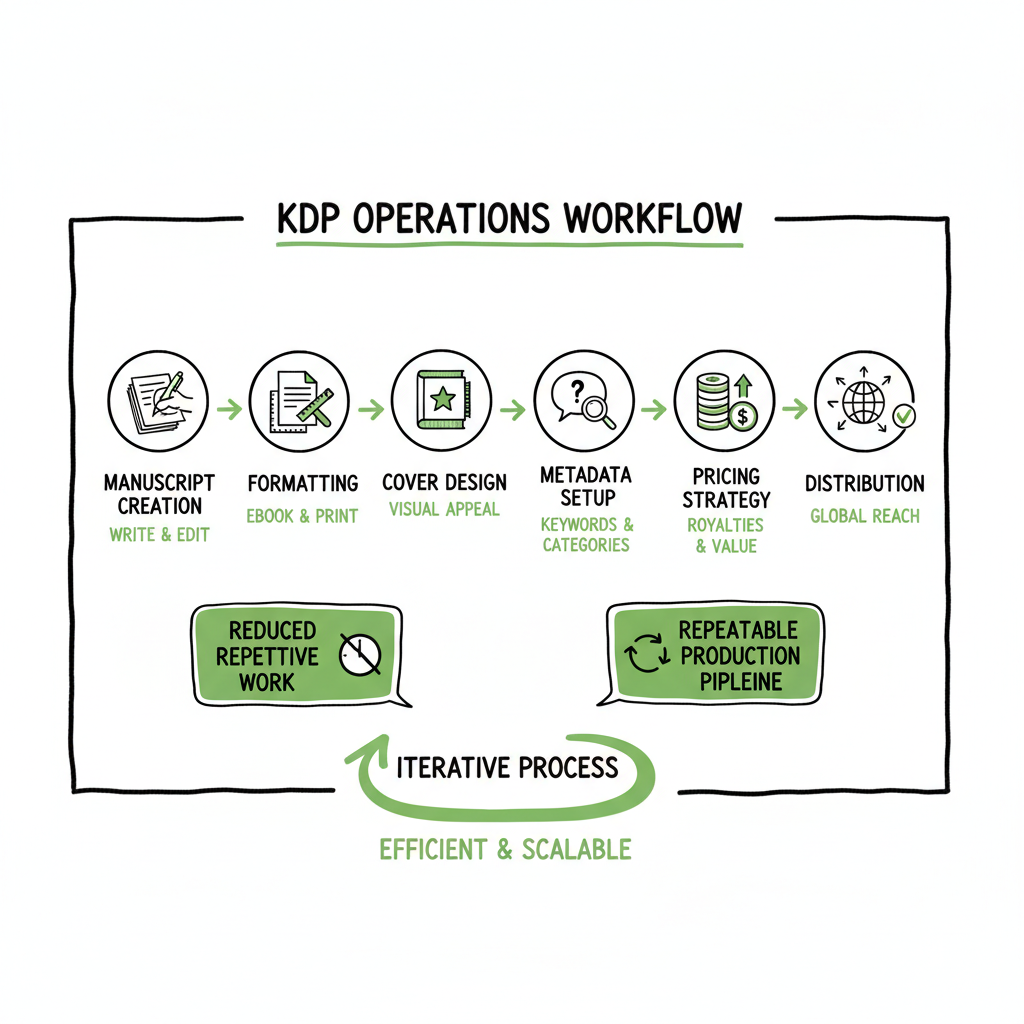
- Prioritize a repeatable production pipeline: manuscript, formatting, cover, metadata, pricing, and distribution.
- Use batch uploads, platform-aware checks, and reliable retry logic to scale without breaking quality.
- BookUploadPro automates multi-platform uploads, saving ~90% of manual time and reducing errors.
- Start small, standardize templates, then add automation points to reach predictable throughput.
Table of Contents
- Designing a practical kdp operations workflow
- Implementing a kdp ops automation framework
- Scaling the kdp production pipeline
- FAQ
Designing a practical kdp operations workflow
A kdp operations workflow is the repeatable set of steps you run for every title from draft to live on storefronts. For one-off authors this looks like a few manual clicks. For multi-title publishers it becomes a production line: templates, CSVs, checks, and handoffs. The goal is not to remove judgment from publishing but to remove repetitive toil so your attention goes where it matters—quality, marketing, and positioning.
Start with a map of the work that must happen for each book. Break the lifecycle into clear stages:
- Manuscript finalization and proofing
- Interior formatting and file generation
- Cover creation and export
- Metadata collection and keyword work
- Upload, pricing, and territory setup
- Post-publish checks and reporting
When you write these stages down they reveal duplication: the same metadata fields, the same export formats, the same descriptive copy. Those are the places you standardize. A standard template for paperback trim sizes, a single CSV column for BISAC categories, and shared cover export settings turn ad-hoc tasks into predictable inputs.
If you expect to grow, study how others scale: there’s a dedicated playbook on Scaling an Amazon KDP Business that outlines batching and account strategies. Scaling an Amazon KDP Business material meshes with a practical operations plan and is useful once you’ve standardized your baseline processes.
Why standardization matters
- Standardization is the simplest leverage in a publishing operation. When every title uses the same template:
- Errors drop because fewer manual decisions are required
- Training new team members becomes faster
- Automation plugs into consistent inputs (CSV columns, named files)
- Quality is easier to audit across many titles
Think of the workflow as a production pipeline rather than a checklist. When a manuscript is “done,” it moves to formatting. The formatted file moves to cover and metadata. Each handoff has a small, repeatable acceptance test: does the PDF match trim size? Are the front/back matter files included? Is the ISBN present? Those quick checks stop small problems before they multiply.
If you want to explore this concept further, Designating it as a practical guide is helpful: Designing a Practical Kdp Operations Workflow provides a deeper dive into structuring inputs and handoffs for scale.
Implementing a kdp ops automation framework
The phrase kdp ops automation framework describes the mix of templates, scripts, and tools you use to take standardized inputs and produce ready-to-upload outputs. This section focuses on practical, operator-level choices: which things to automate first, how to keep errors visible, and how to maintain platform-specific intelligence.
Automate the boring, keep humans in the loop for judgment
Not everything should be automated. Automate repetitive, deterministic tasks: format conversions, image resizing, CSV merges, and batch metadata validation. Keep humans for subjective decisions: cover approvals, final copy edits, and launch timing.
Core automation candidates
- CSV-driven metadata: one row per book with columns for title, subtitle, author, keywords, categories, price, and territories.
- Batch file exports: generate EPUB and print-ready PDF from a master manuscript file.
- Cover exports: create cover images at platform-specific dimensions and DPI.
- Pricing updates: apply a pricing matrix based on territory and royalty choices.
- Post-publish checks: verify live pages and capture ASIN/ISBN links into your tracker.
Practical tools and integrations
You don’t need heavy engineering to automate. Use simple scripts, reliable command-line tools, or services that accept CSVs and named files. The important features are repeatability, logging, and retry behavior. If a step fails, the system should report the failure with enough context for a human to act.
When you need to produce EPUB files or move between ebook formats, a dedicated converter makes the step reliable and repeatable; use a tool built for book conversion to reduce formatting surprises and HTML/CSS quirks—this is especially important when you convert to EPUB for Apple Books or Kobo, so consider using a trusted EPUB converter for that step. EPUB converter
Covers and paperback files
Cover setup has strict technical requirements for print books (spine width, bleed, safe zones). Use a cover process that outputs platform-ready files consistently. If you do cover generation in bulk or want programmatic cover exports, a reliable cover tool speeds the cycle and reduces manual rework. When you prepare print versions, ensure a single source for interior proofs and a separate, validated export for upload. cover tool
Note on creating a paperback or ebook: when a project reaches the production stage, choose a single, validated file set for all uploads to avoid mismatches between editions. If you need a small, scriptable tool to create paperback and ebook files, consider services that support repeatable generation and export. creating a paperback or ebook
BookUploadPro: where automation meets platform intelligence
BookUploadPro is purpose-built to take the standardized inputs you create and distribute them to multiple retailers. It supports CSV batch uploads across Amazon KDP, Kobo, Apple Books, Draft2Digital, and Ingram with platform-specific intelligence that reduces rework at each upload step.
- Unified multi-platform publishing: one interface to push the same metadata and files to multiple vendors.
- CSV batch uploads: scale with spreadsheets rather than browser clicks.
- Platform-specific intelligence: automated checks for KDP titling rules, Kobo cover sizes, and Apple Books requirements.
- Error reduction and retry logic: uploads retry and log failures so your team fixes the source, not the symptom.
- ~90% time savings on upload tasks once templates are in place.
Automate the upload. Own the distribution. When publishing reaches the point where manual clicks slow you down, tools like this become an obvious upgrade.
Platform-aware checks and templates
Every retailer has different requirements. A KDP paperback needs bleed and spine; Apple Books prefers specific EPUB metadata. Your framework should enforce those requirements before you upload:
- Validate EPUB against the store rules
- Verify cover dimensions and file types per retailer
- Confirm territory and pricing matrices match your business rules
This platform-aware validation is low-effort to implement but high-impact in preventing rejection loops. EPUB converter and cover generator help here.
Links to supporting tools
When your production pipeline includes format conversions, use a tool that reliably converts manuscripts to the formats you need. If your process includes automated cover exports, an available cover generator can save hours during batch production.
Implement these links where they fit naturally:
- If you need to convert to EPUB reliably while maintaining formatting, consider a dedicated EPUB converter. EPUB converter
- For cover creation at scale, a book cover generator can streamline exports. cover generator
- For programmatic paperback and ebook creation, choose a service that supports batch operations. creating a paperback or ebook
Scaling the kdp production pipeline
Scaling a publishing operation is not just about faster uploads; it’s about predictable throughput, low error rates, and steady content quality. The kdp production pipeline is the chain from idea to live listing. To scale, optimize each link in that chain.
Batching and staging
- Batching is the simplest lever for scale. Group books by format and process them in batches: all 6×9 trade paperbacks in one batch, all fixed-layout children’s books in another. Staging means only move items forward when they meet acceptance criteria. This minimizes back-and-forth and produces steady output.
Parallelism and resource allocation
If you have multiple team members or virtual assistants, allocate tasks by stage: one person formats interiors while another builds covers and a third prepares metadata. Your system should allow parallel uploads and keep a single source of truth for book data (CSV/ID). That prevents duplicate entries and mismatched metadata.
Error handling, logging, and visibility
At scale, small errors become big time sinks. Build standard logging for every upload and every retry. Keep error messages human-friendly and actionable: “Cover missing bleed” is better than “Upload failed.” Use dashboards or simple spreadsheets to track status: pending, uploaded, live, or needs attention.
Quality controls that scale
- Formatting accept: page count matches expected trim size; font embedding confirmed.
- Cover accept: spine text aligned; no critical text within bleed.
- Metadata accept: title/subtitle match internal naming; categories chosen from a controlled list.
A random-sample QA of live titles weekly catches regression early. Don’t QA every title manually—sample intelligently.
Multi-platform distribution at scale
When you distribute to many retailers, you want a single source of truth for files and metadata and a deliberate mapping to each retailer’s requirements. Use CSV templates with retailer-specific columns when necessary. A platform-aware upload layer will map your source fields to each vendor, apply conversions, and surface conflicts before they reach submission.
Publishing at scale requires tactical decisions
- What to centralize vs. what to customize per retailer
- Which retailers receive which formats (some retailers don’t accept paperback)
- How to manage ISBNs versus retailer-assigned identifiers
Common scaling pitfalls and how to avoid them
- Pitfall: Treating uploads as one-off tasks. Fix: Standardize templates and automate the boring steps.
- Pitfall: Ignoring platform rules until upload time. Fix: Validate earlier in the pipeline with platform-aware checks.
- Pitfall: Poor error messages. Fix: Log structured errors and include links to the offending file or CSV row.
- Pitfall: No rollback or retry plan. Fix: Build idempotent upload steps that can be re-run safely.
Operational practices that make scale sustainable
- Use version-controlled templates for interiors and covers.
- Keep a master CSV as the system of record for titles.
- Assign ownership of each pipeline stage to a person or role.
- Automate reporting: daily summaries of uploads and failures.
Final operational note: scale is not a single tool. It’s discipline—templates, small automation investments, and consistent checks. When the project reaches a volume where the manual process takes too many hours, a multi-platform uploader that supports CSV batching becomes an obvious upgrade. At that point, automating the upload step preserves your time for higher-value work.
Automating file generation at scale
When you handle many titles, generate files programmatically from templates: auto-fill front matter, merge metadata into interior files, and produce platform-specific cover exports. Use the same naming conventions so your upload layer can match interior, cover, and metadata rows reliably.
Keep a clear file naming standard:
- BookID_interior.pdf
- BookID_cover.jpg
- BookID_epub.epub
This small discipline makes batch uploads deterministic and reduces mismatches.
Operations at scale: people and process
Even with automation, people matter. Train team members on the acceptance checks. Create short SOPs for common error fixes. Use the automation to free time for strategic tasks: category research, ad creative, and long-term author brand building.
FAQ
Q: What exactly is a kdp operations workflow?
A: It’s the repeatable sequence of steps you run to turn a manuscript into a live listing on retailers. That sequence includes formatting, cover creation, metadata entry, pricing, upload, and post-publish checks. A good workflow standardizes inputs so you can batch and automate the boring parts.
Q: Where should I start when I want to streamline kdp business processes?
A: Start by documenting the stages you already run for each book. Identify the repetitive tasks and build templates for them. Then move to CSV-driven metadata and batch file exports. Small, repeatable changes produce outsized time savings.
Q: What is a kdp ops automation framework and when is it appropriate?
A: It’s the set of tools and patterns you use to convert standardized inputs into platform-ready files and listings—CSV templates, file export scripts, and upload tools. It becomes appropriate when manual uploads slow you down or when you produce multiple titles per month.
Q: How does BookUploadPro fit into this pipeline?
A: BookUploadPro is the multi-platform upload layer: it accepts your templates and files, applies platform-aware checks, and distributes to multiple retailers. It reduces manual uploading time, retries failed uploads automatically, and provides a single dashboard for distribution status.
Q: Do I need special tools to convert to EPUB or make covers?
A: You’ll want reliable, repeatable tools for format conversion and covers. A dedicated EPUB converter keeps formatting consistent across retailers, and a cover generator or template process speeds cover exports for different print sizes and retailers.
Q: How do I avoid platform-specific rejections?
A: Validate files against platform rules before submission—cover size, EPUB validity, page count, and ISBN presence. Use a staging step with clear acceptance criteria and fix issues before they enter the upload queue.
Q: Can I keep quality high while publishing multiple titles per month?
A: Yes. Standardize templates, batch similar titles, automate deterministic tasks, and reserve human attention for quality checks and launch decisions. Random sampling for QA helps maintain standards without checking every title manually.
Sources
- https://github.com/ekr0/auto-kdp
- https://flyingupload.com/amazon-kdp-upload-automation/
- https://www.kindle-prime.com
- https://powerkdp.com/automation/
- https://coconote.app/notes/c6cb3078-dcf8-4065-861b-d1518790ac9e
- https://www.youtube.com/watch?v=G7vpA0tQKK0
- https://www.youtube.com/watch?v=nZ-Cliyxyyg
Final thoughts
A pragmatic kdp operations framework turns unpredictable publishing tasks into predictable outputs. Start by standardizing inputs, adopt a clear production pipeline, and automate the boring parts. Use platform-aware checks and a single source of truth for files and metadata. When uploads start to dominate your calendar, a multi-platform uploader that supports CSV batch uploads and intelligent retries is an obvious upgrade—BookUploadPro is built for that stage, offering unified distribution, platform-specific intelligence, error reduction, and significant time savings.
Visit the BookUploadPro website to explore a free trial and see how it can fit into your publishing workflow.
Sources
- https://github.com/ekr0/auto-kdp
- https://flyingupload.com/amazon-kdp-upload-automation/
- https://www.kindle-prime.com
- https://powerkdp.com/automation/
- https://coconote.app/notes/c6cb3078-dcf8-4065-861b-d1518790ac9e
- https://www.youtube.com/watch?v=G7vpA0tQKK0
- https://www.youtube.com/watch?v=nZ-Cliyxyyg
kdp operations workflow: a practical framework for scaling your publishing Estimated reading time: 12 minutes Key takeaways: A clear kdp operations workflow reduces repetitive work and frees time for writing and marketing. Prioritize a repeatable production pipeline: manuscript, formatting, cover, metadata, pricing, and distribution. Use batch uploads, platform-aware checks, and reliable retry logic to scale…