
In this guide
- Start with the Dashboard
- Month-to-Date, and why it differs from the Dashboard
- The KENP Report: what page reads pay
- Prior Month’s Royalties: the number that pays you
- The Payments view, and a quick reading routine
- FAQ
- How do you read your KDP reports? Sales, royalties, and KENP pages explained.
- What is KENP in KDP reports?
- Why do my KDP dashboard and monthly report show different numbers?
- When are KDP royalties finalized?
KDP Reports is where your sales, royalties, and Kindle Unlimited page reads live, but the numbers you see depend on which view you open, because each report updates on its own clock. The Dashboard refreshes every 15 minutes, Month-to-Date lags by a day or two, and Prior Month’s Royalties only finalises near the 15th of the following month. Read the wrong view at the wrong time and the numbers look wrong, when they are simply not finished yet. This guide walks through each view, what it is for, and which one to trust for settled money.
Key takeaways:
- The Dashboard is an overview of estimated royalties, orders, and KENP pages read, updated about every 15 minutes. Ebook orders take up to 24 hours to appear, and KENP reads 24 to 48 hours.
- Month-to-Date shows unit sales and KENP reads for the current or prior month, but it is not downloadable and its KENP numbers can still move.
- Prior Month’s Royalties is the source of truth for settled money. It updates near the 15th of the following month, and that is the figure your payment is based on.
- KENP means Kindle Edition Normalized Pages: the page unit Amazon uses for Kindle Unlimited reads. The per-page rate is set monthly from the Global Fund and is not fixed.
- The Royalties Estimator is an estimate only. Amazon says plainly that it will not match what you are paid.
Start with the Dashboard
The Dashboard is the first thing you see at kdpreports.amazon.com, and it is an overview, not a ledger. It shows today’s top-earning books, estimated royalties, orders, and KENP pages read and listened, plus your top formats and marketplaces for the month and a 30-day trendline of orders and KENP reads. Amazon updates the Dashboard about every 15 minutes, but the data feeding it is slower: ebook and Kindle Unlimited orders usually appear within 24 hours of the order, print orders within 24 hours of shipping, and KENP reads can take 24 to 48 hours to appear. KENP reads are calculated in Coordinated Universal Time, while order totals use the time zone where the order was recorded, so a sale late in your evening can land in the next day’s figures. Use the Dashboard to spot trends and check whether a launch is moving, not to count exact earnings.
Month-to-Date, and why it differs from the Dashboard
Month-to-Date shows unit sales transactions and KENP reads for the current or prior month, broken down by title and marketplace. It follows the same processing rules as the Orders report: ebooks count once payment is confirmed, print books once they have shipped. Its numbers can differ from the Dashboard because the two views refresh on different cycles, and because monthly KENP numbers can still move until they are finalised near the 15th of the following month. Month-to-Date is not downloadable, so if you need a file to keep, use the Dashboard or the KENP Report, both of which are. If the Dashboard and Month-to-Date disagree by a small amount, that is normal; wait for the mid-month finalisation before treating either as settled.
The KENP Report: what page reads pay
KENP stands for Kindle Edition Normalized Pages, Amazon’s standardised page unit for pages read and listened when a customer borrows your book through Kindle Unlimited. Amazon normalises the count, so a page is a page regardless of font size or margins. The KENP Report shows the royalties you earn from those reads, and Amazon updates it near the 15th of every month. The per-page rate is not fixed: it is calculated each month by dividing the KDP Select Global Fund by the total KENP pages read across all enrolled titles, and it has historically sat around four to five tenths of a cent per page. During the month the Royalties Estimator shows a line for KENP earnings based on an expected rate, but Amazon says that estimate will not match your actual earnings, because the fund and the rate are only announced after the month closes. The final KENP royalty appears in Prior Month’s Royalties.
Prior Month’s Royalties: the number that pays you
Prior Month’s Royalties is your royalties by month, and it is the authoritative record of what you earned. It updates near the 15th of every month, when KDP has finalised the royalty calculations across all marketplaces, reconciled returns, and set the KENP rate for the month. For prior months Amazon uses the exchange rate on the last day of the month, so the figure in your own currency is fixed at that point. This is the report to use for tax records and for checking what you were actually paid, because the Dashboard and the Estimator are both estimates. KDP pays about 60 days after the end of the sales month, so January sales appear in Prior Month’s Royalties around the middle of February and are paid at the end of March. Expanded Distribution data is slower still: Amazon says it updates about 90 days after the end of the month following the month in which a sale was reported.
The Payments view, and a quick reading routine
The Payments view shows what KDP has actually sent you and when, which is the final check in the chain. A useful routine is: during the month, watch the Dashboard for direction and ignore small wobbles; around the 15th of the next month, open Prior Month’s Royalties and the KENP Report for the settled figures; then check Payments about 60 days after the month ends to confirm the money was sent. If a sale you know happened is missing from the Dashboard, wait 24 to 48 hours, because ebook orders and KENP reads both lag. If a whole marketplace is missing from Prior Month’s Royalties, check whether that marketplace pays on a different schedule, because KDP pays each marketplace separately. And if the Estimator and the settled figure disagree, trust the settled figure; the Estimator uses the exchange rate at the time of payment, which will differ from the rate used in the report.
FAQ
How do you read your KDP reports? Sales, royalties, and KENP pages explained.
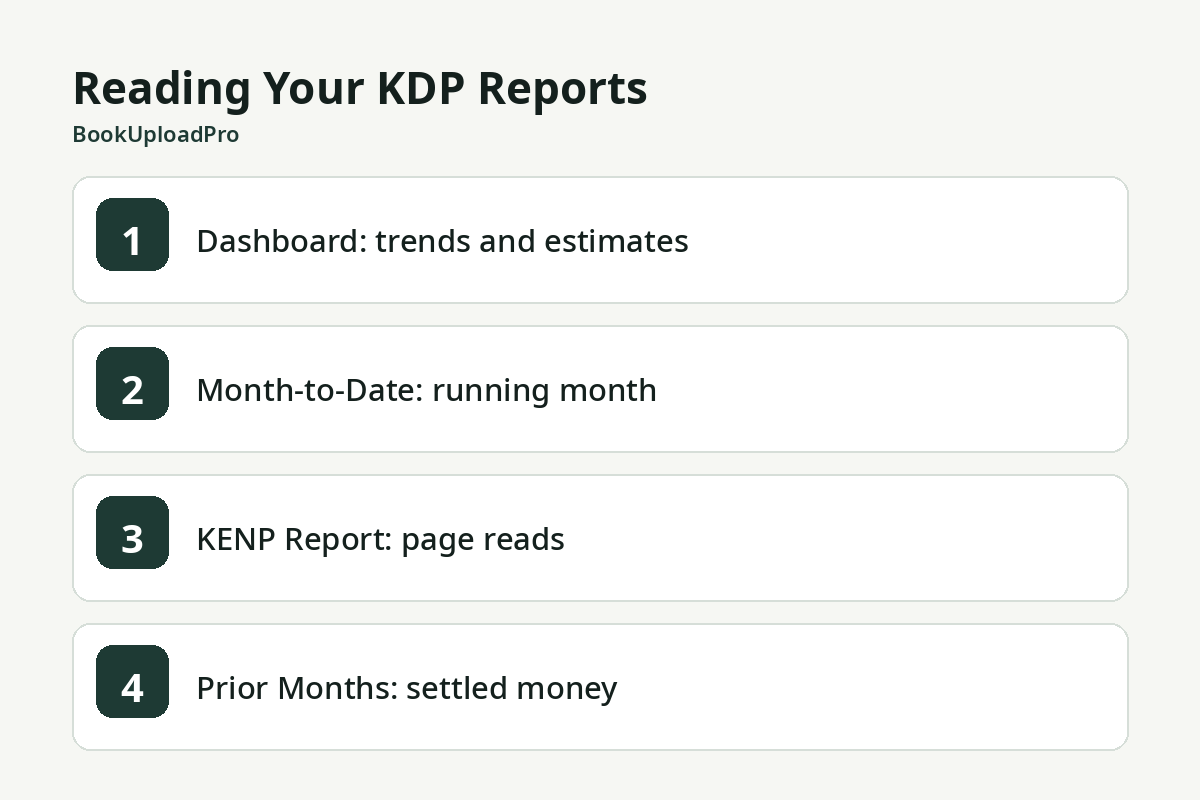
Start with the Dashboard for trends, use Month-to-Date for the running month, use the KENP Report for Kindle Unlimited page reads, and use Prior Month’s Royalties for settled money. Each view updates on its own clock, so small differences between them are normal until the mid-month finalisation.
What is KENP in KDP reports?
KENP means Kindle Edition Normalized Pages, the page unit Amazon uses for Kindle Unlimited reads. When a subscriber reads your enrolled book, Amazon counts the normalised pages read and pays you from the KDP Select Global Fund. The per-page rate is set monthly and is not fixed.
Why do my KDP dashboard and monthly report show different numbers?
The Dashboard updates about every 15 minutes but its underlying data lags: ebook orders up to 24 hours, KENP reads 24 to 48 hours. Month-to-Date refreshes on a different cycle, and monthly KENP figures can move until they are finalised near the 15th of the following month. Both views are estimates until then.
When are KDP royalties finalized?
KDP finalises monthly royalties near the 15th of the following month, when Prior Month’s Royalties and the KENP Report update. Payment follows about 60 days after the end of the sales month, or about 90 days for Expanded Distribution.