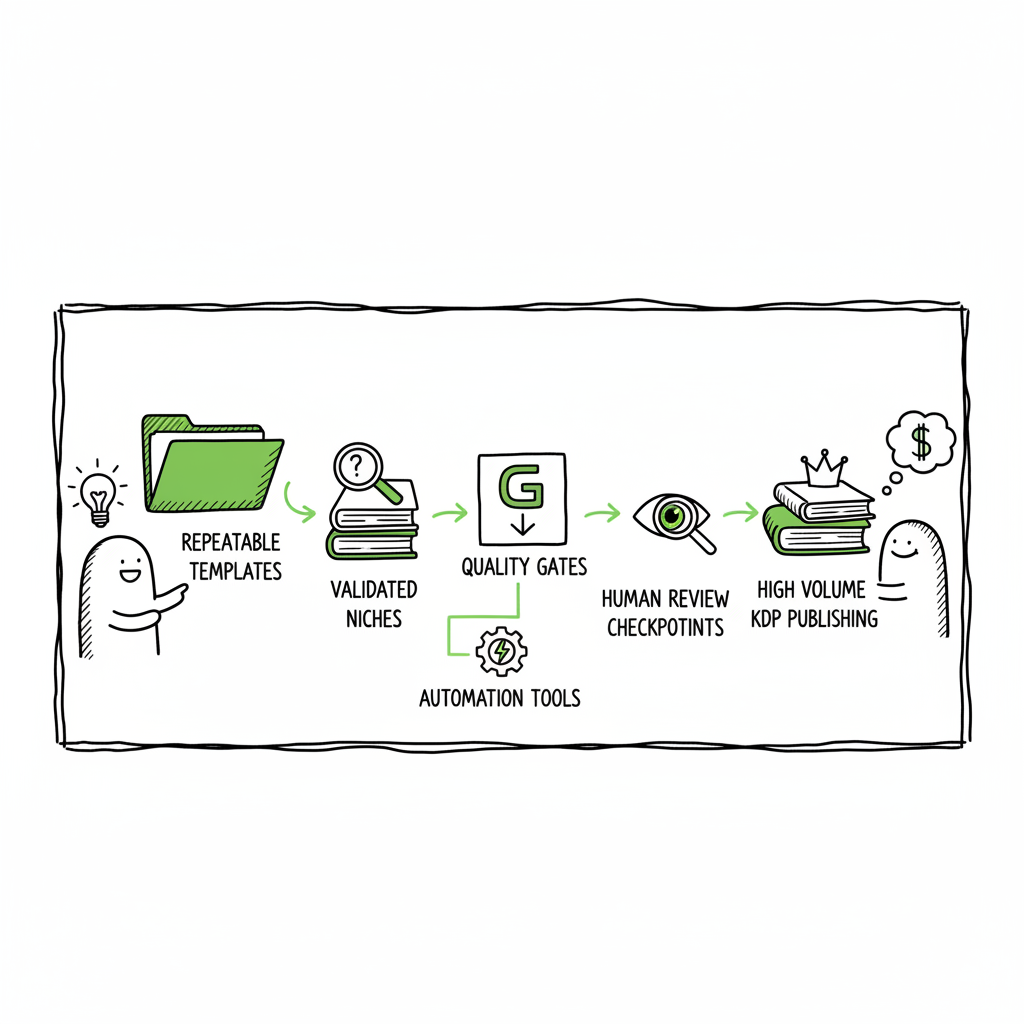
High Volume KDP Publishing Practical Process to Scale Dozens
High volume KDP publishing: a practical system for scaling dozens of books
Estimated reading time: 8 minutes
Key takeaways
- High volume KDP publishing succeeds when you treat publishing like a production pipeline: repeatable templates, validated niches, and clear quality gates.
- Automation and batch tools cut per-book time, but human review protects your account and long-term catalog value.
- BookUploadPro makes multi-platform batch uploads practical: CSV batch uploads, platform intelligence, and dramatic time savings so publishing dozens of books becomes sustainable.
Table of Contents
- Why high volume KDP publishing works — and where it fails
- A repeatable, high output KDP process
- Quality, compliance, and risk controls for a volume KDP publishing system
- Operational playbook: from idea lists to batch uploads
- FAQ
Why high volume KDP publishing works — and where it fails
High volume KDP publishing is a practical strategy when you want to move from one or two titles to dozens. The idea is simple: use repeatable formats (journals, planners, short guides, templates) and a refined process so each book takes hours, not days. Do this well and the catalog compounds — more titles mean more discoverability in related searches and more steady income.
But there are trade-offs. Low-quality or repetitive books damage your brand, invite negative reviews, and risk KDP policy action. Successful volume publishers focus on three core controls: niche validation, standardized templates, and real human review.
If you plan to scale beyond a handful of titles, read our practical guide Scaling an Amazon KDP Business to see the account-level and team moves that keep volume publishing sustainable. Scaling an Amazon KDP Business
What high-volume publishing looks like in practice
- Templates: One interior design can produce dozens of related journals or workbooks by swapping prompts, chapter titles, or cover text.
- Series: Instead of 100 unrelated books, you publish series in tight niches — 10 planners for runners, 8 meal planners for a diet style, 12 niche how-to guides.
- Automation: Use tools to populate interiors, render covers, and assemble KDP-ready files. Combine automation with spot checks and short edits.
- Batch uploads: Validate metadata and perform uploads in batches rather than one at a time. A single smooth CSV-driven upload can replace hours of repetitive work.
A repeatable, high output KDP process
High output doesn’t mean mindless output. It means pulling the production work into a pipeline and treating each stage as modular. This is where you cut time per book without losing control.
Stage 1 — Niche and keyword validation
Start with measurable demand. Look for searches with buying intent, low-to-moderate competition, and enough volume that even a modest rank can sell. Track ideas in a single spreadsheet. Treat each validated idea as a production ticket.
To scale beyond a handful of titles, read our practical guide Scaling an Amazon KDP Business.
Stage 2 — Templates and outlines
Design reusable interiors and cover style systems. For short non-fiction, use an outline template: intro, promise, 3–5 short chapters, checklist, CTA. For low-content books, fix the interior grid and vary the prompts. Keep a folder of master templates so you can produce consistent outputs.
Stage 3 — Content generation and humanization
You can use AI to draft text or generate page blocks, but always run an editing pass to humanize tone, fix errors, and add specifics. Systems that produce “humanized” output reduce obvious AI fingerprints and improve readability — a small edit can make a large difference in review scores.
Stage 4 — Assets: covers and formatting
Covers are a decision point. A repeatable cover system preserves brand and produces consistent results across a series. If you rely on automated cover tools, use them for speed but run visual checks for typography, alignment, and market fit. For interior formatting and cross-platform compatibility, automated EPUB conversion keeps ebooks correct and fast; if you need a quick conversion, an EPUB conversion tool will save time and errors. When creating paperback and ebook files at scale, a tested book creation workflow that outputs both print-ready PDFs and EPUBs is critical.
For automated cover processing, see Book Cover Generator Processing. If you require flawless EPUBs for wide distribution, use EPUB Converter and verify the output in a few reader apps. And for comprehensive ebook and paperback generation, consider the book creation workflow.
When creating paperback and ebook files at scale, a tested book creation workflow that outputs both print-ready PDFs and EPUBs is critical. BookUploadPro is built to help with that middle ground: it focuses on CSV batch uploads, platform-specific intelligence, and repeatable templates so an operator can publish dozens of books without redoing the same steps each time. Think of it as an obvious upgrade once you’re publishing seriously: it saves time, reduces errors, and makes wide distribution practical.
Stage 5 — Metadata and listing optimization
Metadata is where small changes yield outsized results. Test titles, subtitles, and bullet points at scale. Use focused long-tail keywords in subtitles and backend fields. Keep one metadata template that can be adjusted per title — this reduces mistakes and speeds uploads.
Stage 6 — Batch uploads and multi-platform distribution
Upload in batches. A CSV or package-based uploader reduces repetitive entry and helps you catch errors before they go live. Once you have production-ready files, push to multiple platforms — KDP, Kobo, Apple Books, Draft2Digital, and Ingram — to reach readers outside Amazon. Unified multi-platform publishing reduces the chance that a title succeeds only on one store, and makes distribution practical at scale.
Where automation matters most
Automation is useful where the work is repeatable: creating interiors from templates, rendering cover variations, running spelling checks, generating ASIN-ready front matter, and doing bulk metadata updates. Good systems preserve variability so books don’t look identical, and they let you set parameters like word count, chapter depth, and style.
BookUploadPro is built for that middle ground: it focuses on CSV batch uploads, platform-specific intelligence, and repeatable templates so an operator can publish dozens of books without redoing the same steps each time. BookUploadPro is an obvious upgrade once you’re publishing seriously: it saves time, reduces errors, and makes wide distribution practical.
Quality, compliance, and risk controls for a volume kdp publishing system
Doing this at scale exposes two main risks: quality drift and KDP compliance problems. Address both with simple, enforceable checks.
Quality thresholds
- Reading sample check: read the first two chapters or first 25% of the book for coherence.
- Error budget: run a spell and grammar check; fix any structural issues.
- Design check: ensure covers are legible at thumbnail size and interiors flow logically.
- Originality check: use plagiarism tools and keep a record of sources.
Human review is not optional. Even with automation, a short human pass prevents repeated errors across dozens of titles.
KDP policy compliance
Amazon’s rules coverage originality, public domain material, and metadata accuracy. When you generate content with AI or outsource parts of production, document your process and maintain records of edits and source checks. Avoid mass-publishing identical interiors with only changing keywords — that pattern invites enforcement.
Scale-friendly risk controls
- Sampling rule: randomly audit 10% of books each month.
- Rollout window: don’t upload hundreds of titles in a single week from one account—stagger releases to monitor performance and flag issues.
- Account hygiene: maintain accurate tax and payment info and keep a record of rights and permissions for images and content.
Operational playbook: from idea lists to batch uploads
This section turns the process into a practical playbook. It is operational, not theoretical. You can follow the steps below with a small team or a single disciplined operator.
Step 0 — Foundations
- Create a master spreadsheet with columns: idea title, validated keywords, projected volume, template ID, cover style, estimated publish date, status.
- Build or buy templates for interiors and covers. Keep them versioned.
Step 1 — Research and validation
- Fill the spreadsheet with 50–200 ideas. Use keyword tools, category scans, and competitor lists.
- Score each idea on search volume, competition, and intent. Keep only the top 20–30 as production candidates.
Step 2 — Template setup
- Assign a template to each validated idea. Templates should include front matter, chapter structure, and basic design tokens.
- Create a cover style sheet: color palette, typography, layout rules. A consistent style means you can automate cover generation safely.
Step 3 — Drafting and humanization
- Use controlled prompts for AI generation, if used, with clear parameters: word counts, tone, and examples.
- For very short books (5–10k words), keep chapter lengths consistent and include checklists and practical takeaways.
- Run a minimal editorial pass focused on factual accuracy, readability, and removing repetitive phrasing.
Step 4 — Asset generation
- Produce the interior in the required formats: print-ready PDF, EPUB, and source file.
- Use a cover generator to batch-create cover variations and export at KDP dimensions. If you need a dedicated cover processing pipeline, a cover generator with processing options will speed up production.
- If you require flawless EPUBs for wide distribution, use a reliable EPUB conversion tool and verify the output in a few reader apps.
Step 5 — Preflight checks
- File naming: follow a strict naming convention for interiors and covers so upload scripts can match assets to metadata.
- Metadata lock: ensure title, subtitle, author, keywords, and categories are correct and match the product page copy.
- Run the quality checklist: sample read, thumbnail check, plagiarism scan.
Step 6 — Batch upload and distribution
- Use a CSV or package uploader to push multiple titles to KDP and other stores. Where KDP requires manual steps, automate as much of the metadata and asset assignment as possible.
- Push simultaneously to other retailers where format requirements differ; a book creation workflow that outputs both ebook and print formats will save time for multi-platform distribution.
- Track uploads and confirmation IDs in your spreadsheet.
Step 7 — Post-publish monitoring
- Track first-week downloads, sales, and reviews. Use this data to decide whether to tweak metadata, change a cover, or pause a title.
- Iterate on titles that perform: adjust pricing, test different subtitles, or swap covers.
How multi-platform publishing changes the math
Publishing only on Amazon makes some things simple, but leaves readers on other platforms untapped. Multi-platform publishing reduces single-store risk and often increases total revenue. The practical challenge is that each storefront has its own formatting and submission rules. If you publish dozens of titles, the manual overhead of converting files and performing multiple uploads becomes the bottleneck.
That’s where unified multi-platform publishing tools help. With CSV batch uploads, platform-specific intelligence, and error reduction features, you can scale across stores without multiplying work. The time savings are real — the typical claim is up to ~90% time savings on repetitive upload tasks — which means you can repurpose time into niche research, marketing, and quality control.
Practical notes on covers, EPUBs, and print files
- Cover thumbnails win readers. Never skip a thumbnail check.
- EPUBs need different attention than print PDFs: test them in at least two readers.
- For paperbacks, bleed, margins, and spine calculations must match printer specs. Use templates that already include KDP-safe dimensions.
If you build or rely on a consistent pipeline, these tasks become a few quick checks rather than a full project for every book.
When to use tools and when to keep work manual
Tools accelerate repeatable work — template filling, batch rendering, and uploads. Keep manual effort for creative decisions and quality control. A good rule: automate the mechanical, humanize the content.
BookUploadPro is designed for operators who want that division: it automates repetitive uploads, enforces KDP-ready file structures, and handles multi-platform packaging so you can focus on niche selection and quality. Automate the upload. Own the distribution.
FAQ
Q: What types of books work best for high volume KDP publishing?
A: Short non-fiction, journals, planners, activity books, and tightly scoped guides work well. These formats benefit most from templates and repeatable structure. Series-based approaches in consistent niches tend to produce better long-term income than unrelated, random titles.
Q: How many books should I aim for per month?
A: Start small. Produce a steady cadence — for example, 2–4 titles per month — and focus on quality and market fit. Once your pipeline and review checks are reliable, scale up to the level your account and review process can safely handle.
Q: How do I avoid KDP policy issues when using AI?
A: Keep records of prompts and edits, run originality checks, and avoid copying public-domain material without adding real value. Don’t publish identical interiors in many listings. Provide human edits and ensure factual accuracy in non-fiction.
Q: Should I use the same cover style across a series?
A: Yes. A consistent cover system helps branding and reduces per-title design time. But ensure each cover has enough variation to be distinct at thumbnail size.
Q: How do I handle different file requirements across platforms?
A: Use a workflow that outputs both print-ready PDFs and EPUBs. Convert and test EPUBs before upload. When possible, use a single pipeline that produces correctly sized assets for each platform to avoid manual rework.
Q: What metrics should I watch after publishing?
A: First-week sales and page reads, conversion from page views to sales, reviews and ratings, and search rank for targeted keywords. These metrics tell you whether a book needs a metadata tweak or a new cover.
Sources
- https://damyantiwrites.com/kindle-direct-publishing/
- https://selfpublishing.com/amazon-kdp/
- https://reedsy.com/blog/guide/kdp/how-to-publish-a-book-on-amazon/
High volume KDP publishing: a practical system for scaling dozens of books Estimated reading time: 8 minutes Key takeaways High volume KDP publishing succeeds when you treat publishing like a production pipeline: repeatable templates, validated niches, and clear quality gates. Automation and batch tools cut per-book time, but human review protects your account and long-term…