Bulk Publishing Books Practical Guide and Rollouts
Bulk publishing books: a practical guide to scaling multi-platform releases
Estimated reading time: 15 minutes
Key takeaways
- Bulk publishing books is about repeating a reliable process: good templates, consistent metadata, and controlled rollouts beat random mass uploads.
- Use tooling to save time and reduce errors—CSV batch uploads, platform-aware checks, and single-point control make wide distribution practical.
- Automating uploads is an obvious upgrade when you publish seriously: it saves ~90% of time, reduces mistakes, and frees you to focus on testing and marketing.
Table of Contents
Why bulk publishing books works
Publishing many titles at once—bulk publishing books—sounds brute force, but it has clear logic behind it. Each new listing is a chance to be found. If you keep interiors solid, experiment with covers and keywords, and roll out steadily across platforms, your odds of a sale rise with scale.
Start simple: think of your catalog as a set of experiments. Each notebook, journal, or short ebook tests a cover, description, and keyword set. Most will earn little; some will find a niche and generate steady income. The trick is doing this without burning days on manual uploads.
If you plan to grow, reading about Scaling an Amazon KDP Business will give you context about limits and good cadence. That background helps you decide how fast to push new titles and when to pause and optimize.
Why scale matters
- Search and category visibility reward variety. Multiple related titles can share keywords while offering slight design differences that appeal to different buyers.
- Small royalties across many live listings compound. A steady trickle from dozens of low-touch books becomes meaningful income.
- Data from many listings gives faster signal: you learn which keywords, colors, and descriptions work.
Common objections, answered
- Quality vs. quantity: Quantity only wins if you maintain baseline quality—interiors that read well, fits that match product specs, and covers that don’t look cheap.
- Platform limits: KDP and others have practical caps and review policies. A measured rollout avoids flags.
- Time investment: The first 10 uploads teach you what to template. After that, the right tools cut time per book dramatically.
A practical mass book publishing workflow
This section lays out a reproducible workflow that works across Amazon KDP, Kobo, Apple Books, Draft2Digital, and Ingram. The emphasis is practical steps that an operator can apply immediately: templates, batch files, checks, and a staggered rollout.
1) Plan your catalog
Decide what you will publish and why. Low-content books (notebooks, planners) are easiest to scale; short ebooks and short-form nonfiction can work too.
- Define families: group covers and interiors into families. A family might be “lined notebook, 120 pages, 6×9” with five cover color variations.
- Set naming conventions: author/publisher name, title format, series markers. Consistent naming helps CSV imports and tracking.
- Keyword groups: prepare 4–6 keyword sets per family to test different angles.
2) Build reliable templates
A template is your safety net. It saves time and prevents errors.
- Interior templates: consistent page counts, margins, and trim sizes. Save as print-ready PDFs for paperback and as source files for ePub conversion.
- Description template: one long description and several short variants that swap calls-to-action and keyword emphasis.
- Pricing and royalty targets: decide a default price band ($2–$6 for low-content paperbacks in many markets), then adjust after sales data.
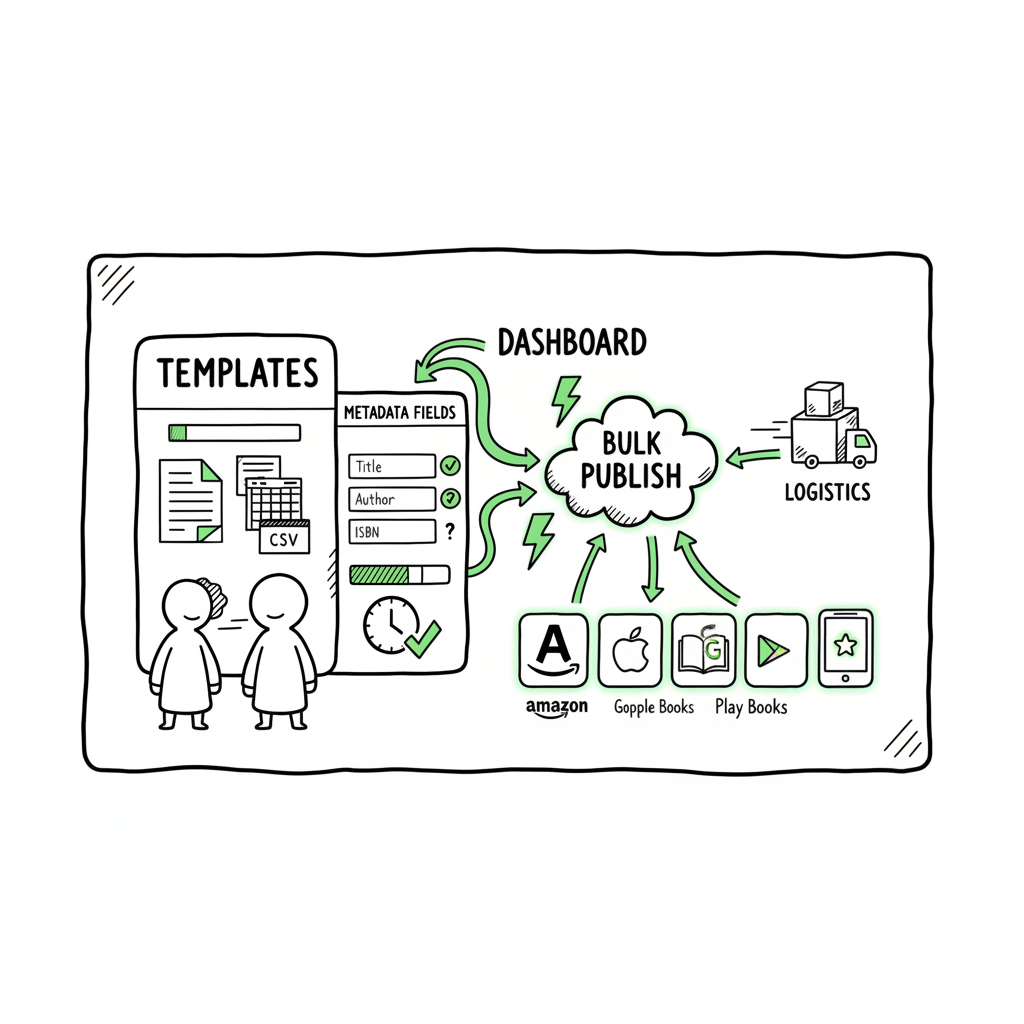
- Metadata spreadsheet: columns for title, subtitle, author, series, language, categories, keywords, price, ISBN (if you have one), and file links.
3) Prepare assets: covers, interiors, and ebook files
Make assets once, reuse many times.
- Covers: create a set of cover variants that follow your brand rules—fonts, color palettes, and imagery. If you use automated tools for covers, link to a book cover generator when you want to batch-create or process many covers quickly.
- Interiors: finalize one interior per trim/line type and export to print-ready PDF. For ebooks, convert a clean source to ePub; a dedicated EPUB converter helps ensure clean, validated files for Apple and Kobo stores.
- Formats: for wide distribution you’ll need at least a paperback PDF and an ePub (or separately converted formats for each retailer).
4) Organize for batch uploads
Use a single spreadsheet as the source of truth.
- CSV master: each row is one SKU. Include file paths or cloud links for interiors and covers, and ensure fields match the upload tool’s expected format.
- Profiles: create profile presets per platform (KDP region, Kobo settings, Apple requirements). They speed category, language, and distribution options.
- Error checks: validate file sizes, spine calculations, and mandatory fields before you start uploading.
5) Use tooling for batch KDP book uploads and multi-platform distribution
Manual entry is slow and error-prone. Tools that support CSV/batch KDP book uploads or multi-platform CSV imports cut time from hours to minutes.
- Why tools help: they fill forms, match fields to platform inputs, and flag missing data. Good tools include platform-specific intelligence—checks for trim-size mismatches, cover bleed errors, or forbidden keywords.
- What to expect: no tool can violate platform rules or bypass reviews. Expect fast filling, not magic. Use these tools to queue and stagger uploads rather than push everything at once.
- BookUploadPro role: for serious publishers, a unified workflow that can push to KDP, Kobo, Apple Books, Draft2Digital, and Ingram from one CSV saves roughly 90% of manual time and cuts many common mistakes. It’s an obvious upgrade once authors start publishing seriously.
6) Staggered rollout and monitoring
Publish in controlled batches. A steady pace looks more natural to platform reviewers and gives you time to monitor.
- Start small: publish 10–30 titles, then watch sales and error reports for 2–3 weeks.
- Increase cadence: if no flags appear, increase to 50–100 over time. Many publishers aim for 50–100/day, but platform limits and account health vary—steady growth is safer than big dumps.
- Monitor performance: track impressions, clicks, and sales per title. Pull keywords that underperform and re-use successful metadata patterns.
7) Iterate and scale
Data informs design. If one cover style works well, clone it with small variations. If a keyword set fails, replace it and relaunch.
- A/B by family: keep interiors constant and vary covers and keywords.
- Catalog pruning: retire titles that never get traction or consolidate them into better-performing variants.
- Pricing experiments: test price thresholds for conversion and watch royalty margins.
Practical tips that save time and reduce risk
- Keep one spreadsheet per platform mapping column names to platform fields. It’s much faster than ad-hoc copying.
- Preserve originals: always keep editable source files for covers and interiors. When you need a change, edit the source and re-export.
- Use ISBN strategy: understand when to use your own ISBNs versus platform-assigned ones (e.g., KDP-provided ISBNs). That affects distribution through Ingram and wide retailers.
- Track uploads: log upload dates, ASINs/identifiers, and marketplace availability. This becomes essential when you run promotions or troubleshoot takedowns.
- Respect guidelines: no keyword stuffing, no banned content, and accurate metadata. Platforms flag accounts for repeated violations.
Making wide distribution practical
Wide publishing means having the same title available across retailers. It requires slightly more work up front, but it expands reach.
- File formats: create a clean ePub and a print PDF. Some platforms accept other formats, but ePub and PDF cover the majority.
- Distributor choice: using aggregators like Draft2Digital simplifies small ebook distribution, but if you want full control, upload directly to each retailer.
- Central control: tools that let you manage titles centrally—change descriptions, swap covers, or update pricing—make wide publishing manageable at scale.
Risk management and platform limits
- Platform limits: Amazon imposes practical limits and monitoring. Don’t exceed weekly or daily thresholds without precedent. Publish gradually and keep a record of your cadence.
- Quality enforcement: accounts can be suspended for repeated low-quality uploads. Maintain baseline quality and avoid scraping or copyrighted content.
- Metadata consistency: inconsistent metadata across platforms creates confusion and may hurt discoverability. Keep titles and descriptions aligned where appropriate.
- Author brand: use consistent author or imprint names to build discoverability and trust.
When to automate versus when to do manual tweaks
Automation is powerful for repetitive tasks. But some changes require human judgment.
- Automate: repetitive uploads, file validation, bulk price changes, and profile application across many SKUs.
- Manually edit: listings that hit a performance inflection, titles with unexpected reviews or content disputes, and any marketing copy that needs creative testing.
Integrating covers, ebooks, and conversions into the workflow
Creating assets at scale is part design and part process.
- Covers at scale: standardize layer structure in your cover source files so a designer or batch script can swap images and colors easily. If you need fast, bulk-ready covers, try a reliable book cover generator to process variations quickly.
- ePub conversion: automated conversion tools reduce headaches with reflow, toc, and validation. Use an EPUB converter that preserves clean headings and images for Apple and Kobo exports.
- Paperback and ebook creation: prepare both formats from the same source when possible; converting source files once and exporting multiple outputs is more reliable than reformatting separately. If you need one place that handles creation at scale, consider robust book creation tools that support batch exports.
BookUploadPro fits into this workflow
BookUploadPro is designed for the publisher who reaches the tipping point: more than a few titles and a desire to scale without manual drudgery. It automates repetitive uploads across Amazon KDP, Kobo, Apple Books, Draft2Digital, and Ingram.
- What it automates: CSV batch uploads, platform-specific checks, and multi-market distribution.
- Gains: around 90% time savings on uploads, fewer file and metadata errors, and centralized control for pricing and updates.
- Practical benefit: it makes wide distribution practical by handling the repetitive, error-prone steps. Authors can focus on product improvement and marketing, not form filling.
- Affordability: the service is priced to be accessible for serious indie publishers, and there’s a free trial to test whether it fits your scale.
Real-world example (scaled operator view)
A small team published 1,200 low-content titles over six months. They used consistent interiors, varied covers by color and pattern, and grouped keywords into sets. With an automated batch upload pipeline, the team reduced upload time from 300+ hours to under 30 hours. The portfolio generated small but steady royalties that, combined, replaced a part-time income.
The team maintained account health by:
- Publishing in waves (50–100 per week)
- Monitoring returns and takedowns weekly
- Keeping a documented template library for covers and interiors
Common pitfalls and how to avoid them
- Pitfall: publishing too fast. Fix: stagger uploads and check for platform feedback.
- Pitfall: inconsistent metadata across retailers. Fix: use a master CSV and push the same key fields to all platforms.
- Pitfall: poor cover bleed or trim issues. Fix: finalize a cover template and check spines and bleeds before batch exports.
- Pitfall: forgetting to convert to correct ebook format. Fix: include an ePub conversion step early and validate ePub files.
Pricing strategy for bulk indie title rollouts
With large catalogs, price becomes a lever for discoverability.
- Low-price tests: initial low pricing can increase volume and visibility for new listings.
- Royalty targets: set expected royalty per title ($1–$4) and calculate breakeven for production and ad spend.
- Dynamic pricing: change prices based on performance; automated tools can push price changes across platforms in bulk.
Wrap-up
Bulk publishing books is not a shortcut to success—it’s an operational approach. The right combination of templates, batch files, validation, and measured rollout lets you test many designs and keywords quickly and safely. Tools that centralize uploads and guardrails will save time and reduce mistakes. When you reach the point where the repetitive work dominates your time, automation becomes the sensible upgrade.
FAQ
Q: How many books should I publish at once?
A: Start small—10–30 titles. Monitor for 2–3 weeks. If all looks stable, increase batch size. Platform policies change, so gradual increases help avoid flags.
Q: Can I use the same interior for many covers?
A: Yes. Using the same interior with different covers is a common and effective strategy. Keep page counts and trim sizes consistent to avoid reformatting.
Q: Will automated uploads trigger platform reviews?
A: Tools that fill forms don’t bypass reviews. Automation saves time but should be used responsibly—stagger uploads and maintain quality to avoid automated flags.
Q: Do I need separate ISBNs for each format?
A: Generally yes—each format (paperback, hardcover, ebook) can have its own identifier. Using your own ISBN gives control in broader distribution channels; platform-assigned ISBNs can limit publisher-level control.
Q: How do I handle cover and ebook creation at scale?
A: Create reusable templates and use batch-friendly tools. For covers, a good book cover generator helps process variants. For ebooks, an EPUB converter ensures files validate across Apple and Kobo.
Sources
- How to Upload KDP Low Content Books in BULK – YouTube
- KDP Batch Upload: Revolutionizing Workflow Automation | iFlowy Blog
- How to bulk upload Amazon KDP Listings – YouTube
- Automate your Amazon KDP Uploads 2023 Tutorial – YouTube
- Bulk Orders: Author Copies or Amazon Orders? – KDP Community
Bulk publishing books: a practical guide to scaling multi-platform releases Estimated reading time: 15 minutes Key takeaways Bulk publishing books is about repeating a reliable process: good templates, consistent metadata, and controlled rollouts beat random mass uploads. Use tooling to save time and reduce errors—CSV batch uploads, platform-aware checks, and single-point control make wide distribution…