Bulk Publishing Books Practical Multi-Platform Workflow
Bulk publishing books: Practical workflow for multi-platform rollouts
Estimated reading time: 14 minutes
Key takeaways
- Bulk publishing books is a repeatable, templated operation—do the hard work once, then scale reliably.
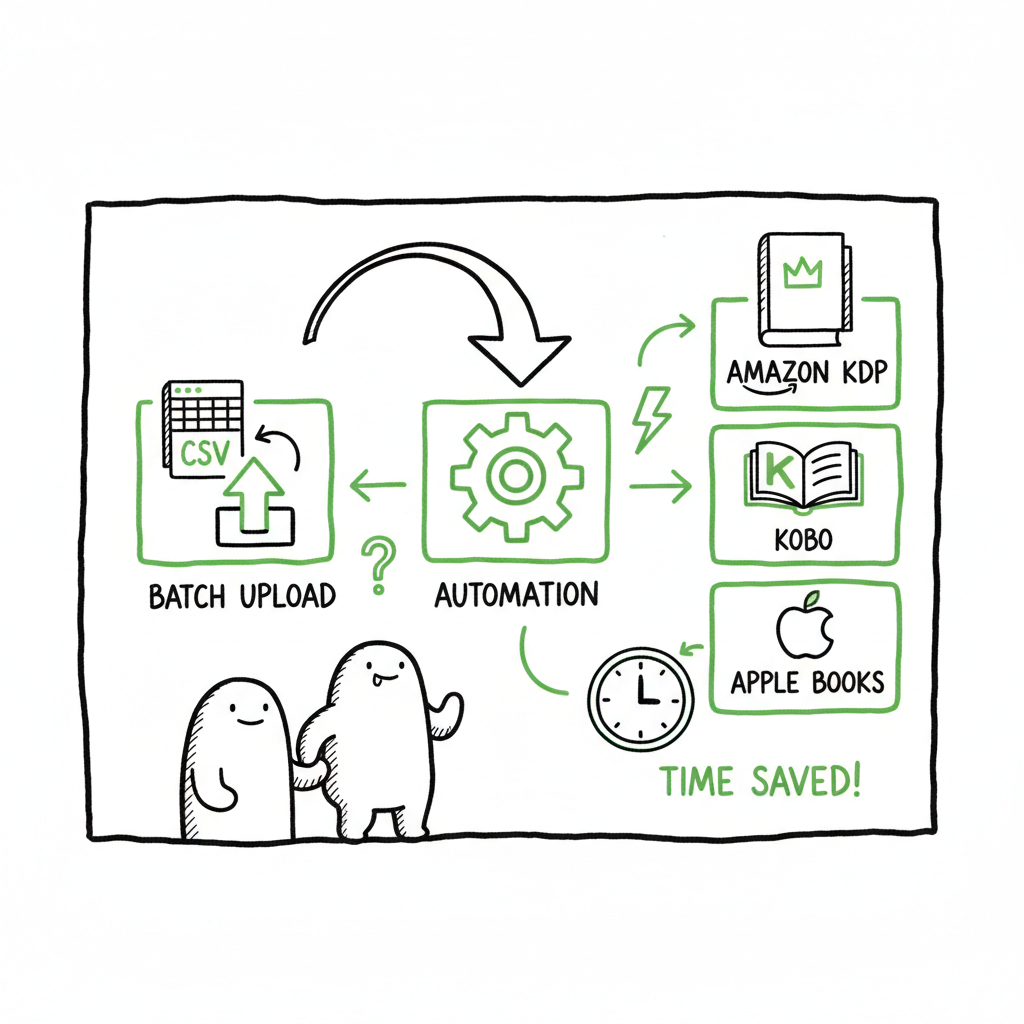
- Use CSV batch uploads, platform-specific intelligence, and consistent metadata to cut errors and save ~90% of time.
- Automate uploads across Amazon KDP, Kobo, Apple Books, Draft2Digital, and Ingram to make wide distribution practical.
- Quality control and a clear rollback plan keep volume safe: audit a sample, fix templates, then push the next batch.
Table of Contents
- Why bulk publishing books matters
- Designing a mass book publishing process
- Automation and batch KDP book uploads
- Quality control, metadata, and post-publish operations
- FAQ
Why bulk publishing books matters
Bulk publishing books is not a shortcut or a spam tactic. For serious indie authors and small publishers, it’s a practical approach to distribution: you standardize production, reduce per-title overhead, and reach more readers across multiple stores. When you’re publishing tens or hundreds of titles, manual uploads become the choke point. A repeatable process—templates for interiors and covers, CSV-based metadata, and automated uploads—turns publishing from daily busywork into a predictable scale operation.
Scaling a catalog changes the economics. A single title might return a few dollars a month; a catalog of hundreds can generate stable, scalable income. That’s why many teams transition from manual uploads to automation as soon as they hit a steady cadence. If you want an example of what happens next, consider reading a practical guide, like Scaling an Amazon KDP Business, which explains the operational moves that follow once volume matters. This move—treating publishing like production—lets you optimize for time and error reduction without sacrificing quality.
When you plan for bulk rolls, prioritize platform coverage. Publishing to Amazon KDP alone leaves readers on Kobo, Apple Books, or bookstores unreachable. A unified multi-platform approach—CSV batch uploads, platform-specific intelligence, and automated deployment—makes wide distribution practical while reducing human error. For many authors, that automation is an obvious upgrade once they start publishing seriously.
For an example of what happens next, Scaling an Amazon KDP Business explains the moves that follow once volume matters.
Designing a mass book publishing process
A mass book publishing process is a pipeline. Think of it in stages: concept and templates, asset production, formatting and conversion, metadata, upload, and post-publish checks. Each stage should be repeatable and produce consistent outputs that feed the next stage.
- Start with templates, not one-offs
- Interior templates: Create a small set of high-quality templates for the kinds of books you publish (journals, workbooks, short fiction, children’s picture books). Templates reduce layout time and keep pagination predictable.
- Cover templates: Use a cover system that separates background art, title block, and author name so you can swap elements without redesigning each cover. If you need a fast, consistent cover workflow, consider a processing tool for covers that integrates into your pipeline via an automated endpoint.
- Produce assets in batches
- Artwork and photos: Buy or license image packs and store them with version control. Use consistent dimensions and color profiles.
- Interior files: Generate interiors from the template with automated scripts or tools that fill titles, chapter headings, or repeated sections.
- Export masters to standard formats: For print, PDFs with embedded fonts; for ebooks, a clean XHTML or source that converts reliably.
- Formatting and EPUB conversion
- Convert a validated source to EPUB using a purpose-built conversion tool that keeps hierarchy, images, and styles intact. If your pipeline produces EPUBs frequently, it’s worth relying on a dedicated converter to avoid hand-fixing files later.
- Metadata and SKU planning
- Create a single CSV that captures title, subtitle, author, series, description, keywords, price, royalty choices, language, BISAC, and categories per platform. A single source of truth avoids mismatch errors at upload time.
- Decide on pricing strategies and territory rights in your spreadsheet so each row is a complete upload package.
- Platform mapping
- Not all platforms use the same fields. Map your CSV columns to the required fields for Amazon KDP, Kobo, Apple Books, Draft2Digital, and Ingram. Platform-specific intelligence—rules about image DPI, trim sizes, EPUB validation—should be encoded so your bulk uploader can validate before pushing.
This process is iterative. Start small: deploy a batch of 10–20 titles, audit, fix templates, then scale to larger batches. That iterative approach keeps risk acceptable while you optimize for speed.
Automation and batch KDP book uploads
Automation is the lever that turns a template-driven pipeline into a high-output publishing engine. For Amazon specifically, “batch KDP book uploads” is a common need. You can either build tooling or use a service that handles platform quirks for you.
What automation needs to do
- Read a CSV and validate each row against platform rules.
- Attach the correct interior file, cover, and EPUB where required.
- Choose correct trim size, paper type, and print options for paperbacks.
- Push to multiple platforms in one workflow, adjusting the payload for each store.
Platform logic matters. KDP behaves differently from Apple Books or Ingram. A robust uploader applies platform-specific intelligence—file naming, image DPI, allowed categories—so your batch doesn’t fail after an hour of manual retries. That intelligence is what separates crude mass-upload scripts from reliable production systems.
Practical automation elements
- CSV batch uploads: A central CSV drives the whole process. Each row equates to a title. This lets you track status, run partial reruns, and generate reports.
- Error reduction: Automated pre-flight checks catch missing fields, bad image sizes, or EPUB errors before hitting store APIs.
- Workflow orchestration: Staged uploads—first to KDP, then to other vendors—allow you to prioritize marketplaces while ensuring global availability.
When building or selecting a tool, verify support for these features:
– Multi-platform endpoints (KDP, Kobo, Apple Books, Draft2Digital, Ingram).
– CSV mapping UI and templates.
– Retry and rollback options.
– Reporting and logging for compliance and tax records.
If you publish seriously, automation isn’t optional. It’s how you turn a set of single-title steps into a repeatable operation that saves time—often up to ~90% compared to manual uploads—while letting you focus on catalog strategy and marketing. Automate the upload. Own the distribution.
Quality control, metadata, and post-publish operations
High-volume publishing increases the impact of small mistakes. A single typo in an ISBN or a bad cover can create a bad listing that’s costly to fix at scale. Build quality controls into your pipeline so errors surface early, and fixes are surgical.
Sampling and staged publishing
- Pilot batch: Before a full rollout, publish a pilot batch of 10–20 titles. Inspect live listings for layout, category placement, and thumbnail clarity.
- Staged deployment: Release in waves. Fix template issues after each wave rather than stopping the whole process.
Automated checks to add
- EPUB validation: Run every generated ebook through a converter that reports structural errors and image problems.
- PDF preflight for print: Validate bleed, trim, embedded fonts, and page count.
- Metadata consistency: Check that keywords aren’t duplicated across fields, descriptions are present and within character limits, and pricing follows your rules.
Handling returns, updates, and takedowns
- Batch updates: Keep a single CSV as your authoritative metadata file so updates can be applied in bulk when needed.
- Rollback plan: If a template error slips through, revert affected titles by re-uploading corrected files or withdrawing listings in a controlled batch.
- Track changes: Log every bulk job with time, operator, and CSV version so you can trace who changed what and when.
Royalty and reporting hygiene
- Reconcile platform reports against your own sales logs monthly.
- Separate testing SKUs from production SKUs to avoid false royalties.
- Include ISBN management in your CSV so print and ebook versions are correctly linked.
Operational mindset
- Treat publishing like production: version control, test runs, and quick rollback procedures.
- Optimize for predictability. Volume only scales if each step consistently produces the expected output.
- Invest in the small tools that prevent big rework: an EPUB converter that fixes common issues, a cover processor that ensures right dimensions, and a unified dashboard that shows job state.
Practical tool mentions (integrations)
- If your workflow creates EPUBs regularly, use a dedicated EPUB converter to avoid recurring manual fixes.
- For covers, use a generator or processor that outputs correctly sized cover files for each trim and store requirement.
- For paperback and ebook generation, consolidate production through a single tool that can produce both formats reliably.
These integrations reduce the manual rework that otherwise erodes the benefits of bulk publishing. They also reduce the most common sources of rejection from stores.
Final thoughts
Bulk publishing books becomes a stable, repeatable operation when you design for scale up front. Templates, CSV-driven metadata, platform-aware automation, and phased rollouts keep your catalog healthy. When your process is reliable, publishing moves from an ad-hoc creative sprint to a predictable production line—letting you focus on which titles to expand next.
FAQ
Q: Is bulk publishing books safe for my KDP account?
A: Yes, if you approach it responsibly. Don’t flood KDP with low-quality or duplicate content. Use staged rollouts, validate files before upload, and follow Amazon’s content guidelines. The recommended practice is to test small batches, fix any template issues, and scale incrementally.
Q: How many titles can I upload to KDP in bulk?
A: KDP technically supports large volumes, but best practice is to pace uploads—many publishers aim for dozens per day initially and scale up. Keep records of what you upload and monitor account notifications.
Q: What file formats should I prepare for multi-platform publishing?
A: Prepare a high-quality print-ready PDF for paperbacks, a validated EPUB for ebooks, and high-resolution JPEG/PNG covers sized per platform specs. Use a conversion tool for consistent EPUB generation.
Q: How do I handle ISBNs for bulk paperback rollouts?
A: Allocate ISBNs in your CSV and store them as part of the metadata. If you use platform-assigned ISBNs, track which platform issued each ISBN to avoid conflicts.
Q: Can I update metadata across platforms in bulk later?
A: Yes. Keep a master CSV and use your uploader’s batch update functionality to change prices, descriptions, or keywords across all titles.
Sources
- How to Upload KDP Low Content Books in BULK — YouTube
- Automate your Amazon KDP Uploads 2023 Tutorial — YouTube
- KDP Batch Upload: Revolutionizing Workflow Automation — Blog
Bulk publishing books: Practical workflow for multi-platform rollouts Estimated reading time: 14 minutes Key takeaways Bulk publishing books is a repeatable, templated operation—do the hard work once, then scale reliably. Use CSV batch uploads, platform-specific intelligence, and consistent metadata to cut errors and save ~90% of time. Automate uploads across Amazon KDP, Kobo, Apple Books,…