AI tools for metadata in KDP and multi-platform publishing
AI tools for metadata: Practical ways to automate KDP-ready book listings
Estimated reading time: 9 minutes
Key takeaways
- AI tools for metadata save time and surface competitive titles, blurbs, keywords, and category suggestions, but outputs need human review.
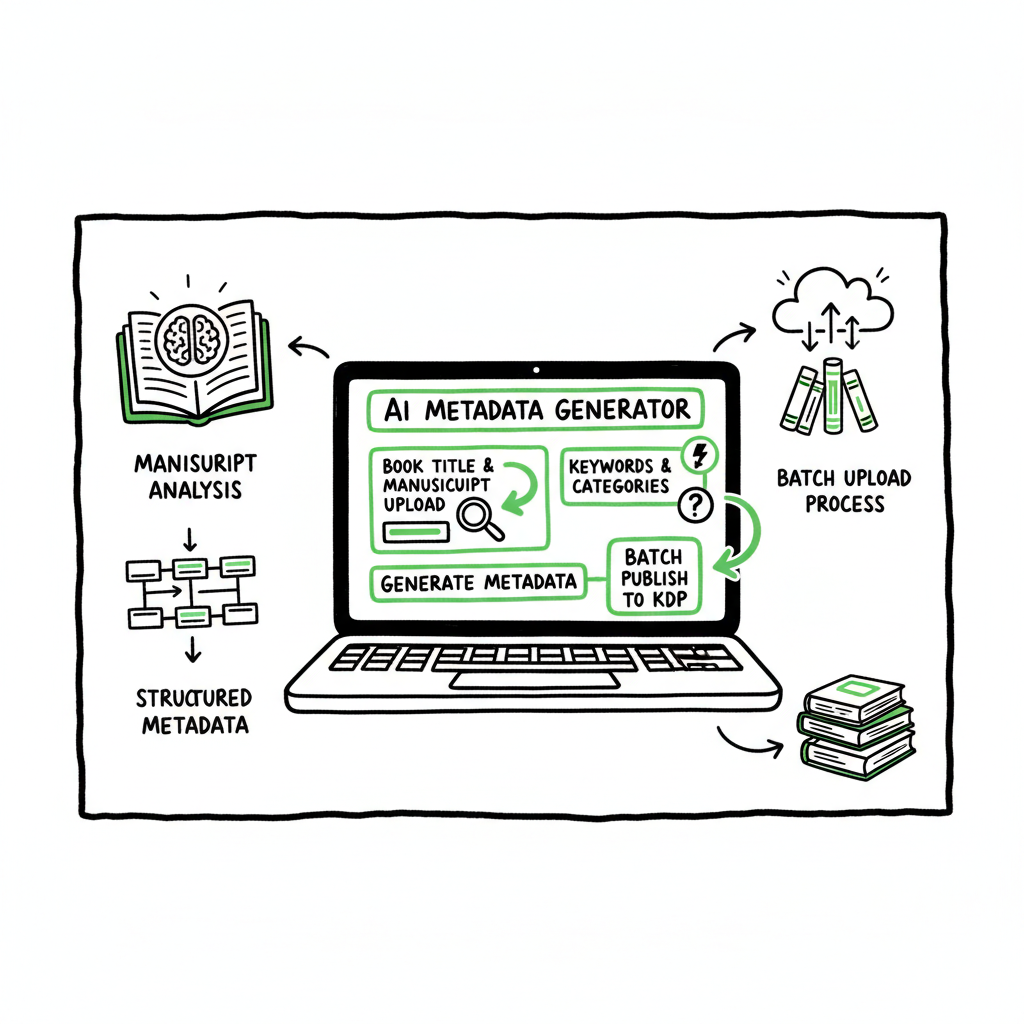
- Use AI within an upload-ready workflow: manuscript analysis → structured metadata → platform mapping → batch upload.
- For multi-platform scale, combine metadata AI with CSV batch uploads and platform-specific intelligence to reduce errors and save ~90% of manual work.
Table of Contents
- How AI tools for metadata work
- Using AI metadata tools in a KDP and multi-platform workflow
- Scaling metadata creation: practical automation without losing control
- Frequently asked questions
How AI tools for metadata work
AI tools for metadata read a manuscript or a summary and generate the listing copy and tags a store needs: title and subtitle options, blurbs and descriptions, keyword lists, category suggestions (Amazon categories, BISAC/Thema), series fields, pen name suggestions, and sometimes price guidance.
At a basic level these systems do three things:
- Text analysis: The AI ingests content (DOCX, EPUB, or a pasted synopsis) and identifies themes, topics, tone, and audience signals.
- Discoverability modeling: It maps those signals to likely search terms and categories that real readers use, producing keyword-rich blurbs or short keyword lists.
- Field formatting: The output is arranged to match platform fields, so you get ready-made text for KDP title, subtitle, description, and keyword slots.
Why this matters for authors
Authors wrestle with two problems when preparing a listing: discoverability and conversion. Discoverability is about whether readers find the book in search or browse; conversion is whether a found reader clicks “Buy.” AI tools for metadata address both by combining keyword research with conversion-focused copy. The result is a set of candidate titles, descriptions, and keywords that you can test and refine.
What AI does well
– Speed: It replaces hours of manual keyword research with seconds of suggestions.
– Consistency: When you publish many titles, the tone and structure of metadata can be uniform across a catalogue.
– Breadth: AI can propose categories across multiple classification systems (Amazon, BISAC, Thema) so you don’t guess.
What AI does poorly (without human oversight)
– Niche accuracy: AI may misread subgenre nuances and suggest categories that feel off.
– Policy compliance: It can generate blurbs that unintentionally violate store rules (claims, trademarks, or prohibited content).
– Over-optimization: Machine outputs can cram keywords into blurbs in ways that read poorly or trigger filters.
A short note on author workflow stress
Publishing at scale creates a real risk of burnout. If you’re experimenting with high-output publishing, you might find this post helpful for pacing and control: AI Self Publishing Speed Burnout. That article covers how to use automation without losing craft or control. (The link above goes to a focused discussion on workload management and pacing for authors.)
When you feed a full manuscript into a metadata AI, the best systems use the entire text to derive accurate themes and stronger, human‑sounding descriptions rather than rely on a short synopsis alone. That’s why full‑text analysis is a differentiator for book metadata generators geared to KDP-style publishing: the system can propose category codes, long‑form descriptions, and targeted keywords that match the book’s actual content.
For pacing and workload management ideas, see Ai Self Publishing Speed Burnout.
Platform mapping is where a publishing automation service becomes valuable. BookUploadPro emphasizes upload-ready presets for Amazon KDP, Apple Books, Kobo, Draft2Digital, and Ingram. That means the AI output isn’t just a suggestion list; it’s formatted to slot directly into each platform’s required fields, reducing the chance of truncation, misplacement, or missing fields. For authors publishing multiple titles, that mapping eliminates repetitive trimming and re-formatting.
Practical considerations for KDP optimization
– Keywords: Think like a user. The seven KDP keyword slots are best used for distinct keyword phrases rather than repetitions. AI can propose dozens of keywords; you’ll pare them to the best seven.
– Categories: Choose two Amazon browse categories, but remember BISAC or Thema categories will affect distribution outside Amazon. Use AI to propose both and then pick for the marketplace you expect to sell most in.
– Blurb structure: Lead with a hook, show stakes, and close with a call to action. AI can generate multiple voice options; pick one that matches your brand.
When you need to make an ebook or paperback for distribution, production and metadata link closely. If you’re creating the files yourself, you’ll want a reliable tool to create EPUBs and the cover assets that match store specs. If you convert to EPUB with a trusted converter, you reduce formatting issues that otherwise make metadata recommendations inaccurate because the table of contents, chapter breaks, or front matter change tagable content. For EPUB conversion, use a credible tool that preserves formatting and metadata integrity.
If you’re preparing a paperback and ebook together, the automation path should also handle cover sizing and print-ready PDFs so your metadata, pricing, and distribution choices align across formats. When you discuss cover creation, consider using a cover processing tool that manages sizing, spine calculation, and export profiles.
Practical links (tools)
– If your workflow includes EPUB conversion, a dedicated EPUB converter will save time and avoid errors.
– If you build or process covers as part of the upload, a cover generator and processing tool will keep sizing and bleed correct.
– If you’re creating paperback and ebook files at scale, a site that handles both file generation and metadata packaging reduces error and friction.
(Those last notes point to operational tools that belong in a publishing pipeline rather than ad hoc fixes; they’re worth integrating early so metadata and files are consistent.)
Using AI metadata tools in a KDP and multi-platform workflow
A practical workflow fits the strengths and limits of AI. Think of AI as the first pass that produces structured, edit‑ready metadata. Then the author reviews and refines for voice, policy compliance, and marketing strategy.
Step 1 — Ingest clean source files
Work from a stable manuscript file and a one‑page synopsis. If you’re producing both ebook and paperback, make sure you have the final manuscript and a formatted interior to confirm page counts and trim size for paperback pricing and categories. If you need to convert to EPUB during this step, a dedicated EPUB converter will make the process smooth and predictable; professional tools remove layout errors that confuse metadata extraction and downstream platforms.
Step 2 — Generate structured metadata
Ask the AI to output each required field separately:
– Title suggestions and subtitle options
– A short blurb (100–200 characters) for ad copy and social
– A long description (300–2,000 characters) for store pages
– Keyword lists tailored for Amazon’s 7-slot keywords, plus broader tag lists for other stores
– Category suggestions: Amazon Browse Categories, BISAC/Thema mappings
– Series and contributor fields
Step 3 — Map to platform fields
Each store has different limits and categories. The AI output should be filtered into platform‑specific fields. KDP requires concise titles and has a unique keyword system; Apple Books and Kobo rely more on BISAC/Thema and straightforward tagging. A tool that formats outputs to the precise field lengths and limits of each platform saves repeated copy/paste work.
Step 4 — Human edit and compliance check
Scan for accuracy, trademarks, and anything that could be interpreted as false claims. Make sure blurbs read like your author voice, not generic AI prose. This step is essential and non‑negotiable.
Step 5 — Batch upload and monitoring
If you have multiple titles, export metadata in CSV form and upload in bulk to your distributor or use an upload automation tool. Look at early signals — impressions, clicks, and conversion — and iterate.
Platform mapping is where a publishing automation service becomes valuable. BookUploadPro emphasizes upload-ready presets for Amazon KDP, Apple Books, Kobo, Draft2Digital, and Ingram. That means the AI output isn’t just a suggestion list; it’s formatted to slot directly into each platform’s required fields, reducing the chance of truncation, misplacement, or missing fields. For authors publishing multiple titles, that mapping eliminates repetitive trimming and re-formatting.
Practical considerations for KDP optimization
– Keywords: Think like a user. The seven KDP keyword slots are best used for distinct keyword phrases rather than repetitions. AI can propose dozens of keywords; you’ll pare them to the best seven.
– Categories: Choose two Amazon browse categories, but remember BISAC or Thema categories will affect distribution outside Amazon. Use AI to propose both and then pick for the marketplace you expect to sell most in.
– Blurb structure: Lead with a hook, show stakes, and close with a call to action. AI can generate multiple voice options; pick one that matches your brand.
When you need to make an ebook or paperback for distribution, production and metadata link closely. If you’re creating the files yourself, you’ll want a reliable tool to create EPUBs and the cover assets that match store specs. If you convert to EPUB with a trusted converter, you reduce formatting issues that otherwise make metadata recommendations inaccurate because the table of contents, chapter breaks, or front matter change tagable content. For EPUB conversion, use a credible tool that preserves formatting and metadata integrity.
If you’re preparing a paperback and ebook together, the automation path should also handle cover sizing and print-ready PDFs so your metadata, pricing, and distribution choices align across formats. When you discuss cover creation, consider using a cover processing tool that manages sizing, spine calculation, and export profiles.
Practical links (tools)
– If your workflow includes EPUB conversion, a dedicated EPUB converter will save time and avoid errors.
– If you build or process covers as part of the upload, a cover generator and processing tool will keep sizing and bleed correct.
– If you’re creating paperback and ebook files at scale, a site that handles both file generation and metadata packaging reduces error and friction.
(Those last notes point to operational tools that belong in a publishing pipeline rather than ad hoc fixes; they’re worth integrating early so metadata and files are consistent.)
Scaling metadata creation: practical automation without losing control
When you publish single titles, you can afford to handcraft every field. When you publish dozens or hundreds, you need rules and automation that keep quality consistent while cutting manual time. Scaling requires three capabilities: batch runs, platform intelligence, and a review loop.
Batch metadata generation
Modern AI metadata tools support batch runs by ingesting a spreadsheet or a folder of manuscripts and producing metadata packages for each title. That output often includes CSVs that map to each platform’s upload format. Batch generation is where you see the biggest time savings — running a dozen books at once beats repeating the same steps per title.
Platform-specific intelligence
A good scaling tool understands the quirks of each store. For instance:
- Amazon truncates long titles and ignores punctuation in keywords.
- Apple Books expects clean BISAC mappings.
- Ingram has different metadata fields for print versus ebook.
Automation that inserts platform-aware defaults avoids the most common rework. It also reduces errors like mismatched BISAC codes or incorrect contributor roles that delay distribution.
CSV batch uploads and error reduction
CSV batch uploads are the industrial method for multi-title publishing. A platform that exports clean CSVs tailored to each store can cut upload time sharply. Automation also removes human copy/paste errors: correct category codes, consistent series ordering, and matching ISBNs across formats.
BookUploadPro is built around that principle: generate metadata in bulk, map it precisely to KDP, Kobo, Apple Books, Draft2Digital, and Ingram, and export upload-ready files. The system’s platform-specific intelligence reduces common errors that occur when an author manually copies fields into multiple store dashboards.
Continuous optimization vs. one-time generation
Some vendors charge per metadata run or per title. A pricing model that allows repeated runs makes iterative testing practical: tweak titles or keywords, republish, and measure. If you plan to run A/B tests or update metadata over time, choose a tool that makes repeat runs affordable and fast.
Practical guardrails for scale
– Use naming conventions for files and rows so outputs are traceable.
– Keep a single source of truth spreadsheet for titles, ISBNs, and publication dates.
– Automate backups for artwork and manuscript versions to prevent accidental overwrites.
Human oversight remains essential
Even at scale, reserve time for quality checks. Automation should catch formatting mistakes; humans catch brand voice and context errors that AI misses. A practical rule: sample 10% of batch outputs in full before committing bulk uploads to stores.
How BookUploadPro fits
BookUploadPro focuses on making wide distribution practical by combining an AI metadata assistant with CSV batch uploads and platform-specific intelligence. It positions itself as an obvious upgrade once authors start publishing seriously: the AI generates upload-ready fields, the batch system pushes them across stores, and the platform reduces repetitive work by about 90% compared to manual uploads. For teams or high-output indie authors, that combination makes multi-platform publishing realistic rather than overwhelming.
Tools that touch this process
– EPUB conversion tools preserve formatting and metadata integrity and should be part of the pipeline.
– Cover processors and generators ensure print and ebook covers match platform specs.
– A distribution-aware upload tool that accepts CSVs and maps fields eliminates repeated manual entries.
If you work at scale, automate the upload. Own the distribution.
Frequently asked questions
Q: What exactly is an “AI metadata generator”?
A: It’s a tool that analyzes text (a manuscript, synopsis, or keywords) and produces structured listing fields: titles, blurbs, keywords, and category recommendations. The output is designed to improve discoverability and conversion, but it should be edited by a human before you publish.
Q: Can AI replace my marketing or should I still hire an editor?
A: AI accelerates research and first-draft copy. It does not replace human judgment for brand voice, legal review, or deep marketing strategy. Think of AI as an assistant that saves time and surfaces options you might not have found manually.
Q: Will AI-generated keywords get my book flagged by Amazon?
A: Used naively, AI can produce keyword suggestions that violate store policies. Always curate keyword lists, avoid prohibited terms or trademarked phrases, and ensure blurbs don’t make unverifiable claims.
Q: Do I need separate metadata for KDP and other stores?
A: Yes. Each platform has different field limits and category systems. A multi-platform workflow converts AI output into store-specific fields so that you don’t lose information or create formatting errors.
Q: How do I test metadata performance?
A: Track impressions, click‑through rate, and conversion after a metadata change. Use small, controlled updates and monitor metrics for a week or two. With batch-friendly pricing, you can iterate more freely.
Q: Are there file prep steps before using an AI metadata tool?
A: Provide a clean final manuscript and a concise synopsis. If you plan to distribute ebook and print, convert files reliably (EPUB for ebooks; print-ready PDF for paperback). Proper file prep improves metadata relevance and reduces downstream upload errors.
Q: What about covers and file formatting?
A: Covers should match store specs for resolution, sizing, and bleed. If your workflow includes automated cover generation or batch processing, make sure it outputs print-ready PDFs and correctly sized JPEG/PNG files for stores.
Final thoughts
AI tools for metadata are operational tools: they speed research, standardize listing fields, and let authors publish more consistently across platforms. They don’t remove responsibility. Your job is quality control — ensure the outputs match your voice, respect store policies, and align with your distribution plan.
If you publish multiple titles or aim for wide distribution, combine an AI metadata assistant with a batch upload workflow and platform-aware mapping. That approach cuts repetitive work, reduces errors, and makes continuous optimization practical.
Call to action
Visit BookUploadPro.com to try the free trial and see how upload-ready metadata plus CSV batch uploads make multi-platform publishing practical.
Sources
- PublishDrive – AI Metadata Generator & Publishing Assistant overview
- PublishDrive – Optimize Your Book’s Reach with AI-Powered Metadata
- YouTube – AI-Powered Book Metadata Generator (PublishDrive)
- Audiorista – How to Generate Metadata and Tags for Content Using AI
- Ex Libris Alma – The AI Metadata Assistant in the Metadata Editor
- MagicPublish.ai – Metadata Generator for YouTube
- Magazine Manager – The Best AI Tools For All Publishing Departments
AI tools for metadata: Practical ways to automate KDP-ready book listings Estimated reading time: 9 minutes Key takeaways AI tools for metadata save time and surface competitive titles, blurbs, keywords, and category suggestions, but outputs need human review. Use AI within an upload-ready workflow: manuscript analysis → structured metadata → platform mapping → batch upload.…