Book Launch Timeline Checklist for 6-12 Month Plan
Book launch timeline checklist: a practical, step-by-step plan
Estimated reading time: 9 minutes
Key takeaways
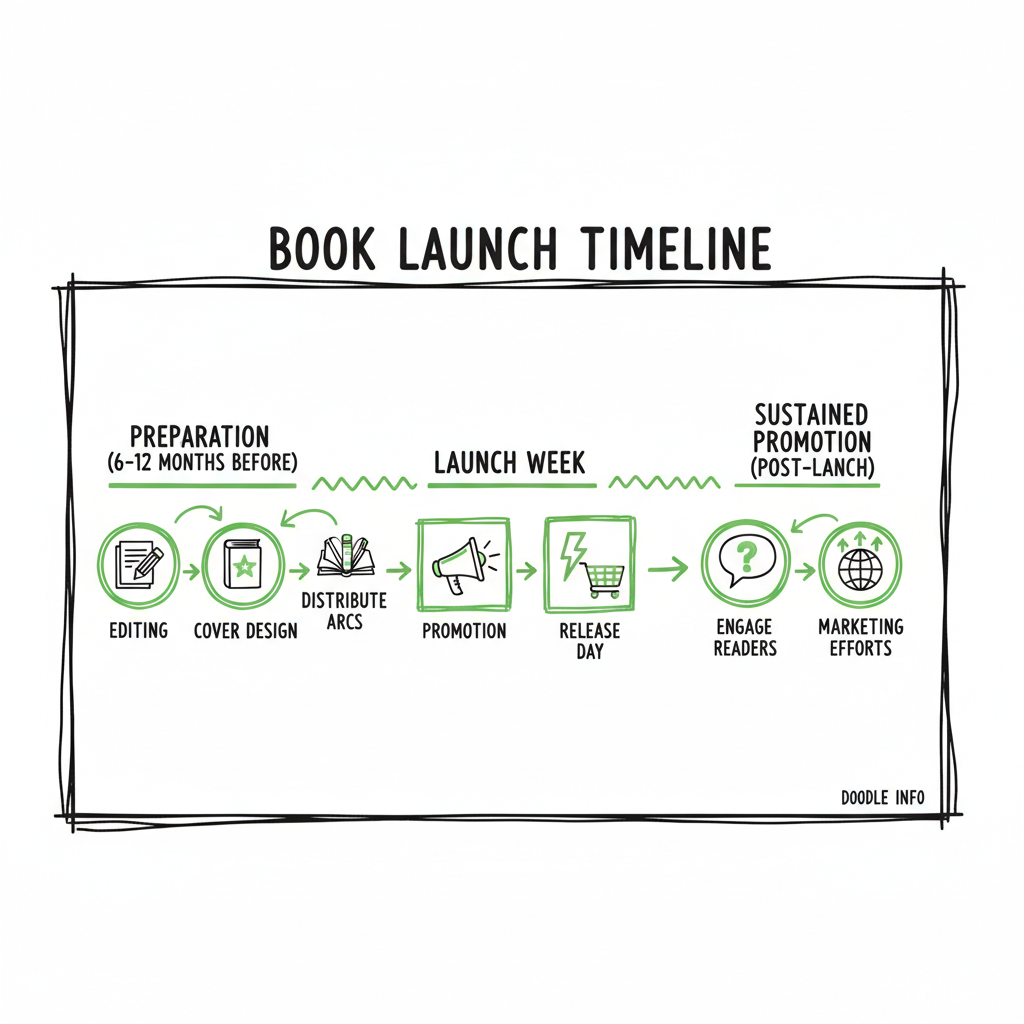
- A practical book launch timeline checklist stretches 6–12 months and breaks work into preparation, launch week, and sustained promotion.
- Focus early on editors, cover, and building an ARC list; automate distribution once you publish to save time and reduce errors.
- Use platform-aware uploads and CSV batch tools to make wide distribution practical—an obvious upgrade when you publish seriously.
Table of Contents
Book launch timeline checklist: the 6–12 month plan
A good book launch timeline checklist keeps a steady pace so you don’t burn out in the last two weeks. Start 6–12 months before your target date and move through three clear phases: preparation, pre-launch, and launch. Early work is mostly creative and administrative: final draft polishing, hiring an editor, and commissioning a cover. Mid-stage is marketing setup: cover reveal, advance reader copies, and preorders. The final month is execution: outreach, promos, and review seeding.
Practical steps by period
- 9–12 months out: Set goals and pick a realistic date. Choose wide distribution if you want bookstores and library channels. Schedule major milestones in a shared calendar.
- 6–9 months out: Hire an editor. Start cover briefs and mockups. If you plan a paperback or ebook, plan formats now so files are ready later.
- 3–6 months out: Reveal the cover, open preorders, gather beta readers, and set up ARCs. Build your email sequence for launch-day outreach.
- 1 month out: Schedule social posts, ad buys, blog features, and newsletter sends. Confirm review team and remind partners.
- Launch week: Drive reviews, send targeted emails, and monitor platforms and distribution channels.
If you want a deeper publisher-style checklist, Book Launch Strategy Practical Guide lays out a step-by-step approach to calendar planning and promotion. It shows how to coordinate editing, cover, preorders, and media outreach so tasks don’t collide in the final weeks.
Cover, file, and format notes
When you commission a cover, provide the artist with final trim size, spine width, and any retail thumbnail requirements. If you’re experimenting with DIY or generative tools, keep the source file handy for retail adjustments. For a reliable cover workflow, consider an automated cover tool that accepts print specs and exports press-ready files.
Convert and validate ebook files well before preorder goes live. If your plan includes EPUB distribution, use a trusted converter that checks reflow, metadata, and table of contents.
(If you’re preparing art or ebook files: tools exist that automate cover production and EPUB conversion—these can remove manual steps and stop small errors from costing time on launch day.)
Automated cover and file tools speed the process: a cover generator that creates print-ready art, an EPUB converter that validates the file, and a platform-aware pipeline that publishes to multiple stores. These are not replacements for editors or designers, but they remove repetitive formatting work and make wide distribution practical. Book creation workflow.
Launch week and immediate actions
Launch week is about momentum, not perfection. The aim is to drive early sales and reviews to reach algorithm thresholds on retailers.
Core launch-day actions
- Morning: send a clear, short email to your list with buy links, a note about reviews, and one or two suggested review lines. Keep it simple so readers can act fast.
- Midday: update your author pages and social profiles with the book banner and buy links.
- Evening: remind your ARC team and reviewers to post if they haven’t. People forget; a single, polite nudge helps.
Handling reviews and ratings
- Ask for honest reviews, not positive ones. Retailers penalize manipulated reviews. Provide reviewers with a short guide on where and how to leave a review.
- Stagger review requests so the first week shows a healthy flow across platforms rather than a single spike.
Ad and promo management
- If you plan ads, run small tests before launch to learn which audiences convert. Increase spend on winners during week one.
- Use limited-time promotions (discounted ebook or free days, if you use them) to create urgency and reach new readers.
Common launch mistakes to avoid
- Leaving the ebook conversion or cover adjustments to the week of launch. Those tasks break time-sensitive retailer uploads.
- Publishing only on one platform without an automated multi-platform plan. Manual uploads to five stores take hours and introduce errors; batch CSV uploads and platform-aware tools cut that labor dramatically.
Post-launch and scale: distribution, automation, and next steps
A book launch timeline checklist isn’t finished on launch day. Sales momentum needs a steady promotional rhythm and reliable distribution so copies are available wherever readers look.
Extend promotion over months
- Continue email sequences highlighting reviews, excerpts, and related content.
- Re-run successful ad creatives and expand to lookalike or interest-based audiences.
- Schedule periodic price promotions tied to events, themes, or holidays.
Make distribution repeatable
- If you publish seriously, unify uploads across stores. Using CSV batch uploads and platform-aware logic lets you push metadata and files to Amazon KDP, Kobo, Apple Books, Draft2Digital, and Ingram without repeating manual entry.
- Platform-specific checks (cover spine size, EPUB validation, interior trim settings) prevent rejections. Automation with post-upload checks reduces errors and saves roughly 90% of manual time on multi-platform publishing.
When to upgrade to automated publishing
- If you publish more than one or two titles a year, automated batch uploads become an obvious upgrade. They reduce copy-paste errors, speed up rollout to bookstores and library channels, and free time for marketing and new writing.
- Automation also keeps consistent metadata across platforms, which improves discoverability and reporting.
Practical tools and file workflows
- Keep master files in a single folder: final manuscript, validated EPUB, print-ready PDF, and source cover files. Use CSV templates for metadata to allow batch imports.
- If you’re creating a paperback and need reliable print files, or generating ebooks repeatedly from a template, convert and test early. For EPUB creation and checking, there are converters that validate navigation, images, and accessibility.
Operational safety: checks and logs
- Track each platform upload with a simple spreadsheet: date uploaded, retailer confirmation, ASIN/ISBN, and any follow-up needed. Logs save time when troubleshooting.
- Automate notifications for failed uploads or missing assets so fixes don’t wait until the next cycle.
Tools mentioned earlier—cover generation, EPUB conversion, and repeatable ebook or paperback creation—can remove almost all manual steps. If you’re producing multiple formats or titles, those services turn tedious work into a few clicks and predictable outputs.
Automated cover and file tools speed the process: a cover generator that creates print-ready art, an EPUB converter that validates the file, and a platform-aware pipeline that publishes to multiple stores. These are not replacements for editors or designers, but they remove repetitive formatting work and make wide distribution practical. book creation workflow.
FAQ
FAQ
Q: How far in advance should I start a launch?
A: Start planning 6–12 months before your target date. That gives time for editing, cover work, and building an ARC list without rushing.
Q: Do I need ARCs?
A: Yes. Advance readers give early reviews and social proof. Recruit a manageable ARC team (50–200, depending on scale) and send clear instructions and deadlines.
Q: What file formats do I need?
A: At minimum: a validated EPUB for most stores and a print-ready PDF for paperbacks. Also keep source files and a high-res cover master.
Q: Should I publish wide or go exclusive?
A: Wide distribution is better for most indie authors aiming for bookstores and library channels. If you plan ads tied to a retailer’s program, weigh the benefits vs. the reach tradeoff.
Q: Can I automate publishing across stores?
A: If you publish more than one or two titles a year, automated batch uploads become an obvious upgrade. They reduce copy-paste errors, speed up rollout to bookstores and library channels, and free time for marketing and new writing.
Q: How do I keep metadata consistent?
A: Automation also keeps consistent metadata across platforms, which improves discoverability and reporting.
Final thoughts
A disciplined book launch timeline checklist keeps steady progress from draft to discovery. Break work into months, protect the last weeks for execution, and make distribution repeatable. When you’re ready to scale, unified multi-platform publishing with CSV batch uploads and platform-specific intelligence saves time, cuts errors, and makes wide distribution practical—an obvious upgrade once authors start publishing seriously.
Try the free trial at BookUploadPro and see how automated uploads and platform-aware checks speed multi-platform publishing.
Sources
- https://scribemedia.com/book-launch-checklist/
- https://shelbyleigh.co/blog/the-ultimate-book-launch-checklist-for-self-published-authors
- https://insights.bookbub.com/book-launch-checklist-marketing-timeline-traditionally-published-authors/
- https://www.etsy.com/listing/1803244688/book-launch-checklist-marketing-plan-for
- https://www.ingramspark.com/blog/book-launch-checklist
- https://www.draft2digital.com/blog/the-pre-launch-checklist/
Book launch timeline checklist: a practical, step-by-step plan Estimated reading time: 9 minutes Key takeaways A practical book launch timeline checklist stretches 6–12 months and breaks work into preparation, launch week, and sustained promotion. Focus early on editors, cover, and building an ARC list; automate distribution once you publish to save time and reduce errors.…