Bulk publishing books for high-volume indie authors
Bulk publishing books: a practical system for high‑volume indie authors
Estimated reading time: 9 minutes
Key takeaways
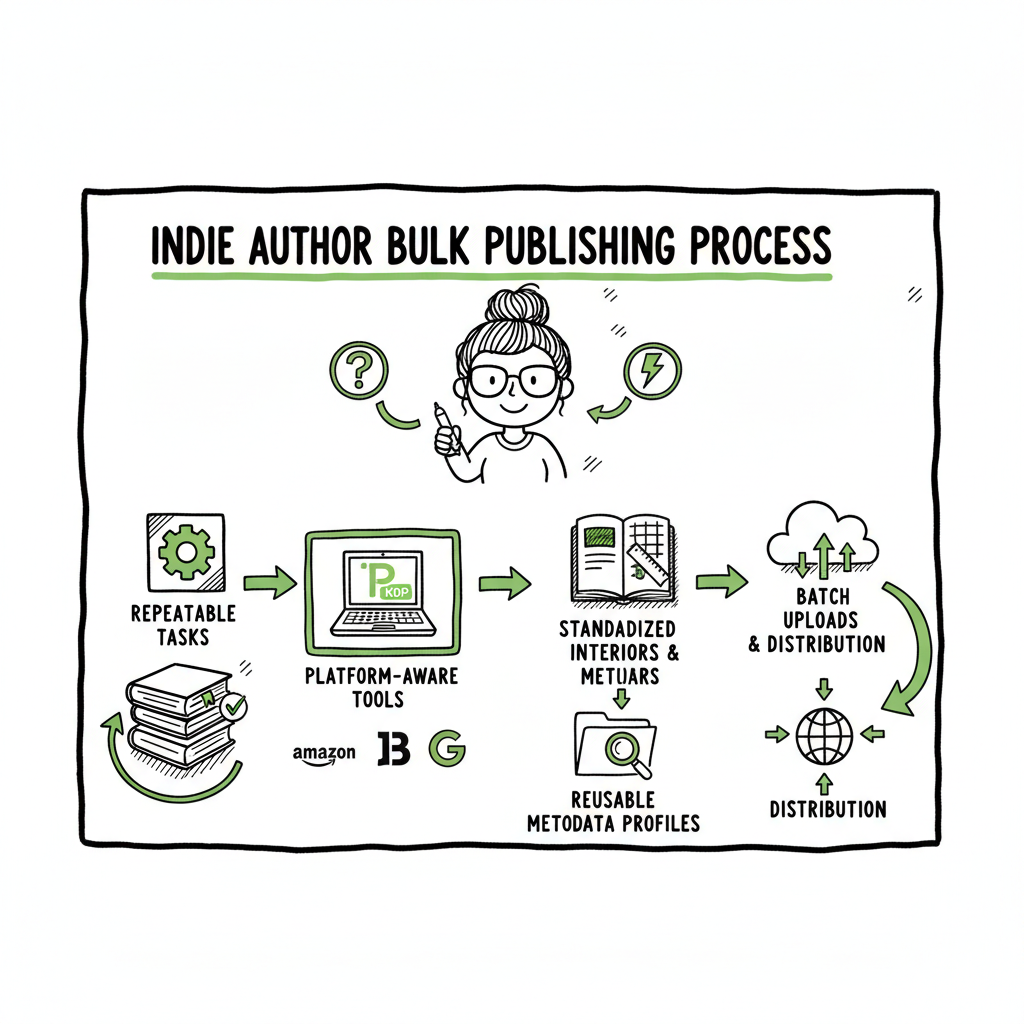
- Bulk publishing books works when you turn manual steps into repeatable tasks and use platform-aware tools to reduce errors.
- A mass book publishing process depends on standardized interiors, reusable metadata profiles, and batch uploads that respect platform limits.
- Services that unify uploads across Amazon KDP, Kobo, Apple Books, Draft2Digital, and Ingram save time, cut mistakes, and make wide distribution practical.
- Platform-aware tools help test keywords and covers across niches while keeping costs predictable.
Table of Contents
- Why bulk publishing books matters
- Designing a mass book publishing process
- Operational tools and platform-specific tips
- FAQ
- Final thoughts
Why bulk publishing books matters
Bulk publishing books is the tactic many indie authors use to increase reach and income without repeating the same manual work every time, a topic explored in Scaling An Amazon Kdp Business.
If you plan to move from a handful of titles to dozens or hundreds, you are no longer doing one-offs; you are building systems. That shift is where the conversation around Scaling an Amazon KDP Business becomes practical: the choices you make about file structure, naming, and metadata determine whether you add one title per week or one hundred.
Bulk publishing is not a shortcut around quality. It is a way to make consistent quality repeatable at scale. Done well, it can increase discoverability by testing keywords and covers across similar niches while keeping costs predictable.
Designing a mass book publishing process
A reliable process is a chain of repeatable steps. Break the chain and the whole project falters. Build each step to be as deterministic as possible so it can be executed by a system, a team, or a tool without guesswork.
1) Start with standard templates
Create an interior template for each product type: lined notebook, habit tracker, 120-page paperback, or short ebook. Keep a versioning system so you can update templates without overwriting earlier editions.
2) Standardize metadata profiles
Save profiles for author/publisher name, BISAC categories, keywords, and pricing tiers. Use clear naming like Notebook-A-120p-US to know what goes with which template.
3) File naming and folder structure
Organize assets with a folder pattern that matches upload tools. Example:
- /ProjectName/Notebook/US/Paperback/Covers/
- /ProjectName/Notebook/US/Paperback/Interiors/
Consistent names let you generate CSVs or batch manifests reliably.
4) Make repeatable covers and interiors
Design interiors that can be reused with small tweaks. For covers, set up a cover system: base layout, title layer, pattern layer. When you need many variants, you replace the title and pattern, not the whole design. If you use a cover generator for batch styling, make sure the output matches each platform’s trim and spine rules; if you need processing at scale, consider a dedicated cover generator for batch jobs.
5) Decide per-platform strategies
Not every title needs distribution to every store. Map the business case:
- Amazon KDP: broad reach, required for many buyers
- Apple Books and Kobo: useful for European/Canadian reach
- Ingram: print-on-demand distribution to bookstores
- Draft2Digital: wide aggregator reach
6) Build a CSV manifest for batch uploads
A CSV manifest lists each title and its metadata, and links to the cover and interior files. This manifest becomes the single source of truth you feed into a batch uploader or a script. Keep columns minimal and standardized: title, subtitle, author, ISBN (if used), price, territories, language, cover file path, interior file path, BISAC, keywords.
7) Include a quality checklist
Before uploading, run an automated or manual check for common issues: font embedding, margins, bleed, spine calculation, correct trim size, and metadata correctness. The fewer surprises in the preview, the smoother the upload.
Operational tools and platform-specific tips
Tools are not a magic wand. They turn good procedures into fast, repeatable actions. Choose tools that are honest about what they automate and what remains manual.
Batch upload tools and CSV processes
A true batch uploader accepts a manifest and uploads multiple titles across one or more stores using a controlled, repeatable process. When evaluating tools, look for:
- CSV import with clear template fields
- Upload scheduling and throttling to respect platform limits
- Platform-specific intelligence (e.g., KDP preview quirks, Apple title length rules)
- Error reporting with actionable messages
For authors who want a single, platform-aware system, a unified uploader that exports to Amazon KDP, Kobo, Apple Books, Draft2Digital, and Ingram reduces duplicate effort. That approach is what makes wide distribution practical rather than a collection of browser tabs.
Platform-specific tips
- Amazon KDP: KDP enforces limits and manual verification. Upload in batches that stay under daily/weekly thresholds (many high-volume publishers recommend conservative daily counts to avoid throttling). Keep author/publisher names consistent, and watch for SKU conflicts.
- Apple Books: Apple prefers EPUBs with clean HTML. Generate a clean EPUB and test in Apple Books Producer if possible.
- Kobo: Kobo is more tolerant of certain metadata formats but has its own categories and tagging norms.
- Ingram: For print distribution outside Amazon, ensure your ISBN and printing specs match Ingram’s requirements.
File conversions and cover processing
Most stores need specific file formats: EPUB for many ebook stores, print-ready PDF for paperbacks with correct spine and bleed. Convert cleanly, then validate. If you need a reliable EPUB converter step, use a dedicated converter that handles fonts, metadata, and images properly. For cover batches, a book cover generator processing can speed production, but always check the final file against the store preview.
If you work with many covers or need automated processing pipelines, a cover generator that supports batch processing can be the difference between a few hours and a few weeks of work on design files.
If you need automated cover processing at scale, use a book creation workflow approach to keep everything aligned.
Why platform-aware intelligence matters
Platform-specific intelligence means the system knows the rules and automatically adjusts where possible. That might include:
- Renaming files to match platform conventions
- Auto-generating ISBN fields only where needed
- Adjusting image DPI and color profiles for print vs. ebook
Without platform intelligence, a batch uploader becomes a bulk error generator.
Where BookUploadPro fits
For authors ready to publish seriously, a service that unifies multi-platform publishing reduces repetitive tasks and human error. BookUploadPro automates repetitive uploads across Amazon KDP, Kobo, Apple Books, Draft2Digital, and Ingram, using CSV batch uploads and platform-specific intelligence to cut busywork. Expect large time savings—teams report around ~90% time savings—while reducing preview errors and mismatches.
Next steps: Visit BookUploadPro to see how multi-platform batch publishing can fit your process and try the free trial.
Practical advice for publishing more titles without hitting limits
Scaling means publishing more titles while keeping quality and platform compliance. These are practical controls to keep in place.
Respect platform throttles: Platforms limit the rate of uploads and the number of titles processed per account. Don’t try to push 1,000 uploads in a single day. Plan a release cadence, stagger uploads across marketplaces and regions, and monitor account notices.
Keep audits short and frequent: Audit a small sample of uploads every day rather than a massive audit at the end. Check preview pages and purchase links for 3–5 recently uploaded books to catch systematic errors early.
Manage royalties and pricing: Set standard price tiers and keep them in your CSV manifest. Small variations are fine for market testing, but frequent random pricing complicates reporting and inventory management for print.
Version control and rollback: Version interiors and covers. If a problem is discovered, roll back to the last good version and re-upload only the corrected files.
Batch testing and keyword rotation: When you publish many similar titles, rotate keywords and BISAC categories in a controlled way to test which combinations produce traction. Keep a results spreadsheet and avoid sweeping changes across many titles at once.
Risk management and compliance: High-volume publishing attracts scrutiny. Make sure titles follow platform content guidelines, avoid repeated trademarked content, and maintain original interiors and covers. If you re-use public-domain content, document sources and transformations.
FAQ
Q: How many books can I upload at once?
A: Platforms don’t offer a single number that fits everyone. KDP in practice has soft throttles and manual review triggers. A conservative approach is 20–100 uploads per day depending on complexity. Spread uploads across playlists and marketplaces to avoid hitting rate limits.
Q: Do I need an ISBN for every title?
A: It depends on platform and distribution. Amazon can assign its own identifier for KDP paperbacks; Ingram and some retailers require your own ISBN if you want full retailer access. Keep ISBN policies documented in your manifest.
Q: Can I convert a Word file into EPUB reliably?
A: Word-to-EPUB conversion works for simple ebooks, but complex layouts and images often need a dedicated EPUB converter to ensure consistent results across Apple Books and other stores. Run validation and spot-check pages before publishing.
Q: How do I manage cover variations at scale?
A: Use layered source files and a naming convention. If you use a cover generator, export a batch of final covers and run them through a validation step that checks dimensions, DPI, and color profile for print versus digital.
Q: Will batch uploading hurt discoverability?
A: Not inherently. Quality, keyword relevance, and marketing matter more. Publishing multiple related titles can increase visibility when you target distinct but related keywords and keep quality consistent.
Final thoughts
Bulk publishing books becomes manageable when you trade one-off improvisation for a repeatable system. The core work is not the upload itself but the preparation: templates, metadata profiles, reliable file processing, and a manifest-driven approach. Platform-aware tools are the multiplier. They reduce mistakes, handle platform quirks, and let you test keyword and cover variations without manually refilling forms.
For authors and small publishers who are serious about volume, a unified publishing service that handles multiple platforms is an obvious upgrade. It makes wide distribution practical by automating the upload and ensuring platform-specific rules are respected. Automate the upload. Own the distribution.
If you want a clean way to convert manuscripts to the right formats, generate covers at scale, or handle batch uploads across stores, there are tools targeted at each step. For EPUB requirements, consider a dedicated EPUB converter to avoid common formatting pitfalls. If you need automated cover processing at scale, use a book cover generator processing that supports batch output. And when you publish paperbacks or ebooks in volume, a service that supports a complete book creation workflow reduces friction.
Sources
- How to Upload KDP Low Content Books in BULK
- KDP Batch Upload: Revolutionizing Workflow Automation | iFlowy Blog
- Automate your Amazon KDP Uploads 2023 Tutorial
- How I Built a Fully Automated Amazon KDP Business
- Bulk Orders: Author Copies or Amazon Orders?
Bulk publishing books: a practical system for high‑volume indie authors Estimated reading time: 9 minutes Key takeaways Bulk publishing books works when you turn manual steps into repeatable tasks and use platform-aware tools to reduce errors. A mass book publishing process depends on standardized interiors, reusable metadata profiles, and batch uploads that respect platform limits.…