Bulk Publishing Books Multi-Platform Workflow Guide
Bulk publishing books: Practical multi‑platform workflow for indie authors
Estimated reading time: 14 minutes
Key takeaways
- Bulk publishing books is about repeatable systems: templates, CSV data, and platform-aware exports.
- Multi‑platform distribution scales best when uploads are automated and platform rules are respected.
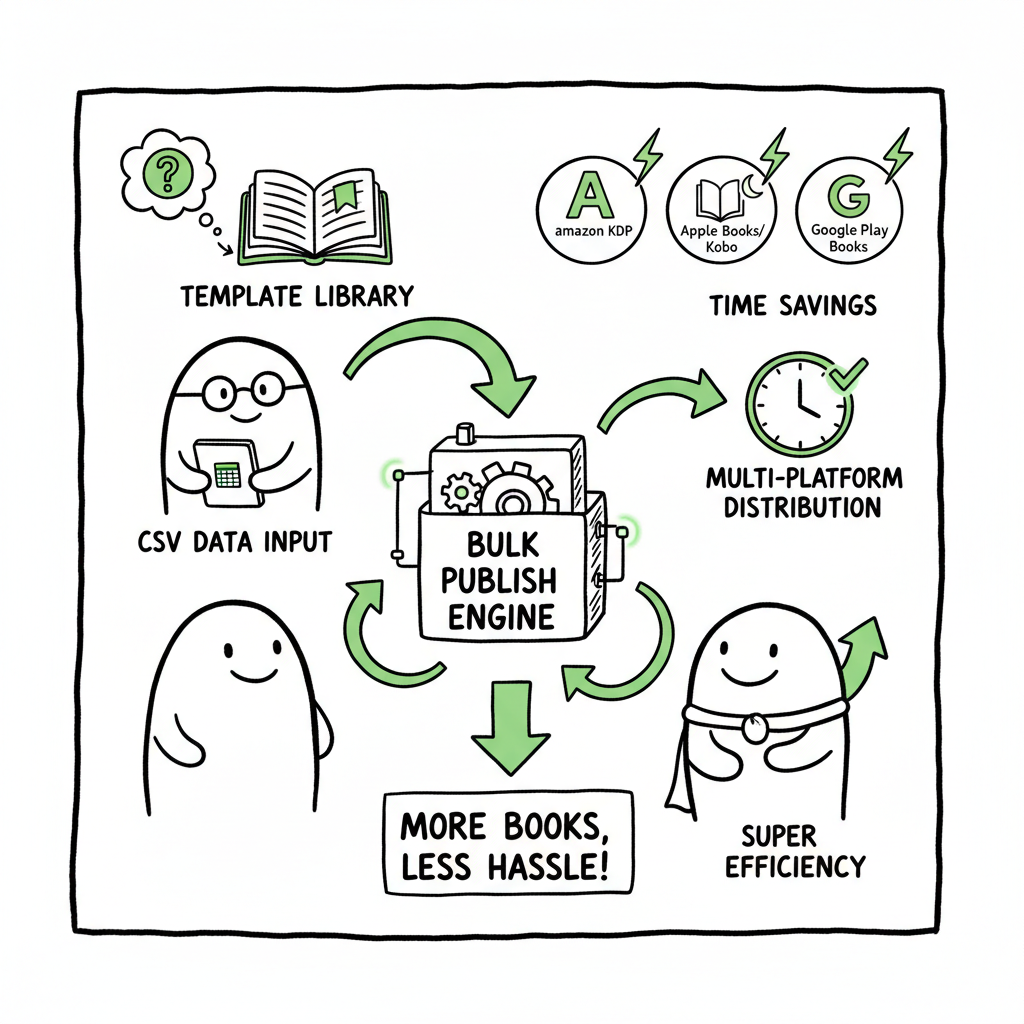
- BookUploadPro provides CSV batch uploads, platform intelligence, and ~90% time savings — an obvious upgrade once you publish seriously.
Table of Contents
- Why bulk publishing books matters
- A practical multi‑platform bulk publishing process
- How BookUploadPro automates the work
- Final thoughts
- FAQ
- Sources
Why bulk publishing books matters
When an author or small press moves from one book a year to dozens, the work stops being creative work and becomes a process problem. Bulk publishing books isn’t about flooding stores with low‑quality files; it’s about making high‑quality, repeatable products and getting them live everywhere with minimal friction.
Scaling requires a clear separation between creative tasks (writing, covers, interior design) and publishing tasks (metadata, pricing, uploads). When those publishing tasks are manual, error rates climb and time per title explodes. That’s why many serious creators turn to systems that handle batch kdp book uploads and multi‑platform distribution — it keeps quality high while letting authors publish more titles without burning out.
If you’re building a high-volume list or managing a catalog, see Scaling an Amazon KDP Business for operational notes that connect upload rhythm with team structure and inventory control. Early on, you’ll test formats and templates; once you find what works, repeatability becomes the main lever for growth.
Readers exploring Scaling an Amazon KDP Business can learn from operational notes that connect upload rhythm with team structure and inventory control.
A practical multi‑platform bulk publishing process
This section walks through a process that works at scale. It focuses on decisions you repeat for every title so you can batch them efficiently.
1) Define your product types and templates
Start by categorizing the kinds of books you’ll publish: paperback interiors, 6×9 notebooks, short ebooks, illustrated children’s books, or multi‑format bundles. For each product type build:
– A master interior template (Word, InDesign, or HTML for EPUB).
– A cover template with safe zones, spine calculation, and export presets.
– A metadata template (CSV) with fields like title, subtitle, author, series, contributors, keywords, categories, price, territories, ISBNs.
When you design covers, consider using a cover generator processing pipeline that exports platform‑ready files automatically — that keeps dimensions and spine math consistent across formats. A reliable cover pipeline reduces rework and rejections on stores.
2) Prepare clean source files
For ebooks, convert your final manuscript to a validated EPUB and test in multiple readers. Converting to EPUB early helps surface issues with images, TOC, and special characters before you batch upload. Use a dedicated EPUB converter that flags common failures so you don’t push broken files across stores.
For print, create a press‑ready PDF with correct bleed and embed fonts. Keep master files organized so you can regenerate variations (trim sizes, paper types) without rebuilding from scratch.
3) Build your CSV master feed
A CSV is the single source of truth for metadata. Each row is a book; each column is a metadata field. Common columns include:
– SKU or internal ID
– Title, subtitle, author
– Description and bullet points
– Primary and secondary categories
– Keywords
– Price and royalty options
– Files: ebook EPUB path, paperback PDF path, cover path
– Territories and distribution flags
Populate the CSV using templates and export logic from your catalog system. Maintain consistent naming for files so a batch upload tool can match rows to files automatically.
4) Validate per platform rules
Stores behave differently. A checklist helps:
– KDP: cover and interior PDF dimensions, storefront categories, KDP Select options.
– Kobo and Apple Books: EPUB validation and image handling.
– Ingram: trim size, spine width, and barcodes.
– Draft2Digital: metadata normalization and distribution flags.
The smartest batch processes include platform‑specific intelligence that adjusts metadata and file packaging before upload. That prevents errors like mismatched spine widths or invalid EPUBs, and reduces manual corrections after publishing.
5) Execute uploads in batches
Batch uploads run faster than single uploads because they reuse authentication, apply consistent metadata, and submit parallel jobs. Use a tool that supports CSV batch uploads to KDP, Kobo, Apple Books, Draft2Digital, and Ingram so you can push a title to multiple storefronts from a single job.
Upload order matters. Many publishers push ebooks and print to non‑Amazon stores first to confirm EPUB behavior and print proofs, then finalize Amazon listings with validated files and pricing. Keep a staging area for proofs and a published flag in your CSV to track status.
6) Post‑publish checks and analytics
After upload, verify storefront pages, metadata presentation, and download samples. Track errors and rejections in a single log. For discovery, normalize keywords and categories across stores while adapting descriptions to platform formatting (HTML allowed on some, plain text on others).
At scale, a small set of KPIs matters:
– Time per title (from ready file to live)
– Error rate (files rejected or metadata fixes required)
– Distribution coverage (percent of stores live)
– Sales per title and per bundle
A process that reduces time per title and error rate makes wide distribution practical.
How BookUploadPro automates the work
BookUploadPro is a tool built to move publishers from manual uploads to a repeatable, multi‑platform pipeline. It’s practical software, not strategy consulting: you bring the books and the templates, the platform handles the repetitive work.
What BookUploadPro does well
- Unified multi‑platform publishing: One CSV and one job can push the same title to Amazon KDP, Kobo, Apple Books, Draft2Digital, and Ingram with platform‑specific adjustments. That reduces duplicate data entry and keeps metadata consistent.
- CSV batch uploads at scale: Upload a hundred rows and let the system map files, metadata, and pricing automatically. This is the heart of true bulk publishing process.
- Platform‑specific intelligence: The system knows each store’s file and metadata rules, and applies transformations so files and metadata meet requirements before submitting. That reduces rejections and saves time.
- Error reduction and reporting: Failures are reported with actionable notes. Instead of hunting through five dashboards, you fix the source CSV or files and reprocess the job.
- Time savings: For many users the result is roughly ~90% time savings on upload work compared with manual methods. That changes what’s practical for indie publishers: instead of choosing a handful of titles, you can roll out a catalog.
- Affordable pricing and free trial: The product is priced for authors and small presses, with a free trial to test CSV batch uploads and multi‑platform publishing.
When to adopt a tool like this
If you publish a few titles a year, manual uploads may be fine. The break point comes when the time cost and error risks of manual uploads begin to slow growth. If you find yourself spending hours on repetitive KDP or Ingram uploads, or hiring VAs just to keep pace, automation becomes an operational upgrade.
Many publishers call it an obvious upgrade once they publish seriously. Automate the upload. Own the distribution.
How the process ties to real work: examples
- A notebook creator uses a 30‑column CSV to publish 120 interiors with 12 cover color variants. A batch job creates 1,440 SKUs across platforms in hours instead of weeks.
- A hybrid press prepares 20 short nonfiction titles. Using a single EPUB master and a validated EPUB converter, they fix issues before distribution and push to Apple and Kobo with no manual EPUB edits.
- A small press using channel partners exports a CSV that feeds both retail platforms and Ingram for POD distribution, ensuring paperbacks are available in libraries and retailers worldwide.
Operational notes on teams and handoffs
Even with automation, human steps remain:
– Designers deliver covers and interiors in agreed folder structures.
– A content editor or production manager finalizes metadata in the CSV.
– Proofing steps for print remain critical: order a proof before finalizing wide distribution.
Automation removes busywork, not decision making. You still need a quality control loop.
Practical tips to reduce friction
- Standardize file names. Use predictable patterns so CSV mapping is reliable.
- Keep a staging environment for proofs. Don’t push everything live at once.
- Use version control for CSVs so you can roll back changes.
- Maintain a single canonical description for each title and adapt formatting per store.
- Batch similar titles together (same trim size, same interior template) to minimize per‑job transformations.
Tools that intersect this process
- When you need consistent covers for many sizes, use a cover generator pipeline to export platform‑ready files without manual resizing.
- For EPUB needs, use a dedicated EPUB converter to validate and correct common issues.
- If you generate many paperbacks and ebooks, a book creation workflow tool can manage master files and generate platform assets automatically.
Final thoughts
Bulk publishing books is not just a volume play. It’s a change in how you organize production and distribution so publishing more titles improves, not degrades, quality. The operational baseline is simple: repeatable templates, validated files, and a batch upload engine that understands each store.
BookUploadPro focuses on the upload and distribution layer: mapped CSVs, platform adjustments, error reporting, and multi‑store push. For authors and small presses taking publishing seriously, that layer turns a time sink into a predictable, repeatable step. Combining that with reliable cover generation, EPUB conversion, and a solid book creation process makes wide distribution practical and cost‑effective.
FAQ
Q: How many books can I upload at once with a batch system?
A: That depends on your plan and the tool. Batch systems designed for publishers typically accept CSVs with hundreds of rows; uploads are processed in jobs. Some systems limit job size to keep error handling fast, but they support repeated jobs so you can process large catalogs in manageable chunks.
Q: Will bulk uploads increase errors and rejections?
A: No — when the process includes platform‑aware validation and clean source files, batch uploads reduce errors because the same validated process runs every time. The key is validating EPUBs, print PDFs, and cover files before submission.
Q: Do I still need to order proofs for print books?
A: Yes. Proofs are essential. Even with automated spine math and templates, physical proofs check paper, margin, and print quality. Automation speeds uploads but doesn’t remove proofing.
Q: Can BookUploadPro handle Amazon KDP plus other stores?
A: Yes. The platform is designed for unified multi‑platform publishing and can push titles to Amazon KDP as well as Kobo, Apple Books, Draft2Digital, and Ingram, applying platform‑specific logic during the process.
Q: What are the common hold‑ups when moving to bulk publishing?
A: Common hold‑ups include inconsistent file naming, poorly formed EPUBs, mismatched cover dimensions, and incomplete metadata. Addressing these at the source — with consistent templates, a reliable cover generator, and a validated EPUB converter — removes most friction.
Sources
- https://www.youtube.com/watch?v=4WiPbSUcWU4
- https://www.youtube.com/watch?v=nZ-Cliyxyyg
- https://bookbolt.io
- https://bookuploadpro.com
- https://www.bookautoai.com/book-cover-generator-processing
- https://www.bookautoai.com/epub-converter
- https://www.bookautoai.com
Bulk publishing books: Practical multi‑platform workflow for indie authors Estimated reading time: 14 minutes Key takeaways Bulk publishing books is about repeatable systems: templates, CSV data, and platform-aware exports. Multi‑platform distribution scales best when uploads are automated and platform rules are respected. BookUploadPro provides CSV batch uploads, platform intelligence, and ~90% time savings — an…