Wide Publishing Workflow Explained for Self-Publishers
Wide publishing workflow
Estimated reading time: 12 minutes
Key takeaways
- A clear wide publishing workflow turns one book into many live copies across retailers with far less manual work.
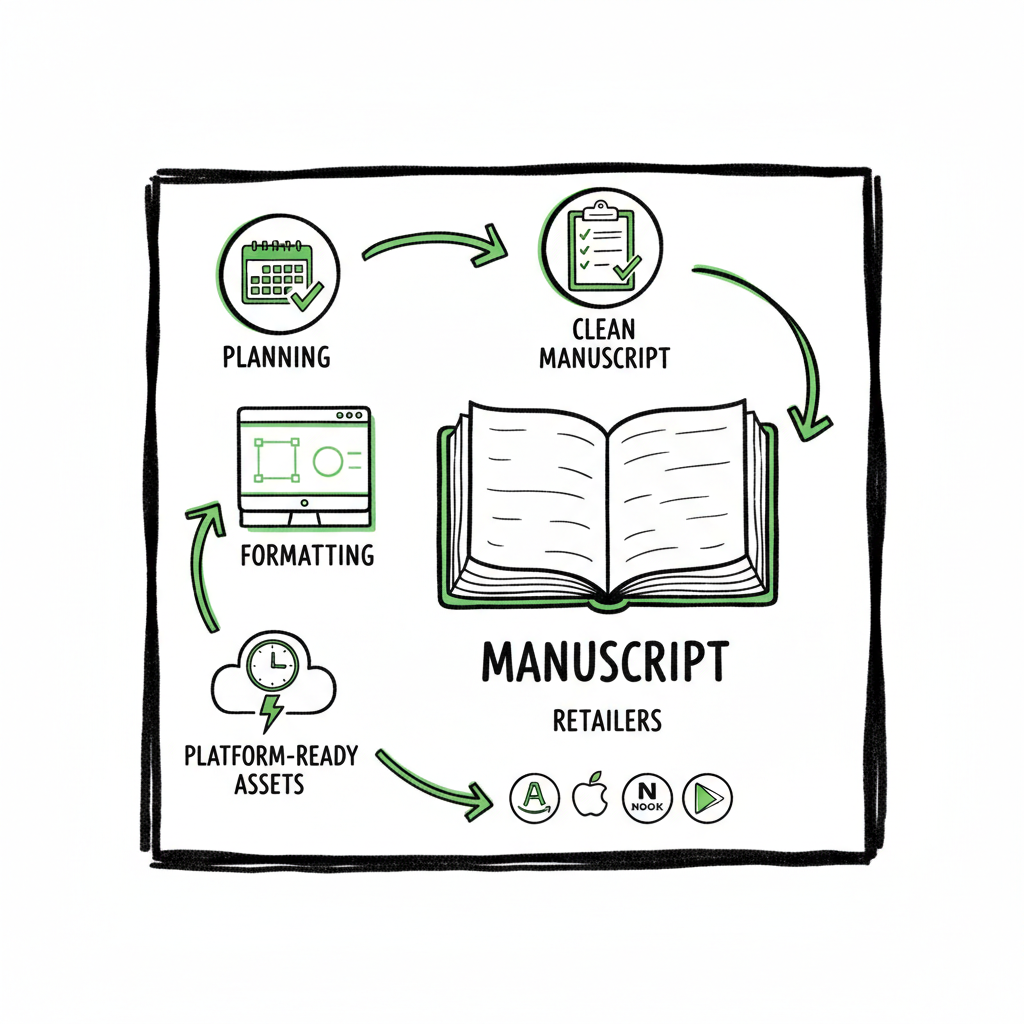
- Focus on repeatable stages: planning, clean manuscript, format for each channel, platform-ready assets, and a reliable upload cadence.
- Use tools that support CSV batch uploads, platform-specific checks, and error reporting to scale without adding busywork.
Table of Contents
- Why go wide: what this approach solves
- Core steps in a wide publishing workflow
- Scaling, tooling, and avoiding common errors
- FAQ
Why go wide: what this approach solves
Authors choose a wide publishing workflow because it makes selling outside a single retailer practical and repeatable. Instead of treating each platform upload as a one-off task, this approach bundles the work into stages you can repeat for every title. That matters when you move from publishing one book a year to a catalog you update or expand regularly.
A practical wide publishing workflow does a few things well: it forces decisions (rights, pricing, territories), produces platform-ready files, and reduces manual copy-and-paste errors when you register metadata or ISBNs. If you need examples or a template to compare your process against, see Publish Wide Self Publishing Workflow for a straightforward outline you can adapt. Early clarity here saves weeks later.
Going wide is not marketing hype. It’s operational: making the same book appear in Amazon KDP, Apple Books, Kobo, Draft2Digital, and Ingram while keeping editions consistent and minimizing rework. For authors serious about scale, a service that centralizes uploads and handles platform-specific quirks becomes an obvious upgrade. BookUploadPro, for example, automates repetitive uploads across those retailers, supports CSV batch uploads, and cuts manual time by about 90%.
Why this matters now
Retailers have different file expectations, price rules, and metadata fields. If you try to do everything manually, you’ll spend a lot of time fixing mistakes: incorrect pricing, mis-sized covers, EPUB validation errors, or mismatched descriptions. A wide publishing workflow anticipates those friction points and builds verification into the steps.
Core steps in a wide publishing workflow
This section covers the practical steps you’ll repeat for every title. Think of them as the sequence that turns a finished manuscript into multiple listed editions across stores. Keep the sequence rigid; if you skip or reorder steps you’ll create avoidable work downstream.
1) Plan rights, formats, and distribution targets
Start with a short checklist: which territories, what formats (ebook, paperback, hardcover), and which retailers. Decide whether you need expanded distribution or exclusive deals. Picking formats early determines cover specs, interior layout choices, and ISBN needs.
2) Finalize the manuscript and metadata
Edit, proofread, and prepare a clean manuscript. Simultaneously, draft metadata in a single source file: title, subtitle, series data, author name style, description, keywords, BISAC or category choices, language, and publisher info. Store this in a spreadsheet or a single record in whatever project tool you use. Standardize field names so they map to each retailer’s upload form.
For added efficiency, you can reference a canonical metadata sheet as the source of truth and map fields to each retailer’s inputs before uploading.
3) Create platform-ready assets
Convert your clean manuscript to the required file types. For ebooks, that typically means a validated EPUB; for print, a PDF with correct margins and bleed. If you need a fast, reliable EPUB conversion, use a dedicated tool rather than hand-editing HTML — it saves time and catches structural errors. If you’re converting manuscripts to EPUB, consider a specialist converter to avoid validation issues.
Covers must match retailer specs for size, spine width, and resolution. If you need a quick cover or to generate variations that meet these specs, a cover generator that can process sizes for multiple retailers is helpful.
4) Build and verify edition details per retailer
Create a single canonical set of metadata, then map fields to each retailer’s required inputs. Retailers vary: one asks for keywords, another for BISAC, a third for contributor roles. Map once, export field-by-field, and validate before upload.
5) Batch uploads and file delivery
When you have multiple titles, you’ll want to upload in batches rather than one at a time. CSV batch uploads let you push many records quickly. If you’re doing widespread distribution, a unified process that supports CSV import and per-retailer API deliveries reduces repetitive clicks and copy/paste.
6) Post-upload checks and reporting
After uploads, verify storefront pages: description formatting, cover display, and sample content. Track ISBN assignments, publication dates, and pricing. Keep a short audit log for each title showing where it’s live and any outstanding issues.
7) Ongoing maintenance
Titles change: new editions, price changes, or updated covers. Keep the canonical metadata file current, and plan periodic audits. A standard cadence (quarterly or semiannual) will catch territory mismatches or retailer storefront changes early.
Practical tips for each step
- Standardize file naming so you can identify a book, edition, and retailer at a glance. Example: Title_Year_Edition_Retailer.pdf
- Keep a single CSV or spreadsheet with canonical metadata; it becomes your source of truth.
- Run a quick checklist after each upload: cover check, description check, price check, sample download.
- Use platform-specific checks: EPUB validators for ebooks; print PDF preflight checks for paperbacks and hardcovers.
Asset tools that speed the process
- For cover sizing and batch processing, use a cover generator that outputs the exact dimensions for multiple formats.
- For EPUB creation and validation, use a dedicated EPUB converter to avoid hand-editing or last-minute fixes.
- For paperback and ebook creation (interior and print-ready files), services that bundle layout and file generation cut handoffs and errors.
If you use a cover generator, an EPUB converter, or a unified book-creation tool, they should sit early in your chain so uploads start with validated files.
Note on platform differences
– Amazon KDP has slightly different interior margins and cover spine calculations than Ingram. Generate a separate print-ready PDF per print channel when necessary.
– Apple Books prefers a validated EPUB with specific metadata tags for contributors.
– Kobo and Draft2Digital accept many of the same fields but handle categories differently.
Small differences add up. The point is not to memorize every nuance but to make those differences part of a predictable step so they don’t surprise you at upload time.
Tools and actions for the people running this process
- Use a template spreadsheet with fields for every retailer you support.
- Assign ownership: who prepares files, who validates, who uploads, and who reviews storefronts.
- Keep communications short and task-focused: a single line noting “ready for upload,” with links to the validated EPUB/PDF and the metadata record.
These steps form your baseline wide publishing process steps. Repeat them, refine them, and automate where it reduces repetitive manual work without hiding important validations.
Scaling, tooling, and avoiding common errors
When you start publishing more than a handful of books, small inefficiencies become big time sinks. The trick is to scale in a way that preserves quality and reduces friction.
Where authors waste time
- Re-entering the same metadata into multiple retailer dashboards.
- Re-creating covers for different spine widths and trim sizes manually.
- Attempting ad-hoc EPUB fixes instead of using a proper converter.
- Doing one-off checks and discovering problems weeks later.
Three levers for scaling
- 1) Standardization
Standardize formats, metadata fields, and file naming. The fewer formats and exceptions you have, the less manual mapping you’ll do. A standardized CSV structure that maps to each retailer minimizes repetitive entry. - 2) Batch operations
Batch uploads let you move many titles at once. CSV imports and batch deliveries are not just speed features; they force you to clean your data. Batch processes also make rollbacks easier because you can compare before/after states in a single file. - 3) Platform-specific intelligence and error reporting
Look for tools that know retailer quirks—things like required fields, file dimension rules, or pricing limits—and surface errors before submission. That saves the back-and-forth that costs hours across multiple titles.
How automation fits (without getting lost in tech)
You don’t need to invent complex systems. What matters is automating repetitive, error-prone tasks: copying metadata fields into the right shape, generating correctly sized covers, converting and validating EPUBs, and dispatching files to each retailer. The goal is to replace repetitive manual work with consistent, auditable steps that you can run reliably.
A service designed for multi-retailer uploads can be a force multiplier. For example, BookUploadAI automates repetitive uploads across Amazon KDP, Kobo, Apple Books, Draft2Digital, and Ingram. It supports CSV batch uploads, applies platform-specific intelligence to reduce errors, and frees authors from the manual chore of visiting multiple dashboards. For authors who publish seriously, that shift is an obvious upgrade: automate the upload. Own the distribution.
Common errors and how to prevent them
- Wrong cover dimensions: Always generate retailer-specific covers and check the preview in advance. If you create covers in bulk, use a cover tool that outputs the exact specs per retailer and edition.
- EPUB validation failures: Use a dedicated EPUB conversion and validation tool. If you convert HTML to EPUB manually, run automated validators to catch structure and metadata issues.
- Price mismatches across territories: Keep a pricing master sheet and a simple rule set for list prices and discounts. Reconcile regularly.
- Missing metadata fields: Map canonical metadata fields to each retailer before you upload. Treat the mapping as part of the file you validate.
- ISBN confusion: Track ISBNs in a single place and make sure the right ISBN goes with the right format and distributor.
Where to invest first
If you’re scaling from one-off titles to multiple releases a year, invest first in tools that remove repetitive data entry and that validate files before upload: a good EPUB converter, a cover generator that outputs multiple specs, and a system that accepts CSV batch uploads to multiple retailers.
Why CSVs matter
CSV batch uploads are not exotic. They’re the practical way to scale because every title becomes a row in a table and every field becomes a column you can audit. When you use a CSV-first approach you:
- Reduce manual typing
- Make bulk edits simple
- Create an auditable log for publication state
Services that support CSV batch uploads and dispatch to retailers let you publish many titles quickly while ensuring each store receives files in the format it expects.
Operational checklist for scale
- Maintain a canonical metadata CSV
- Keep validated EPUB and print files in a named folder per title
- Use a cover generator that outputs retailer-ready images
- Batch upload via CSV to your publishing tool or service
- Run a post-upload audit and keep a short public-facing log for each title
Practical case: one-minute preflight
- Is the canonical metadata file complete? (Yes/No)
- Are EPUBs validated and named properly? (Yes/No)
- Are print PDFs preflighted for each trim size? (Yes/No)
- Are cover files the correct dimensions for each retailer? (Yes/No)
- Is the CSV correctly formatted for the upload tool? (Yes/No)
If any answer is No, fix it. That one-minute gate prevents hours of fixes after submission.
Where to get the right assets quickly
- If you need to produce covers that match retailer specs, use a cover processing tool that outputs multiple sizes and formats in one pass.
- If you need to convert manuscripts to valid ebook files, use a reliable EPUB converter rather than hand-editing exports.
- If you need print and ebook creation bundled, a tool that supports both interior layout and ebook generation reduces file handoffs.
These kinds of tools let you keep most of the work in-house while removing manual tedium. If you’re curious about fast cover creation or batch EPUB conversion, look for solutions that integrate into your process so files flow from manuscript to store-ready assets without rework.
A note about costs and SaaS choices
Going wide adds operational costs—services, ISBNs, and platform fees. Choose tools that are affordable and offer a free trial so you can test the process with one or two titles. The right tool should pay for itself by saving time and reducing errors; for authors publishing several titles, that math is usually immediate.
Final operational tips
- Document the process in simple steps so anyone on your team can follow it.
- Keep a short audit log per title with links to the validated files and the upload CSV row.
- Run periodic audits to ensure storefronts still reflect your canonical metadata.
FAQ
Q: What exactly is a “wide publishing workflow”?
A wide publishing workflow is the repeatable process that takes a finished manuscript through formatting, asset creation, and distribution to multiple retailers. It covers decisions about formats, metadata, file validation, batch uploads, and post-publishing checks.
Q: Do I need different files for each retailer?
Often you will. Ebooks typically use EPUB, but each retailer has subtle metadata or HTML handling differences. Print often requires separate PDFs per trim size and distributor. The goal is to produce validated files per retailer so what you upload is accepted without manual fixes.
Q: Can I handle this alone or should I use a service?
You can do it manually at small scale, but a service that supports CSV batch uploads, platform-specific checks, and multi-retailer dispatch becomes cost-effective quickly. For authors publishing multiple titles a year, automation and centralized uploads are worth the investment.
Q: How do I handle covers for different trim sizes and retailers?
Use a cover generator or cover processing tool that outputs the correct dimensions for each trim size and retailer. That removes manual resizing and reduces preview problems.
Q: Where can I convert manuscripts to EPUB without hassles?
Use a dedicated EPUB converter to generate validated files. These tools handle structure, metadata, and validation rules so you avoid storefront rejections.
Q: What is the simplest way to start moving toward a wide process?
Start by creating a canonical metadata spreadsheet and producing validated assets for one title. Then perform a batch upload trial to one non-Amazon retailer and audit the result. Iterate from there.
Sources
- How to Build a Content Publishing Workflow – Activepieces
- The Stages of the Publishing Process – Enago
- Publishing Workflow Management: 8 Steps for Easy Setup – Automateed
- Hybrid workflow how-to: introduction & editorial steps – Network Cultures
- 5 Tips For The Perfect Publishing Process | PublishOne
- How to Develop Efficient Editorial Workflows – State of Digital Publishing
- How to Develop an Editorial Workflow – Elite Editing
- How to build a content creation workflow that works – ShareFile blog
Wide publishing workflow Estimated reading time: 12 minutes Key takeaways A clear wide publishing workflow turns one book into many live copies across retailers with far less manual work. Focus on repeatable stages: planning, clean manuscript, format for each channel, platform-ready assets, and a reliable upload cadence. Use tools that support CSV batch uploads, platform-specific…