Wide Publishing Workflow Practical Steps for Authors
Wide publishing workflow: A practical guide to multi‑retailer distribution
Estimated reading time: 14 minutes
Key takeaways
- A clear wide publishing workflow reduces manual steps and errors when you upload to multiple retailers.
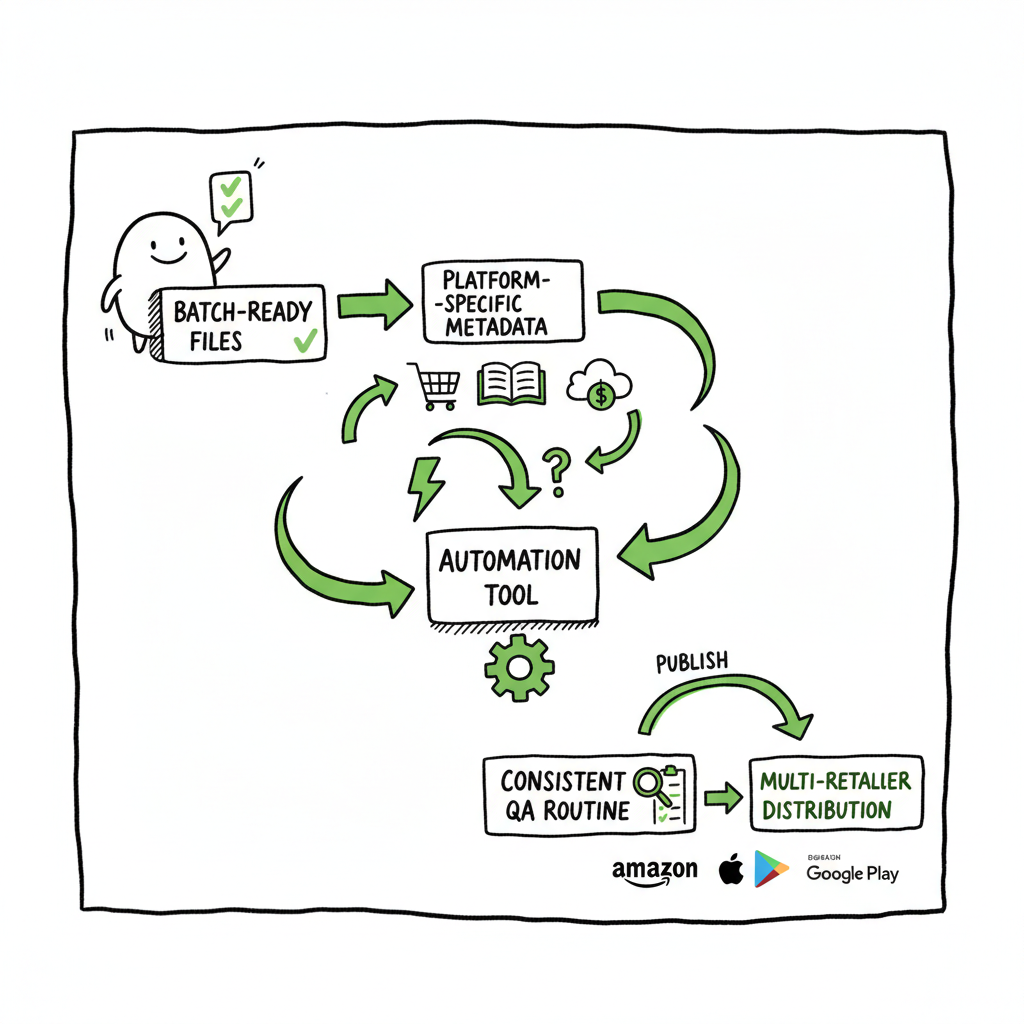
- Batch-ready files, platform-specific metadata, and a consistent QA routine are the core of a repeatable process.
- Automation tools and CSV batch uploads make wide distribution practical and save up to ~90% of upload time once set up.
Table of Contents
- What wide publishing means and why it matters
- Wide publishing workflow: practical steps
- Platform specifics and common pitfalls
- Automation, scale, and tools for go wide operations
- FAQ
- Sources
What wide publishing means and why it matters
“Wide” publishing means distributing your book across multiple retailers and aggregators instead of being exclusive to a single store. A wide publishing workflow takes you through the file preparation, platform mapping, and upload steps that make this distribution reliable and repeatable.
For most independent authors, the first few books are single-platform experiments. Once you reach consistent output — several titles a year — the manual process becomes a time sink. A defined wide publishing workflow turns a once-daily chore into a predictable operation. It protects metadata quality, reduces rejected uploads, and improves discoverability across stores.
If you’re building processes, look for documented steps you can hand someone else or automate. Many authors and small presses use a single shared checklist that mirrors their actual publishing cadence. That checklist becomes the foundation for automation and scaling. For a ready internal template that matches these ideas, see the Publish Wide Self Publishing Workflow for a clear example of a repeatable sequence you can adopt and customize.
Note: This section lays the groundwork for a scalable, repeatable process that protects metadata quality and improves distribution reliability across stores.
Wide publishing workflow: practical steps
This section lays out a pragmatic end-to-end process. Think of it as the assembly line for your book. Each step is small on its own, but together they remove surprises.
- Project setup and naming conventions
– Create a single project folder for each book. Use a consistent naming convention: AuthorLast_Title_Version (for example, Lee_CookingBasics_v1).
– Keep source files (manuscript, cover PSD or layered file), final print and ebook files, and a metadata spreadsheet in subfolders.
– Record a release date, territories, and pricing decisions in the metadata sheet so everything is centralized. - File preparation
– Finalize your manuscript in a clean file format. Export a properly formatted EPUB for ebook stores and a print-ready PDF for paperback or print-on-demand channels.
– For ebook distribution, check the EPUB with a validator before upload. If you need conversion or a clean EPUB, use a dedicated EPUB conversion tool to avoid reflow problems. A reliable EPUB converter can eliminate common formatting headaches and ensure compatibility across retailers.
– If you’re creating a paperback or ebook, prepare both interior and cover files to retailer specs. Some services accept a single upload for both; others require separate assets. If you’re working on covers or need a fast start for cover production, a book cover generator can speed the process and produce compliant images quickly. - Metadata and asset checklist
– Maintain a master CSV or spreadsheet that holds all metadata fields: title, subtitle, series, contributors, language, BISAC categories, age range if relevant, keywords, blurbs, and pricing for each market.
– Standardize category and keyword choices across platforms where possible, but be ready to map platform-specific category codes.
– Store retailer-specific images and text in the same project folder. That prevents last-minute hunting for a jacket text or a retailer-specific cover trim. - Platform mapping and rights management
– Decide which retailers you will use: Amazon KDP, Apple Books, Kobo, Draft2Digital, Ingram, and others. Some platforms require exclusive rights for promotional programs; plan your promotions around those rules.
– Map territories and pricing per retailer. Some platforms allow fine-grained territory control; others are broader. Keep a rights grid in your project spreadsheet so you never publish in a restricted territory by mistake. - Preflight and QA
– Run a final checklist: EPUB validation, PDF print checks, cover bleed and spine calculations, metadata completeness, and pricing parity.
– Test group: upload draft files to a closed group or use device previews to catch layout issues. A quick check on a phone, tablet, and a print proof will catch the most common problems. - Upload and verification
– Upload to each retailer or use an aggregator. If you upload manually, follow the same sequence each time to avoid skipping steps: metadata, pricing, assets, categories, distribution rights.
– Immediately after upload, verify titles in store listings and sample downloads. Keep a verification log with dates and screenshots to troubleshoot later. - Post-publish monitoring
– Monitor sales dashboards and returns. Watch reviews and metadata display to ensure there are no mismatches.
– If a store shows incorrect metadata, update and re-verify. Some changes take days to propagate; track expected update windows. - Iteration and documentation
– After release, refine the workflow. Note where manual intervention was needed and add those steps to the master checklist.
– Store each book’s final metadata CSV so you can reuse successful configurations for future titles.
These steps form the backbone of a wide publishing process steps checklist. For teams or authors scaling output, turning these into CSV batch uploads and automated routines pays back quickly.
Platform specifics and common pitfalls
Each retailer has its own quirks. Knowing the common pitfalls saves time and prevents rejections.
Amazon KDP
– KDP has specific formatting rules, especially for print interiors and cover bleed. Amazon’s previewer will catch many errors, but always order a proof copy before wide promotion.
– KDP’s promotional programs sometimes require exclusivity. If you want to run those promotions, factor exclusivity windows into your release calendar.
Apple Books
– Apple prefers clean EPUBs with proper navigation and embedded fonts. If your EPUB was generated without care, Apple may reject it or display odd typography.
– Pay attention to book descriptions. Apple processes metadata differently, and you may need different blurbs to optimize discoverability.
Kobo and Pocket Stores
– Kobo supports KWL and has its own category mapping. Regional pricing behaves differently, so confirm currency conversion and royalties.
– Kobo often has faster turnaround for price changes than larger retailers.
Ingram and IngramSpark
– Ingram connects to many retailers and libraries, but print specs are strict. Spreadsheets for ISBNs, print dimensions, and barcode handling must be exact.
– Use print-ready PDFs that match Ingram’s bleed and spine templates to avoid failed print jobs.
Draft2Digital and Aggregators
– Aggregators simplify distribution to multiple stores, but they add a layer between you and the retailer. Use aggregators for convenience, but keep a copy of your master metadata and know how the aggregator maps your fields.
Common pitfalls
– Inconsistent metadata across stores creates discoverability problems and confusion for readers. Always source the master record from your project spreadsheet.
– Missing file checks lead to rejected uploads. A final preflight catches most issues.
– Price mismatch across markets reduces trust. Aim for consistent pricing logic and document how you convert prices.
When you document these platform behaviors, your wide publishing process becomes resilient. Small teams and solo authors both benefit when the odd quirks are written down.
Automation, scale, and tools for go wide operations
When you publish more than a handful of titles a year, automation stops being optional. Tools that handle CSV batch uploads and platform-specific intelligence reduce repetitive work and human error.
What automation addresses
– Bulk metadata mapping: one CSV row per book that populates fields across retailers.
– File routing: sending the correct EPUB or PDF to the matching retailer upload.
– Pricing rules: apply global price tiers and automatically convert to local currencies.
– Error reduction: validation checks catch common rejections before upload.
What to automate first
– Metadata CSVs: standardize fields and make a template. This makes it possible to reuse the same data across platforms.
– File naming: adopt a file naming convention that automation trusts. A single letter or version mismatch can break automated routing.
– Preflight checks: run EPUB validation and image size checks automatically as part of the file export.
Choosing tools
– Look for a platform that supports CSV batch uploads and has platform-specific intelligence — the ability to map your master metadata to the quirks of each retailer.
– A solution that provides unified multi-platform publishing, CSV batch uploads, and error reporting is often an immediate upgrade for authors publishing at scale. When authors start publishing seriously, automated uploads and distribution controls become an obvious upgrade.
Practical example at scale
Imagine releasing ten backlist titles across five stores. Manual uploads could take days and involve dozens of repetitive clicks. With batch CSV uploads and routed files, the same work becomes a one-hour setup plus automated processing.
That’s where unified multi-platform publishing shows ROI: roughly ~90% time savings on uploads, consistent metadata across stores, and fewer rejected files.
Tooling considerations
– Security and control: keep your credentials safe. Use role-based access if you hand off work to contractors.
– Audit logs: the ability to see who uploaded what and when helps trace problems quickly.
– Pricing and trial: look for affordable pricing and a free trial so you can test the workflow with a single title before committing.
If you want a hands-on platform that automates repetitive uploads and offers CSV batch processing with platform intelligence, tools built for wide operations are the sensible next step. Automate the upload. Own the distribution.
Book production links and helpers
– If you need a fast, compliant cover, a book cover generator can produce retailer-ready images and speed up the visual side of your workflow: https://www.bookautoai.com/book-cover-generator-processing
– For clean EPUBs, use a dedicated conversion service to avoid formatting problems that block stores: https://www.bookautoai.com/epub-converter
– If you’re generating both paperback and ebook files and want a one-stop place to manage assets, a focused book creation resource can be helpful: https://www.bookautoai.com
Practical note about adoption
– Start small. Automate one part of the process and measure time saved. Then broaden the automation to metadata, pricing, and file routing.
– Expect a setup phase. Mapping fields and testing uploads takes time, but once the templates are stable you’ll see time savings compound.
FAQ
Q: What is the fastest way to move from single-store publishing to wide?
A: Document your current manual steps, build a single master metadata CSV, validate your files, and run a pilot release across two additional platforms. Use the pilot to refine field mappings and cover specs, then expand.
Q: Can I use one EPUB for all retailers?
A: Often yes, but only if the EPUB is clean, validated, and tested on devices. Some stores have unique requirements (e.g., embedded fonts or navigation) so test each retailer’s previewer. Use a conversion tool if you’re unsure.
Q: Should I use an aggregator or upload directly to each retailer?
A: Aggregators simplify distribution but add a middleman layer. If you want direct control, upload to each retailer. If you value convenience and fewer logins, an aggregator is fine. Keep a master file and know how the aggregator maps fields.
Q: How do I keep pricing consistent across stores?
A: Maintain a pricing table in your metadata CSV with base price and market conversions. Use pricing rules in your tooling to apply consistent tiers across currencies.
Q: What’s the biggest time saver for go wide operations?
A: Batch uploads via CSV and automated file routing. Those two elements collapse repetitive manual work and reduce errors dramatically.
Sources
- Publisher documentation and platform guides (Amazon KDP, Apple Books, Kobo, IngramSpark)
- Book auto tools and converters referenced for file and cover processing
Wide publishing workflow: A practical guide to multi‑retailer distribution Estimated reading time: 14 minutes Key takeaways A clear wide publishing workflow reduces manual steps and errors when you upload to multiple retailers. Batch-ready files, platform-specific metadata, and a consistent QA routine are the core of a repeatable process. Automation tools and CSV batch uploads make…