Wide Publishing Workflow Practical Guide for Authors
Wide publishing workflow: a practical guide for authors who want to go wide
Estimated reading time: 14 minutes
Key takeaways
- A reliable wide publishing process reduces repeated manual work and keeps quality consistent across retailers.
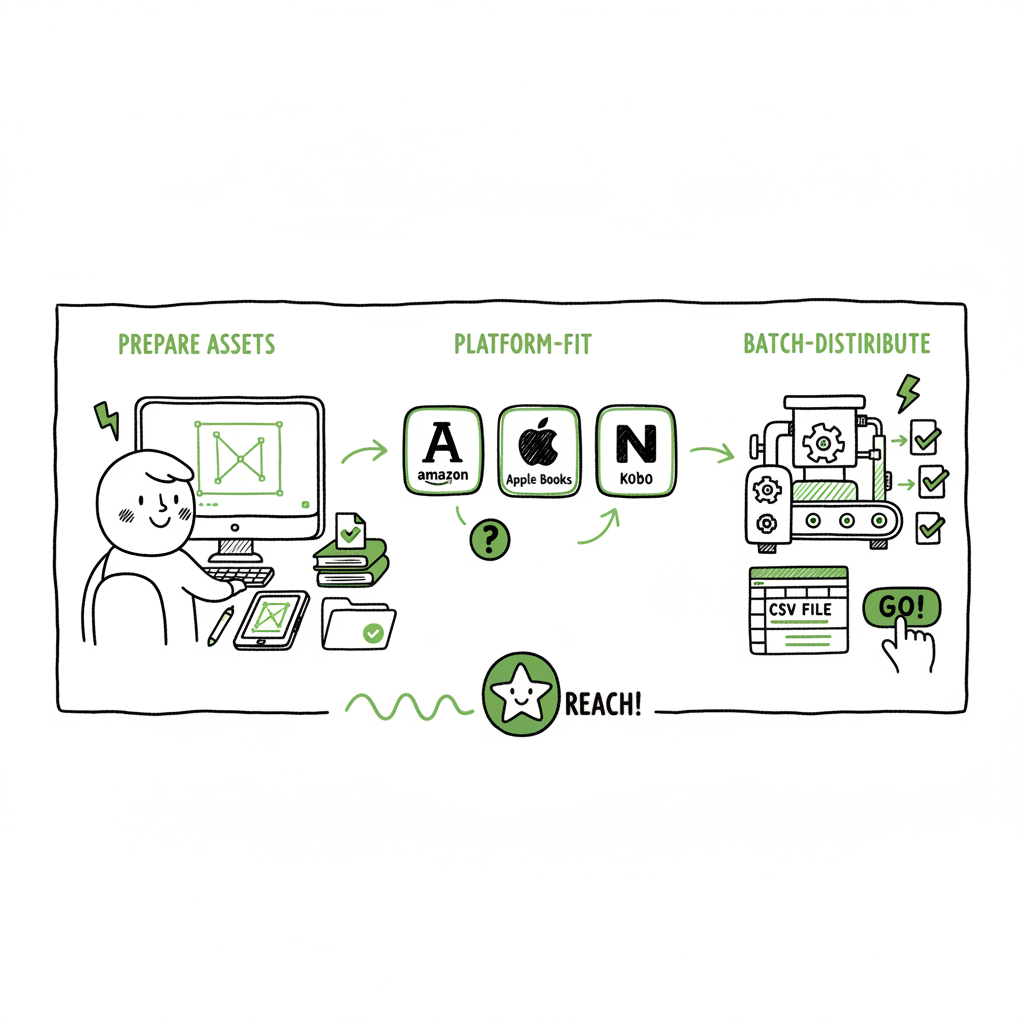
- Focus on three repeatable stages: prepare assets, platform-fit each version, and batch-distribute with checks.
- Automation and CSV batch uploads cut time by ~90% and make multi-retailer publishing practical at scale.
Table of Contents
- Why go wide and when it matters
- Core steps in a wide publishing process
- Platform-specific notes and quality checks
- Tools and automation for a multi retailer upload process
- FAQ
- Sources
Why go wide and when it matters
“Going wide” means making your book available across the major retailers and aggregators, not just one store. For an author publishing more than one title a year, a repeatable wide publishing process is the only way to keep releases regular, accurate, and low-friction.
A good wide publishing process saves time, avoids costly mistakes, and unlocks different audience channels—Amazon, Apple Books, Kobo, Draft2Digital, Ingram, and others. If you’re publishing multiple books, translations, or formats, consider a system that treats distribution like a repeatable operation, not a one-off project.
If you want a ready path to scale, see our Publish Wide Self Publishing Workflow for a step-by-step plan that matches what serious indie authors use. Early in the process, plan for unified metadata (title, subtitle, series, contributors), strong covers, and clean interior files so platform-specific prep is a brief step rather than a rework.
When to go wide
- You have more than one title or plan multiple formats (ebook, paperback, audiobook).
- You want broader discoverability and different revenue streams.
- You need redundancy—different retailers perform differently by region and genre.
When not to go wide
- You’re testing a single book and prefer exclusive programs for promotional advantages.
- You want a simple, single-platform launch with limited ongoing maintenance.
Core steps in a wide publishing process
A practical wide publishing process breaks down into three repeatable stages: prepare, adapt, and distribute. Each stage has clear tasks you can systematize and turn into a checklist or CSV for batch processing.
Prepare: master files and metadata
Start by building a single master package for each book:
- Manuscript: final proofread and formatted source file.
- Interior exports: a clean print-ready PDF for paperback and a reflowable source (DOCX or EPUB source).
- Ebook conversion: create a validated EPUB for retailers that accept EPUB. If you convert formats, use a reliable EPUB conversion tool to reduce formatting errors.
- Cover files: layered source (PSD or high-res), plus exports sized for each retailer’s spec. If you generate covers programmatically, keep a consistent naming convention and backup.
- Metadata spreadsheet: title, subtitle, series, edition, contributors, ISBNs, pricing by market, keywords, categories, short/long descriptions, territories, and publication dates.
Tips
- Store everything in a folder structure that matches your CSV naming: book-slug/interiors/covers/metadata.
- Keep a changelog for each upstream change—when you update a cover or interior, note the date and reason.
Adapt: platform-fit each version
Retailers have different technical and editorial rules. Treat this as light adaptation, not a rewrite.
- File format: Kindle prefers MOBI/AZW3 or EPUB depending on the delivery route; Apple/Kobo use EPUB; Ingram needs print-ready PDF for paperbacks.
- Cover bleed and spine calculations for paperbacks: use the exact page count and paper type to size the spine.
- Metadata fields: some stores support more tags, others need a strict category path.
- Pricing and territories: some platforms allow marketplace pricing differences; some need global pricing.
Rather than edit the master every time, produce platform-specific exports from your master. That keeps the source clean and lets you re-export quickly when you update the book.
Distribute: batch uploads and checks
Distribution is where scale wins or fails. Manual uploads, repeated pages, and tiny mistakes eat time. The discipline here is consistent naming, CSV exports for batch submission, and a short QA pass after upload.
Batch distribution tips
- Use CSV batch uploads where supported. Prepare a single CSV with a row per SKU and columns for required fields (title, ISBN, file path, price, distribution rights).
- Keep platform-specific intelligence in separate columns so the same CSV can feed parallel processes.
- Run automated or manual validation checks before submitting: file sizes, EPUB validation, cover dimensions, missing metadata.
The first time you do a full wide release it will take more time. After that, reusing CSVs, exports, and templates drops workload dramatically.
Practical checklist (repeatable)
- Master files: manuscript, interior, master cover, metadata sheet—finalized.
- Exports: EPUB, print PDF, store-specific covers.
- CSV batch file: rows for each retailer and SKU.
- Validation: EPUB check, PDF preview, metadata completeness.
- Upload: schedule and submit CSVs or use the platform UI for edge cases.
- Post-upload QA: storefront listings, link checks, price verification.
Platform-specific notes and quality checks
You don’t need to memorize every retail rule, but you do need a short set of platform notes in your process so you don’t repeat the same errors across titles.
Amazon KDP
- Strongly validate your MOBI/AZW3 or EPUB. KDP has its own conversion; provide clean EPUB when possible.
- Use KDP’s previewer for both ebook and paperback. Verify TOC and image placement.
- For paperbacks, double-check spine width after final page count.
Apple Books and Kobo
- They prefer EPUB files. Run an EPUB validation pass if you’re handing off files directly.
- Apple is strict about metadata and descriptions—use clean HTML-free text for short descriptions and a limited set of inline formatting.
Draft2Digital and aggregators
- Aggregators may reflow your source files for other retailers. They often accept EPUB and DOCX.
- Allow a day or two for aggregator distribution to propagate; check retailer pages afterward.
Ingram
- Ingram’s print specifications are rigid. Use their templates or generate a print-ready PDF that matches their trim, bleed, and spine specs exactly.
Common checks
- EPUB validation and a litmus test on major devices.
- Cover check: legible thumbnail and no clipped titles.
- Metadata parity: same title, subtitle, series, and contributor ordering across platforms.
- Price testing: ensure VAT/GST settings are correct for each marketplace.
When you automate or batch the process, encode these checks as gates. If a file fails EPUB validation, stop before distributing.
Note on covers and EPUB tools
Covers and EPUB creation are frequent friction points. If you generate covers or convert packages in bulk, use tools built for book assets: a reliable book cover generator reduces manual trimming, and an EPUB converter produces validated files faster than manual tweaks. These tools save hours per title and keep your inventory consistent.
- For automated cover processing, consider a purpose-built book cover generator.
- For EPUB work, a dedicated EPUB converter reduces formatting errors and saves rework.
Tools and automation for a multi retailer upload process
At scale, the difference between a one-off release and a reliable schedule is tool choice and data discipline. Automation here means scripted exports, CSV feeds, and upload tooling that understands each store’s requirements—not “magic”. The goal is error reduction and time savings.
What to automate first
- Metadata spreadsheets to CSV exports: design a single metadata master that can export per-retailer CSV with mapped columns.
- File exports: generate EPUB, print PDF, and cover variants from a single master input.
- Batch uploads: use systems that accept CSV batch uploads or APIs where available to submit multiple SKUs.
What to keep manual
- Creative decisions: cover art, front-and-back matter, and blurbs.
- First-time retailer issues: if a retailer flags something unusual, handle it manually so you learn the edge case.
Platform intelligence
A platform-aware tool will apply retailer-specific rules automatically: spacing for spine measurement, EPUB sanitization for Apple, or thumbnail cropping for Kobo. That saves hours and avoids repeated re-uploads.
Why multi-platform publishing tools matter
- Accept one master package and export retailer-ready files.
- Produce CSV batch uploads for multiple retailers at once.
- Reduce manual entry by using standardized metadata.
- Decrease upload errors and speed up time to live—authors report up to ~90% time savings on repeated tasks.
If you’re publishing several titles or formats, this kind of automation is an obvious upgrade once authors start publishing seriously. It makes wide distribution practical instead of a set of one-off projects. Automate the upload. Own the distribution.
Practical tool checklist
- Master file repository with consistent naming and versioning.
- EPUB converter for validated EPUB exports.
- Book cover generator or processor to produce platform-size covers automatically.
- CSV export templates for each retailer and an aggregator where needed.
- A distribution dashboard that tracks statuses and error logs.
Integrations to consider
- A cover processing service to batch-generate thumbnails and print-ready covers.
- An EPUB converter that accepts your master file and returns validated EPUBs.
- A central distribution tool that supports CSV batch uploads to multiple retailers.
If you design your process around these tools, your repeat time per title drops sharply and you make wide publishing a sustainable operation.
FAQ
How fast can I scale once I have a repeatable wide publishing process?
If your assets and metadata are organized, and you use batch CSV exports, you can reduce per-title upload time by roughly 70–90%. The first title sets the templates; each subsequent title becomes mostly export and QA.
Do I need a separate ISBN for each format?
Yes. Paperbacks and ebooks usually require different ISBNs on many platforms. Keep ISBNs listed in your metadata master and tied to SKU rows in your CSV.
What common errors should I watch for in batch uploads?
Missing or mismatched metadata, incorrect cover dimensions for paperbacks, EPUB validation errors, and pricing fields set incorrectly for territories are the most common. Build automated checks to catch these before upload.
Can I use one EPUB for all retailers?
Technically you can, but some retailers have strict validation or prefer specific packaging. Use an EPUB converter and validator to produce a clean file and keep platform-specific exports when needed.
Should I use aggregators or upload to each store directly?
Both approaches have trade-offs. Aggregators simplify distribution but introduce a propagation lag and might change certain metadata. Direct uploads give more control and faster updates, but cost more time. A hybrid approach—direct for priority stores and aggregator for the long tail—works for many authors.
What about translation and foreign rights?
Treat each language as a distinct SKU. Maintain separate master folders, metadata rows, and cover variants. For rights and royalties, track territories carefully in your CSV exports.
Final thoughts
A wide publishing process is not a theory—it’s a set of repeatable actions that turn publishing into ongoing operations. Focus on:
- Organizing master files and metadata.
- Producing platform-ready exports from the same source.
- Using CSV batch uploads and simple tool chains to reduce repetitive work.
- Keeping a short QA pass as a gate before distribution.
When you publish multiple titles, the manual approach becomes unsustainable. At that point, a platform that supports unified multi-platform publishing, CSV batch uploads, platform-specific intelligence, and error reduction becomes the logical next step. It’s an obvious upgrade once you start publishing seriously.
Sources
- https://www.bookautoai.com/book-cover-generator-processing
- https://www.bookautoai.com/epub-converter
- https://www.bookautoai.com
- https://www.bookuploadpro.com
Wide publishing workflow: a practical guide for authors who want to go wide Estimated reading time: 14 minutes Key takeaways A reliable wide publishing process reduces repeated manual work and keeps quality consistent across retailers. Focus on three repeatable stages: prepare assets, platform-fit each version, and batch-distribute with checks. Automation and CSV batch uploads cut…