Self Publishing Steps Process Outline for Indie Authors
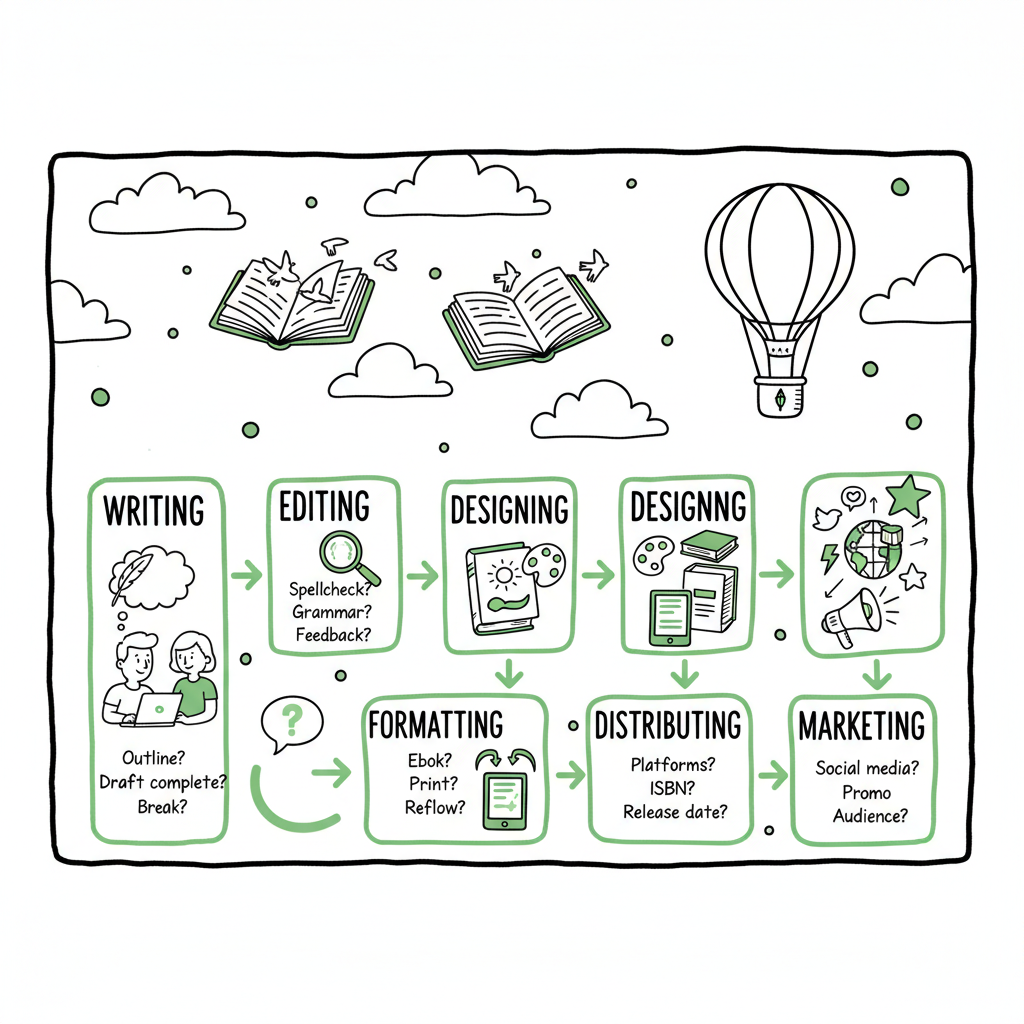
Self publishing steps: a practical, scalable workflow for indie authors
Estimated reading time: 14 minutes
Key takeaways
- Self publishing steps are a repeatable sequence: write, edit, design, format, distribute, and market. Each step has practical checks that reduce re-work.
- Format for multiple platforms early: prepare clean EPUB and print files, optimize metadata, and use platform previews to avoid listing errors.
- For authors publishing more than one title, automation and CSV batch uploads cut manual work by ~90% and make wide distribution practical.
Table of Contents
- Overview — what this guide covers
- The self publishing steps: a practical process outline
- Multi‑platform publishing at scale and where automation fits
- FAQ: common questions about the self publishing steps
Overview — what this guide covers
Self publishing steps should be simple to describe and disciplined to execute. This article lays out a clear self publishing process outline you can follow for one book or scale across dozens. I’ll cover the practical tasks that matter, when to stop iterating, and how to make distribution predictable across Amazon KDP, Kobo, Apple Books, Draft2Digital, and Ingram.
If you’ve read scattered checklists, this piece ties them together into a workflow you can repeat. It assumes you want professional results without unnecessary expense, and that you plan to publish multiple books eventually. For single titles, the steps still apply; for a series or parallel releases, automation choices become the difference between a hectic launch and a steady system. Throughout, I’ll point out where simple tools and services remove tedious work, so you can focus on writing and marketing.
Covers sell books. Invest in a cover that fits your genre and scales to small thumbnails. If you’re experimenting, test a few concepts but finalize the design before formatting. For efficient cover workflows, see the book cover generator processing.
Formatting is where many self publishing steps collide. Prepare separate assets for:
- Reflowable ebook (EPUB and platform-specific variations)
- Print-ready PDF for paperback or hardcover, with correct trim size, margins, and gutters
If you need an efficient cover workflow, consider automated tools that process cover files at scale. These services speed up generation and production-ready exports for both ebook and printed formats. For EPUB conversion, you can use the EPUB converter.
Practical tips:
– Keep chapter headings consistent and use paragraph styles
– Avoid manual page breaks in the manuscript source for ebooks
– Check widows/orphans and header/footer placement in print files
– Produce a separate table of contents for print and ebook when platforms require it
For publishing platforms and automation options, see BookAutoAI platform.
Final thoughts and next steps
If you’re publishing one book, follow the steps above and take time to do each well. If you intend to publish multiple titles, invest early in templates, a publication playbook, and an automation tool that supports CSV batch uploads and platform-specific checks. Those choices let you scale without sacrificing quality.
Visit BookUploadPro.com to explore unified multi‑platform publishing and try the free trial.
The self publishing steps: a practical process outline
What follows is not a marketing checklist. It’s an operator’s workflow—what needs to be done, why it matters, and how to avoid common mistakes. Think of it as an assembly line: each station adds value and reduces errors for the next.
-
Finish the manuscript and lock a draft
Write the book, then finish a draft you can ship to readers. “Finished” means you can hand it to early readers and professionals without embarrassment. Resist polishing forever. Set a deadline, complete the draft, then move to structured feedback.
Why this matters: perpetual revision delays publication and wastes money on repeated edits. Treat the first complete draft as the raw material you refine with editorial help.
-
Early feedback and structural edits
Use beta readers or a small critique group first. Their job is big-picture: pacing, character arcs, clarity of argument, or the usefulness of content in nonfiction.
Practical tip: collect feedback in one place (a shared doc or spreadsheet) and prioritize revisions that affect the manuscript’s structure. Don’t chase line edits at this stage.
-
Professional editing (developmental → copyediting → proofreading)
Plan for three editorial passes, though not every book needs all three:
- Developmental edit: reorganize sections, tighten structure, fix major gaps.
- Copyediting: grammar, consistency, style, and minor clarity fixes.
- Proofreading: final pass on the formatted file before distribution.
Why hire pros: editors catch problems readers notice first. A clean manuscript reduces formatting and conversion errors later.
-
Design a professional cover and title package
Covers sell books. Invest in a cover that fits your genre and scales to small thumbnails. If you’re experimenting, test a few concepts but finalize the design before formatting.
If you need an efficient cover workflow, consider automated tools that process cover files at scale. These services speed up generation and production-ready exports for both ebook and printed formats. For automated cover workflows, see the cover generator processing.
-
Prepare front/back matter and metadata
Decide what belongs in front matter (title page, dedication, short author bio) and back matter (author bio, newsletter link, other titles). Keep back matter consistent across editions.
- Metadata checklist:
- Title and subtitle optimized for clarity and search (not keyword stuffing)
- A short, compelling book description (first 1–2 lines are crucial)
- Author name consistency across platforms
- Categories and keywords tuned to where readers look
- Series metadata (if applicable)
- ISBNs for print (buy your own if you want control) — platform-assigned ISBNs are acceptable for many authors but consider ownership
- Metadata checklist:
-
Formatting for e‑book and print
Formatting is where many self publishing steps collide. Prepare separate assets for:
- Reflowable ebook (EPUB and platform-specific variations)
- Print-ready PDF for paperback or hardcover, with correct trim size, margins, and gutters
Use clean, well-structured source files (Word, Google Docs, or Markdown). A tidy source reduces conversion glitches.
If you need a reliable conversion step, automated EPUB converters can remove manual headaches and create validated EPUB files ready for platform upload. For EPUB conversion, see the EPUB converter.
Practical tips:
– Keep chapter headings consistent and use paragraph styles
– Avoid manual page breaks in the manuscript source for ebooks
– Check widows/orphans and header/footer placement in print files
– Produce a separate table of contents for print and ebook when platforms require it -
Previews and device testing
Always check your EPUB and print PDF in platform previewers and on real devices where possible. Each store’s preview tool will show different issues; fix those before you hit publish.
-
Build an author assets folder
Create a single folder with all final files and metadata:
– Final manuscript source
– EPUB and PDF for print
– Final cover files (ebook and print)
– Metadata: title, subtitle, series, description, category choices, keywords, price per store, territories
– Marketing assets: author photo, sample chapter, ad creatives
This makes batch uploads, retailer edits, and support requests faster. -
Platform upload and distribution choices
Decide where to list and how wide to distribute. Common strategy:
– Amazon KDP for direct retail (mandatory for most)
– Kobo, Apple Books, and regional stores via direct or aggregators
– Draft2Digital or Ingram for extended distribution (libraries, bookstores, and other retailers)When you’re listing files, double-check:
– Correct file uploads (EPUB for ebook stores, print-ready PDF with correct spine dimensions)
– Pricing set for each storefront and rollout schedule
– Rights and territory settingsIf you’ll publish many books, a CSV batch upload tool is a time-saver to avoid repeating the same entries on every platform. For publishing platform options, see BookAutoAI platform.
-
Plan the indie book launch sequence
A launch is a short, focused campaign to get downloads, reviews, and visibility. A simple indie book launch sequence includes:
- Prelaunch: build a mailing list, get ARC readers, and prepare giveaways
- Launch week: promotional pricing, targeted ads, newsletter sends, and social posts
- Postlaunch: continue advertising, run promotions, and encourage reviews
Avoid overcomplicating the sequence. The most important elements are getting early readers, ensuring reviews are visible, and maintaining metadata accuracy.
-
Post‑launch maintenance
After launch, track sales and retailer reports. Update metadata if a category or keyword isn’t performing. For books in series, keep back matter updated to cross-promote.
-
Repeatability and improvement
After each title, capture lessons in a publication playbook. Note recurring issues and create templates for covers, metadata, and upload profiles so the next release takes less time.
Tools and practical choices that matter
– Use style templates in your manuscript editor.
– Name files consistently with title, edition, and date.
– Keep a publish log that records ISBNs, platform ASINs, and live dates.
The difference between a messy release and a smooth one is the quality of these organizational habits.
Multi‑platform publishing at scale and where automation fits
Once you publish more than a handful of titles, manual uploads become the bottleneck. That’s where multi‑platform publishing and automation turn workflow into a system.
Why automation
- Reduce repetitive work: upload details once and push to multiple stores.
- Avoid data entry errors: platform-specific requirements differ; automation software applies the right settings per store.
- Save time: authors report up to ~90% time savings on the upload and distribution stage when using batch tools and CSV imports.
- Make wide distribution practical: managing KDP, Kobo, Apple Books, Draft2Digital, and Ingram manually is tedious; unified systems keep everything consistent.
What an automation service should do
- CSV batch uploads for titles, metadata, pricing, and files
- Platform-specific intelligence that maps your inputs to each retailer’s requirements
- Error checking before submission to reduce rejects and rework
- Store previews and logs so you can audit what was submitted and when
BookUploadPro’s role
- Unified multi-platform publishing so you don’t repeat the same tasks on five different dashboards
- CSV batch uploads for when you have multiple books or edition updates
- Platform-specific intelligence that reduces common submission errors
- Affordable pricing and a free trial to test the workflow before committing
Automate the upload. Own the distribution. When you move from one-off titles to a catalog, automation protects your time while keeping your files and metadata consistent across stores.
Where automation does not replace judgment
Automation speeds the mechanics of publishing, but it doesn’t replace editorial judgment, cover design choices, or launch strategy. Use automation for the repetitive, error‑prone parts—uploads, format conversions that follow a validated template, and cross-platform metadata mapping—so you can spend energy where it moves the needle: writing, editing, and marketing.
Integrations and practical setup
- Store validated final EPUB and print-ready PDFs in a consistent folder structure.
- Use standardized CSV templates for title metadata.
- Keep a record of each retailer’s ASIN or ISBN in a master spreadsheet for reporting.
- Run small test uploads before bulk pushes to confirm mappings.
Cover, ebook, and print conversions — practical notes
- Cover: Make separate deliverables for ebook and print. Print covers need a spine and bleed; ebook covers are simple rectangles but must look good as thumbnails. If you use automated cover processors, you can convert a concept to production-ready files faster and with higher consistency. For automated cover workflows, see the book cover generator processing.
- EPUB: A validated EPUB is the cleanest way to reach most ebook stores. Convert from a clean source and test on multiple readers. If you prefer a reliable conversion service, use one that validates and fixes common EPUB issues. For EPUB conversion, see the EPUB converter.
- Print: Confirm trim size and margins early. A print-ready PDF must match the exact dimensions for printer templates to avoid rejected files and unexpected formatting shifts.
Operational checklist for scaling
- Maintain a central source folder per title with versioned filenames.
- Keep a release calendar and map marketing activities to each book.
- Use a launch brief template so contractors (editors, designers, marketers) have exact specs.
- Audit your catalog quarterly for metadata consistency and pricing opportunities.
FAQ: common questions about the self publishing steps
Q: What are the absolute must‑do steps before I publish on KDP?
A: At minimum, finish the manuscript, run a professional copyedit, design a professional cover, format a validated EPUB and print PDF, and prepare accurate metadata. Preview files in the KDP previewer and check pricing/rights settings before publishing.
Q: Do I need separate files for ebook and paperback?
A: Yes. Ebooks are reflowable and use an EPUB; print needs a fixed-layout PDF with correct trim size and bleed. They have different cover requirements too.
Q: What’s the best order for editing and formatting?
A: Finish structural edits first (developmental), then copyediting, and only after those are complete create final formatted files. Proof the formatted files last.
Q: How can I make the indie book launch sequence manageable?
A: Keep the launch simple. Secure ARC readers, prepare a launch week promotion, and ensure your metadata and review process are in place. Use one promotional channel at a time and measure results.
Q: When should I use an aggregator vs. direct distribution?
A: Use direct distribution when you want the most control on a platform (e.g., KDP for Amazon). Use aggregators like Draft2Digital to reach multiple smaller stores quickly, or when inventory and royalty reporting from a single dashboard saves time.
Q: How does automation help reduce errors?
A: Automation maps your clean inputs to the exact fields each retailer needs. It validates files, flags missing metadata, and applies store-specific rules so you don’t submit a file that one platform will reject.
Q: Are there risks to automating uploads?
A: The main risk is garbage in, garbage out. Automation assumes your source files and metadata are correct. Maintain clean inputs, test small batches, and monitor the first few automated uploads to confirm everything mapped as expected.
Sources
- https://selfpublishing.com/self-publishing/
- https://davidgaughran.com/lets-get-digital-how-to-self-publish-guide-free/
- https://reedsy.com/blog/guide/how-to-self-publish-a-book/
- https://www.helpingwritersbecomeauthors.com/steps-to-self-publish-your-book/
- https://www.dabblewriter.com/articles/self-publishing-guide
- https://goteenwriters.com/2019/09/09/an-overview-of-the-self-publishing-process/
Self publishing steps: a practical, scalable workflow for indie authors Estimated reading time: 14 minutes Key takeaways Self publishing steps are a repeatable sequence: write, edit, design, format, distribute, and market. Each step has practical checks that reduce re-work. Format for multiple platforms early: prepare clean EPUB and print files, optimize metadata, and use platform…