Self Publishing Process Explained Step-by-Step for Authors
Self Publishing Process Explained
Estimated reading time: 16 minutes
Key takeaways
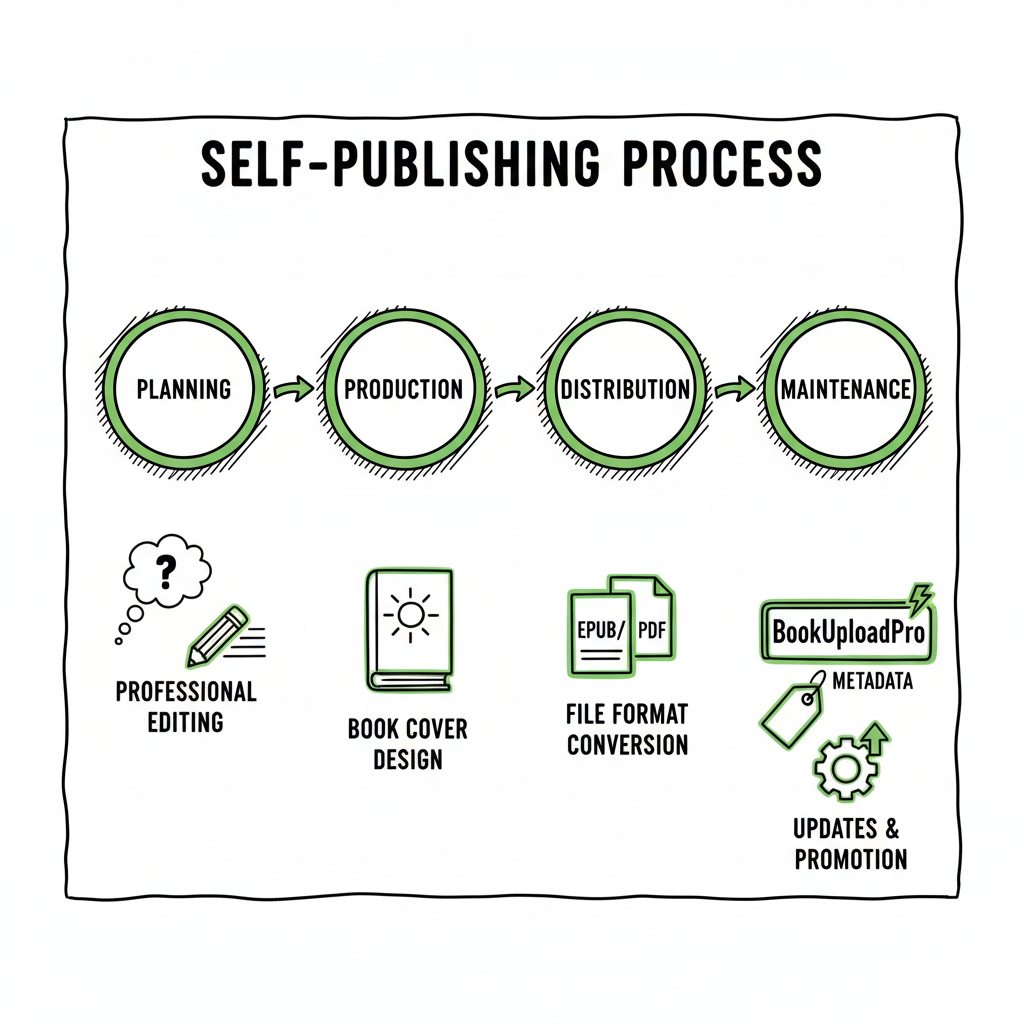
- Self publishing process explained as a clear, step-by-step workflow: plan, produce, distribute, and maintain.
- Professional editing, a strong cover, correct file formats (EPUB/PDF), and precise metadata drive discoverability.
- BookUploadPro makes wide distribution practical for serious authors.
- Important technical tasks include converting to EPUB, preparing print-ready PDFs, and choosing distribution channels.
- Treat publishing as an ongoing project: launch, measure, and adjust pricing, metadata, and promotion over time.
Table of Contents
Plan and research
The self publishing process explained starts well before the first full draft. Good planning saves money and keeps you focused. Think of publishing as two things at once: a creative project and a small business. You need both the craft and the operating plan.
Begin with the market, not the story alone. Read active books in your genre. Look at their covers, blurbs, and reader reviews. That shows what readers expect and where you can fit. If you are new to self publishing, a practical primer like Self Publishing for Beginners is a useful place to start when you need a broad overview. Use that context to choose your reader, tone, and format (novel, short nonfiction, workbook, or serialized series).
Outline a basic timeline and budget. Typical steps are:
- Research and outline
- Drafting and self-editing
- Professional editing
- Cover and interior design
- File prep (EPUB for ebooks, PDF for print)
- Platform setup, metadata, and pricing
- Launch and post-launch marketing
Be realistic about costs. Professional editing and design are the two places to spend first. Good editing makes the book readable. Good design gets the book clicked. You can cut corners on promotion at first, but poor production quality hurts long-term sales.
Create a simple product brief that lists: genre, word count, target reader, comparable titles, launch window, and distribution goals (exclusive vs. wide). This brief becomes the north star for editors, designers, and any team members you hire.
Production and file prep
Production is where a manuscript becomes a book. It is also the place where many self-publishing projects stall. Break production into three clear tasks: editing, design, and technical file preparation.
Editing
Start with self-editing: global pass for structure, then line edits for clarity, then proofing for typos. After you’ve done as much as you can, hire a professional editor. Types of editors:
- Developmental editor: big-picture structure and pacing
- Copyeditor: grammar, consistency, and style
- Proofreader: final pass for errors and formatting issues
A professional edit raises the quality to a level that readers expect. Budget for at least a copyedit for fiction and often both development and copyediting for longer projects.
Cover and interior design
Covers are marketing. The thumbnail is what sells the click. Don’t try to DIY the cover unless you have design skills and market knowledge. A strong cover follows genre conventions while offering a clear, readable title and author name at thumbnail size.
For authors who want to streamline tasks, tools exist to speed up cover work—especially when you need variants for different retailers. If you need help creating images or processing multiple covers, consider a dedicated cover generator to speed production and keep technical standards consistent.
Interior layout matters for print and EPUB. For print, choose trim size early and set margins and gutters to match the printer’s specs. For ebooks, use clean styles and logical heading structure so EPUB conversion is clean.
File formats and technical checks
Ebook platforms expect clean EPUB files. Poorly structured files lead to broken chapters, missing images, or odd spacing. Convert to EPUB from your manuscript with tools or services that preserve styles and metadata. If you need a fast, reliable EPUB conversion, an EPUB converter can streamline that task and reduce rework.
For print-on-demand, generate a print-ready PDF that matches the selected trim size and includes embedded fonts and correct bleed. Create separate files for paperback and hardcover if required.
Create one clear list of final deliverables: EPUB, MOBI if needed, print-ready PDF, high-resolution cover (usually a wrap file for print), and a plain-text version for metadata extraction.
Making paperback and ebook editions
Decide whether to publish ebook-only or ebook plus paperback from the start. Many readers expect both. Paperbacks increase discoverability in some markets and allow readers who prefer print to buy without using third-party distributors. When you convert the manuscript for print and ebook, keep a single source of truth for text and chapter breaks so future updates are easy.
If you want tools to speed up generating print and ebook files in the same workflow, consider book creation workflow tools that prepare consistent outputs across formats.
Distribution, pricing, and launch
This section covers the choices that determine how your book reaches readers and how you maintain the listing over time. Distribution and launch strategy are where publishing becomes operational.
Distribution model
- Exclusive to one retailer (e.g., KDP Select on Amazon) for short-term promo benefits.
- Wide distribution to multiple retailers and aggregators to reach a broader audience.
Exclusive programs can help early visibility on a single platform but limit reach. Wide distribution places your book on Amazon, Apple Books, Kobo, Ingram (for bookstores and library distribution), and others. The right choice depends on goals and genre. For series authors who expect steady sales across platforms, wide distribution often wins.
If you plan to publish across several platforms, manual uploads are repetitive and error-prone. Self Publishing for Beginners can be a useful reference as you consider automation options. BookUploadPro automates multi-platform uploads to Amazon KDP, Kobo, Apple Books, Draft2Digital, and Ingram. It uses CSV batch uploads and platform-specific intelligence to reduce errors and save about 90% of the time you would spend doing each retailer by hand.
Metadata: what to get right
Metadata is search and discovery. Key elements:
- Title and subtitle: clear, searchable, and honest about the book.
- Series name and number: important for series visibility.
- Author name: be consistent across platforms.
- Description: use short lead sentences and then a fuller blurb. Keep the most important benefits or plot hooks at the top.
- Keywords: retailer-specific keywords help discoverability. Use phrases readers search for, but avoid stuffing.
- Categories: pick categories that match the book and where you can realistically rank.
Pricing strategy
Price affects perception and sales velocity. Common starting points:
- Fiction standalone: $2.99–$4.99
- Novella or short: $0.99–$2.99
- Nonfiction: $4.99–$9.99 depending on depth and audience
Use temporary discount promotions at launch to gain reviews and page reads. If exclusivity is part of the plan, price and promotional options may differ.
Launch plan
A launch is not a single day; it’s a sequence. Typical launch steps:
- Build a small launch team or advance reader list
- Set a pre-order period (if using pre-orders)
- Run a focused promotion window (five to seven days) with email, paid ads, or promotional sites
- Seek reviews ethically and early
- Measure and adapt after week one (sales, click-throughs, and conversion)
Marketing and post-launch maintenance
Marketing is ongoing. Track what moves the needle and continue what works: price tweaks, ad campaigns, newsletter campaigns, or series updates. Keep metadata fresh and update categories and keywords as you learn which phrases convert to sales.
Practical production and distribution tips
- Keep all source files version-controlled in a folder system that mirrors editions.
- Maintain a single spreadsheet for ISBNs, ASINs, file names, and store links.
- Use batch tools to upload multiple titles; they prevent copy/paste errors that cause price or file mistakes.
- Check platform previews for both ebook and print files. Retailers’ previewers catch many layout problems.
Automation and scale
Once you publish more than a handful of titles, manual uploading is wasteful. BookUploadPro’s value is operational. It automates uploads, supports CSV batch uploads, adapts metadata to each retailer’s rules, and reduces errors that come from manual work. When you publish seriously, automation preserves time and mental energy so you can focus on writing and marketing. Automate the upload. Own the distribution.
FAQ
Q: What is the single best investment for a self-published author?
A: A quality edit. Readers forgive many things, but consistent errors or a broken structure limit recommendations and reviews. A professional edit returns value over time in trust and retention.
Q: Do I need an ISBN for an ebook?
A: Most retailers provide their own identifiers (ASINs on Amazon). If you want a private ISBN to control edition identification across platforms or to distribute through certain channels, buy your own. For print, many authors use a publisher-owned ISBN to retain control.
Q: Should I enroll in exclusive programs like Amazon KDP Select?
A: It depends. KDP Select can boost early visibility on Amazon, but you must be exclusive for the ebook. If you want presence in libraries, Apple Books, Kobo, and others, wide distribution is better. Consider your goals before committing.
Q: How important is the cover compared to the blurb?
A: Both matter. The cover gets the click; the blurb converts that click to a sale. If you must prioritize, spend first on a cover that reads well at thumbnail size and then on a strong blurb and opening pages.
Q: What file formats do I need?
A: For ebooks, a clean EPUB is standard. For Amazon, EPUB converts to the platform’s internal format, but start with EPUB. For print, use a print-ready PDF sized to the trim with embedded fonts. If you plan to convert or distribute at scale, use a reliable EPUB converter to avoid formatting issues.
Q: How do I handle updates and fixes after publishing?
A: Keep clear source files. Update the source, regenerate EPUB and print PDF, and upload new files. Note that retailers may take time to process changes; plan accordingly.
Final thoughts
Self-publishing is a repeatable, manageable system when you separate creative work from production and distribution tasks. Follow a consistent workflow: plan, polish, produce clean files, choose distribution thoughtfully, and maintain the book with measured promotion. Use tools to automate repetitive work so you can focus on writing and growing a catalog.
Sources
- https://selfpublishing.com/self-publishing/
- https://reedsy.com/blog/guide/how-to-self-publish-a-book/
- https://www.dabblewriter.com/articles/self-publishing-guide
- https://davidgaughran.com/lets-get-digital-how-to-self-publish-guide-free/
- https://janefriedman.com/self-publish-your-book/
Self Publishing Process Explained Estimated reading time: 16 minutes Key takeaways Self publishing process explained as a clear, step-by-step workflow: plan, produce, distribute, and maintain. Professional editing, a strong cover, correct file formats (EPUB/PDF), and precise metadata drive discoverability. BookUploadPro makes wide distribution practical for serious authors. Important technical tasks include converting to EPUB, preparing…