Publishing Books at Volume Practical Workflow Guide
Publishing Books at Volume
Estimated reading time: 14 minutes
Key takeaways
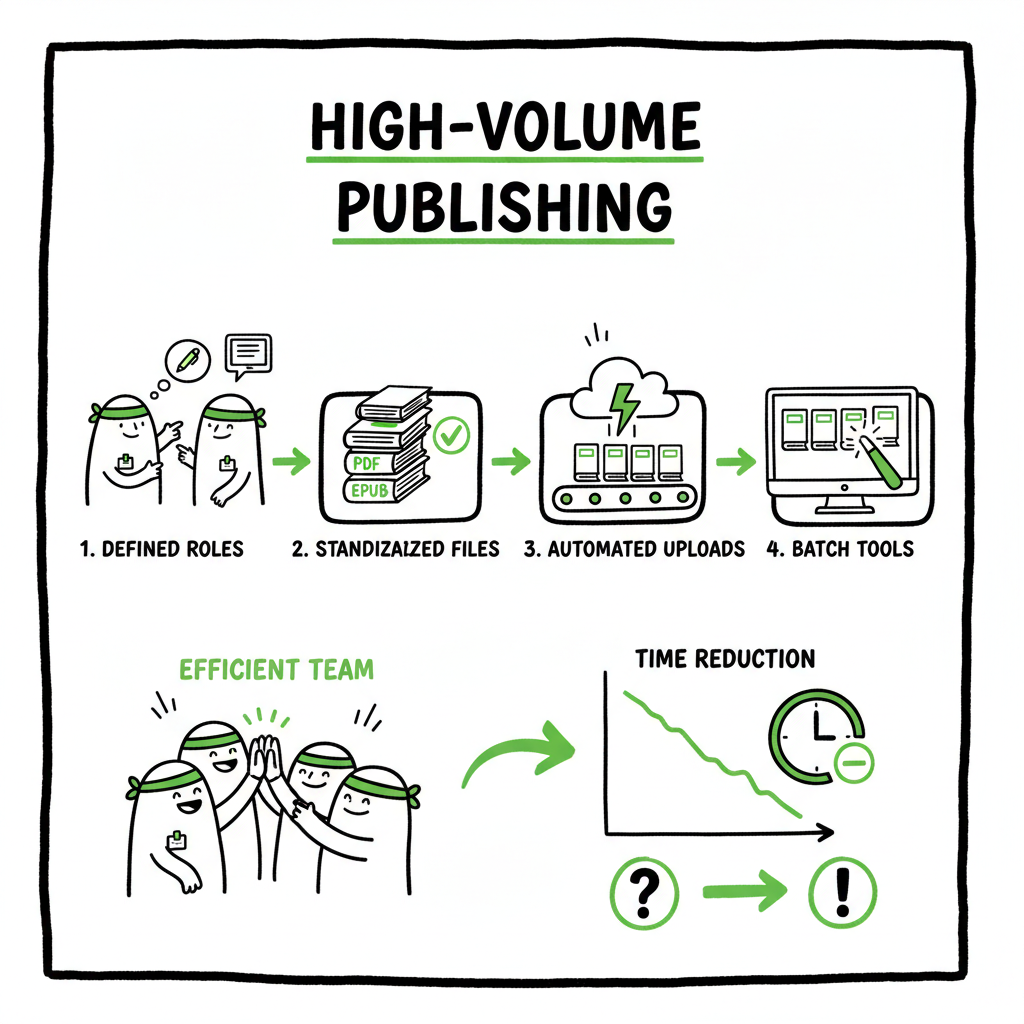
- Publishing books at volume is a repeatable process: define roles, standardize files, and automate uploads to keep quality steady while increasing output.
- Use batch tools, platform-specific checks, and a small trusted team to cut time per title by roughly 70–90% versus ad hoc methods.
- Unified multi-platform publishing (single CSVs, data templates, and error checks) makes distributing dozens of titles practical and affordable.
- BookUploadPro automates repetitive uploads across major stores, reduces errors, and turns a solo-publisher operation into something that scales sensibly.
Table of Contents
- Why authors scale to volume
- Practical steps to set up high-output book production
- Tools, team and file handling
- Quality control, distribution and final thoughts
- FAQ
- Sources
Why authors scale to volume
If you write or commission many short books, guides, or series, publishing books at volume becomes less an experiment and more a competence you must build. The math is simple: the same manual steps that take a week for one book turn into months when repeated for dozens. Authors who want predictable income, library placement, or to serve niche readers learn to treat publishing like a manufacturing problem — not to remove craft, but to make good output repeatable.
When small teams move from manual uploads to a repeatable model, the game changes. Systems that let you Publish Books At Scale remove the tedious parts so you can keep focus on content, series structure, and marketing. That shift is why many serious indie authors and small presses stop treating distribution as a one-off and start designing processes that scale.
Why volume matters in practice
- Revenue stability: dozens of modest-selling titles beat one occasional bestseller for steady income.
- Discoverability: series, categories, and repeat readers compound when you have multiple titles in a niche.
- Efficiency: standardized files and templates cut time-per-title dramatically, so new books actually ship.
Practical steps to set up high-output book production
High-output book production is about predictable, repeatable steps that reduce variation and friction. Here are practical steps any author or small team can follow.
1. Standardize your assets
Create templates for interior files, metadata, and cover layouts. Use consistent chapter styles, front/back matter, and file naming conventions. A clear folder structure prevents mistakes when handling multiple titles.
- Interior template: a single manuscript template (Word or InDesign) trimmed for trim size and typesetting rules.
- Metadata template: a CSV with columns for title, subtitle, series name, ISBN, language, keywords, and categories.
- Cover template: a layered file with placeholders for title, author name, and spine copy.
If you need reliable, fast ways to produce paperback and ebook files, consider dedicated book-creation tools that generate print-ready interiors and cover PDFs from templates. These tools reduce the manual fiddling that kills throughput and increase consistency across dozens of titles.
2. Batch the production tasks
Group identical tasks across many titles. For example, do all copy edits for a set of books in one block, then typeset the same batch, then generate proof PDFs. This reduces setup time and keeps suppliers focused.
- Editing round: assign X books to a copy editor in one batch.
- Typesetting round: push all X books through your interior template in one session.
- Final checks: proofread a batch of final PDFs and resolve common typesetting issues.
3. Outsource non-core work
You can’t scale alone. Replace low-value tasks with trusted freelancers or vendors: copy editors, proofreaders, designers, and file checkers. A single project manager or coordinator who knows your templates can manage external suppliers and keep quality consistent.
4. Use platform-specific intelligence
Stores have different requirements. Amazon KDP wants specific margins, image resolutions, and file types; Apple Books and Kobo have their own rules. Maintain a simple checklist per platform and validate files automatically where possible. That reduces rejections and delays.
5. Automate the repetitive uploads
Once your files and metadata are standardized, automate uploads so the same CSV drives publishing across multiple platforms. Automation reduces human error in fields like ISBN, keywords, pricing, and territories. For many publishers this is the step that delivers the largest time savings.
Tools, team and file handling
Scaling requires the right mix of tools and people. You want tools that handle batch exports and people who manage exceptions.
Essential roles
- Coordinator: one person manages schedules, checks reports, and handles platform issues.
- Editor/proofreader pool: a small stable of editors who know your style and templates.
- Designer: creates cover templates and batch designs; hands off layered source files.
- Upload operator or system: a person or service that handles the final platform submissions.
Core tools and file practices
- Single-source manuscript: keep one master file per title. Generate paperback, ebook, and proof outputs from that file.
- CSV metadata master: a single spreadsheet that contains all metadata and pricing. This file becomes the integration point for batch uploads and reporting.
- Version control: simple versioning like v1, v2, FINAL in filenames to avoid confusion.
- Proof checklist: quick items to check on every proof (pagination, TOC links, image bleed, gutter margin).
Converting files and covers
Converting to epub is a specific step that often blocks ebook distribution. Use a reliable converter to handle chapter markers, images, and CSS. A dedicated EPUB tool reduces time and fixes common problems with layout and table of contents. If you are converting many manuscripts, a consistent converter keeps files uniform and saves rework.
When you design many covers, use a generator or template system so titles and subtitling are applied automatically to the same layout. That protects your brand across a series and speeds production.
BookUploadPro fits here as the upload engine
The upload engine automates the repetitive store uploads and applies platform-specific intelligence to reduce rejections. By pushing standardized files and single CSV metadata into a unified system, you cut upload time dramatically and create audit trails for each title.
Single CSVs and multi-store publishing
A properly structured CSV becomes the backbone of high-output distribution. Columns map to title, subtitle, ISBN, pricing, and storefront choices. A single upload mechanism that accepts those CSVs and pushes to Amazon KDP, Apple Books, Kobo, Ingram, and Draft2Digital makes wide distribution practical. In addition, having platform-specific checks—file size, cover bleed, ISBN matching—prevents surprises.
Linking production to distribution
When your production stages output the required formats (print-ready PDF, validated EPUB, cover PNG/PDF), the upload system simply takes them and maps metadata automatically. That reduces the per-title upload time from hours to minutes. This is where an automated upload service becomes an obvious upgrade once authors start publishing seriously.
Quality control and distribution at scale
Scaling output must not mean scaling problems. You need guardrails.
Preventing quality drift
Quality drift happens when small errors repeat across titles: a misplaced front matter page, wrong ISBN in the header, or inconsistent chapter styles. Prevent quality drift by:
- Locking templates. Make changes deliberately and communicate them to the team.
- Maintaining a style guide. A short guide prevents editors from introducing inconsistent punctuation, casing, or numbering that multiplies across titles.
- Running batch checks. Scripts or tools that scan interior files for common issues (or validate EPUBs for broken nav) catch problems before upload.
Platform-specific checks
Different platforms have different technical rules. Maintain a checklist for each and require a quick sign-off by the coordinator before upload. Common checks include:
- Trim size and bleed for print PDFs
- Embedded fonts and image resolution
- Correct EPUB navigation and TOC
- Consistent ISBN and imprint data
Cover and ebook considerations
Covers should be checked as part of the proof stage for print and as a separate file for ebooks. If you automate cover generation, include a manual spot check for the first few titles of each batch to verify type, color, and legibility.
If your production mentions converting files to EPUB, use a tool that validates the output against common store validators and fixes common issues like missing NCX entries. A validated EPUB reduces rejections and keeps launch schedules on track.
Distribution and pricing strategy
When you publish dozens of titles efficiently, pricing strategy becomes powerful. Use consistent price tiers that map to length or market expectations. For series, stagger launches and promotions so each title gets attention. Distribution matters: wide availability across stores increases discoverability, but each store requires slightly different metadata and pricing options. Batch tools that respect per-store differences let you run targeted experiments without manual duplication.
How automation helps
Automation is not about replacing judgment. It’s about removing low-value repetitive work: filling forms, uploading files, and matching metadata. With standardized inputs and a reliable upload engine, the coordinator can focus on exceptions—ISBN conflicts, rights issues, or copy approvals—rather than repetitive typing.
BookUploadPro as the upload engine
For authors producing many titles, a single automated upload service reduces error rates and saves time. The system accepts CSV data, maps fields to stores, runs preflight checks, and produces a report for each batch. That model supports CSV-driven production and makes distribution across KDP, Kobo, Apple Books, Draft2Digital and Ingram practical.
Final thoughts
Publishing books at volume is not a shortcut to quality. It’s a methodical way to make good publishing decisions repeatable and measurable. Treat your process like a small production line: standardize inputs, batch work, outsource the tasks you should not do yourself, and use a reliable upload engine to move finalized files into stores.
FAQ
Q: How many titles per year counts as “volume”?
A: It depends on capacity and goals. For many indie authors, publishing a dozen titles a year is a clear shift to volume; for small presses, 50–100 titles is a common target. Focus on what you can maintain with consistent quality.
Q: Is quality compromised when you publish dozens of titles?
A: Not if you standardize templates, keep a stable team for editing and design, and run batch checks. The risk is real when tasks are rushed or templates change without control.
Q: Do I need an ISBN for every title?
A: Yes, each edition and format (paperback, hardcover, ebook) typically needs its own ISBN if you control distribution. Some stores provide internal identifiers for ebooks, but ISBNs are standard for print distribution through channels like Ingram.
Q: Can I re-use covers for a series?
A: Yes. Using a consistent design system or template for a series improves brand recognition and makes cover creation faster.
Q: How do I handle rights and territory settings at volume?
A: Record rights and territory choices in your metadata CSV and use it to drive uploads. If rights differ by title, add a column to capture those exceptions.
Q: What if a platform rejects a file in a batch?
A: A robust system provides per-title error reports. Fix the specific issue (file format, image resolution, metadata mismatch), update the single-source file, and re-run the upload for just that title.
Q: When should I invest in automation or an upload service?
A: When you regularly publish more than a handful of titles per year and you find upload and metadata entry consuming your time, it’s time to upgrade. Automation pays back quickly once you have consistent files.
Q: Are there common licensing or tax issues when publishing widely?
A: Yes. Tax forms, VAT, and payment thresholds vary by store and country. Keep a simple record of store payments and consult an accountant if your volume crosses tax reporting thresholds.
Q: How does pricing affect discoverability for volume publishers?
A: Consistent, audience-appropriate pricing helps. Consider price tiers based on length or format and use promotions carefully to avoid training your readers to wait for discounts.
If you’re ready to streamline uploads, reduce errors, and make wide distribution practical, visit BookUploadPro and try the free trial.
Sources
- A Guide to the Publishing Process – Bloomsbury
- Production and the Publishing Process – Writers & Artists
- The Publishing Process – Author Services – Taylor & Francis
- Publishing Workflow: What It Is and How It Helps – WriteSeen
- End-to-End Solution: Scaling Up Book Publishing – Aries Systems
- Volumes Publishing – A Division of M&T Printing Group
- How to get your edited volume published – Manuscript Works
- Specialized Book Production Workflow for Columbia University Press – KW Global
Publishing Books at Volume Estimated reading time: 14 minutes Key takeaways Publishing books at volume is a repeatable process: define roles, standardize files, and automate uploads to keep quality steady while increasing output. Use batch tools, platform-specific checks, and a small trusted team to cut time per title by roughly 70–90% versus ad hoc methods.…