Publish Wide vs Exclusive KDP Practical Guide for Authors
Publish wide vs exclusive KDP: a practical guide for authors
Estimated reading time: 9 minutes
Key takeaways
- Publish wide vs exclusive KDP is a choice between reach across stores and Amazon-focused tools like Kindle Unlimited. Each has trade-offs for royalties, visibility, and control.
- Test deliberately: use 90-day KDP Select cycles for some titles and go wide for others. Track page reads, direct sales, and international reach.
- For authors publishing at scale, automated multi-platform uploads unlock wider distribution without huge time costs — an obvious upgrade once you start publishing seriously.
Table of Contents
- What publish wide vs exclusive KDP actually means
- How to choose: a practical test plan for authors
- FAQ
- Sources
What publish wide vs exclusive KDP actually means
#what-it-means
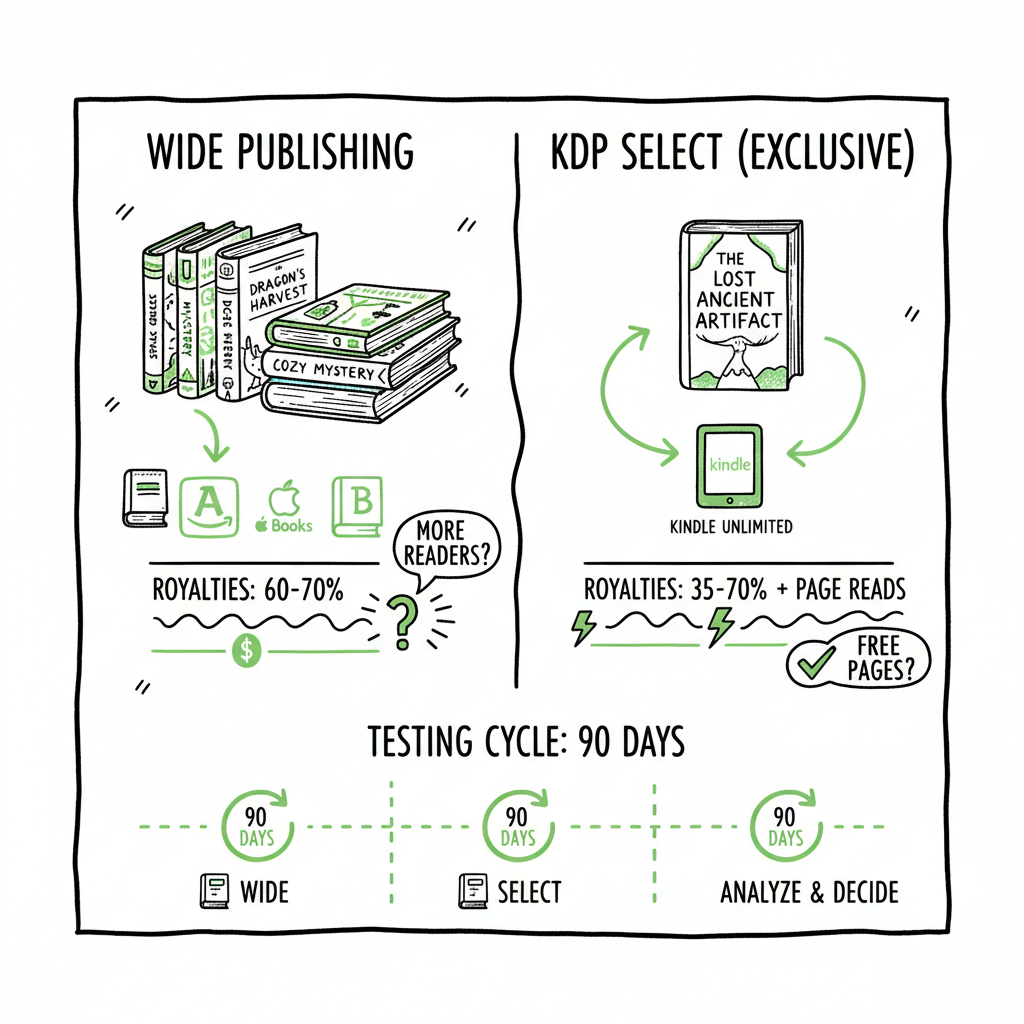
The phrase publish wide vs exclusive KDP names a real decision authors face when releasing an ebook. “Publish wide” means you distribute your ebook to many stores: Amazon, Apple Books, Kobo, Barnes & Noble, and others. You control pricing and availability across platforms. “Exclusive KDP” refers to enrolling an ebook in KDP Select, which requires 90-day exclusivity to Amazon in exchange for access to Kindle Unlimited (KU) and promotional tools.
Both options are valid. Each serves different goals. Publishers who want fast Amazon growth and KU page-read income might prefer KDP Select. Authors seeking long-term, diversified revenue aim to publish wide.
If you work at scale, the choice stops being binary and becomes a set of tactics. You can use a Publish Wide Self Publishing Workflow to automate the repetitive work of uploading and updating files across platforms. That makes wide distribution practical without doubling your workload.
Royalties, reach, and marketing trade-offs
Royalties, reach, and marketing trade-offs
Royalties and payout models differ between Amazon and other stores. On Amazon, purchases of a Kindle book generally pay 35% or 70% of the list price, depending on price and delivery costs. Kindle Unlimited pays via page reads from KU subscribers. Payouts from KU come out of a shared fund and can vary month to month.
Other stores pay through direct sales. Apple Books and Kobo pay percentages similar to Amazon’s 70% tiers for many markets, but they do not require exclusivity. Selling wide means you capture sales that might not happen on Amazon. You also reach readers who prefer Apple, Kobo, or library platforms.
Visibility and marketing tools differ, too. KDP Select gives access to Kindle Countdown Deals, Free Book Promotions, and, crucially for many authors, visibility inside Kindle Unlimited. KU can drive fast borrowing and page-read royalties in genres where readers binge, such as romance, thrillers, and certain types of fantasy. That makes it easier to test prices, run Amazon-only promotions, and show up in Kindle-focused recommendation algorithms.
Publish wide pros
- Multiple revenue streams: direct sales across different stores and markets.
- International reach: Kobo and Apple can be strong in Canada, Australia, the UK, and some European markets.
- Library and subscription access: wide distribution allows library suppliers and aggregators to carry your title.
- Pricing and control: you set prices separately on platforms (where allowed) and can run promotions outside Amazon.
Publish wide cons
- More distribution work: you must manage accounts, metadata, and updates across platforms.
- No KU page-read income: you trade the KU ecosystem for broad availability.
- Marketing complexity: you cannot focus all promotional energy on a single store.
Exclusive KDP (KDP Select) pros
- Access to Kindle Unlimited page reads and the KU readership.
- Amazon promotional tools and better placement opportunities inside the Kindle store.
- Simpler operations: one platform to manage.
Exclusive KDP cons
- Mandatory exclusivity means your ebook cannot be sold or distributed elsewhere during enrollment.
- KU payouts are variable and opaque month-to-month.
- Limited control over price perception across other stores and libraries.
Genre and audience matter
Some genres perform far better in KU than in single-sale models. Short series romances and binge-friendly genres often see strong KU performance. Nonfiction, reference, and books with long tails often do better wide because of ongoing direct sales and discoverability in non-Amazon stores or through libraries.
Time horizon matters
If you want quick growth on Amazon and are testing concepts or series quickly, KDP Select can accelerate visibility. If you want steady, long-term income and global reach, wide is usually the better option.
Operational cost matters
Going wide means more work. You need clean metadata, formatted files for EPUB and print, a cover that meets multiple platforms’ specs, and a system to upload and maintain all versions. If you publish frequently, manual uploads take time. For higher-volume authors, automation is the operational difference between losing hours and gaining weeks.
Practical note on deliverables
When you go wide, you’ll often need EPUB files for most stores, a print-ready PDF for print-on-demand, and separate cover files sized to each retailer’s specs. If you want a single tool that helps create or convert these artifacts, services exist to convert manuscripts to EPUB and to auto-generate covers. For EPUB conversion, consider an automated EPUB converter to avoid formatting issues. If you build or commission covers, a book cover generator can speed the process and enforce the correct dimensions. And when you create paperback or ebook files at scale, a book creation tool can simplify the repeatable parts of production.
File preparation checklist (practical)
- Clean manuscript: consistent styles, linked table of contents, correct images.
- EPUB: validated for Apple, Kobo, and other stores.
- Print PDF: correct trim size, bleed, and margins.
- Cover files: separate ebook and print covers with required spine and dimensions.
- Metadata: title, subtitle, description, BISAC categories, keywords, ISBNs where needed.
If you need a reliable EPUB conversion tool, an EPUB converter can save time and reduce rejections. For covers, a cover generator speeds iteration and ensures sizes match retailer rules. For producing multiple formats in one pipeline, a book creation tool can consolidate steps and prepare files for all the platforms you intend to publish on.
Operational tips for smooth wide publishing
- Keep a canonical metadata sheet (CSV) with all book fields. That sheet becomes the single source of truth for all platforms.
- Batch updates when possible. Change metadata in your source file, then push updates through your upload tool.
- Track territory and rights. Confirm which territories you control before changing exclusivity.
- Use consistent ISBNs for print editions and unique identifiers for ebooks when required by platforms.
How to choose: a practical test plan for authors
#how-to-choose
Make this decision methodical. Treat KDP Select vs wide as a testable hypothesis, not an identity. Below is a step-by-step plan that fits authors who publish one title or many.
Baseline metrics to track
- Amazon sales and ranks
- KU page-reads and borrows (if enrolled)
- Direct sales on other platforms (monthly)
- Advertising spend and ROI
- Subscriber growth and newsletter conversions
These metrics give you a way to measure the impact of switching strategies.
Choose a short test window
KDP Select enrollment is 90 days. That makes the test length clear. If you are currently wide, enroll a title in Select for one 90-day period and measure results. If you’re starting from scratch, pick one title to enroll in KDP Select and keep another title wide for comparison.
Match genre and catalog strategy
Pick titles that represent your main genre. If you write romance and thrillers, test within the genre that most of your readers buy in. If genres differ, results won’t translate across your catalog.
Standardize variables
Run comparable promotions across both strategies where possible. For example, set the same price tier for both titles and run similar advertising levels. Where you can’t match tools (KU promotion vs Apple promo), note the differences.
Measure outcomes
- Net income per platform
- Reader acquisition cost (ads, promos)
- Subscriber growth
- International sales
- Long-term discoverability (are ranks stabilizing or falling off)
Use a hybrid approach
Many authors find a hybrid approach works best: enroll new releases in KDP Select to leverage KU and Amazon visibility, then go wide after a few cycles to capture other platforms and libraries. Or keep core series wide and use Select for short, aggressive launches.
Scale with automation
If your test shows wide distribution is beneficial, don’t swap manual uploads for months of extra admin. Invest in automated multi-platform uploads and batch CSV workflows. Automation reduces mistakes, standardizes metadata, and saves time — often by around 90% compared with manual uploads. That makes wide distribution practical when you publish multiple titles or editions. Automating uploads is an obvious upgrade once you publish seriously.
File preparation checklist (practical)
- Clean manuscript: consistent styles, linked table of contents, correct images.
- EPUB: validated for Apple, Kobo, and other stores.
- Print PDF: correct trim size, bleed, and margins.
- Cover files: separate ebook and print covers with required spine and dimensions.
- Metadata: title, subtitle, description, BISAC categories, keywords, ISBNs where needed.
If you need a reliable EPUB conversion tool, an EPUB converter can save time and reduce rejections. For covers, a cover generator speeds iteration and ensures sizes match retailer rules. For producing multiple formats in one pipeline, a book creation tool can consolidate steps and prepare files for all the platforms you intend to publish on.
FAQ
#faq
Q: Can I switch between exclusive KDP and going wide?
A: Yes. KDP Select enrollments run in 90-day blocks. When a block ends, you can choose to renew or go wide. Many authors rotate titles through Select to test performance.
Q: Will going wide hurt my Amazon ranking?
A: Not necessarily. Amazon ranking depends on sales velocity, conversions, and reader engagement on Amazon. If you go wide and lose sales on Amazon, rankings could drop. But wide distribution can build a broader reader base that eventually returns to Amazon for other titles.
Q: Do libraries and subscription services work differently for wide authors?
A: Wide authors can reach libraries and non-Amazon subscription services more easily. Some library aggregators and distributor options require wide distribution or separate agreements that KDP Select’s exclusivity would block.
Q: How do KU payouts compare to direct sales?
A: KU pays per page read, with a monthly fund that fluctuates. Direct sale royalty is a fixed percentage of the list price. KU can produce quick income in binge-friendly genres, but it’s less predictable month-to-month.
Q: What if I publish both ebooks and paperbacks?
A: Many authors mix strategies by format. Paperbacks and print-on-demand distribution via Ingram or other channels work best when you’re wide, because Ingram supplies bookstores and libraries that Amazon-exclusive ebooks won’t reach. For print files and distribution, use a reliable tool to create your paperback from the same source files as your ebook. If you produce lots of copies, a centralized book creation tool lets you output both paperback and ebook versions efficiently.
Q: How much time does wide distribution add?
A: Manually, a single title on multiple platforms can add several hours of work for first upload and ongoing updates. For authors publishing at scale, automation reduces that to minutes per title. CSV batch uploads and platform-specific intelligence cut errors and rework. Once automated, wide distribution is manageable and repeatable.
Q: Should I change my price strategy when going wide?
A: Sometimes. Pricing can vary by market, so authors often test different prices on Apple Books or Kobo where customers behave differently. Keep a record of price changes and results. Also remember that some platforms have minimum and maximum price rules.
Final thoughts
Choosing between publish wide vs exclusive KDP is not a one-time decision. It’s a business tactic that you can test and refine. For many authors, the smartest path is hybrid: use KDP Select to gain early visibility and then widen distribution to capture other markets and revenue streams. If you publish multiple titles, automation is the lever that turns wide distribution from a chore into a scalable channel. Unified multi-platform publishing, CSV batch uploads, and platform-specific intelligence reduce errors and free time for writing and promotion.
If you want to reduce the manual work of wide publishing while keeping control of pricing and territories, consider tools that convert and prepare the files you need. An EPUB converter simplifies ebook formatting. A cover generator helps produce consistent covers that meet retailer specs. And a single book creation tool can output both paperback and ebook formats as part of a repeatable workflow.
Sources
- https://www.writtenwordmedia.com/amazon-kdp-select-vs-wide-which-is-better-for-authors/
- https://createifwriting.com/should-you-publish-your-book-wide-or-go-exclusive-with-amazon/
- https://scribecount.com/blog/wide-vs-kindle-unlimited
- https://davidgaughran.com/a-tale-of-two-marketing-systems/
- https://www.kdpcommunity.com/s/question/0D52T00005X6Mo7SAF/kdp-select-or-going-wide?language=en_US
- https://www.youtube.com/watch?v=AgZ4fQe1eqo
Additional resources mentioned
- https://www.bookautoai.com/epub-converter
- https://www.bookautoai.com/book-cover-generator-processing
- https://www.bookautoai.com
Publish wide vs exclusive KDP: a practical guide for authors Estimated reading time: 9 minutes Key takeaways Publish wide vs exclusive KDP is a choice between reach across stores and Amazon-focused tools like Kindle Unlimited. Each has trade-offs for royalties, visibility, and control. Test deliberately: use 90-day KDP Select cycles for some titles and go…