Publish Wide vs Exclusive KDP — How to Choose for Growth
Publish Wide vs Exclusive KDP: How to Choose for Long-Term Growth
Estimated reading time: 10 minutes
Key takeaways
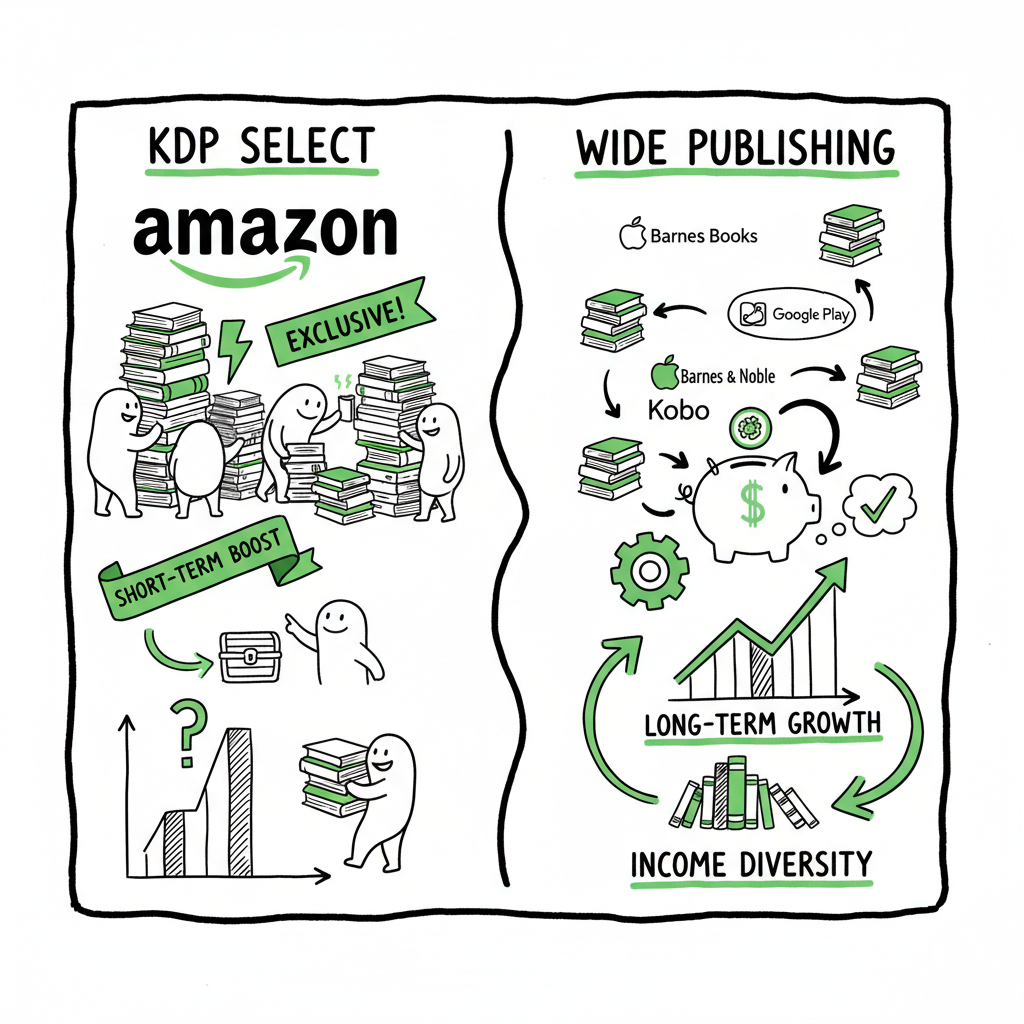
- KDP Select (exclusive) gives short-term promotional tools and slightly higher visibility on Amazon, but it restricts distribution.
- Publishing wide reaches more stores, diversifies income, and unlocks long-term discoverability; it adds operational work unless automated.
- For serious, repeat publishers, automated multi-platform uploads cut the time and error costs of going wide — making wide distribution practical.
Table of Contents
- Why the choice matters
- Money, marketing, and reader reach
- Scaling multi-platform publishing (operations)
- FAQ
- Final thoughts
- Sources
Why the choice matters
Anchor: #why-the-choice-matters
Choosing between publish wide vs exclusive KDP isn’t a theoretical debate. It changes how you reach readers, how you market, and how you run your publishing business. Right away: the core trade-off is control and reach versus convenience and Amazon-focused tools. That means your decision should match how many books you plan to publish, how you want readers to find you, and how much time you can spend on uploads and maintenance.
If you plan to publish a single book or experiment, exclusive KDP (KDP Select) can make sense. If you plan to publish a series, multiple formats, or build durable income, wide distribution is usually the better path. For authors looking to scale, a practical middle step is to learn a repeatable way to publish wide: Publish Wide Self Publishing Workflow for a deeper look at batch and platform-aware processes. That workflow shows how to reduce repetitive tasks and avoid common platform errors when sending books to multiple stores.
At the simplest level, ask:
- How many books will you publish this year?
- Do you want to control pricing and promotions across platforms?
- Can you manage the extra steps to distribute to other stores?
The answers point you toward exclusive KDP for simplicity and short-term Amazon focus, or wide for reach, diversification, and long-term growth.
For authors looking to scale, you can also speed production with a book creation workflow. If EPUB conversion is part of your process, an EPUB converter can automate conversion and validation. And if you need covers, a cover generator helps produce consistent artwork across formats.
Money, marketing, and reader reach
Anchor: #money-marketing-reader-reach
Royalties and revenue
Royalties and revenue
Amazon pays up to 70% royalty for KDP ebook sales in many territories when you meet their delivery and price rules. KDP Select itself doesn’t change the royalty percentage; it gives access to Kindle Unlimited and a share of the KDP Select Global Fund for pages read. KU can be lucrative for certain kinds of books (serial fiction, long-form reads, or titles that gain steady page reads), but it requires exclusivity.
Publishing wide lets you sell on Apple Books, Kobo, Google Play, Barnes & Noble (via aggregators), and through aggregators like Draft2Digital or Ingram for wider ebook and print availability. While some of those platforms pay slightly different royalty rates, the value of wide distribution is diversification: one platform’s algorithm or policy change won’t sink all your sales.
Promotions and discoverability
KDP Select offers promotional tools (Kindle Countdown Deals, Free Book Promotions) and KU visibility. If your marketing plan centers on Amazon-specific ads and lightning deals, exclusivity can boost those efforts.
Wide distribution supports organic discoverability in more places. For example, readers who prefer Apple Books or Kobo will never find your book if it’s locked to KDP Select. Also, some markets (Canada, parts of Europe) skew toward other retailers; going wide makes sure you’re discoverable where your readers are.
Audience ownership and direct sales
Publishing wide makes it easier to build relationships outside Amazon. You can sell direct from your website (via ebook files or print-on-demand links), bundle books differently across platforms, and collect email subscribers without relying solely on Amazon’s algorithms. That control matters when you want to run off-platform promotions, newsletter-driven launches, or box sets that won’t conflict with KDP Select rules.
Reader experience and format parity
Going wide also gives you control over where and how your book appears in different reading ecosystems. You can ensure EPUB conversions are clean, covers display well, and metadata matches everywhere. If you need to convert to EPUB in-house, use a reliable converter to avoid formatting issues that frustrate readers — for example, an EPUB converter can automate many of the technical steps and prevent common mistakes.
Operational realities: publishing wide at scale
Going wide is the practical choice for authors who publish regularly, but it’s also operationally heavier. Each store has metadata rules, file requirements, and optional fields. Paperback distribution adds another layer: trim sizes, cover templates, and proofing. Without a process, wide publishing can feel like spinning plates.
Common operational tasks
- Prepare a clean manuscript and create platform-ready EPUB and print-PDF files.
- Generate platform-specific covers and thumbnails.
- Fill store-specific metadata: BISAC, pricing in local currencies, territories, DRM choices, and descriptions.
- Upload to multiple platforms or use aggregators to reduce touches.
- Monitor sales reports and returns across channels.
- Manage updates, corrections, and new editions.
File preparation and covers
Good file preparation removes friction. For EPUBs, a reliable converter and validation step prevents formatting errors on Apple Books and Kobo. If you’re responsible for EPUB conversion, consider automated tools that preserve styling and table of contents accurately.
Covers also behave differently across platforms. A square thumbnail on one store may crop or look different on another. If you create covers yourself or use a generator, validate the final files against each store’s image rules. If you need a fast cover pipeline, cover generators can speed the process while keeping consistent branding.
Automation and tools that matter
If you publish several books a year, automation becomes the multiplier that makes wide distribution efficient. Two automation capabilities matter most:
- Batch metadata uploads: Use CSV-based bulk uploads when possible. This eliminates repetitive manual entries and reduces human error.
- Platform-specific intelligence: Tools that know store rules (file sizes, title length limits, category mappings) will prevent rejections and speed acceptance.
This is where a dedicated multi-platform publishing service becomes an operational upgrade. A system that automates uploads to Amazon KDP, Kobo, Apple Books, Draft2Digital, and Ingram — with CSV batch uploads and platform-specific checks — reduces manual work by roughly 90% for multi-book publishers. That kind of time savings turns wide publishing from a chore into a scalable channel. Automate the upload. Own the distribution.
Practical examples of bottlenecks
- You upload one title to five stores. Without automation that’s five separate forms, five sets of metadata, and five places to fix errors.
- You need both ebook and paperback. Paperback requires interior PDF files, cover spread templates, and proofing for each print platform.
- You change a price or update a cover. Doing that in each store separately means inconsistency and delay.
Addressing each bottleneck with one workflow — batch CSV, validated EPUBs, and centralized error reporting — is how you make wide publishing practical.
How I choose in real operations
If I had a small catalog (1–2 books) and a tight timeline for a launch targeting Amazon customers, I’d test KDP Select for a 90-day window and use KU-promoted read strategies. If the goal is building a long-term catalog, I’d plan for wide from the start and invest in a repeatable pipeline that handles EPUBs, covers, metadata, and print files.
When moving wide, these practical steps matter:
- Start with a single reliable EPUB conversion and validation step to minimize rejections on Apple Books and Kobo.
- Build or acquire a cover generator workflow so you can produce print jackets and thumbnails that meet each store’s specs.
- Use a hub or aggregator for stores where it makes sense, but keep direct accounts with platform helpers if you need maximum control.
- Track ISBN usage and print-on-demand settings centrally to avoid duplicate listings or format mismatches.
BookAutoAI integrations for file prep
When you create ebooks or paperbacks, tools that handle the technical parts of production save time. For example, if you’re creating a paperback or ebook, a book creation workflow can produce properly formatted files and reduce proofing cycles. If EPUB conversion is part of your process, an EPUB converter can automate conversion and validation. And if you need covers, a cover generator helps produce consistent artwork across formats.
FAQ
Anchor: #faq
Q: What is KDP Select, exactly?
A: KDP Select is an Amazon program that requires ebook exclusivity for enrollment. In return, authors get Kindle Unlimited access and marketing tools like Kindle Countdown Deals and Free Book Promotions. Enrollment is for 90-day blocks that auto-renew unless you opt out.
Q: Can I leave KDP Select later?
A: Yes. Enrollment is opt-in for 90-day terms. After any active 90-day period, you can choose not to renew and then distribute wide.
Q: Does going wide reduce royalties?
A: Not inherently. Royalty models differ by store and region. Amazon’s 70% band remains competitive, but wide lets you capture sales across platforms. The difference is more about reach and diversification than a single percentage point.
Q: How do I distribute to multiple stores without spending hours each week?
A: Use batch uploads, CSV-based workflows, and platform-aware tools to automate the repetitive steps. For many authors, automation reduces the time spent per title by around 90%, which is the practical difference between occasional wide publishing and scalable wide publishing.
Q: Do I need separate ISBNs?
A: For print books, each format (paperback, hardcover, large print) generally needs its own ISBN. For ebooks, many platforms don’t require an ISBN, but if you plan to sell through wide channels and use metadata consistently, using ISBNs can help with tracking and library distribution.
Q: Is it possible to be in KDP Select for a time and then go wide?
A: Yes. Many authors use KDP Select for a launch window and then go wide. That can capture Amazon’s promotional benefits early while planning for broader reach later.
Final thoughts
The decision between publish wide vs exclusive KDP is a practical business choice, not a moral one. Use exclusive KDP when you need Amazon-centric promotion and you accept the trade-off of limited distribution. Choose wide when you want reach, resilience, and control over your formats and audience relationships.
If you plan to publish more than a few books per year, invest in a reliable production and distribution pipeline: clean EPUBs, validated covers, and an automated upload system. Tools that handle EPUB conversion, cover generation, and batch uploads convert wide publishing from a headache into a repeatable, low-friction workflow. For many publishers, the next logical upgrade is automation that reduces time and error — making wide distribution not only possible, but practical.
Visit BookUploadPro to explore multi-platform automation and try the free trial.
Sources
- https://kdp.amazon.com
- https://www.apple.com/ibooks/
- https://www.kobo.com
- https://www.draft2digital.com
- https://www.ingramcontent.com
- https://bookuploadpro.com
- https://www.bookautoai.com
- https://www.bookautoai.com/epub-converter
- https://www.bookautoai.com/book-cover-generator-processing
Publish Wide vs Exclusive KDP: How to Choose for Long-Term Growth Estimated reading time: 10 minutes Key takeaways KDP Select (exclusive) gives short-term promotional tools and slightly higher visibility on Amazon, but it restricts distribution. Publishing wide reaches more stores, diversifies income, and unlocks long-term discoverability; it adds operational work unless automated. For serious, repeat…