Publish Wide vs Exclusive KDP Practical Guide for Authors
Publish wide vs exclusive KDP: A practical guide for self-publishers
Estimated reading time: 14 minutes
Key takeaways
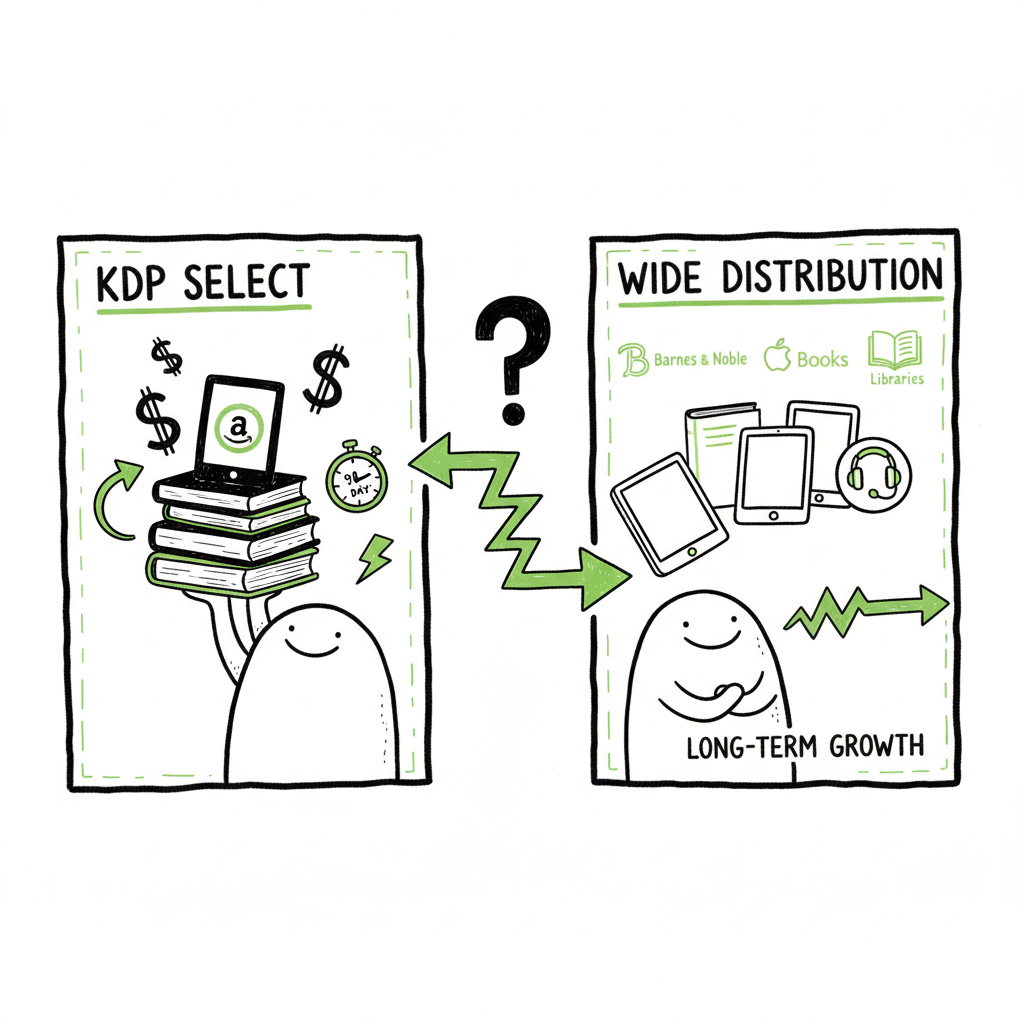
- KDP Select (exclusive KDP) gives fast Amazon visibility and Kindle Unlimited (KU) page-read income, but it requires 90-day exclusivity and narrows distribution.
- Publishing wide spreads sales across stores, libraries, and formats for long-term stability, but it needs more setup, platform knowledge, and marketing muscle.
- For authors publishing multiple titles, automation—batch uploads, platform-aware metadata, and consistent delivery—makes going wide practical and efficient.
Table of Contents
- How KDP Select works and what exclusivity buys
- Exclusive KDP vs Wide: Practical pros and cons
- Switching strategies and KDP exclusivity alternatives
- Final thoughts
- Next steps
- FAQ
- Sources
How KDP Select works and what exclusivity buys
Amazon’s KDP Select is a simple trade: you give Amazon exclusive rights to distribute your ebook for 90 days, and in return you get two main benefits—access to Kindle Unlimited (KU) earnings based on pages read, and a set of Amazon-only promotional tools like Countdown Deals and free-book promotions. That exclusivity rule means you cannot sell the same ebook file anywhere else while enrolled.
The term publish wide vs exclusive KDP comes up because the choice shapes everything that follows: where people can buy your book, how you run promos, and how you prioritize marketing. If you’re testing a new idea and want fast KU traction, exclusivity can move the needle quickly. If you want steady, global placement and control over pricing, going wide wins.
When you’re thinking about the mechanics of wide distribution, it helps to plan the workflow for larger-scale publishing. For teams or authors publishing multiple titles, a clear Publish Wide Self Publishing Workflow cuts setup time and prevents common errors by batching metadata, covers, and files across platforms. This saves time and reduces rework when launching books to Amazon, Kobo, Apple Books, Draft2Digital, and Ingram.
How exclusivity affects royalties and visibility
KDP Select does not change your list price royalties—those stay at the regular 35% or 70% tiers on Amazon—but it adds KU page-read payments and often better organic visibility within Amazon’s ecosystem. Amazon tends to favor KU titles in search and recommendation algorithms because KU creates reader engagement on its platform.
Going wide spreads risk. You’ll earn direct sales on other stores, and some platforms pay similarly to Amazon for list-price purchases. Wide distribution also opens library channels and international stores that Amazon doesn’t dominate. That diversity can stabilize income across slow months on any single store.
Exclusive KDP vs Wide: Practical pros and cons
Audience and genre fit
KU-friendly genres: Romance, thriller, fantasy, and certain serial fiction do well in KU because readers binge. Going exclusive can capture a big slice of that monthly KU reader time.
Niche or non-fiction books: If readers shop outside Amazon—academic readers, craft-specific audiences, or buyers who prefer Apple Books or Kobo—going wide reaches those pockets.
Control and promotions
Exclusive KDP pros: You get Amazon-only promo tools that can create spikes in visibility without external advertising. That’s useful for early discovery and testing.
Wide pros: You control pricing and promotions across stores. You can run simultaneous discounts and time-limited promotions on multiple platforms.
Distribution and long-term earnings
Exclusive KDP cons: You can’t sell elsewhere during the exclusivity period. That slows library access and reduces international storefront presence.
Wide pros: You build multiple revenue streams—sales on Apple Books, Kobo, Barnes & Noble, and library systems—so one bad month on Amazon isn’t catastrophic.
Setup and operational cost
Exclusive KDP is operationally cheap: upload once, manage one store, and Amazon handles the logistics.
Wide distribution is operationally heavier: different platform requirements, cover sizes, file formats, tax forms, and territories. That’s where automation matters—CSV batch uploads, platform-specific intelligence, and error checks drop the manual time dramatically and reduce mistakes.
Practical example: A three-book series
Imagine a three-book romance series. If you enroll Book 1 in KDP Select and it hits KU traction, you can earn strong page-read income quickly. If you enroll all three and build a reader funnel, KU will reward readers who binge your series.
On the other hand, if you want readers in Canada (Kobo is strong there) and libraries (Ingram and Draft2Digital), going wide from the start gives you access those channels. If you publish several books a year, wide also prevents over-reliance on KU-induced readers who may not follow you outside Amazon.
Revenue comparisons that matter
Authors report different mixes: some earn most from KU page reads, others collect steady sales across platforms. KDP Select gives a concentrated, sometimes volatile income source tied to KU’s monthly pool. Wide distribution tends to deliver smaller but more stable revenue streams from multiple stores and library channels.
Scale and workflow efficiency
If you are publishing one title, the overhead of wide vs exclusive is manageable either way. If you publish dozens of titles or run a small indie press, doing wide manually becomes a time sink. That’s why tools that automate uploads across platforms, apply platform-specific intelligence, and check for errors make wide distribution practical for high-volume publishers. Unified multi-platform publishing with CSV batch uploads can reduce repetitive work by roughly 90%, help avoid rejections, and let you focus on marketing and writing.
Operational checklist—what to expect if you go wide
This is not a step-by-step checklist; it’s what your operations will need to handle:
- Clean metadata for each store (different field requirements)
- Multiple file formats (Amazon prefers MOBI-generation via KDP upload; Apple and Kobo require EPUB)
- Covers sized to each retailer’s spec
- Territory and pricing management by store
- Library distribution setup (Ingram, Draft2Digital)
- Tax and payment forms per platform
If you handle these at scale, you will want a repeatable workflow and automation that enforces platform rules and exports the right files. When cover or format work comes up, consider tools that convert to EPUB reliably and create store-ready assets. For EPUB conversion, a dependable tool like epub converter makes the file step painless. If you need a single place for cover production, book cover generator processing can standardize covers across stores. For general book creation and paperback or ebook generation, BookAutoAI provides end-to-end tooling that speeds production.
Switching strategies and KDP exclusivity alternatives
Many authors don’t commit forever. They adapt their strategy over time.
Common paths authors take
- Test exclusive, then go wide: Start with KDP Select for 90-day promotion and KU testing; after a few cycles, pull the book out and distribute wide to diversify income.
- Launch wide from day one: Authors with existing audience or niche readership may skip exclusivity and aim for global coverage immediately.
- Hybrid approach: Keep a flagship title exclusive and publish other titles wide; or enroll only some books in Select at a time.
Practical timing for switching
If you enroll a book in KDP Select, monitor KU engagement across the 90-day term. If page reads, sales rank, and visibility rise, your book may benefit from repeated exclusivity cycles. If KU income stagnates and you want library or international sales, switch to wide at the next enrollment window.
What changes technically when you switch
Metadata cleanup: Some stores like Kobo and Apple will accept the book more quickly if metadata is clean and rights statements are clear.
File handling: When moving wide, produce a proper EPUB for Apple/Kobo, and consider a separate paperback-ready interior for Ingram.
Audience behavior: Readers who found you in KU may not follow to other stores immediately. Expect some drop-off and plan email campaigns to bring them with you.
KDP exclusivity alternatives and tools
If you want KU-style exposure without locking into Select full-time, there are alternatives:
- Enroll temporarily and use the time to build reviews, mailing list sign-ups, and cross-promotions.
- Use price promotions and ads on other platforms to create bursts similar to Amazon promos.
- Consider library-focused promotions and aggregator partners that place titles in library networks.
Operational tools that soften the work of going wide
Automation matters if you publish seriously. Features to look for:
- Batch CSV uploads to multiple stores
- Platform-specific intelligence that flags cover size, forbidden keywords, or required territories
- Error reduction through pre-flight checks and format validation
- Single dashboard to manage enrollments, pricing, and territories across Amazon, Kobo, Apple, Draft2Digital, and Ingram
BookUploadPro aims at this exact pain point: when authors publish at scale, unified multi-platform publishing and CSV batch uploads save time and prevent mistakes. The platform’s automation cuts repetitive uploads and reduces errors so wide distribution becomes practical rather than a logistical headache. BookUploadPro can help you automate the upload. Own the distribution.
Practical examples: A year in the life of a part-time author
One-book author: If you publish one book a year and lean on Amazon’s marketing, KDP Select can be a simpler choice. It reduces the number of platforms to manage and funnels readers through KU.
Multi-title author: If you publish multiple books a year, the time cost of manual wide distribution adds up. Batch automation and platform-aware uploads let you scale without hiring help.
Backlist optimization: For authors with backlist titles, moving older books wide can open new markets and library income. Batch processes make it feasible to convert metadata and files across dozens of titles.
Common mistakes when deciding
Misconception: Treating KDP Select as a long-term plan without tracking KU income trends.
Overconfidence in wide equaling no Amazon presence: Amazon remains a large sales channel even when you go wide; you’ll still need to maintain a good Amazon listing.
Formatting issues: Ignoring platform-specific formatting and rejection causes—automated validation prevents simple errors like wrong EPUB structure or missing front matter.
Pricing, royalties, and reader behavior—what to watch
KU earnings are monthly and tied to total KU reads. That pool can fluctuate, so KU income may swing.
Retail sales on other platforms pay per sale, often comparable to Amazon’s list-price royalties.
Reader behavior matters: KU readers expect bingeable content; other storefront readers may buy single titles more often.
Final thoughts
Choosing between publish wide vs exclusive KDP is a practical business decision, not a moral one. It depends on your genre, publishing cadence, audience behavior, and how much operational work you’re willing to handle. KDP Select gives fast, Amazon-centered tools and KU exposure that can fuel early growth. Wide distribution builds a more diverse, international income base but requires setup and ongoing ops.
For authors moving from occasional publishing to a sustained program, automation and platform-aware workflows make wide distribution a logical upgrade. Tools that support CSV batch uploads, platform-specific checks, and centralized management let you scale while reducing manual errors and repetitive tasks. For many authors, BookUploadPro becomes an obvious upgrade once they publish seriously—offering unified multi-platform publishing, ~90% time savings on repetitive uploads, and reduced error rates.
Next steps
If you’re unsure which path fits your goals, try a short experiment: enroll one title in KDP Select for a cycle and track KU reads, ranks, and new subscribers. If the results point to steady KU earnings, repeat or refine the approach. If you want broader reach, plan a wide rollout with a batch-ready workflow and toolset that handles EPUB conversion, cover sizing, and platform rules.
FAQ
Can I switch a book from KDP Select to wide?
Yes. After your KDP Select enrollment period ends, you can opt out and distribute the ebook through other stores. Expect a transition period as other stores index your title.
Do KU page-reads always beat wide sales?
No. KU can be lucrative for binge-friendly genres, but earnings vary. Wide distribution spreads risk and can bring steady sales from different stores and libraries.
Will Amazon punish me for going wide?
Amazon does not “punish” you, but Amazon’s algorithms favor KU titles for some internal placements. That can make Amazon visibility harder for wide books, so expect a different marketing plan on Amazon if you leave Select.
What technical work is required to go wide?
You’ll need store-ready EPUBs, covers sized to each retailer, metadata tailored to platform fields, and accounts for payment/tax forms. For paperback distribution, a print-ready interior and ISBN setup is also required.
Is there a tool that helps with batch uploads and checks?
Yes. There are services that automate multi-platform uploads, CSV batch submissions, and platform-aware checks to reduce errors and speed publishing. These tools are especially helpful when you publish multiple titles regularly.
Sources
- Wide vs Kindle Unlimited – Pros, Cons, and Best Distribution
- Should You Publish Your Book Wide or Go Exclusive with Amazon?
- Pros & Cons of Self-Publishing Your Book WIDE – YouTube
- Wide vs. Exclusive: A Tale of Two Marketing Systems
- KDP Select or “going wide” – KDP Community
Publish wide vs exclusive KDP: A practical guide for self-publishers Estimated reading time: 14 minutes Key takeaways KDP Select (exclusive KDP) gives fast Amazon visibility and Kindle Unlimited (KU) page-read income, but it requires 90-day exclusivity and narrows distribution. Publishing wide spreads sales across stores, libraries, and formats for long-term stability, but it needs more…