Publish Wide vs Exclusive KDP Practical Guide for Authors
Publish wide vs exclusive kdp: A practical guide for serious authors
Estimated reading time: 14 minutes
Table of contents
- Introduction — what this comparison covers
- How KDP Select works and what “wide” means
- Wide vs KDP Select: practical pros and cons
- How to choose and scale distribution
- FAQ
- Sources
- Final thoughts
Introduction — what this comparison covers
The choice to publish wide vs exclusive KDP is one of the first operational decisions an author faces after the manuscript is ready. The phrase publish wide vs exclusive kdp will guide this discussion: it’s a practical comparison of what you actually gain and what you give up when you choose exclusivity with Amazon versus distributing across multiple retailers.
This article is written for authors who plan to publish more than one title, want predictable workflows, and care about moving beyond manual uploads. It explains how each path affects reach, royalties, royalties timing, marketing options, and the work required to manage distribution. If you want a repeatable approach to going wide, see the
Publish Wide Self Publishing Workflow for a step-by-step method used by teams that publish at scale.
How KDP Select works and what “wide” means
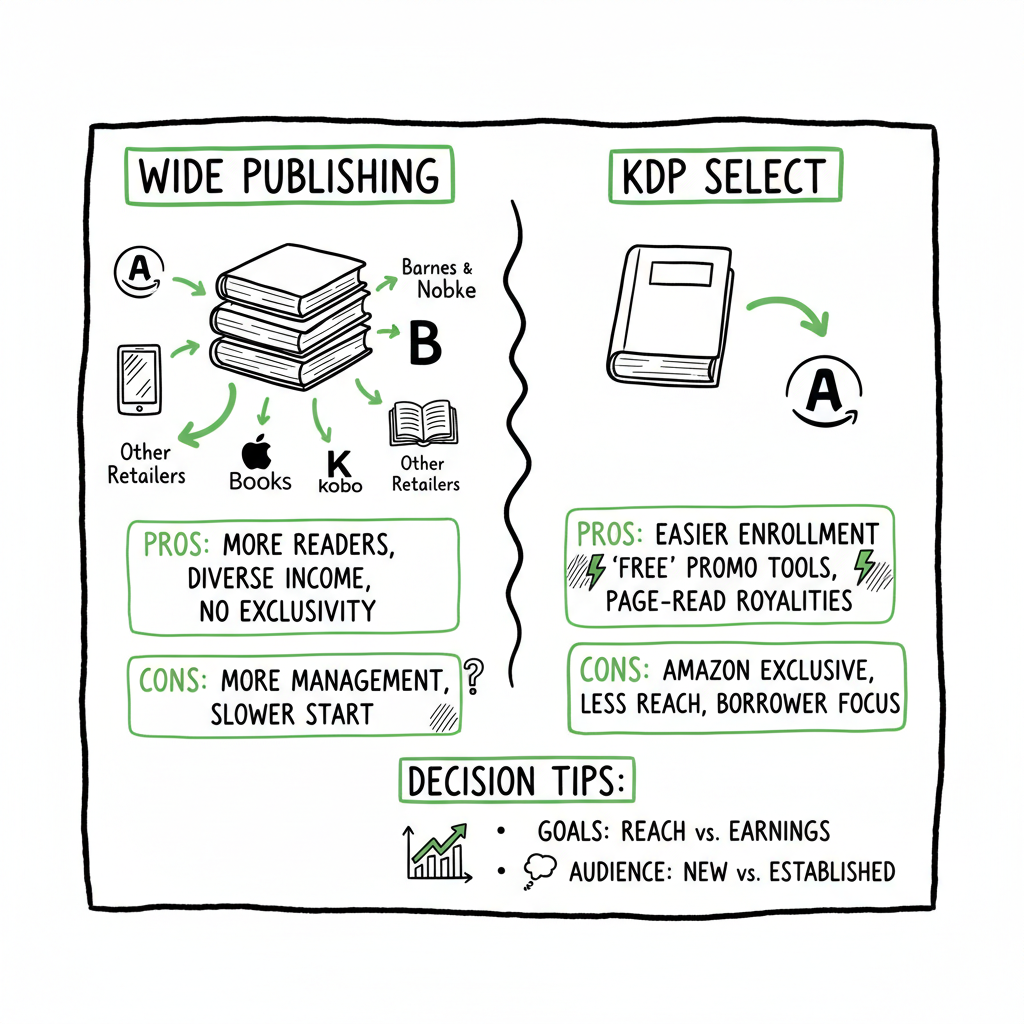
KDP Select is the program Amazon offers to make ebooks exclusive to Kindle and enroll them in Kindle Unlimited (KU) and the Kindle Owners’ Lending Library. Enrollment is in 90-day blocks. During enrollment, you must not sell or distribute the enrolled ebook on other retail channels. You get paid from the KDP Select global fund based on pages read in KU, and Amazon gives added discoverability through certain placement opportunities.
Publishing wide means you distribute your ebook and often the print edition to multiple retailers and distributors: Apple Books, Kobo, Barnes & Noble (Nook), Google Play, Draft2Digital, Ingram, and others. Wide distribution can also include direct sales from your own website. Wide is about reach and multiple revenue streams rather than relying on a single retailer ecosystem.
Operationally the two models differ sharply:
- Exclusivity simplifies distribution: one platform, one dashboard, and Kindle-centric marketing.
- Wide distribution multiplies settings, file formats, and marketing touchpoints: each store has its own metadata fields, price controls, territory settings, and file requirements.
If you plan to sell paperback and hardcover editions as well as ebooks, or to place books in libraries and subscription services outside KU, wide is the default approach. That said, many authors use both strategies over a career: start exclusive to grow initial visibility, then go wide later.
Wide vs KDP Select: practical pros and cons
This section compares outcomes that matter to authors who want to build a sustainable publishing business.
Visibility and audience
– KDP Select: Amazon is the largest ebook store in many markets. KU gives direct access to readers who use the subscription heavily in certain genres (romance, thrillers, some fantasy). Amazon’s algorithm rewards active titles, and KU pages-read can push a book into higher visibility.
– Wide: You reach readers who do not use Amazon: Apple Books readers, Kobo’s international base, and library borrowers via aggregators like OverDrive/Ingram. This matters for global reach and resilience if Amazon’s policy or algorithm changes.
How to choose and scale distribution
Authors who publish seriously face the same operational challenges regardless of the path: formatting, covers, metadata, platform rules, and repetitive uploads. The strategic choice is whether you accept the operational overhead of wide distribution or opt for the simpler workflow that comes with exclusivity.
A practical decision framework
- 1. Start with the book’s role: Is this a loss leader to build an email list, a first book in a planned series, or a standalone title? Role affects whether KU’s sampling behavior is useful.
- 2. Analyze genre behavior: Look at where readers predominantly buy in your genre. Romance and certain subgenres often perform well in KU; other genres show meaningful sales on Apple or Kobo.
- 3. Map revenue vs effort: If a title will be the only book you publish for a long time, KDP Select may reduce friction. If you plan multiple titles, diversifying across stores often yields better lifetime earnings.
- 4. Consider timing strategies: Many authors use timed exclusivity — enroll in KDP Select for 90-day windows around launch, then go wide. That requires careful timing and understanding of Amazon’s exclusivity rules.
- 5. Measure and iterate: Track per-store sales, page reads, and cost of operations. If the administrative work for wide eats half your earnings, automation is the next step.
Scaling distribution without doubling your workload
Wide publishing stops being practical only when the manual work exceeds the benefit. For authors publishing more than a book every six months, process automation becomes essential.
Key operational items that add time:
- Creating store-ready EPUB files and validating them per retailer.
- Generating and sizing covers for ebook thumbnails and print interiors.
- Preparing platform-specific metadata: categories, BISACs, age ranges, territories.
- Uploading files across multiple dashboards.
- Tracking pricing and syncing updates across stores.
- Handling errors from each store and resubmitting.
Automation changes the math. A tool that supports CSV batch uploads, platform-specific intelligence, and automated error checks can reduce the repetitive time by an estimated ~90% compared with manual uploads. That’s not a marketing line — it’s the practical threshold where wide distribution becomes feasible for small teams and individual authors.
Operational steps to publish wide at scale
This section covers the concrete steps and where automation matters most. If you want to publish wide reliably and without redoing the same work for each title, these are the processes to standardize.
- 1) Standardize the master files
Create a single, validated EPUB that meets the most rigorous retailer requirements. Keep a clean manuscript source (DOCX or InDesign) with consistent styles.
– If you need a fast EPUB conversion or want a tested converter, use a dedicated EPUB converter to ensure consistent results across stores. - 2) Build reusable cover files and templates
Make covers that adapt to different thumbnails, vertical and horizontal display, and print spine sizes. A consistent cover template speeds mockups and updates.
– For fast cover generation or batch processing, a cover generator reduces the time to produce store-ready images. - 3) Maintain a single metadata source
Keep one CSV or spreadsheet with title, subtitle, author, series name, ISBNs, descriptions, keywords, categories, price, and territory flags. That CSV becomes the source of truth for batch uploads. - 4) Use platform-specific intelligence
Automated tools apply store-specific rules from your single metadata source. They map internal categories to BISAC, select appropriate territory options, and prevent common errors like invalid ASIN mappings or missing rights. - 5) Batch uploads and error management
Upload via CSV to multiple stores at once. The system should run preflight checks (file validation, cover size, metadata completeness) and flag retailer-specific issues before submission. When stores return errors, the tool should summarize required fixes and allow re-upload without re-keying everything. - 6) Templates for store promotions and pricing
Store-specific promotions and price-localization rules differ. A system that translates a single price strategy into validated prices for Apple, Kobo, Amazon, and distributor channels saves manual calculations. - 7) Logs and reporting
Keep a central log of file versions, upload dates, and store responses. Reporting should show which titles are live where and highlight discrepancies like mismatched lists or price differences.
Where automation helps the most
- CSV batch uploads save repetitive form filling across stores.
- Preflight validation prevents store rejections and reduces time chasing fixes.
- Platform-specific intelligence avoids manual guesswork about required fields.
- Centralized error reporting keeps changes fast and repeatable.
Tools to consider for scaling
A multi-platform publishing tool that integrates batch workflows and store intelligence is the practical choice once you publish seriously. Look for these features:
- CSV import/export and batch upload support.
- Store-specific mapping rules and automated preflight checks.
- Support for Amazon KDP, Kobo, Apple Books, Draft2Digital, and Ingram.
- Print ISBN and paperback distribution controls.
- Affordable pricing with a free trial so you can test with one title.
BookUploadPro offers unified multi-platform publishing with CSV batch uploads, platform-specific intelligence, and error reduction that make wide distribution practical. For authors and small publishers who publish multiple titles, it’s an obvious upgrade: automate the upload. Own the distribution.
Operational example: a four-step process for a new title
- 1. Prepare master files: finalize manuscript, run one EPUB conversion and one interior PDF for print, and generate a cover set.
– If you want a tested EPUB conversion, try a reliable EPUB converter.
– For covers, a bulk cover generator helps create consistent images quickly. - 2. Populate a master CSV: title data, prices, publication dates, territories, ISBNs.
- 3. Run a batch upload: the platform performs preflight checks, maps categories, and submits to stores.
- 4. Monitor reports and fix any issues via the dashboard; re-submit only the changed fields.
Cover, format, and paperback notes
- Covers: a single cover template should generate store-ready JPG/PNG sizes and print-ready PDF or TIFF for spines and full-wrap. Use a cover generator if you need many versions or a quick batch.
- EPUB: a validated epub reduces the risk of bad reflows or missing images. Automated conversion tools and validators catch errors before upload. EPUB converter can help ensure consistent results across stores.
- Paperback: print files require proper trim size, margins, and ISBN handling. If you plan paperbacks widely, integrate a print distribution strategy early to avoid double work. For a streamlined paperback workflow, see BookAutoAI.
FAQ
Q: Can I enroll in KDP Select and also sell paperbacks widely?
A: Yes. KDP Select exclusivity applies only to the ebook file. You can distribute paperbacks and hardcovers outside Amazon while enrolling the ebook in KDP Select. Check KDP terms for any updates before you enroll.
Q: If I pick KDP Select for launch, how soon can I go wide?
A: KDP Select enrollments run in 90-day blocks. At the end of a block you can choose not to renew and then distribute the ebook wide. Plan your launch timeline carefully so you avoid accidental overlap with other retailers.
Q: Does going wide mean I have to manage five different dashboards?
A: Not if you use a multi-platform publishing tool that supports batch uploads and centralized management. A good tool reduces repetitive tasks and catches errors before stores reject files.
Q: How do royalties compare between KU and wide sales?
A: KU pays per page read from a monthly fund; wide pays per sale typically as a percentage of list price. The best path depends on genre, volume, and your pricing strategy. Track real numbers across titles and stores to decide.
Q: Are there genres where KDP Select is almost always better?
A: High-engagement genres where readers binge or sample heavily — such as certain romance and some thriller subgenres — often show strong KU performance. Still, wide can add long-term sales and library revenues, so many authors use both over a career.
Q: How should I price if I go wide?
A: Consider market norms per store and currency. Use a master pricing strategy and let your publishing platform translate that into store-specific prices. Avoid constantly changing prices manually across five dashboards.
Sources
- https://kdp.amazon.com
- https://www.draft2digital.com
- https://www.kobo.com/writinglife
- https://authors.apple.com
- https://www.ingramcontent.com
Final thoughts
The choice between publish wide vs exclusive kdp is less about right or wrong and more about what you want to build. Exclusivity simplifies the early steps and can accelerate initial visibility on Amazon. Wide distribution diversifies income and reaches readers who do not buy from Amazon, but it demands better processes.
For authors publishing regularly, automation turns wide from a chore into a competitive advantage. Centralized CSV uploads, platform-aware checks, and batch processing are the operational changes that make wide distribution scalable. When the manual work stops being the bottleneck, you can focus on writing, marketing, and building a catalog.
Visit BookUploadPro.com to try the free trial. Automate the upload. Own the distribution.
Publish wide vs exclusive kdp: A practical guide for serious authors Estimated reading time: 14 minutes Table of contents Introduction — what this comparison covers How KDP Select works and what “wide” means Wide vs KDP Select: practical pros and cons How to choose and scale distribution FAQ Sources Final thoughts Introduction — what this…