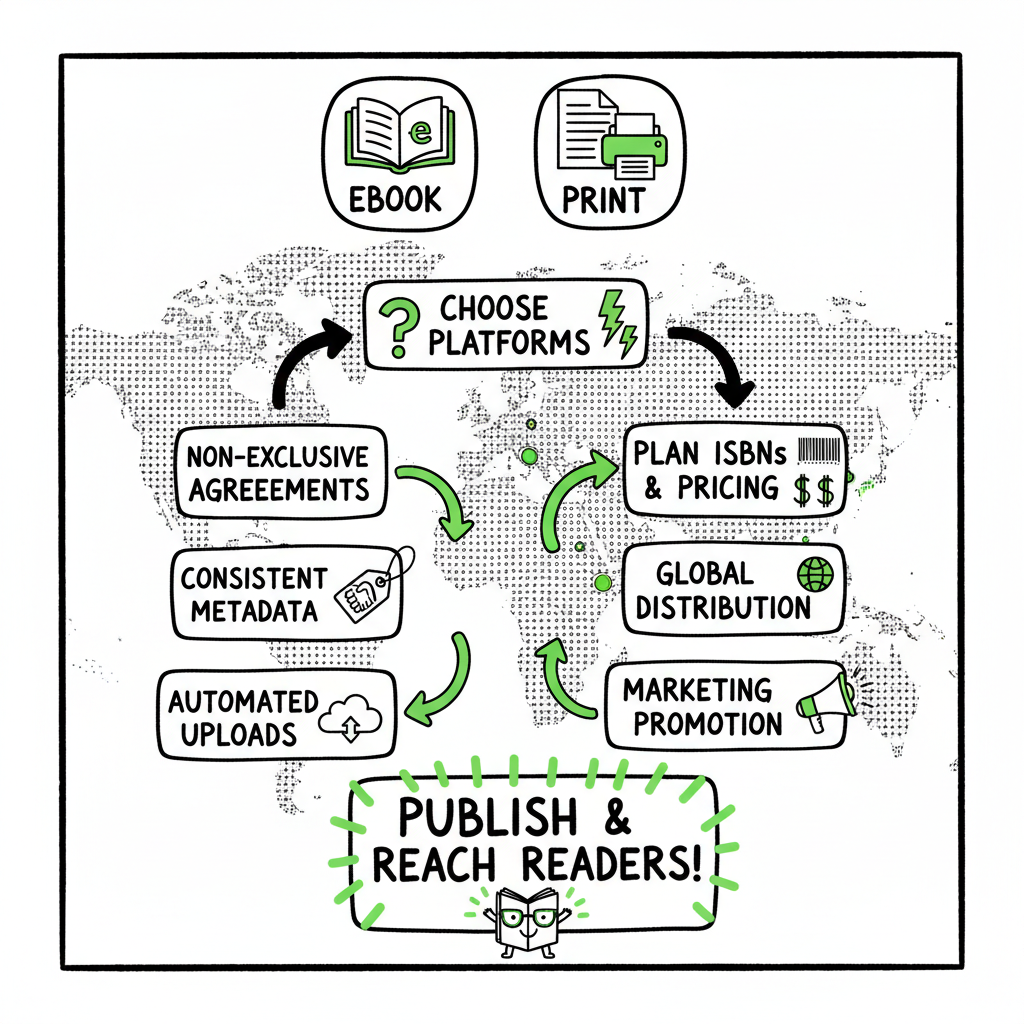
Publish Same Book Everywhere Practical Guide for Authors
Publish same book everywhere
Estimated reading time: 18 minutes
Key takeaways:
- Publishing the same book everywhere maximizes reach, but it needs non-exclusive agreements, consistent metadata, and platform-specific files.
- Automating uploads with a multi-platform tool saves roughly 90% of the repetitive work, reduces errors, and makes wide distribution practical at scale.
- Plan ISBNs, pricing, and exclusivity (like KDP Select) up front; prepare one clean source file and derive platform-specific outputs.
Table of Contents
- Why publish same book everywhere?
- How to prepare files, metadata, and a platform strategy
- Platform rules, pricing, and printing essentials
- FAQ
- Final thoughts
Why publish same book everywhere?
Many authors ask whether they should publish the same book everywhere. The short answer is: usually yes, if your goal is reach and long-term sales. For a practical process that scales, Publish Wide Self Publishing Workflow.
To publish same book everywhere means distributing identical content and consistent metadata across multiple retailers so readers can find and buy on their preferred platform. That’s universal book distribution in practice.
Going wide removes friction. Different readers prefer different storefronts—Apple Books, Kobo, Barnes & Noble, or a local library via Ingram. Selling only on one store limits discoverability. When you publish same book everywhere, you tap multiple audiences and reduce dependency on any single algorithm.
There are trade-offs. Amazon KDP Select requires 90-day ebook exclusivity, which blocks wide distribution while enrolled. Some authors test Select for promotional boosts, then go wide. Other authors never enroll, preferring to build sales across stores from day one. The choice depends on your goals and the book’s lifecycle.
Operationally, publishing same title all platforms looks simple but becomes time-consuming fast: different file formats, metadata fields, cover specs, and sales regions. This is where automation pays. A consistent, automated workflow that creates platform-specific files from one source saves time, cuts errors, and makes non exclusive multi store publish practical. If you’re publishing multiple titles or editions, that efficiency is essential—publishers and serious indie authors often treat multi-store distribution as an operational problem, not a marketing one. If you want a practical process that scales, explore Publish Wide Self Publishing Workflow as a way to standardize the repeated steps and avoid manual mistakes.
How to prepare files, metadata, and a platform strategy
Start with a single, well-edited source file
- Use one master manuscript (Word, Google Doc, or industry tool) that you keep authoritative. Edit and proofread the master, then export consistent files for each platform.
- For ebooks, clean up chapter breaks, remove soft page breaks, and make a plain-text copy to check for stray characters. For print, use a final PDF with embedded fonts.
Manuscript formats and conversions
- Most stores accept EPUB for ebooks and PDF for print-on-demand (POD). Convert from your master to platform files carefully and check the output in an EPUB reader and on devices.
- If you need a reliable conversion to EPUB, use a dedicated tool that preserves headings, images, and metadata. A focused EPUB converter will save hours of tweaking and ensure compliance with major stores.
Cover and interior assets
- Create covers sized to each retailer’s specs. For ebooks, a single high-res cover often works across stores, but pay attention to pixel dimensions and aspect ratios. For print, include spine width and a full wrap PDF.
- If you’re creating a cover from scratch or automating batch covers, use a processing tool that handles versions and size exports. That reduces manual resizing and keeps branding consistent.
Metadata: consistency matters
- Use the same title, subtitle, author name, and series name everywhere. That keeps search and cataloging clean and avoids duplicate listings.
- ISBN strategy: for ebooks, many stores do not require ISBNs, but for print you’ll want a consistent approach. Using the same ISBN across print platforms ties listings together across retailers. For POD books, a shared ISBN (or proper distribution through Ingram) helps link catalogs and prevents duplicate product pages.
- Keywords and categories: tailor these modestly per store. Retailers interpret categories differently; a small tweak can improve discoverability without breaking consistency.
Edition control and versioning
- Add a clear edition statement in metadata when you update content. Retailers treat books as new products when ISBNs change, so keep a record of which version is live where.
- If you plan frequent revisions, maintain a changelog and date the files. That helps when you must update covers, pricing, or categories across stores.
Batch uploads and spreadsheets
- For multiple titles, a CSV batch upload saves enormous time. Populate one spreadsheet with metadata, files, prices, and territory rules, then push to each platform or aggregator.
- Automating these uploads removes repetitive form-filling and reduces human error when you publish same book everywhere.
Files and tools that save time
- Use a single source of truth for each element: manuscript, cover, ISBN, and metadata. Generate platform outputs from those masters.
- If you’re converting many books, invest early in a conversion tool for EPUB and a cover processing tool to automate size exports. These reduce last-minute failures during upload and save hours on every title.
Platform rules, pricing, and printing essentials
Ebook exclusivity and KDP Select
- KDP Select requires 90-day ebook exclusivity to enroll. While enrolled, your ebook cannot be offered on competing stores. Some authors use KDP Select early for promotion and then publish wide. Others avoid it to keep non exclusive multi store publish options open from day one.
- If you choose KDP Select, schedule the 90-day window so it aligns with launch and promotional plans. Track expiry dates precisely so wider distribution can start promptly when you want it.
Royalties and pricing across stores
- Royalty rates differ by retailer and price tier. Amazon’s 70% royalty requires certain price ranges in specific territories. Apple, Kobo, and Barnes & Noble have their own rules.
- Price matching and parity: Amazon may price-match other retailers. Keep pricing strategy consistent, or be prepared for Amazon to adjust its sale price. When you publish same book everywhere, decide whether to maintain identical prices or use regional and platform pricing to respond to local markets.
Print distribution: ISBNs and POD
- For print, a shared ISBN across platforms keeps the same edition linked. Using KDP Print and IngramSpark together is possible if you manage the ISBN and distribution settings carefully to avoid competing listings on Amazon.
- If using Ingram for global distribution, set up returns, wholesale discount, and list pricing correctly. Stores that pull from Ingram will see that edition and list it in their catalogs.
Territories and rights
- Set territories and rights centrally. If you have global rights, publish to all marketplaces. If rights are limited by territory, ensure platform settings match your contract.
- VAT/GST and tax forms: each platform has tax collection and reporting. Treat this as an ongoing admin task rather than a one-off setup.
Aggregators vs direct publishing
- Aggregators like Draft2Digital or similar services can place your ebook across many stores and handle conversion and metadata for you. They charge a percentage of royalties but remove many manual steps.
- Direct publishing to each retailer may yield slightly higher net royalties (no aggregator cut) but costs more time. For serious, high-volume publishing, the operator approach favors automation and batch uploads to cut operational cost per title.
Print setup advice
- Proof a physical copy before wide distribution to check margins, gutters, and color handling.
- Keep your print and ebook metadata aligned. If a print listing uses a different subtitle or author name, bookstores and catalog systems may treat it as a different product.
Quality control and uploads at scale
- Automate checks where possible: file-size limits, embedded fonts, cover bleed, and metadata validation. A single automated check routine reduces failed uploads and saves rework.
- Track submission status and errors centrally so updates propagate correctly across stores.
Operational benefits of automation
- When you publish same book everywhere across dozens of titles, the manual approach breaks down. Automation yields roughly 90% time savings for repetitive uploads, reduces errors, and supports CSV batch uploads and platform-specific intelligence.
- A good multi-platform service will map the right fields for each store, handle EPUB conversion and cover processing, and let you own the distribution without micromanaging every storefront.
Practical guide to publishing the same book everywhere (step-by-step in practice)
- Step 1: Finalize your master manuscript and cover. Export a print-ready PDF and a clean source file for conversion.
- Step 2: Assign ISBNs. Decide whether your print edition will reuse an ISBN across services.
- Step 3: Convert to EPUB and check results on multiple readers. If you need a reliable conversion, use a professional EPUB converter to avoid format errors.
- Step 4: Generate store-ready covers for each channel and print wrap files for POD. If you want automated coverage for sizes and versions, use a cover processing tool to produce files at scale.
- Step 5: Prepare a metadata CSV with titles, subtitles, author names, ISBNs, descriptions, categories, keywords, prices, and territories.
- Step 6: Upload via an aggregator or through a multi-platform automation system. Validate and publish. Track any errors, adjust files if necessary, and confirm listing links.
- Step 7: Maintain a release calendar and update or withdraw editions consistently across all stores when needed.
Tools to reduce friction
- EPUB converter link: if you choose to use a specialized converter to get EPUB right the first time, a dedicated tool can save hours.
- Cover generator link: for bulk publishing, a cover processing system that produces correctly sized ebook and print covers reduces manual image editing.
- Book creation workflows and batch upload solutions make creating a paperback or ebook at scale manageable when you publish many titles.
FAQ
Q: Can I publish the same ebook on Amazon and Apple at the same time?
A: Yes, as long as you do not enroll the ebook in KDP Select. KDP Select requires 90 days of exclusivity for the ebook edition. For a non-exclusive multi store publish, skip Select and distribute directly or through an aggregator.
Q: Do I need separate ISBNs for each platform?
A: For ebooks, ISBNs are optional on many stores. For print, using the same ISBN across platforms keeps the ISBN aligned to the same edition. If you create a new edition or significant change, issue a new ISBN.
Q: Will Amazon block me if my book appears elsewhere?
A: Amazon does not block non-exclusive distribution. It only restricts ebooks enrolled in KDP Select. For print, ensure your ISBN and distribution settings do not create duplicate listings.
Q: Should I use an aggregator or publish direct?
A: Use an aggregator if you prioritize time savings and convenience, especially for many titles. Publish direct if you want the highest royalties per sale and are ready to manage multiple dashboards. Aggregators take a cut but handle conversions, distribution, and some metadata mapping.
Q: What are the common reasons uploads fail?
A: Typical failures include improper EPUB formatting, missing or invalid metadata, cover size mismatches, and embedded font issues in print PDFs. Automated checks and validated conversion tools reduce these failures.
Q: How should I price across platforms?
A: Consider parity in major markets to avoid price-matching issues, but adjust for regional expectations and currency differences. Track royalty thresholds per store and set prices that meet those thresholds where possible.
Final thoughts
Publishing the same book everywhere is a practical choice for authors who want reach and resilience. The mechanics are straightforward but repetitive: a clean master file, consistent metadata, correct cover and print files, and careful attention to each platform’s rules. Once those pieces are in place, automation is the difference between a one-off hobby and a repeatable publishing operation.
If you’re serious about multi-platform distribution, standardize your process. Use reliable EPUB conversion and cover processing tools so files pass validation first time. Keep one source of truth for metadata and ISBNs. Automate batch uploads when you can. A repeatable workflow removes busywork and lets you focus on writing and marketing.
When the workload grows—more titles, multiple editions, translations—automation becomes essential. At scale, multi-platform publishing without a centralized upload process is expensive and error-prone. That’s why a publish-wide approach that includes CSV batch uploads, platform-aware file generation, and error reduction is an obvious upgrade once authors start publishing seriously.
FAQ note: You’ll often need different pieces of technology to handle conversion, cover sizing, and batch uploads. If you create paperbacks or ebooks regularly, integrate tools that handle EPUB conversion and automated cover processing from your master assets to minimize manual steps.
Sources
- https://blog.bookbaby.com/how-to-self-publish/self-publishing/can-you-self-publish-a-book-on-multiple-sites
- https://www.bestsellingpublisher.com/publish-your-ebook-on-multiple-platforms
- https://www.youtube.com/watch?v=4ZyjqHqhQ2M
- https://tribe.allisonspoonerwriter.com/t/can-you-self-publish-on-multiple-platforms/110
- https://www.kdpcommunity.com/s/question/0D58V00007tkAXuSAM/publishing-books-at-another-platforms-along-with-kdp?language=en_US
Publish same book everywhere Estimated reading time: 18 minutes Key takeaways: Publishing the same book everywhere maximizes reach, but it needs non-exclusive agreements, consistent metadata, and platform-specific files. Automating uploads with a multi-platform tool saves roughly 90% of the repetitive work, reduces errors, and makes wide distribution practical at scale. Plan ISBNs, pricing, and exclusivity…