Publish Same Book Everywhere Practical Workflow Guide
How to publish same book everywhere: a practical guide for self-publishers
Estimated reading time: 14 minutes
Key takeaways
- Publishing the same book everywhere (going wide) increases reach and reduces dependency on a single retailer, but it requires careful metadata, pricing, and ISBN choices.
- Use platform-aware tools, aggregators, and batch uploads to save time and avoid errors when distributing the same title to many stores.
- Automation for multi-platform uploads — CSV batch uploads, platform-specific checks, and unified asset management — makes wide distribution practical at scale.
Table of Contents
- Why publish same book everywhere?
- How to publish same book everywhere (practical workflow)
- Common mistakes and how to fix them
- FAQ
- Final thoughts
- Sources
Why publish same book everywhere?
If you’re an author who wants consistent availability, selling the same title across Amazon, Apple Books, Kobo, Ingram, and other stores is the clear route. The phrase “publish same book everywhere” describes a straightforward idea: one title, the same cover and metadata, offered non-exclusively across multiple retailers so readers can buy where they prefer.
There are good reasons to go this route:
- Reader choice matters. Some readers buy on Apple, some on Kobo, some on Amazon — and many still buy print from other retailers. Wider availability reduces friction for sales.
- Long-term discoverability. Relying on a single platform ties your audience to that platform’s policies and algorithms. Spreading distribution diversifies risk.
- Aggregated revenue. Small sales across many stores add up. You don’t need blockbuster performance on one site to build a sustainable business.
- Flexibility. Non-exclusive distribution lets you test different promotions and pricing strategies on different retailers.
Going wide is not just about permission; it’s about process. Most retailers allow non-exclusive listings — the main caveat is Amazon KDP Select, which enforces 90-day exclusivity for ebooks if you enroll. If you want the benefits of wide distribution while keeping upload overhead manageable, consider a predictable, repeatable process or a publishing automation tool. For a practical system that standardizes multi-store uploads and removes manual repetition, see our Publish Wide Self Publishing Workflow early in your process to save time and reduce errors.
When you’re ready to scale, the technical parts become operational problems: consistent metadata, file formats, cover variants, pricing strategy, and ISBN management. That’s where a production mindset helps: treat each title like a repeatable job and build a process that minimizes exceptions.
How to publish same book everywhere (practical workflow)
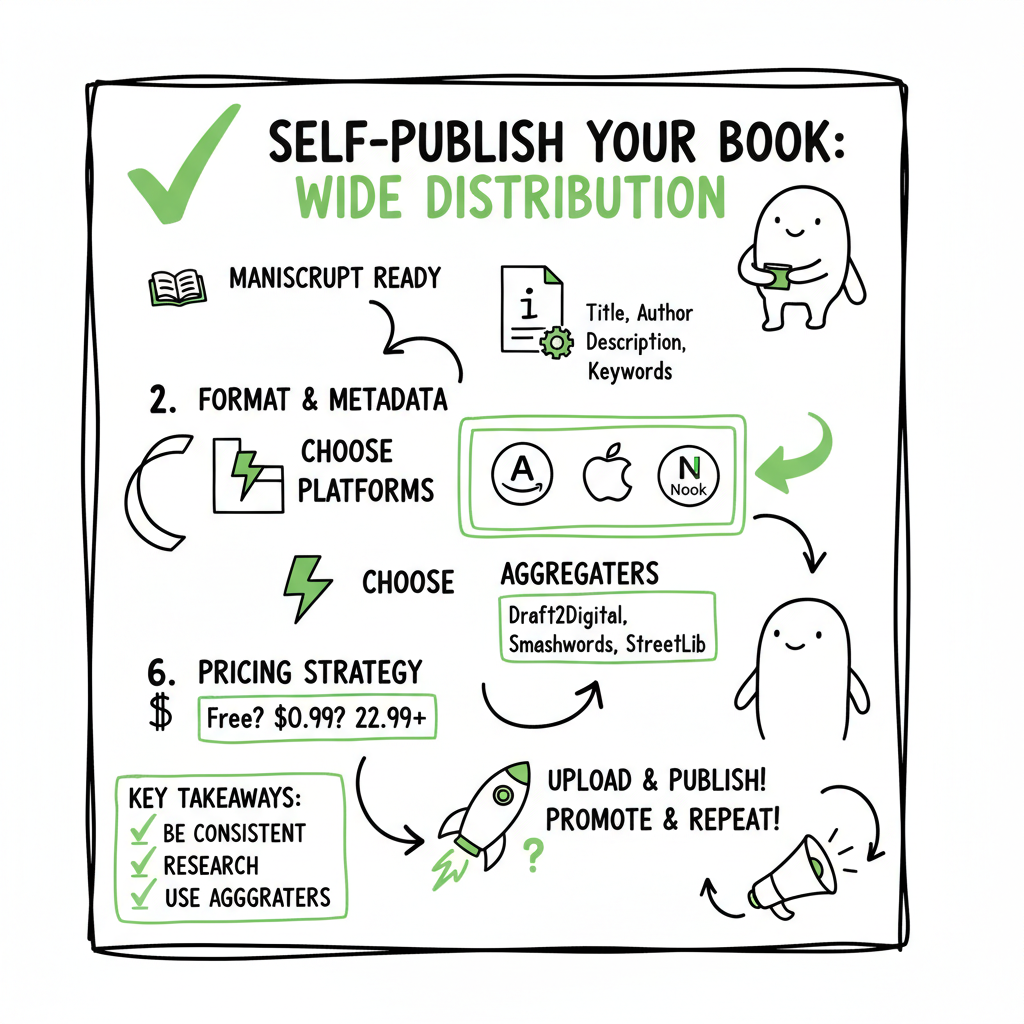
This section lays out a practical, repeatable workflow for publishing the same book on multiple platforms. Keep it simple: prepare once, export consistent assets, then distribute through platform-specific channels or an aggregator.
- Start with a single source of truth
Create one master folder for the book that contains:
– Final manuscript (clean Word or manuscript file)
– Final ebook files (EPUB and/or MOBI)
– Print-ready PDF for paperback or hardcover
– Final cover images sized for each retailer
– Metadata file (title, subtitle, series, author name, contributors, description, keywords, categories, language, publication date, pricing, territories)
– ISBNs and barcode files (if you use them)
– A CSV row or spreadsheet entry per edition (ebook, paperback, audiobook) to support batch uploads - Format files for each platform
Most stores accept EPUB for ebooks. Amazon KDP accepts EPUB as well, but it also handles specific internal conversions. Make sure your EPUB validates cleanly; validation catches many issues that otherwise cause rejections or poor rendering. If you need a reliable conversion step, use an EPUB converter that produces compliant files and clear error reports. - Create consistent metadata
Consistency is the most underrated operational control. Use the exact same title, author name, series information, and primary categories across stores. Format the description consistently, but know that display rules differ by storefront — short and front-loaded descriptions work best for most algorithms. - Decide how you’ll distribute: direct vs aggregator
You have two main practical options: - Direct uploads: Manage an account on each platform (KDP, Apple Books, Kobo Writing Life, IngramSpark, Draft2Digital) and upload files and metadata manually or in batches when supported.
- Aggregators: Use services like Draft2Digital or other distributors to push to many retailers from one upload. Aggregators save time but may charge fees or limit certain channels.
- ISBN strategy for print
For print-on-demand, ISBN choices matter:
– Using the same ISBN across different print PODs can create duplicate listings on retail sites if they index both print providers separately. Some authors prefer to use the same ISBN to keep the edition consistent; others use separate ISBNs and manage retailer listings proactively.
– Amazon offers free KDP ISBNs; if you use one of those and then distribute the same paperback via IngramSpark, you may see two separate retail listings. Using your own ISBN assigned to that specific print edition avoids confusion but requires managing your ISBN inventory. - Pricing and territory strategy
Price consistently but be mindful of price-matching on Amazon and local currency differences elsewhere. Some authors set slightly different prices across stores to reflect local market conditions. - Covers and image assets
Design or prepare a single master cover, then export platform-specific sizes and variants. Covers may be required in specific dimensions for Apple, Kobo, and Amazon.
If you create covers yourself or use an automated service, consider a dependable cover generator production step; a book cover generator can automate resizing and output the correct file types for each retailer, which removes a major source of upload friction. - Batch uploads and verification
When you’re ready to upload, use the metadata CSV and the platform upload tools. If your chosen platforms accept batch uploads, validate the first batch, correct any errors, then proceed with the rest. - Post-publish housekeeping
Once live, track the listings and note any differences. Use sales and reporting tools to confirm files are selling and to spot delivery or conversion errors. Maintain your source-of-truth folder and update it with final store ASINs, ISBNs, and cover variations.
If you publish multiple titles, repeatable steps like CSV updates, automated cover exports, and batch uploads will save time. At scale, these steps are the difference between a manageable workload and a mountain of repetitive tasks.
Common mistakes and how to fix them
Mistake: Inconsistent metadata across retailers
Fix: Keep a master metadata spreadsheet. Before every upload, copy metadata from the spreadsheet into each store or importer. This prevents duplicated series titles, missing subtitles, or mismatched author forms (e.g., J. Smith vs John Smith). The spreadsheet is also your audit trail for later changes.
Mistake: Wrong file formats or badly validated EPUBs
Fix: Validate EPUBs before uploading. Use a reliable EPUB converter that flags missing fonts, broken internal links, or bad structure. If a platform requires a different format, keep the converted version but archive the validated EPUB as the canonical ebook file.
Mistake: Multiple print listings for the same edition
Fix: Decide on an ISBN strategy before uploading print. If you want one global print edition, use your own ISBN and distribute through channels that respect that ISBN. If you prefer separate PODs with unique print offers, use different ISBNs and accept separate listings.
Mistake: Choosing KDP Select without planning
Fix: Know the trade-offs. KDP Select gives you promotional options like Kindle Unlimited but requires 90-day ebook exclusivity in exchange for those benefits. If you want to publish the same ebook everywhere immediately, stay out of KDP Select or plan its timing deliberately (for example, use Select for a launch window and then go wide afterward).
Mistake: Manually resizing and exporting covers for each store
Fix: Use a cover export step or tool. A cover generator can produce the multiple required sizes and formats in one pass, reducing human error and keeping visuals consistent.
Mistake: Not using aggregators or automation
Fix: If you publish multiple titles or editions, use an aggregator or automation layer for consistent uploads. Aggregators do have trade-offs (fees, limited control on some retail-specific fields), but they remove a lot of repetitive work. If you need platform-specific intelligence — for example, file tweaks for Apple versus Kobo — look for tools that include platform checks and automated fixes.
Operational tip: Keep a change log
Whenever you update metadata, price, or files, add a line to your change log (date, change, reason). This helps resolve later disputes or confusion and is a small practice that scales well when you manage many titles.
FAQ
Q: Can I enroll in KDP Select and still publish the same ebook everywhere?
A: Not at the same time. KDP Select requires 90 days of ebook exclusivity on Amazon for any ebook enrolled. You can choose not to enroll and publish non-exclusively, or enroll for a promotional window and then go wide after the period ends.
Q: Will using the same ISBN across platforms cause duplicate listings?
A: It can. Using the same ISBN for the same print edition is correct in publishing terms, but retailer indexing can create duplicate product pages if the same book is uploaded by multiple providers. Some authors use separate ISBNs per POD provider to avoid duplicate retail listings; decide based on how you want the edition represented.
Q: Is it necessary to create separate ebook files for each retailer?
A: Usually one well-validated EPUB works for multiple retailers, but some platforms have unique quirks. Validate and test files; if a retailer needs a specific tweak, keep a separate copy for that store and note it in your source files.
Q: How do I keep pricing consistent across stores?
A: Use a pricing spreadsheet and update each platform from that sheet. Some automation tools let you push price changes across stores simultaneously. Remember to consider local currencies and tax differences.
Q: What’s the fastest way to publish the same book everywhere if I have many titles?
A: Use a repeatable process: master folder, validated files, metadata CSV, and either an aggregator or automation tooling that supports CSV batch uploads and platform-specific intelligence. That reduces each book to a standard checklist and a small number of verification steps.
Final thoughts
Publishing the same book everywhere is less about permission and more about process. The biggest gains come from turning ad-hoc uploads into a repeatable process: one master set of files, consistent metadata, validated formats, and automated steps where possible. Aggregators and converters reduce friction; platform-aware checks prevent common rejections. For authors publishing multiple titles, this approach saves time and reduces the number of issues you’ll troubleshoot later.
If you build a reliable pipeline, wide distribution becomes manageable rather than overwhelming — an obvious upgrade once authors start publishing seriously. BookUploadPro for free
Sources
- https://help.leanpub.com/en/articles/117414-can-i-sell-my-book-on-leanpub-and-on-amazon-or-on-other-self-publishing-platforms-at-the-same-time
- https://blog.bookbaby.com/how-to-self-publish/self-publishing/can-you-self-publish-a-book-on-multiple-sites
- https://www.bestsellingpublisher.com/publish-your-ebook-on-multiple-platforms
- https://www.youtube.com/watch?v=4ZyjqHqhQ2M
- https://www.kdpcommunity.com/s/question/0D58V00007tkAXuSAM/publishing-books-at-another-platforms-along-with-kdp?language=en_US
How to publish same book everywhere: a practical guide for self-publishers Estimated reading time: 14 minutes Key takeaways Publishing the same book everywhere (going wide) increases reach and reduces dependency on a single retailer, but it requires careful metadata, pricing, and ISBN choices. Use platform-aware tools, aggregators, and batch uploads to save time and avoid…