Publish Same Book Everywhere for Wide Distribution
Publish Same Book Everywhere
Estimated reading time: 14 minutes
Key takeaways
- You can publish the same book everywhere without chaos if you match metadata, manage exclusivity, and use the right tools.
- A short technical checklist (ISBNs, formats, pricing, and retailer rules) prevents duplicate listings and lost sales.
- Automation and batch CSV uploads cut repetitive work by ~90% and make wide distribution practical for serious authors.
Table of Contents
- Why publish the same book everywhere?
- Technical checklist for publishing the same title
- Common pitfalls and how to fix them
- Automating wide distribution at scale
- FAQ
Why publish the same book everywhere?
Publishing the same book everywhere is about reach and resilience. When you make your title available on Amazon, Apple Books, Kobo, Draft2Digital, and Ingram, you meet readers where they already buy. That means more chances for discovery, more formats sold, and less dependence on any single store or program.
Authors often ask whether they should enroll in exclusive programs or go wide. The answer depends on goals. Exclusivity programs can boost visibility for a short period. But long-term growth usually favors universal book distribution. If you intend to scale—multiple titles per year—you’ll outgrow manual uploads fast. That’s where a clear operational workflow matters. If you publish multiple titles, our Publish Wide Self Publishing Workflow explains how to package metadata and CSV uploads so you can push one title to many stores consistently and without repeated errors.
Making the same title available everywhere also supports branding. When a reader searches for your name or a book series, consistent listings across platforms build trust. Same title all platforms — with the same cover, description, and price strategy — keeps readers from getting confused by mismatched information.
Technical checklist for publishing the same title
Start with these concrete items before you hit “publish.” They stop most duplication and technical problems.
- ISBNs and product identifiers
- Ebooks: Most platforms don’t require an ISBN for ebooks, but some do or will list it if you provide one. Decide whether you’ll assign your own ISBNs for consistency.
- Paperbacks/print: Use a single ISBN per physical edition if you plan to distribute the same print edition through multiple services. A single ISBN avoids duplicate listings in retailers that pull from the same bibliographic databases.
- Exact metadata match
- Title, subtitle, series name, author name, and edition notes must match exactly across platforms. Small differences create multiple product pages and split sales history.
- Keep a master metadata file (CSV) that serves as your source of truth.
- File formats and conversion
- EPUB is the universal ebook format. Convert your manuscript to a validated EPUB for most retailers. Use an EPUB check before uploading to catch obvious problems.
- For Amazon KDP, a MOBI or converted EPUB may be used, but validated EPUB is increasingly standard.
- If you need a reliable conversion tool, an EPUB converter can simplify this step and reduce format errors.
- Covers and asset sizes
- Retailers require different cover dimensions and spine calculations for print. Start with a high-res master cover and generate the platform-specific files from it.
- If you don’t want to design covers from scratch every time, a book cover generator can speed up consistent, compliant artwork for each platform.
- Price and royalty rules
- Understand retailer price-matching policies. Amazon may adjust pricing if your book is listed cheaper elsewhere. Set a price strategy that considers fees and net royalties across platforms.
- Some stores have minimum or maximum price points for certain royalty tiers. Account for that in your pricing CSV.
- Distribution choices and exclusivity
- KDP Select requires temporary ebook exclusivity for Kindle benefits. If you enroll, schedule when you’ll exit to go wide if that’s your strategy.
- Aggregators like Draft2Digital or direct channels like Kobo Writing Life and Apple Books each have pros and cons. Choose channels based on reach and control.
- Proofing and quality control
- Always order a proof copy for print. For ebooks, test on multiple devices and use platform previewers.
- Keep an error log and version numbers in your master CSV so you can trace changes.
- Save and reuse configurations
- Store template files: a title metadata CSV, cover masters, and formatted EPUBs. Reuse and tweak these to keep the process fast and repeatable.
- If you plan to publish many titles, structured templates will save hours.
Common pitfalls and how to fix them
Duplicate listings on Amazon
Cause: Different ISBNs or slightly different title metadata.
Fix: Consolidate to a single ISBN for the print edition and update retailer metadata to match the master record. If duplicates persist, contact Amazon KDP support with proof of ownership and the intended ISBN.
Broken EPUBs and bad formatting
Cause: Unvalidated conversions or leftover Word styling.
Fix: Run your EPUB through a validator and check the reading order. If conversion trips you up, use a trusted EPUB converter and test on a phone and tablet.
Cover rejected or cropped wrongly
Cause: Wrong dimensions or low resolution.
Fix: Generate platform-specific covers from a single high-resolution master. A book cover generator can produce compliant variations quickly.
Pricing mismatches and lost royalties
Cause: Listing different prices across stores or forgetting regional pricing.
Fix: Maintain a price matrix in your master file, and decide which store will be the “price lead.” Monitor prices after publishing to ensure consistency.
KDP Select vs. wide distribution confusion
Cause: Signing up for exclusivity without planning the schedule.
Fix: If you use KDP Select early in a book’s life, set a clear calendar: how long to stay exclusive, marketing windows, and when the title will go wide.
Metadata drift (small changes that cause big problems)
Cause: Manually retyping descriptions and titles on each platform.
Fix: Keep a single source CSV and paste metadata as needed. When you update a field, update the master and push changes consistently.
Automating wide distribution at scale
Once you understand the manual steps, the next problem is scale. Publishing one book manually is fine. Publishing dozens a year is not. Automation removes repetitive tasks, prevents human error, and makes wide distribution practical.
Why automation helps
- Speed: Uploads that once took hours per platform become batch CSV operations. That’s where ~90% time savings comes from for teams using automation.
- Consistency: The same master metadata populates every retailer, eliminating drift.
- Platform-specific intelligence: Good automation adapts the upload to each store’s rules (cover dimensions, required fields, file types) so you don’t get rejected.
- Error reduction: Automated validation catches common problems before an upload.
What to automate first
- Metadata injection from a master CSV
- EPUB and cover packaging per retailer requirements
- Price matrix application across regions and stores
- Batch uploads of files and metadata
- Post-publish checks and reporting
How an automated tool fits into your workflow
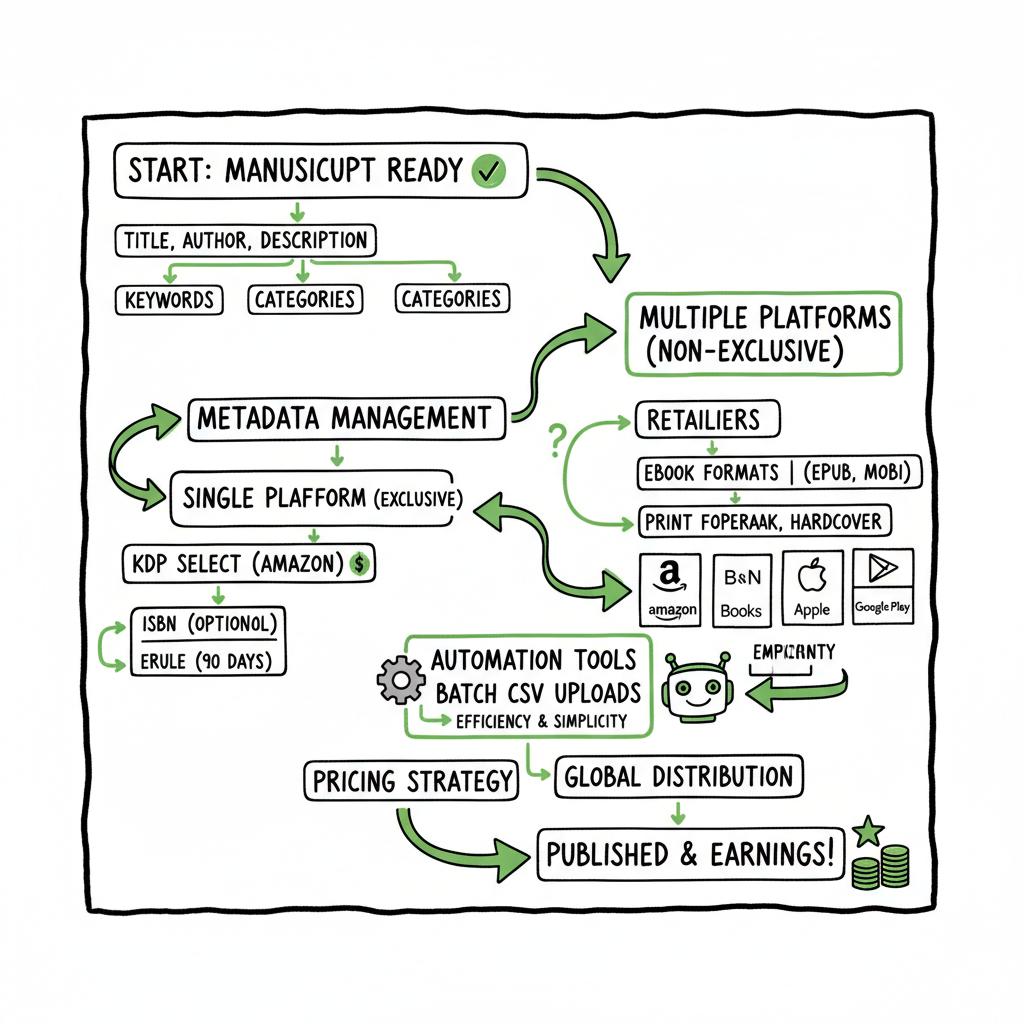
A practical automation tool takes your master files and executes platform-specific uploads. It handles the grunt work—file conversion, metadata mapping, and error reporting—while you make editorial decisions. The workflow looks like this:
- Prepare master assets (manuscript, cover master, metadata CSV)
- Generate platform-ready files (validated EPUBs, tailored covers)
- Execute batch upload to retailers
- Monitor reports and fix flagged errors
That report becomes your single source for troubleshooting rather than juggling five separate inboxes.
Why BookUploadPro
- Unified multi-platform publishing: one place to push to Amazon KDP, Kobo, Apple Books, Draft2Digital, and Ingram.
- CSV batch uploads and platform-specific intelligence reduce repetitive work and rejections.
- ~90% time savings vs. manual uploads once you publish seriously.
- Affordable pricing with a free trial—an obvious upgrade for authors moving from occasional to regular releases.
Operational tips when automating
- Keep your master CSV well-structured. Column names should be consistent and descriptive.
- Version control your cover masters and EPUBs. Label them clearly (e.g., Title_v1_EPUB).
- Schedule regular audits of published listings to catch unexpected changes by retailers.
- Use automation logs to understand frequent rejections and fix the root cause in your master templates.
Practical example: One-title, many platforms
Imagine you have a finished manuscript, a cover master, and a CSV row with metadata. The automation sequence:
- Convert manuscript to validated EPUB and a print-ready PDF.
- Generate platform-specific cover files.
- Map metadata columns to each platform’s required fields.
- Batch upload files and metadata in one run.
- Receive a report of successful uploads and any items that need attention.
That report becomes your single source for troubleshooting rather than juggling five separate inboxes.
Cover, EPUB, and ebook generation — small tools that matter
When you standardize assets, the rest flows. Tools that convert to EPUB and create compliant covers remove a lot of friction. If you need a reliable file conversion, try an EPUB converter to avoid format failures. If covers slow you down, a book cover generator creates consistent artwork across editions.
Final steps before you go live
- Double-check the primary retailer listing (often Amazon) for proofing changes and alignment.
- Confirm price and royalty expectations for each store.
- Schedule marketing and promotions after the book is live on multiple platforms so links and store pages are ready.
FAQ
Q: Can I publish the same ebook on Amazon and other stores at the same time?
A: Yes, unless you enroll in an exclusivity program like KDP Select. If you choose exclusivity, you’ll need to honor the agreed period before going wide.
Q: Should I use one ISBN for print everywhere?
A: For the same physical edition, use one ISBN to avoid duplicate retailer listings. Different formats (paperback vs. hardcover) need separate ISBNs.
Q: Does publishing the same title everywhere hurt my sales ranking on Amazon?
A: Not inherently. Rankings are based on sales and engagement within each store. The main risk is price mismatch or conflicting metadata creating duplicate listings, which you can avoid with careful metadata management.
Q: Do aggregators work for wide distribution?
A: Aggregators like Draft2Digital simplify distribution to many stores, but they take a percentage. Direct uploads give you more control and sometimes higher royalties. Use whichever fits your scale and control needs.
Q: How do I prevent Amazon from lowering my price because it finds a cheaper offer?
A: Keep pricing consistent across retailers or make the platform you prefer the price lead. Monitor prices regularly and adjust as needed.
Q: Is automation safe for small presses and single authors?
A: Yes. Automation scales down as well as up. Templates and batch uploads save time even if you publish one book every few months.
Sources
- How to Self-Publish on Multiple Sites — BlogBaby
- Publish Your eBook on Multiple Platforms — BestSellingPublisher
- Using ISBNs and Print Distribution — YouTube resource
Final thoughts
Publishing the same book everywhere is practical and effective when you treat it like an operational process: consistent metadata, validated files, and a repeatable workflow. Automation brings scale and reliability—CSV batch uploads, platform-specific rules, and error reduction make wide distribution practical for authors who want steady growth rather than one-off releases. Automate the upload. Own the distribution.
Visit BookUploadPro to try the free trial.
Publish Same Book Everywhere Estimated reading time: 14 minutes Key takeaways You can publish the same book everywhere without chaos if you match metadata, manage exclusivity, and use the right tools. A short technical checklist (ISBNs, formats, pricing, and retailer rules) prevents duplicate listings and lost sales. Automation and batch CSV uploads cut repetitive work…