How to Publish Same Book Everywhere for Self-Publishers
How to publish same book everywhere: a practical guide for self-publishers
Estimated reading time: 12 minutes
Key takeaways
- You can publish same book everywhere by keeping your rights and using a mix of direct uploads and aggregators to reach all major stores.
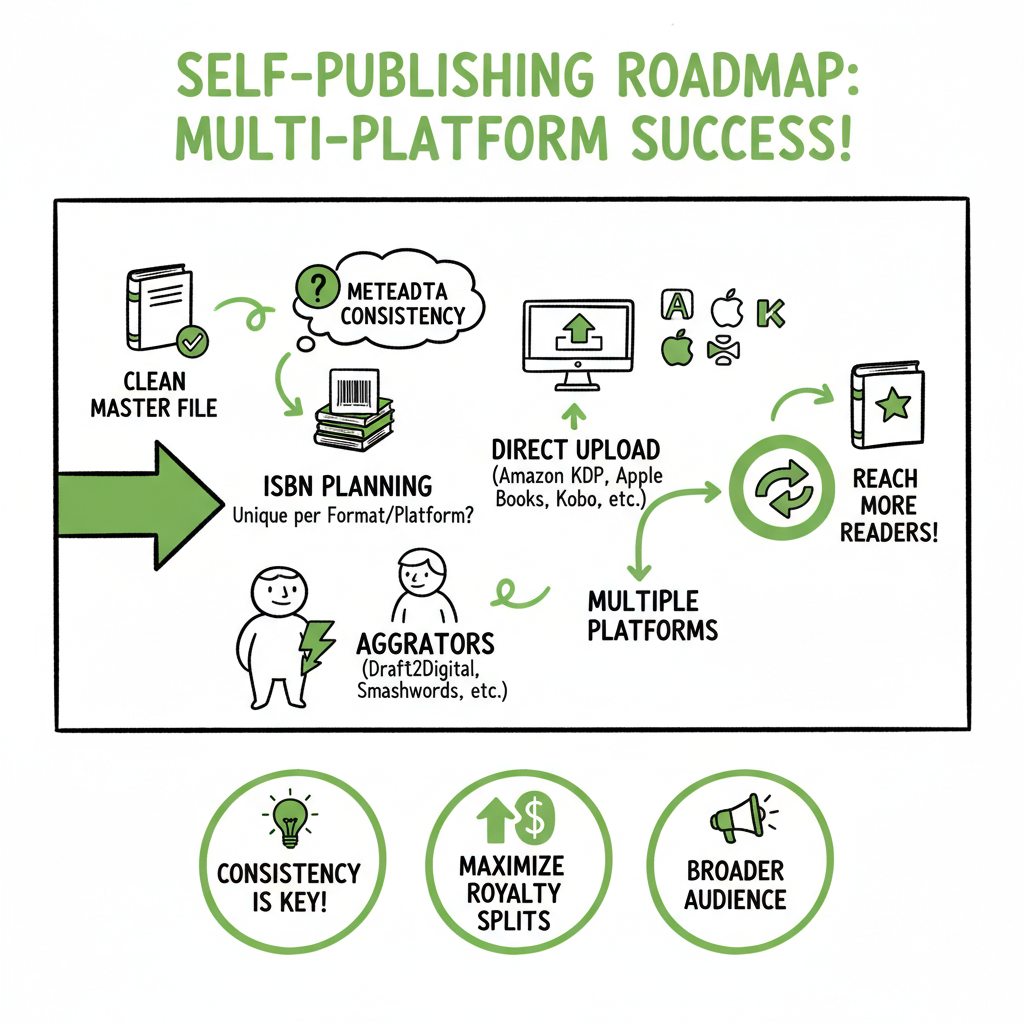
- Prepare one clean master file, consistent metadata, and a clear ISBN/edition plan to avoid duplicate listings and delivery errors.
- Automation tools like BookUploadPro make multi‑platform publishing practical by handling conversions, batch uploads, and store‑specific tweaks.
- Use a universal book link for marketing so one shared URL sends readers to the store they prefer.
- Mind exclusivity programs, pricing windows, and print distribution limits when you go wide.
Table of Contents
- Why publish same book everywhere
- A practical workflow to publish same book everywhere
- Key takeaways
- FAQ
- Sources
Why publish same book everywhere
If you want to publish same book everywhere, the job is less about scattering files and more about control. You keep the same title, cover, and edition live across multiple stores so any reader can buy from the place they already use. That approach improves discoverability and reduces friction in marketing. It also avoids tying your book to a single platform’s ecosystem unless you choose to.
When authors weigh options, the debate often becomes direct vs aggregator, or exclusive vs wide distribution. If you’re unsure which path fits your goals, our comparison Publish Wide vs Amazon Exclusive covers the tradeoffs clearly and helps you pick a strategy that matches sales, marketing, and long‑term rights management. Read that piece before locking in any exclusivity deal.
Publishing the same book on multiple stores normally requires three practical choices:
- Where you will upload directly (for example, Amazon KDP).
- Which aggregators or services will handle the rest.
- How you will manage metadata, files, and updates so every store shows the same edition.
This guide focuses on an operational workflow. It explains what files you need, how to avoid duplicates, and how automation changes the work from repetitive uploads to a repeatable, low‑error process.
A practical workflow to publish same book everywhere
This section walks through a repeatable process you can use on every book. It covers master files, platform rules, routing strategies, and how to use automation to reduce work by roughly 90% once you publish at scale.
Start with a single master file
Treat one clean source manuscript as the truth. That master should be the manuscript you edit, proofread, and finalize. From it you derive each format required by stores: ebook (EPUB, KPF/MOBI where needed), print‑ready PDF for paperbacks, and any special variations (large print, illustrated editions).
Why one master?
– Keeps chapter numbering, front/back matter, and acknowledgments consistent.
– Makes future updates simpler: update one file, then propagate changes.
– Reduces the chance of inconsistent metadata or versioning that confuses readers and retailers.
Convert carefully to retailer formats
Different stores require different file formats and small technical variations. EPUB is the universal ebook format, but Amazon accepts KPF (Kindle Package Format) or MOBI/KF8 derivatives in some workflows. Many issues—margins, image sizing, embedded fonts—stem from imperfect conversions.
If you need a reliable EPUB conversion tool, consider an automated EPUB converter that preserves structure and cleans up common errors. Good conversion reduces rejections and speeds distribution.
Design a cover that fits all channels
You also need platform‑ready cover files. Ebooks generally take a single JPEG or PNG at recommended dimensions, while print needs a full cover PDF that includes spine and bleed. A professional cover that works across ebook thumbnails and bookstore listings keeps branding coherent.
If you want an automated way to make and process covers for different platforms, a book cover generator can produce the right sizes and bleed‑aware PDFs so you don’t redesign covers by hand for each store.
Decide which stores you’ll upload to directly
Major retailers you might upload directly to:
– Amazon KDP — still the largest ebook marketplace in many countries.
– Apple Books — strong on iOS and in some international markets.
– Kobo Writing Life — good for readers in Canada and parts of Europe.
– Barnes & Noble Press — useful if you want direct control on B&N.
Direct uploads give you control over listings, but each platform is a separate dashboard with its own quirks. Many authors upload to Amazon KDP themselves because it allows direct control of pricing, promotions (unless you opt into KDP Select), and metadata.
Use an aggregator for global reach
Aggregators distribute files to many stores and library channels. Popular aggregators include Draft2Digital, PublishDrive, and IngramSpark for print distribution. Aggregators save time by sending one file to multiple platforms and handling store‑specific conversions where needed.
Aggregators vary:
– Coverage: which stores, countries, and library networks they reach.
– Pricing model: percentage cut vs subscription.
– Account requirements: some need separate ISBNs for print editions.
A common pattern is to upload directly to Amazon KDP and use an aggregator for the rest. That avoids double‑sending the same edition to Amazon and reduces conflicts. If you prefer to avoid direct uploads, some aggregators can also deliver to Amazon but you must be careful to not duplicate the same ISBN or edition on the same retailer via two routes.
Map editions to ISBNs and retailer identifiers
Track which edition lives where. Use ISBNs for print editions and keep an internal record for ebook editions if you assign ASINs or store IDs. Avoid submitting the same edition through multiple channels to a single store; that creates duplicate listings and delivery failures.
Here’s a simple rule: one edition = one ISBN (print) and one master file. If you need a different trim size or interior layout, treat that as a separate edition with its own ISBN.
Create consistent metadata and assets
Metadata includes title, subtitle, series information, author name formatting, description, keywords, and categories. Inconsistency here breaks discoverability and can hurt algorithms. Use the same core description and series metadata across all retailers, adjusting only where a platform’s category or keyword fields differ.
Also prepare:
– High‑quality cover image files for ebook and print.
– Interior files (EPUB and print PDF).
– Author bio and promotional copy.
Prepare to localize pricing
Pricing varies by territory. Decide whether you’ll set a single base price and let platforms auto‑convert, or manually set prices per country. If you publish same book everywhere, a pricing strategy that maps to local markets is helpful. Aggregators often let you set global pricing rules or automatically convert a currency.
Automate the upload and distribution
Manual uploads are slow and error prone. Once you publish several books, automation becomes an obvious upgrade. Automation means:
– CSV batch uploads for multiple titles.
– Platform‑specific intelligence that creates KDP, Apple, Kobo, and Ingram files from one master.
– Error checking that flags problems before submission.
BookUploadPro automates repetitive tasks across Amazon KDP, Kobo, Apple Books, Draft2Digital, and Ingram. It converts your master, prepares store‑ready files, and can perform CSV batch uploads so you don’t click the same form dozens of times. This reduces time spent by around 90% for routine releases and cuts human errors like mismatched metadata or incorrect file types.
For authors publishing more than one book a year, it’s an obvious upgrade.
Route smart: avoid duplicate distribution
If you send the same edition to the same retailer through two channels (for example, direct to Apple and via an aggregator that also delivers to Apple), you risk duplication and delivery failure. Decide which retailers get direct uploads and which will be served by an aggregator, and record that mapping in your publishing checklist.
Plan for print distribution separately
Print‑on‑demand (POD) is different from ebooks. IngramSpark and KDP Print are the two big POD routes. KDP Print gives easy integration with Amazon, while IngramSpark offers broader wholesale distribution to bookstores and libraries. Many authors use KDP Print for Amazon and IngramSpark for wide print distribution; just remember to use separate ISBNs if the interiors or covers differ.
Batch processing for series and multiple formats
If you publish series or multiple formats, use CSV templates or batch upload features to push standardized metadata and files. Batch uploads save the same work repeated across dozens of releases. When a batch fails, good automation gives clear diagnostics so you can fix the specific issue and reprocess only the affected titles.
Keep an updates plan and a changelog
Decide how you’ll handle updates. Small fixes (typos) vs major edits (new chapters) may require new editions. Keep a changelog and dates for when updates go live across platforms. Aggregators and direct platforms have different processing times, so stagger or coordinate releases if timing matters.
Marketing and universal book links
When you market, use one URL that shows every place readers can buy your book. Universal book link services create a single landing page that redirects readers to their preferred store. That makes social posts, email signatures, and author pages simpler to manage.
Rights, exclusivity, and promotions
Avoid KDP Select or other exclusive programs if your goal is to publish same book everywhere. Exclusivity can offer promotional tools and higher visibility on one platform, but it restricts your ability to distribute widely. Always read program terms before enrolling.
Quality checks and delivery monitoring
After upload, monitor retailer dashboards for delivery errors, missing assets, or formatting problems. Keep an eye on:
– Missing interior or cover files.
– Metadata mismatch warnings.
– Territorial or rights errors.
Automation can reduce the number of these issues by preparing files to store standards and running preflight checks.
Practical example: from manuscript to all stores (step‑by‑step summary)
– Finalize the master manuscript and front/back matter.
– Create or generate the ebook interior and print interior from the master.
– Produce a platform‑optimized cover and print jacket PDF.
– Assign ISBN(s) to the proper edition(s) and record them.
– Decide which retailers you’ll upload to directly (often Amazon) and which the aggregator will cover.
– Use an EPUB converter to create a clean EPUB from the master and test it on major readers.
– Use an automated service or aggregator to distribute widely, or batch upload through BookUploadPro to push files to multiple dashboards at once.
– Publish a universal book link for marketing.
Tools that help
– EPUB converter tools remove common structural errors and produce vendor‑ready EPUBs.
– Book cover generators help you produce consistent covers for ebook and print sizes.
– Book creation tools and services convert and assemble ebooks, print PDFs, and distribution bundles so you don’t rebuild every format by hand.
Automate the upload. Own the distribution.
Once you start publishing at scale, manual uploads are the bottleneck. A platform that supports CSV batch uploads, platform‑specific intelligence, and ongoing updates becomes an operational necessity. BookUploadPro sits where you need it: it converts and formats a single master file, routes each store the right version, and maintains metadata across all retailers. For authors publishing more than one book a year, it’s an obvious upgrade.
Final operational tips
– Keep a master spreadsheet for every title and edition.
– Maintain backups of all master files and cover assets.
– Always check a newly delivered store page on mobile and desktop to verify formatting and description.
– Stagger big updates to avoid conflicting deliveries across retailers.
FAQ
Q: Can I really publish the same book on Amazon and other stores at the same time?
A: Yes. Most stores permit wide distribution. The main restriction is exclusivity programs like KDP Select. If you enroll in exclusive programs, you must keep that title exclusive for the program’s duration. Otherwise, you can upload the same edition to multiple retailers, but avoid sending the identical edition to the same store through more than one channel.
Q: Do I need separate files for ebook and print?
A: Yes. Ebooks need a reflowable EPUB (or vendor‑specific KPF), while print requires a fixed-layout PDF that matches trim size and includes bleed and spine. Treat them as related outputs from a single master file.
Q: How do I prevent duplicate listings?
A: Use one distribution path per retailer for a given edition. If you upload directly to Amazon, do not let an aggregator also send that same edition to Amazon. Track ISBNs and edition IDs to ensure each submission is unique.
Q: What if a store rejects my file?
A: Read the error message, fix the issue in your master or conversion settings, and resubmit. Common causes include invalid EPUB markup, oversized images, or missing fonts in print PDFs. Good conversion tools and preflight checks catch many of these before submission.
Q: Will an aggregator list me in bookstores and libraries?
A: Some aggregators (or IngramSpark for print) have wide wholesale relationships that reach bookstores and libraries. Coverage differs by service; check their store and channel lists.
Q: How long does it take for a book to appear everywhere?
A: Processing times vary. Some retailers publish within hours; others can take several days to a couple of weeks. Aggregators may have batch processing schedules. Plan launch timing with these delays in mind.
Sources
- Top 7 Book Aggregators Compared (PublishDrive blog) — https://publishdrive.com/top-book-aggregators.html
- Self‑Publishing Platforms – 12 Options for Authors (SelfPublishing.com) — https://selfpublishing.com/self-publishing-platforms/
- Self‑Publishing Aggregators: Draft2Digital, PublishDrive (ScribeCount) — https://scribecount.com/author-resource/publishing-a-book/self-publishing-aggregators
- Universal Book Links in 4 Easy Steps (Self‑Publishing School) — https://self-publishingschool.com/universal-book-links/
- 7 Reasons Why All Authors Should Use Universal Book Links (The Author Stack) — https://www.theauthorstack.com/p/7-reasons-why-all-authors-should
- Lulu – Online Self‑Publishing Book & Ebook Company — https://www.lulu.com
- Draft2Digital – Go Wide with Smarter Self‑Publishing — https://draft2digital.com
Visit BookUploadPro.com and try the free trial..
How to publish same book everywhere: a practical guide for self-publishers Estimated reading time: 12 minutes Key takeaways You can publish same book everywhere by keeping your rights and using a mix of direct uploads and aggregators to reach all major stores. Prepare one clean master file, consistent metadata, and a clear ISBN/edition plan to…