KDP Pricing Strategy Practical Guide for Indie Authors
kdp pricing strategy: A Practical Guide for Self-Publishing Authors
Estimated reading time: 9 minutes
Key takeaways
- A clear KDP pricing strategy balances royalties, discoverability, and reader expectations across formats.
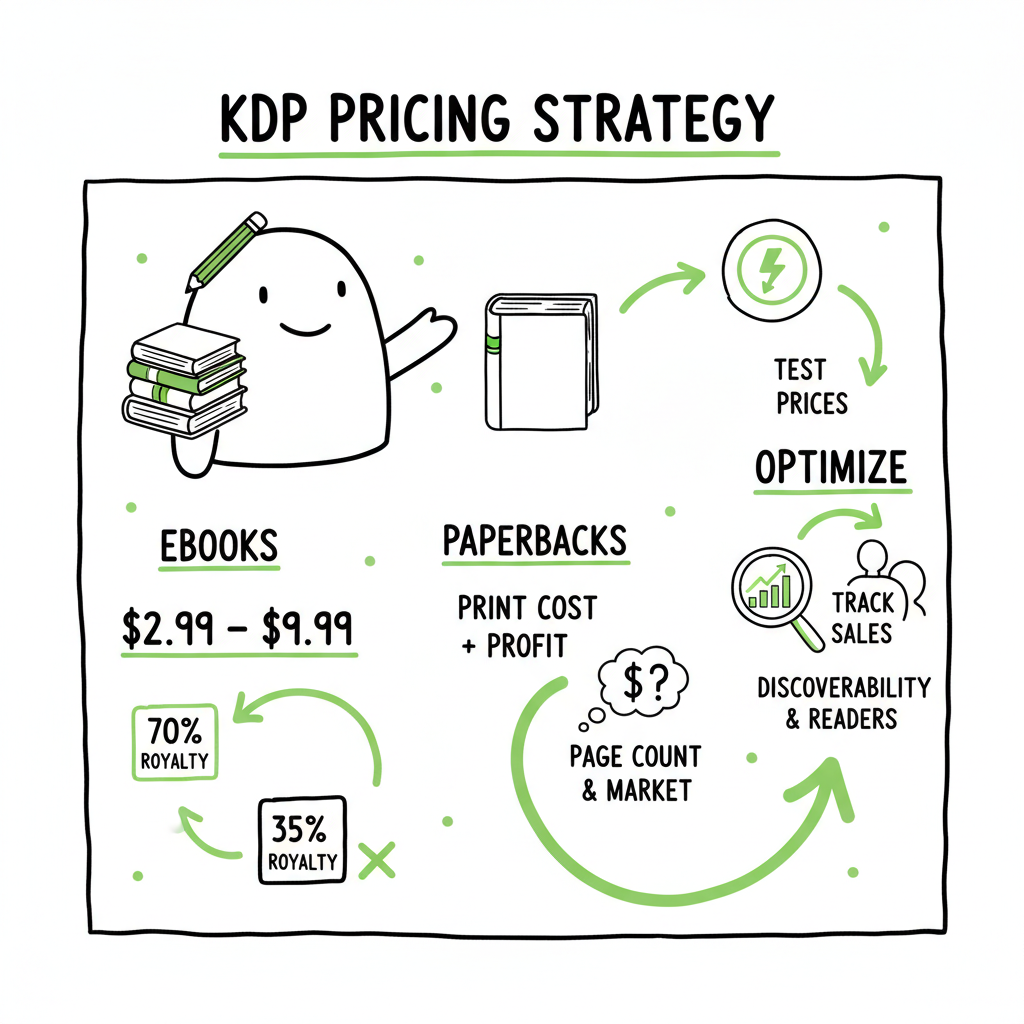
- Price eBooks between $2.99–$9.99 for 70% royalty eligibility where possible; set paperbacks to cover printing plus a sensible margin.
- Test prices, track sales data, and use automation to scale uploads and distribution across platforms.
Table of Contents
- Why KDP pricing strategy matters
- How to set optimal prices for eBooks and paperbacks
- Testing, promotions, series pricing, and tools
- FAQ
Why KDP pricing strategy matters
Pricing is more than a number on a product page. A solid kdp pricing strategy tells a reader what to expect about length, value, and quality. For authors who publish more than one title, price is also a lever you can pull to grow a readership or protect profit margins. In the first few releases, price often affects visibility: lower prices can drive downloads and reviews, while mid-range prices can improve per-book profit for steady, discoverable sales.
You also need to think about platform rules and royalties. The choices you make determine whether you fall into Amazon’s 70% royalty band for eligible eBooks, or the 35% band. If you want the exact thresholds and to understand delivery fees and regional rules, see Amazon KDP Royalties Pricing Profit for the official breakdown. That math matters because a $1 change can swing profit materially when you scale to dozens or hundreds of titles.
Finally, pricing affects the whole distribution plan. If you plan to sell on Amazon alone, your approach looks different than if you want wide distribution across Kobo, Apple Books, Draft2Digital, and Ingram. Automation and batch uploads make wide distribution practical; once you’re publishing seriously, unified multi-platform publishing is an obvious upgrade.
How to set optimal prices for eBooks and paperbacks
Start with the format and goals. Decide what you want from the book: fast audience growth, maximum revenue per sale, or a mix. Price and format go together.
Start with the format and goals
eBooks: For many genres, $2.99–$9.99 is the sweet zone for the 70% royalty option in eligible regions. That range balances affordability and profit, and it’s where readers expect to find quality indie titles. Below $2.99, you usually fall into the 35% royalty band, which reduces profit after costs and delivery fees.
Paperbacks: Set the price to cover printing costs and leave a margin. For many paperbacks, authors target roughly $9.99–$14.99 depending on page count and niche. Printing cost, distribution fees, and perceived value matter here.
Hardcovers and premium formats: Use them when value perception supports it—$14.99–$24.99 is common for higher-priced formats.
Match price to genre and length
Different genres carry different price norms. Non-fiction readers often accept higher prices than readers of genre fiction. Short nonfiction guides or novellas should be priced lower because perceived value is linked to length in many categories.
- Fiction (genre): $2.99–$5.99 is common for single-title fiction, with series entries often higher after the first book.
- Non-fiction: $6.99–$14.99 depending on depth, audience, and author authority.
- Niche or specialty: If your book solves a business problem or targets a professional audience, higher prices are acceptable.
Watch royalties and delivery fees
Amazon applies delivery fees for eBook downloads on the 70% royalty plan. That fee depends on file size and affects net royalties. This makes very low-priced long eBooks less profitable. Always use the platform’s royalty and printing calculators to check margins for each format.
Practical pricing examples
– New fiction author trying to build readers: Start at $2.99 for eBook, price paperback around $9.99–$11.99.
– Series strategy: First book at $0.99–$2.99 to hook readers; follow-ups $3.99–$5.99 to capture lifetime value.
– Established non-fiction author: eBook $7.99–$12.99, paperback $14.99–$19.99 depending on audience expectations.
Consider list pricing psychology
Small price changes matter. $6.99 to $7.99 or $7.99 to $8.99 can greatly increase revenue without proportionally reducing sales volume. Price thresholds also affect perceived value—some readers treat $9.99 as a premium anchor.
Format-specific tips
– Bundles and box sets: Price them lower per-book than buying titles individually, but keep the bundle margin healthy.
– Preorders: Use a launch price slightly lower for preorders to drive early interest and pre-launch reviews.
– Free vs. discounted: Free is powerful for lead generation (especially for the first in a series), but check platform rules about price matching and exclusive programs.
On ebook and paperback creation: speed and consistency matter
When you work across platforms you will need consistent file outputs: EPUBs for most stores, and print PDFs for paperbacks. For automated EPUB conversion, use a reliable EPUB converter to avoid formatting regressions.
If you are creating paperback and ebook designs repeatedly, a cover generator speeds production and keeps brand consistency across titles.
For book creation workflows that tie formatting, cover, and distribution, a unified toolset reduces time to market.
BookUploadPro automates BookUploadPro automated uploads across Amazon KDP, Kobo, Apple Books, Draft2Digital, and Ingram. It supports CSV batch uploads, platform-specific intelligence to avoid common errors, and can cut upload time by roughly 90%. For authors publishing at scale, automation reduces mistakes and makes wide distribution practical—an obvious upgrade once authors start publishing seriously. Automate the upload. Own the distribution.
Formatting and cover generation at scale: When you work across platforms you will need consistent file outputs: EPUBs for most stores, and print PDFs for paperbacks. For automated EPUB conversion, use a reliable EPUB converter to avoid formatting regressions. If you are creating paperback and ebook designs repeatedly, tools that process cover images and templates will save hours. For mass cover generation and batch processing, check services that handle cover templates and output in platform-ready formats.
Useful practical links (tools in the workflow): – For EPUB conversion and consistent eBook files, an EPUB converter can eliminate manual formatting headaches. – If you automate cover creation and processing, a dedicated cover generator speeds production and keeps brand consistency across titles. – For book creation workflows that tie formatting, cover, and distribution, a unified toolset reduces time to market.
Putting price changes into practice: When you change prices across stores, plan the rollout: 1. Decide test groups (e.g., US only or global). 2. Update the platform(s) and record the starting metrics. 3. Monitor daily for 7–30 days depending on traffic. 4. Roll back or iterate based on results.
Testing, promotions, series pricing, and tools
Test deliberately and measure
A kdp pricing strategy should include experiments. Pick one variable per test—price, description, or promotion—and measure the result over a set period.
- Short test: Change price for two weeks during a low-noise period and compare average daily sales and revenue to the baseline.
- Long test: Adjust price for a month and include promotional activity like ad spend or newsletter shots.
Track the right metrics
Dont just track units sold. Track revenue per day, revenue per reader cohort (if possible), and the long-term lift in series sales. If changing the first book in a series, look at downstream effects on the sequels and overall series revenue.
Promotions and discounts
Promotions can be effective, but they should be surgical. Use discounts to jump-start sales or clear inventory for print runs. For eBooks, limited-time discounts and free promotions can increase visibility and generate reviews. If you run a free promotion for the first book in a series, have a plan to drive readers into sequels with strong in-book calls-to-action and follow-up marketing.
Series pricing patterns
Series perform well when you use price as a reader acquisition funnel:
– Entry point: $0.99–$2.99 (or free) for book 1.
– Mid-series: $3.99–$5.99 for books 2–4.
– Backlist or boxed sets: Price attractively for new readers—often lower per-book than buying singles.
Scaling distribution and uploads
If you publish multiple titles or variants, uploading manually to each platform becomes a bottleneck. This is where automation matters. BookUploadPro automates repetitive book uploads across Amazon KDP, Kobo, Apple Books, Draft2Digital, and Ingram. It supports CSV batch uploads, platform-specific intelligence to avoid common errors, and can cut upload time by roughly 90%. For authors publishing at scale, automation reduces mistakes and makes wide distribution practical—an obvious upgrade once authors start publishing seriously. Automate the upload. Own the distribution.
Formatting and cover generation at scale
When you work across platforms you will need consistent file outputs: EPUBs for most stores, and print PDFs for paperbacks. For automated EPUB conversion, use a reliable EPUB converter to avoid formatting regressions. If you are creating paperback and ebook designs repeatedly, tools that process cover images and templates will save hours. For mass cover generation and batch processing, check services that handle cover templates and output in platform-ready formats.
Useful practical links (tools in the workflow)
– For EPUB conversion and consistent eBook files, an EPUB converter can eliminate manual formatting headaches. – If you automate cover creation and processing, a dedicated cover generator speeds production and keeps brand consistency across titles. – For book creation workflows that tie formatting, cover, and distribution, a unified toolset reduces time to market.
Putting price changes into practice: When you change prices across stores, plan the rollout: 1. Decide test groups (e.g., US only or global). 2. Update the platform(s) and record the starting metrics. 3. Monitor daily for 7–30 days depending on traffic. 4. Roll back or iterate based on results.
FAQ
Q: What price is best for an indie author’s first eBook?
A: If your goal is to build readers, consider $0.99–$2.99 to encourage purchases and reviews. For most authors who want sustainable income, $2.99–$5.99 is a good middle ground that retains 70% royalty eligibility in eligible regions.
Q: How do printing costs affect paperback pricing?
A: Printing costs are deducted before royalties. Higher page counts and color interiors increase cost. Use a printing cost calculator to set a retail price that covers printing and leaves a margin. Many authors aim for a paperback price that’s roughly 2–3 times the eBook price for perceived value, adjusted for printing costs.
Q: Should I price all formats the same?
A: No. Readers expect different prices for formats. eBook prices are lower than paperbacks and hardcovers. Keep price parity sensible but recognize that exclusives, subscription programs, and retailer rules can affect recommended retail prices.
Q: How frequently should I test price changes?
A: Test when you have enough traffic to measure an effect. For new titles, give a baseline of a few weeks before testing. For established titles, monthly or quarterly tests are reasonable. Avoid multiple overlapping tests that make attribution difficult.
Q: Can automation change prices across platforms?
A: Some distribution and automation tools let you update metadata, including price, across multiple platforms. Check whether your tool respects regional pricing, retailer rules, and price formatting. If you use batch CSV uploads, ensure the file includes currency and territory mappings.
Q: Where can I get help converting files and creating covers?
A: For converting manuscripts to EPUB quickly and reliably, use a professional EPUB converter. For cover generation and batch processing, specialized cover tools can produce consistent, platform-ready assets. These tools streamline production when you publish multiple books.
Final thoughts
Pricing is a lever you control. Think like a publisher: set a hypothesis, test it, measure, and scale what works. Use automation and reliable file tools to reduce manual work so you can focus on writing and marketing. When you publish seriously, unified multi-platform publishing with CSV batch uploads and platform-aware checks saves time, cuts errors, and makes wide distribution practical.
Sources
- Pricing Strategies for KDP Books: How to Price Your Books Competitively While Maintaining Profitability
- Digital Book Pricing Page – Kindle Direct Publishing
- How To Properly Price Your Book | Scribe Media
- Pricing Ebooks: How to Choose Your Price [+ a tool to help]
- Price Your Book – Kindle Direct Publishing
- Pricing Self-Published Books – Daniel J. Tortora
- How do I choose a price? – Kindle Direct Publishing
Visit BookUploadPro.com and try the free trial.
kdp pricing strategy: A Practical Guide for Self-Publishing Authors Estimated reading time: 9 minutes Key takeaways A clear KDP pricing strategy balances royalties, discoverability, and reader expectations across formats. Price eBooks between $2.99–$9.99 for 70% royalty eligibility where possible; set paperbacks to cover printing plus a sensible margin. Test prices, track sales data, and use…