KDP Author Workflow Streamline Publishing and Distribution
KDP Author Process: How to Streamline Publishing from Manuscript to Distribution
Estimated reading time: 14 minutes
Key takeaways
- A clear kdp author process reduces errors and speeds time-to-market.
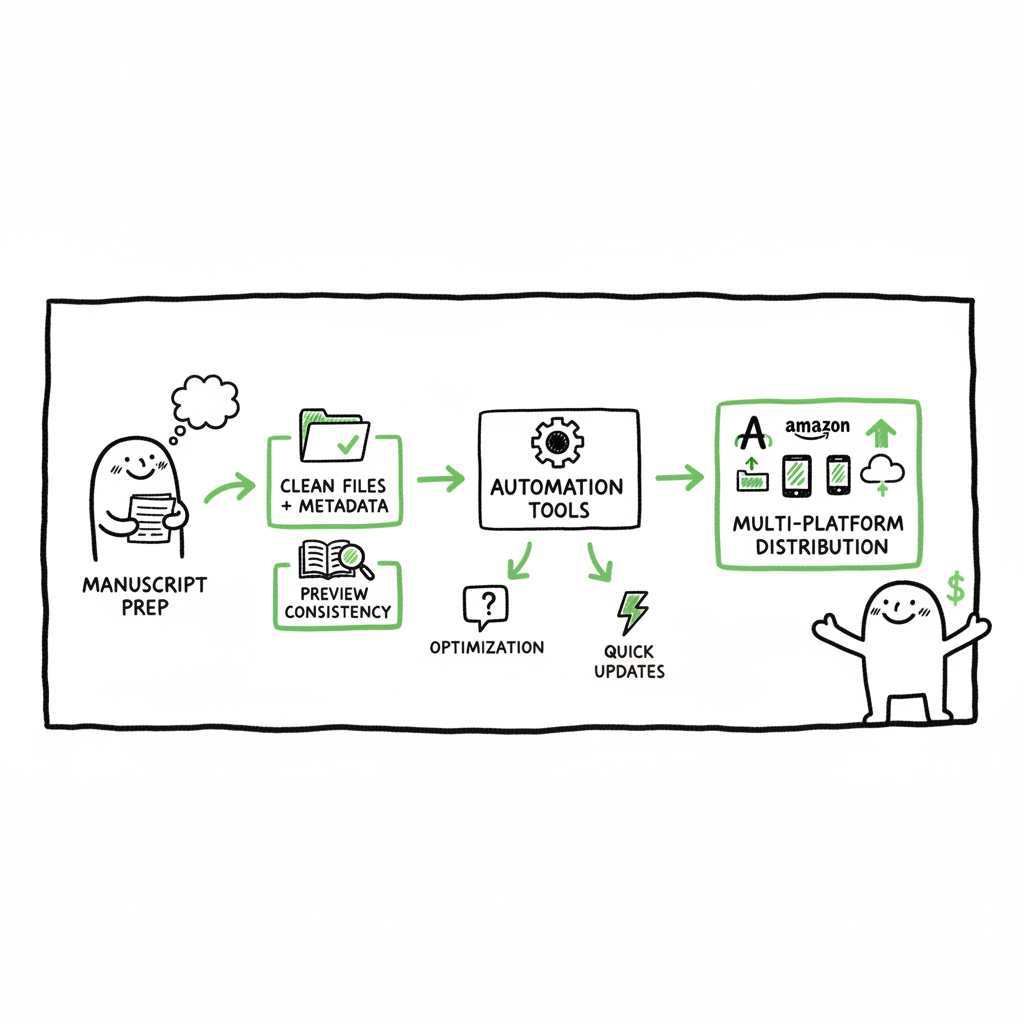
- Preparing clean files, accurate metadata, and consistent previews are the highest-leverage steps.
- Automating uploads and multi-platform distribution saves ~90% of repetitive effort once an author publishes at scale.
Table of Contents
- Overview — What the kdp author process looks like
- Prepare files, metadata, and proofing
- Upload, preview, rights, and pricing
- How automation and multi-platform distribution change the math
- FAQ
- Final thoughts
- Sources
What the kdp author process looks like
The kdp author process is the steady sequence an author follows from a finished manuscript to a live book on Amazon and beyond. It starts with clean files and metadata, moves through upload and preview, and finishes with rights, pricing, and monitoring. Authors who learn the steps once can repeat them reliably for multiple books—this is where efficiency compounds.
Early in this sequence you will spend most of your time on two things: getting the files right and writing metadata that helps readers find your book. For authors with a catalog, that preparation pays off because it avoids repeated manual fixes when uploading. If you want a practical guide to rapid uploads and multi-store distribution, see Self Publish Book Amazon Kdp for a walk-through that aligns with this process. (Self Publish Book Amazon Kdp for a walk-through that aligns with this process.)
This article shows the practical steps inside a typical kdp author process, points out common failure modes, and explains how automation and batch tools change the economics of self-publishing. You’ll get plain advice you can apply today, whether you publish your first title or manage dozens.
BookUploadPro is built for authors who publish seriously. It automates repetitive uploads across Amazon KDP, Kobo, Apple Books, Draft2Digital, and Ingram. Key operational features include:
– Unified multi-platform publishing from one master record.
– CSV batch uploads for catalogs and series.
– Platform-specific intelligence to reduce rejection risk and platform-specific errors.
– Error reduction and faster distribution turnarounds, making wide distribution practical.
For authors who are ready to scale, an automation service isn’t a luxury—it’s the operational upgrade that stops admin work from exhausting creative capacity. Automate the upload. Own the distribution.
Prepare files, metadata, and proofing
Why this stage matters
If the manuscript or metadata contains errors, everything after this point is slow and painful. Proper preparation cuts back-and-forth with stores, reduces failed uploads, and improves reader experience.
Manuscript formats and basics
KDP accepts common manuscript files. Save a final copy that is cleanly formatted for both ebook and print. Common formats include DOCX and final ebook files. Keep these rules simple:
– Clean the formatting: remove odd fonts, manual page breaks, and leftover track-changes. Use consistent paragraph styles.
– Front and back matter: include title page, copyright, table of contents, and author bio. For print, add proper page numbers and margins.
– Test reading flow on a device emulator or local ebook reader before upload.
Cover and visual assets (practical note)
A correct cover file is not just about design; it’s about dimensions, legibility at thumbnail size, and matching the metadata. Authors should always keep a final cover image that matches the title exactly. This lowers rejection risk in the store preview and ensures customers see a consistent product. For ideas on cover generation, see Book cover generator processing.
Title, subtitle, author name
The title and author name must be identical across your files and metadata fields. Mismatched titles between manuscript and the store listing are the most common cause of confusion during review.
Description and discoverability
The book description is marketing copy and an indexing field. Use the description to explain who the book is for, what it delivers, and include a clear hook in the first two lines. Use simple HTML where supported for line breaks and bold text to improve scannability.
Keywords and categories
KDP allows a limited number of keywords and categories. Pick keywords that match search intent and reader language. Categories should reflect where readers expect to find similar books. If you publish multiple books, keep a tracking sheet of keywords you test and the category combinations that perform better.
Metadata checklist
Keep one checklist or spreadsheet per book that contains:
– Final title and subtitle exactly as printed on the cover and title page.
– Author name(s) and contributors.
– Final description (copy-paste friendly).
– Up to seven keyword phrases and chosen categories.
– ISBNs or ASINs, if you supply ISBNs for print.
– Price targets and royalty selection.
Proofing and final pass
Before upload, do a word-level proof and a reader-level proof. The word-level pass catches typos and formatting. The reader-level pass reads the experience as a customer would—are chapter breaks sensible? Is the table of contents useful on device? Doing both forward-looking checks reduces revision cycles after publishing.
Upload, preview, rights, and pricing
The upload step is where the work in the previous stage pays off. If files and metadata are matched, uploads go smoothly and previews reflect the final product.
Account setup and permissions
Make sure your KDP account is verified and payments/taxes are set up. This avoids publishing delays and ensures your royalties route correctly.
Uploading files
On KDP, you’ll enter the title details, then upload the manuscript and the cover. Key operational points:
– Use the exact title and author strings from your metadata sheet.
– Upload the print and ebook files for the formats you plan to sell. If you offer print, double-check bleed and trim sizes.
– For ebooks, run the KDP previewer to confirm table of contents navigation and visual consistency.
Preview and fix cycle
Always preview the book on multiple device sizes via the KDP previewer. The preview shows how the book will look to buyers. Common preview catches:
– Orphaned headings or blank pages that appear in print.
– Images or illustrations misaligned.
– Incorrect cover spine or margin issues for print.
Rights, pricing, and royalty selection
KDP asks you to confirm publishing territories and royalty options. Choices here matter:
– Territories: choose worldwide unless you have rights restrictions.
– Royalty band: picking 70% versus 35% has price and delivery-size implications. Understand the file size and delivery costs for 70% selection.
– Pricing: test price points. Many authors run a short promotion or a lower entry price to build traction.
KDP Select and other programs
KDP Select gives Amazon-exclusive features for ebooks in exchange for exclusivity. Consider it as a tool for specific promotional strategies, not a default forever decision.
Publishing timing and monitoring
Once you publish, books commonly appear in 12–48 hours for English ebooks. Print timelines vary. Track the ASIN and product page immediately after publishing to confirm display and metadata. If adjustments are needed, use your spreadsheet to apply changes consistently and avoid typos.
Post-publish tasks
- Order an author copy for print to verify the physical product.
- Update your Amazon Author Central page with consistent author bio and photos.
- Monitor early reviews and sales ranks to spot issues quickly.
How automation and multi-platform distribution change the math
When you publish one book, manual uploads are manageable. At scale, repetition becomes the bottleneck. That’s why an efficient kdp process for active authors includes automation and a multi-platform strategy.
Why multi-platform matters
Amazon is the largest book store, but a meaningful share of readers buy from other retailers. Distributing to Kobo, Apple Books, Draft2Digital, and Ingram widens discoverability and revenue without much more creative work—if the technical process is automated.
Where automation saves the most time
Automation delivers the biggest gains in three areas:
– Repetitive uploads: filling the same metadata fields across platforms.
– File routing: packaging the same manuscript into platform-specific files.
– Error checking: catching mismatched titles or missing images before upload.
What automation looks like in practice
A practical automation setup does not mean zero human oversight. It means a reliable pipeline:
– Master record: one source of truth for the manuscript, metadata, and cover.
– CSV batch uploads: populate multiple listings from a spreadsheet for metadata and pricing.
– Platform intelligence: handle platform-specific quirks like maximum description length, keyword count, or specific size requirements automatically.
Why that setup matters for an author
For authors publishing several titles or series, automation reduces time spent on uploads by roughly 90%. That time is reclaimed for writing, promotion planning, or higher-value edition work like iterations on covers and blurbs. Once the process is automated, updating metadata across platforms becomes a single task rather than a dozen.
BookUploadPro: where automation fits
BookUploadPro is built for authors who publish seriously. It automates repetitive uploads across Amazon KDP, Kobo, Apple Books, Draft2Digital, and Ingram. Key operational features include:
– Unified multi-platform publishing from one master record.
– CSV batch uploads for catalogs and series.
– Platform-specific intelligence to reduce rejection risk and platform-specific errors.
– Error reduction and faster distribution turnarounds, making wide distribution practical.
For authors who are ready to scale, an automation service isn’t a luxury—it’s the operational upgrade that stops admin work from exhausting creative capacity. Automate the upload. Own the distribution.
FAQ
Q: What are the core steps in a kdp author process?
A: Core steps are: prepare a clean manuscript and cover, finalize metadata (title, description, keywords, categories), upload files, preview the book, set rights and pricing, and publish. Post-publish, monitor listings, order author copies, and update author pages.
Q: Which files do I need to prepare before upload?
A: Prepare a formatted manuscript file for ebook and print, a final cover image sized for the format, and a metadata sheet with title, author name, description, keywords, categories, ISBNs (if you provide them), and pricing. Keep a versioned copy of each file.
Q: How do I avoid common upload rejections?
A: Match title/author across files and metadata, check cover dimensions and spine layout for print, run the previewer for layout issues, and ensure image and font licenses are cleared.
Q: Can I publish to multiple stores without doing multiple manual uploads?
A: Yes—use a multi-platform publishing tool or a distributor that supports batch uploads and platform-specific packaging. These tools handle the routine field mapping and file conversion so you don’t repeat manual steps.
Q: What’s the most important metadata for discoverability?
A: Title and subtitle clarity, a well-written description, and targeted keywords. Categories matter for placement on store pages, and consistent author name across listings helps collect reviews and sales.
Q: How can I track changes and test what works?
A: Maintain a spreadsheet with versions for each book. Track price changes, keyword experiments, category choices, and promo periods. Measure results by sales rank and conversion over the weeks after a change.
Final thoughts
A practical kdp author process is repeatable, low-friction, and designed to surface problems early. Invest time in file and metadata hygiene once. If you publish multiple books, move quickly from manual uploads to CSV batch and automation tools—the time savings compound and free you to focus on writing and growing your readership.
If you are ready to scale the operational side of publishing, consider testing a multi-platform uploader that handles the repetitive parts and reduces manual errors. Automate the upload. Own the distribution.
Visit BookUploadPro.com to try the free trial.
Sources
- How To Publish A Book On Amazon – 2025 KDP Guide – LivingWriter
- Amazon KDP Guide: Publish Your Book in 7 Steps
- Create a Book – Kindle Direct Publishing
- The Ultimate Guide to Publishing on Kindle Direct Publishing (KDP)
- How to Publish a Book on Amazon in 6 Simple Steps – Reedsy
- KDP Jumpstart – Amazon.com
KDP Author Process: How to Streamline Publishing from Manuscript to Distribution Estimated reading time: 14 minutes Key takeaways A clear kdp author process reduces errors and speeds time-to-market. Preparing clean files, accurate metadata, and consistent previews are the highest-leverage steps. Automating uploads and multi-platform distribution saves ~90% of repetitive effort once an author publishes at…