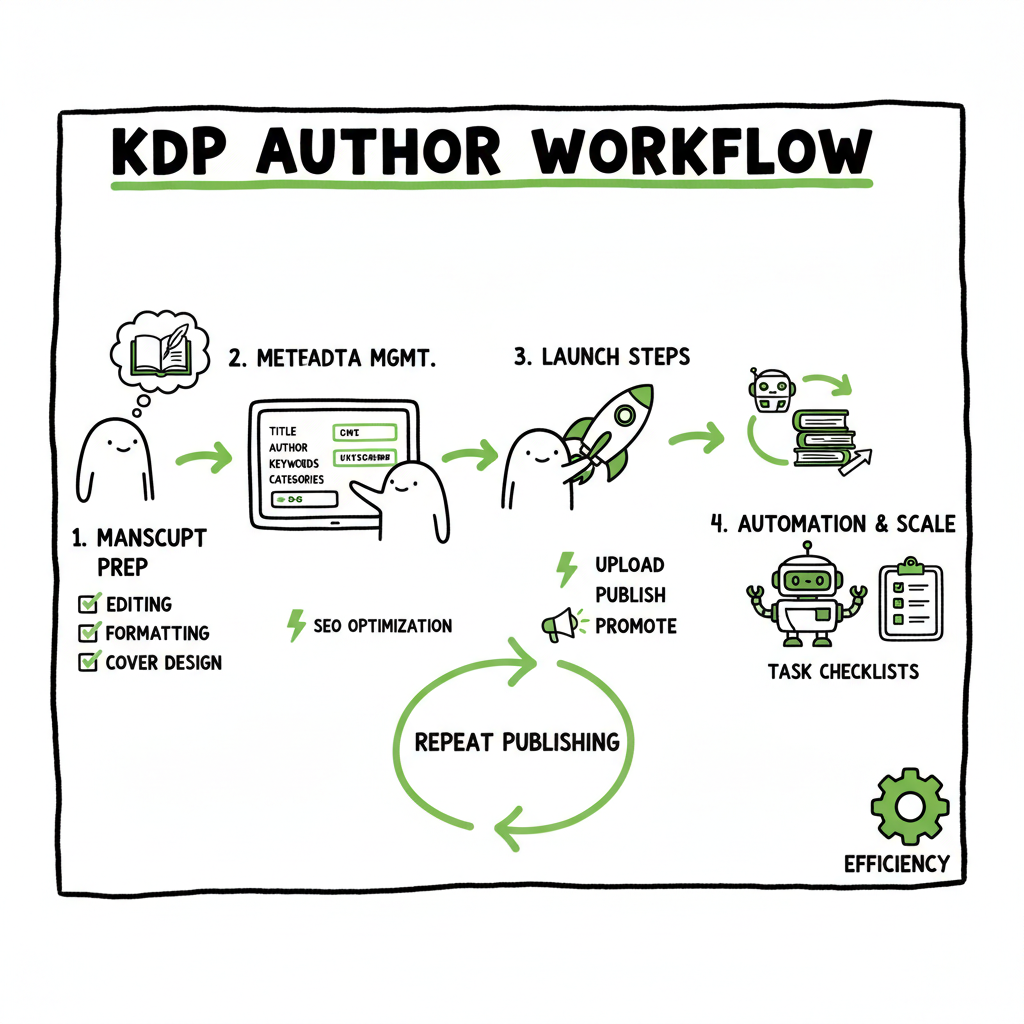
KDP author workflow explained for repeat publishing
kdp author workflow: a practical system for repeat publishing
Estimated reading time: 14 minutes
Key takeaways
- A repeatable kdp author workflow reduces rework by standardizing manuscript, metadata, and launch steps.
- Focus automation on what KDP allows: metadata reuse, batch uploads, and task checklists rather than trying to bypass KDP’s manual steps.
- Tools that unify uploads across retailers save time and cut errors once you publish more than a handful of books.
Table of Contents
- Why standardize your kdp author workflow
- Core stages and efficient kdp publishing steps
- Tools that actually save time
- FAQ
- Sources
Why standardize your kdp author workflow
A clear kdp author workflow is the difference between publishing one book and running a steady publishing program. KDP’s interface is fixed: enter book details, upload content, then set rights and pricing. Authors can’t change those steps inside KDP, but they can control everything around them. That is where gains happen.
When you publish repeatedly, small mistakes multiply. Missing a keyword, uploading the wrong cover file, or forgetting to update royalty information costs time and revenue. A standardized process keeps you consistent. It also makes delegation or automation possible later.
If you want a quick walkthrough of what KDP expects at upload time, check the Amazon KDP for Authors guide and use it to shape your own templates. Early on, build a folder structure that holds final manuscripts, covers, metadata sheets, and ISBN info. Naming files consistently saves minutes that add up across dozens of titles.
For a quick walkthrough, see Amazon KDP for Authors.
Standardization targets three things:
- Reduce manual re-entry of the same information.
- Make previews reliable by using final-format files.
- Keep marketing and metadata ready before you touch KDP’s upload form.
A simple habit that helps immediately is to keep a master metadata sheet. That sheet stores approved title formats, subtitle options, category choices, and several keyword banks. When you assemble a new project, you copy the row and tweak only what needs changing. This replaces recreating metadata from scratch for every book and is the single biggest time-saver for authors publishing multiple titles.
Core stages and efficient kdp publishing steps
An operational workflow mirrors the publishing stages you repeat for each title. Think of these as checkpoints, not as a checklist of granular tasks. The stages below capture the essential sequence and where to apply streamlining.
1) Project setup and account checks
Before publishing, confirm account details: tax and payment info, author name consistency, and publisher entries. Errors here can delay payouts or cause account flags later. Keep an account checklist in the same place you keep your metadata sheet so nothing is left to memory.
2) Manuscript finalization
This is editing, proofreading, and preparing a final file that matches KDP specifications. Use one final version labeled clearly (for example, Title_Final.KDP.docx or Title_FINAL.epub). Proofread on paper, then in an ebook reader if possible. When the interior is clean, upload and preview with confidence.
3) Cover design and sizing
A good cover reduces returns and helps discoverability. Treat covers as final deliverables with version numbers. When you create a paperback, export a print-ready PDF; for Kindle choose a high-resolution JPG or PDF per KDP guidance. If you build a cover, keep the source file and export specifics in your project folder so you can quickly reproduce the correct sizes.
4) Metadata collection and optimization
This is where discoverability lives. Use reusable description frameworks, tested keyword lists, and standard category choices. Keep multiple versions of your description for different channels. Store the final description in both your project folder and the master metadata sheet so the next book is faster.
5) Upload and preview
KDP forces you to upload manuscript and cover, then preview in their system. This is the fixed workflow everyone follows. Because this step is manual, prepare everything so the preview step is a confirmation, not a debug session.
6) Rights and pricing
Decide territories, pricing tiers, and KDP Select choices before starting upload. If you use the same pricing strategy across a series, store it in the metadata sheet and apply it each time.
7) Post-launch checks
After your book is live, verify the listing, download sales reports, and confirm payment routing. Add launch tasks—like setting up Author Central or scheduling promotions—into the same workflow so they are not forgotten.
Where to apply automation and templates
Automation is most effective outside KDP’s manual form. Focus on:
- Metadata templates: Copy fields from your master sheet directly into KDP.
- Reusable keyword banks: Keep sets for genres and tweak per title.
- Batch asset organization: Use a consistent folder structure so uploads are a single drag-and-drop step.
- Launch checklists: A saved checklist reduces cognitive load and avoids missed steps during busy launch days.
These items reduce repetitive typing and repeated decision-making. They don’t replace KDP inputs, but they let you complete KDP’s required steps much faster and with fewer errors.
Practical tips for each stage
- Manuscripts: Save a final EPUB and a final KDP-ready DOCX. Keep backups.
- Covers: Export in both ebook and print formats and store exports beside the source file.
- Metadata: Use short, testable descriptions and save the variations you will try in promotions.
- Pricing: Maintain a standard pricing grid for different markets and formats so you can apply prices quickly.
Tools that actually save time
Tools matter because they reduce busywork that eats publishing momentum. Choose tools that integrate with your workflow rather than tools that demand you change how you work.
What to look for in publishing tools
- Multi-platform output: If you plan to sell beyond Amazon, a tool that prepares files or coordinates uploads for Kobo, Apple Books, Draft2Digital, and Ingram saves real time.
- Metadata reuse and CSV batch support: When you manage many titles, uploading a CSV or using batch metadata imports is far faster than entering each book into each retailer by hand.
- Platform-specific intelligence: A good tool understands where retailers differ and surfaces those differences so you don’t make incorrect assumptions.
- Error reduction: Tools that validate files or flag metadata issues prevent rework.
How BookUploadPro fits into a practical workflow
BookUploadPro is a workflow layer built for authors who publish seriously. It centralizes metadata, supports CSV batch uploads, and coordinates distribution across Amazon KDP, Kobo, Apple Books, Draft2Digital, and Ingram. For authors moving from occasional self-publishing to regular releases, it becomes obvious quickly: automating the upload saves time, reduces errors, and makes wide distribution practical.
Key benefits to expect:
- Unified multi-platform publishing without repeating the same data entry on each retailer.
- Up to ~90% time savings on repetitive tasks like metadata entry and file association.
- CSV batch uploads for consistent, repeatable title batches.
- Platform-specific checks to catch problems early.
- Affordable pricing and a free trial so you can validate the fit for your catalog.
Automating the things KDP won’t automate
KDP enforces its three-step process, so you can’t “skip” manual upload. What you can do is prepare everything outside of KDP in a way that makes the KDP upload quick and error-free. That’s the practical value of an automation layer: it organizes, validates, and applies the right files and metadata so KDP becomes a quick confirmation step.
Supporting tools to reduce formatting and conversion friction
- EPUB conversion tools are useful when you need a clean ebook file that matches retailer requirements. If your process includes converting manuscripts to EPUB, consider specialized converters to close formatting gaps early and avoid preview errors. For hands-off EPUB conversion, use a reliable EPUB conversion service.
- Covers often require precise sizing, so use a cover tool that outputs both ebook and print-ready files. If you build covers in-house, consider a cover generator to speed template-based work and batch exports.
- For paperback interiors, keep one print-ready PDF per title. That file should be named clearly and stored in a shared upload folder.
External helpers you might use in the workflow
- If you need a quick, template-based cover solution, a cover generator can speed the design and export process.
- If you rely on EPUB files for e-distribution, an EPUB conversion service saves manual fixes in KDP’s previewer.
- For creating paperbacks or ebooks and storing them with consistent exports, use a book-creation platform that keeps your assets ready.
Balancing automation and manual checks
Don’t automate checks that require human judgment. The best systems automate the repetitive, verifiable tasks and leave decisions that need taste, language nuance, or legal checks to humans. That hybrid approach reduces mistakes while keeping quality where it matters.
FAQ
Q: Can I fully automate publishing to KDP?
A: No. KDP requires that certain steps—details, content upload, and rights & pricing—be completed in their system. You can automate preparation and reuse of data, but the final KDP steps remain manual.
Q: What parts of the kdp author workflow save the most time when automated?
A: Metadata reuse, CSV batch uploads, file organization, and platform-specific validation save the most time. These tasks eliminate repeated typing, reduce errors, and speed up the manual upload portion of KDP.
Q: Will a tool like BookUploadPro change how I write or edit?
A: No. Tools that support workflow focus on the upload and distribution process. Editing and writing are still your domain. The benefit is less time spent on uploads and more time for actual writing and promotion.
Q: Do I still need formatting and conversion tools?
A: Yes. Formatting and conversion ensure your manuscript looks correct across devices. Use dedicated EPUB conversion tools and reliable cover export methods so KDP previews are clean the first time. If you need help converting files to EPUB, a good EPUB conversion service makes the step less time-consuming.
Q: Is multi-platform publishing worth it for a small catalog?
A: If you plan to publish regularly and want discoverability beyond Amazon, yes. Multi-platform publishing becomes more valuable as you scale because it widens distribution and makes your titles findable in different storefronts. Once you publish seriously, a unified publishing layer is an obvious upgrade.
Final thoughts and next steps
A practical kdp author workflow focuses on repeatability. Start by building a master metadata sheet, creating a consistent file and folder naming system, and deciding on a single process for cover and interior exports. Use templates for descriptions and keywords. Then test one automation step—like a CSV batch upload or a metadata reuse tool—and measure the time saved. When those savings add up, consider a unified service that publishes to multiple retailers and reduces the manual work of repeated uploads.
Automate the upload. Own the distribution.
Call to action
Visit BookUploadPro.com and try the free trial to see how multi-platform upload automation fits your process.
Sources
- How To Publish A Book On Amazon – 2025 KDP Guide (LivingWriter)
- The Ultimate Guide to Publishing on Kindle Direct Publishing (DIY Book Covers)
- Create a Book – Kindle Direct Publishing Help
- Start publishing with KDP – Kindle Direct Publishing Help
- How to Publish a Book on Amazon in 6 Simple Steps (Reedsy)
- Amazon KDP Guide: Publish Your Book in 7 Steps (SelfPublishing.com)
- Getting Started with Kindle Create – KDP Help
kdp author workflow: a practical system for repeat publishing Estimated reading time: 14 minutes Key takeaways A repeatable kdp author workflow reduces rework by standardizing manuscript, metadata, and launch steps. Focus automation on what KDP allows: metadata reuse, batch uploads, and task checklists rather than trying to bypass KDP’s manual steps. Tools that unify uploads…