KDP Author Workflow to Streamline Publishing Steps
KDP Author Process: Streamline Publishing from Manuscript to Market
Estimated reading time: 14 minutes
Key takeaways
- A reliable kdp author process reduces repeated manual steps and prevents common upload errors.
- Automating repetitive tasks—batch CSV uploads, platform-aware file checks, and reuseable metadata—saves time at scale.
- Use unified multi-platform publishing to reach more readers with less overhead; automation makes wide distribution practical.
Table of Contents
- Overview
- A practical KDP author process, step by step
- Automating repetitive KDP tasks at scale
- Common errors and how to prevent them
- FAQ
- Final thoughts
- Sources
Overview
A clear kdp author process turns publishing from a one-off scramble into a repeatable production line. Whether you publish one title a year or a dozen, the same small bottlenecks—file conversions, cover sizing, metadata entry, rekeying rights and pricing—eat time and introduce mistakes. A practical process organizes the work, and automation removes the repetitive clicks.
If you want a deeper look at how KDP handles author accounts and distribution, see Amazon KDP For Authors for platform details and account-level tasks that influence how you structure your process.
In this article you’ll get a simple, operational process you can apply today. I’ll explain where authors commonly lose hours, which steps benefit most from automation, and how to make multi-platform distribution routine without turning publishing into a full-time job.
A practical KDP author process, step by step
-
Source and master files
Keep a single “master manuscript” in a format that’s easy to update (DOCX or a well-managed manuscript project). Track chapters, assets, front matter, and back matter in clearly named folders.
Maintain versioning: add a simple version suffix to filenames (v1, v2) so you always know which file is current.
Save a separate production copy exported to the formats you’ll publish (EPUB for ebooks, PDF/DOCX for print). Standardizing early prevents last-minute surprises.
Why EPUB matters early: export a clean EPUB as soon as the manuscript is stable. EPUB is the most platform-friendly ebook format and forces you to catch structural problems before upload. If you need a tool to convert reliably, use a trusted EPUB converter to avoid layout or metadata issues.
-
Covers and assets
Produce a print-ready cover and an ebook cover that meet each platform’s specs. Keep an editable layered source so you can update spine copy or back-cover text without rebuilding the whole design.
For speed, use a reliable cover generator or processing service that outputs platform-sized images and spine templates automatically; that removes one frequent friction point.
For scalable cover processing, see cover generation resources that produce platform-size images and spine templates automatically.
-
Metadata master record
Create a single metadata spreadsheet for each title. Record title, subtitle, series info, author name variants, description, keywords, BISAC categories, language, rights, ISBNs, and pricing targets for each marketplace.
Store the final product metadata as a CSV that can be reused for batch uploads or pasted into platforms. This is the core of scaling: one master record, many outputs.
-
Format checks and proofs
Run format checks: validate EPUB (structure, images, table of contents), check print PDFs for bleed and margin safety, and create a print proof for physical books.
Use platform previewers and a device or two for visual checks. Automated checks catch a lot, but a final human proof read is still worth the ten minutes.
-
Platform-specific entry
Enter metadata and upload files to each platform (KDP, Kobo, Apple Books, Draft2Digital, Ingram). Follow platform-specific rules—file types, image sizes, metadata fields—without improvising.
Where possible, use CSV batch uploads or multi-platform publishers to reduce repetitive entry.
-
Rights, pricing, and distribution
Confirm rights and territories. Decide which platforms will carry which format (e.g., KDP and Ingram for print, Apple and Kobo for ebooks).
Set pricing tied to your revenue goals and promotional plans; store pricing rules in your metadata master so you can apply them quickly.
-
Post-launch checks and monitoring
Confirm listings live across marketplaces, check buy links, and spot-check formatting.
Track sales channels and returns to feed into your next cycle of releases.
Automating repetitive KDP tasks at scale
Automation is where a thoughtful kdp author process becomes efficient publishing at scale. Automation doesn’t replace careful editing or design, it removes the repetitive, error-prone steps that slow you down.
Where automation helps most
- CSV batch uploads: Populate metadata across multiple platforms from one spreadsheet. This reduces manual typing and ensures identical metadata across channels.
- File conversion and formatting checks: Automate EPUB conversion and validation to catch markup issues early. A reliable converter reduces send-back cycles.
- Cover processing: Automatically generate correctly sized covers for ebooks and print, including DPI, bleed, and spine calculations for specific trim sizes.
- Platform-specific intelligence: Use tools that apply the right settings per platform—for example, choosing the correct file for KDP vs Apple Books or scaling images according to each store’s needs.
Practical automation steps you can adopt now
- Replace repetitive copy-paste with a metadata CSV that maps to platform fields. Keep one row per edition (ebook, paperback) and include columns for each platform’s unique needs.
- Use batch upload features where available, and test them with a single title until you’re comfortable.
- Automate filename conventions with simple scripts or file-renaming tools so your files are always correctly labeled when you upload.
How automation reduces errors
It enforces consistent metadata across all stores, which improves discoverability and reduces the chance of duplicate or mismatched listings. It prevents small file mistakes—wrong spine width, incorrect EPUB table-of-contents, missing images—that cause listings to be rejected or display poorly. At volume, these automated checks compound: saving minutes on each title scales to hours or days per release cycle.
Why multi-platform automation matters
Publishing on Amazon alone is fine for many authors, but widening distribution makes marketing, discoverability, and long-term catalog health stronger. Automation is the practical way to do that without hiring a full-time operations person. Unified multi-platform publishing, CSV batch uploads, and platform-specific intelligence let you publish widely while reducing repetitive work by roughly 90% compared to manual entry.
When to bring in a tool
If you plan to publish more than a few titles a year, look for a publishing automation service that supports KDP, Kobo, Apple Books, Draft2Digital, and Ingram.
Choose tools that: accept CSVs, perform platform-aware checks, handle EPUB conversion reliably, and produce print-ready cover files. When you scale, automation is an obvious upgrade: automate the upload. Own the distribution.
Practical integrations to consider
- EPUB conversion services for consistent ebook files.
- Cover processing that outputs both ebook and paperback art from a single source.
- A publishing dashboard that tracks uploads, errors, and live status across stores.
Note on tools and vendors
Use solutions that focus on reducing errors and standardizing output, not just connectors. Look for services that report exact platform errors and suggest fixes so you spend less time guessing what went wrong.
When to keep things manual
Early drafts and heavy editorial revisions are best done outside automation. Convert to EPUB only when the manuscript is stable. One-off experimental formats (interactive ebooks, image-heavy art books) may need manual attention.
A sample automation flow
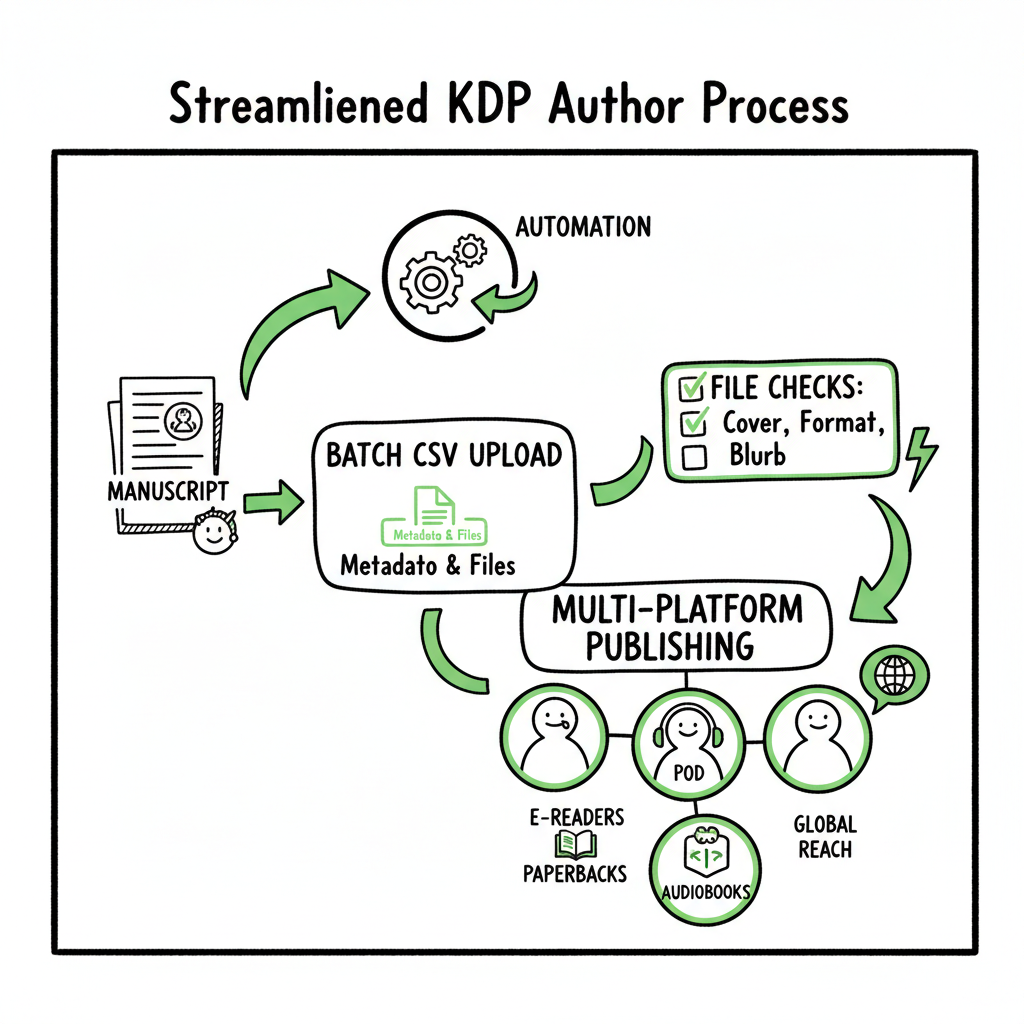
- Finalize manuscript in DOCX.
- Run automated EPUB conversion and validation.
- Generate ebook and print covers via a cover processing service.
- Export metadata CSV for all editions and platforms.
- Run batch upload to distribution services.
- Review platform error reports and fix flagged items.
- Confirm live listings.
A note on covers and EPUB workflow
Cover design and EPUB conversion are distinct but linked steps in a healthy process. Automated cover processing speeds delivery of correctly sized files, and automated EPUB conversion reduces rework. If you need a scalable cover solution, use a cover generator that produces platform-size images and spine templates. If EPUB conversion is part of your routine, use a robust converter to avoid layout regressions and metadata loss. For EPUB-related automation, see the EPUB converter.
If you need a publishing solution, BookAutoAI offers publishing solutions.
Common errors and how to prevent them
-
Wrong spine size or incorrect bleed
Why it happens: spine width depends on page count, paper type, and trim size. People often reuse a previous cover file and forget to update the spine.
Prevention: regenerate spine and bleed automatically from the final PDF page count and trim settings; always export a fresh cover for each edition.
-
EPUB structure issues (broken TOC, lost images)
Why it happens: conversion tools can fail silently when source files have inconsistent styles or embedded objects.
Prevention: clean up styles in the DOCX before conversion, validate EPUB with an EPUB validator, and spot-check the navigation on an e-reader app.
-
Mismatched metadata across platforms
Why it happens: manual entry or copying between sites leads to typos or inconsistent keywords/categories.
Prevention: use a single metadata master CSV and populate platform fields from that source.
-
Incorrect ISBN use across formats
Why it happens: ISBNs are platform- and format-specific; authors sometimes reuse ISBNs across ebook and print.
Prevention: track ISBNs in your metadata sheet and label them by edition. Apply them consistently in uploads.
-
Rejected uploads due to file type or size
Why it happens: each platform has different file type expectations and size limits.
Prevention: follow platform guidelines saved in a central reference sheet. Automate file checks to flag non-compliant images or oversized files.
-
Pricing and royalty mistakes
Why it happens: pricing entered without checking platform royalty bands or regional price mapping causes unexpected royalties.
Prevention: keep a pricing matrix in your metadata master. Automate conversion rules for marketplaces (e.g., list price adjustments for VAT or VAT-inclusive stores).
-
Missed distribution territories
Why it happens: rights and territories get overlooked, limiting availability.
Prevention: decide distribution territories up front and record them in your master record for each title.
Recovery when things go wrong
- Use platform error messages as your guide. Export any available error reports, correct the source file or metadata, and re-upload.
- Keep a changelog for each upload so you can quickly revert or re-issue corrected files.
Operational checks to add to your workflow
- A quick checklist for every upload: final EPUB validated, covers regenerated, metadata CSV updated, ISBNs assigned, pricing matrix applied, and a test buy link confirmed.
- Automate the checks where possible and keep the human spot-check focused on content quality rather than form fields.
FAQ
Q: What is the most important file to keep organized in a kdp author process?
A: The metadata master (CSV) and the final manuscript master (DOCX/EPUB). Those two files control how the book appears across stores and allow batch operations.
Q: Should I always convert to EPUB before uploading to KDP?
A: No. KDP accepts DOCX for paperbacks, but EPUB is the preferred ebook format across many platforms. Generating and validating EPUB early helps prevent ebook-specific issues.
Q: How much does automation actually save?
A: For authors publishing multiple titles a year, automation can cut repetitive entry time by roughly 70–90%, depending on the tools and the number of platforms.
Q: Can I automate covers and still keep quality design?
A: Yes. Use automation for technical tasks—generation of correct sizes and spines—while keeping creative direction human. A good cover generator produces production-ready files that designers can tweak.
Q: How do I avoid duplicate listings across stores?
A: Maintain a single metadata master and ensure ISBNs are used correctly per edition. Use distribution reports and buy links to confirm listings, and track each platform’s title ID in your spreadsheet.
Final thoughts
A reliable kdp author process makes publishing predictable. The discipline of a master manuscript, a metadata CSV, validated EPUBs, and automated cover processing turns a complex convergence of platform rules into an operational routine. That routine lets you publish more titles with fewer errors and frees time to focus on writing and marketing.
When authors start publishing seriously, a unified multi-platform publishing tool becomes an obvious upgrade: it centralizes CSV batch uploads, adds platform-specific intelligence, reduces manual work by about 90%, and makes wide distribution practical. Automate the upload. Own the distribution.
If you use automated cover processing or EPUB conversion in your workflow, leverage services that produce platform-ready outputs and clear validation reports so you spend your time fixing the right problems.
Sources
- KDP Help, Amazon
- Reedsy: How to publish a book on Amazon
- LivingWriter: How to publish a book on Amazon (2025 guide)
KDP Author Process: Streamline Publishing from Manuscript to Market Estimated reading time: 14 minutes Key takeaways A reliable kdp author process reduces repeated manual steps and prevents common upload errors. Automating repetitive tasks—batch CSV uploads, platform-aware file checks, and reuseable metadata—saves time at scale. Use unified multi-platform publishing to reach more readers with less overhead;…