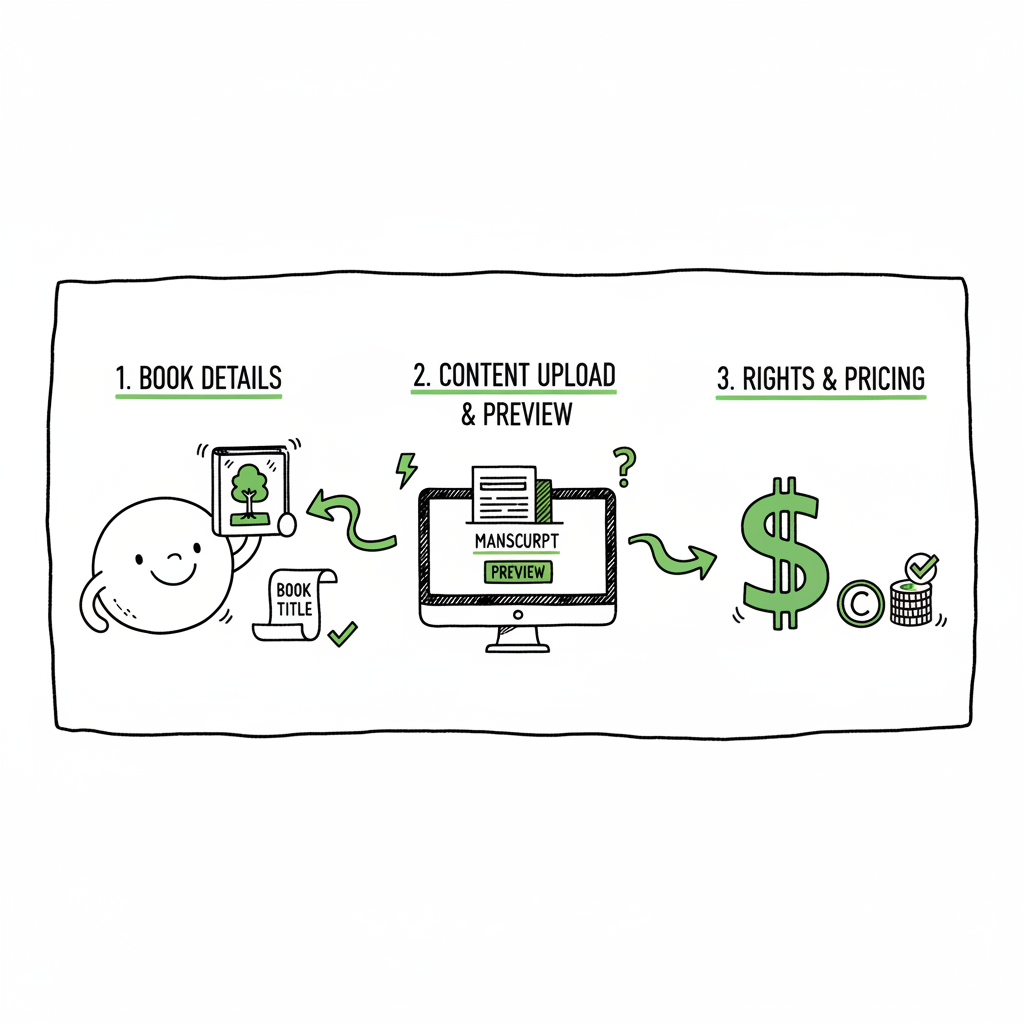
KDP Author Workflow From Manuscript to Distribution
kdp author process: How to move from manuscript to multi-platform distribution
Estimated reading time: 9 minutes
Key takeaways
- The KDP author process breaks into three repeatable stages: book details, content upload & preview, and rights & pricing. Treat each as a checklist to avoid errors.
- You can streamline KDP tasks with careful prep, format choices (EPUB recommended), and targeted tools to reduce repetitive work.
- When you publish at scale, multi-platform automation (CSV batch uploads, platform intelligence, error checks) saves time and reduces mistakes—BookUploadPro makes this practical.
Table of Contents
- What the kdp author process looks like
- How to streamline the kdp author process
- Tools that reduce manual steps and kdp task automation
- Frequently asked questions
- Sources
What the kdp author process looks like
The KDP author process is the step-by-step sequence you follow to take a book from a finished manuscript to live on Amazon. For most authors it’s predictable: enter the metadata, upload the files, and set rights and pricing. Doing those three steps reliably keeps your books linked correctly and minimizes surprises.
Stage 1 — Book details
Stage 1 — Book details
This is where you enter the title, subtitle, author name, description, categories, and keywords. Accuracy matters here. If the manuscript metadata and what you enter into KDP don’t match exactly (title spelling, author format, ISBN), KDP may not link the eBook and paperback together automatically. Plan a naming convention for series and editions and stick to it across platforms.
Stage 2 — Upload and preview content
Stage 2 — Upload and preview content
Upload your manuscript and cover files, then use KDP’s previewer. Amazon prefers EPUB for eBooks. EPUB gives cleaner control over layout and table of contents than uploading a Word file. For print books, confirm trim size, margins, and bleed. Previewers catch the common issues—misaligned images, fonts that don’t embed, and margins that will cut off text. Don’t skip a careful preview pass.
Stage 3 — Rights and pricing
Stage 3 — Rights and pricing
Choose territories, select your royalty option (35% or 70% where eligible), and set regional prices. KDP shows a calculator for marketplace prices and delivery costs for large file eBooks. You can change prices later, but initial settings affect launch reports and preorders, so double-check currency conversions and taxation settings.
Why the process matters
If you follow the same sequence every time, you reduce avoidable errors: mismatched ISBNs, wrong interior files, and lost metadata that prevents series linking. The KDP process has built‑in checks, but your prep determines how often those checks flag issues.
How to streamline the kdp author process
If you publish one book, the raw KDP process is manageable. When you publish dozens of titles, small inefficiencies add up. Streamlining is about removing repeat manual steps so you spend time on high‑value work like writing and marketing.
Start with a preflight checklist
Create a simple preflight checklist that mirrors KDP’s sections. Before you open KDP, confirm:
- Final title, subtitle, author name, and series name exactly as they will appear.
- ISBNs assigned for each edition or a plan to use KDP’s free ISBNs.
- Correct interior file (PDF for print, EPUB for eBook) and a print‑ready cover.
- Categories and five strong, specific keywords.
- Pricing mapped to target royalties and territory availability.
Standardize file names and metadata
Use a naming scheme for files: AuthorName_Title_Edition_Filetype. Store a master CSV or spreadsheet with the fields KDP asks for. That same sheet becomes the single source of truth when you publish to other platforms. This reduces transcription errors and makes bulk uploads possible.
Favor EPUB for eBooks
EPUB is the recommended format for eBooks. It handles reflowing text, navigation, and embedded resources far better than a raw DOCX export. If you use a consistent EPUB workflow, you reduce preview fixes and improve reader experience.
Use templates for print interiors and covers
Set up print templates for your trim sizes. Templates lock in margins and gutter settings, which are the most common causes of printed page issues. For covers, use a standard layer structure so spine, front, and back remain predictable as you swap designs.
Batch repetitive work
If you publish a series or multiple small books, batching metadata entry and content checks saves time. Prepare a batch of metadata in one session, then another session for cover exports, and then a final session for uploading and previewing. That flow reduces context switching and errors.
When to automate vs when to do manual
Automation helps when fields are repetitive: title variants, author name formats, series numbering, pricing tiers. But final quality checks should stay manual. Automation should hand you a clean job to sign off on, not a fully unsupervised publish.
Tools that reduce manual steps and kdp task automation
There’s a difference between tools that help you format and tools that remove manual entry across stores. You’ll use both as your publishing volume grows.
Formatting and validation tools
– Kindle Create: Amazon’s own tool guides formatting and builds a cleaner table of contents. It reduces file-prep time when your manuscript is mostly text and simple elements.
EPUB converters: Converting a manuscript to a validated EPUB is a common step. A reliable converter reduces rework from KDP previewer errors. If you convert often, a dedicated EPUB tool or service speeds things up (see resources below).
Cover generators and templates: For consistent covers across a series, a cover generator or layered templates keep layout predictable.
Platform-level task reduction
Direct KDP automation is limited—KDP is designed as a manual publisher interface. That’s why authors who publish broadly use multi-platform tools to handle repetitive uploads and keep data consistent across stores. If you publish widely, a CSV-based batch upload tool that understands each store’s quirks is worth the investment.
A practical early step: batch export one source of truth
Keep a master CSV with all your book fields. You’ll use it to:
- Populate KDP fields
- Populate other stores (Kobo, Apple Books, Draft2Digital, Ingram)
- Drive cover and interior naming conventions
Where kdp task automation helps most
– Applying the same pricing tiers across marketplaces
– Reusing a single metadata record to populate multiple stores
– Error checking filenames and missing fields before upload
– Bulk toggling terms like DRM, print rights, and territories
When you outgrow manual entry, automation tools that can read a CSV and perform platform-aware uploads reduce tedious work and mistakes.
Scaling with multi-platform publishing tools
Publishing on Amazon alone is fine early on. Wide distribution is practical when you can avoid repeating the same manual steps on each retailer. A multi-platform uploader that handles CSV batch uploads and platform-specific rules lets you publish more titles reliably.
What to expect from a serious uploader
– Unified multi-platform publishing so one job creates listings for KDP, Kobo, Apple Books, Draft2Digital, and Ingram.
– Platform-specific intelligence so your EPUB or print PDF meets each retailer’s requirements automatically.
– CSV batch uploads for dozens or hundreds of titles.
– Validation and error reporting before you hit publish.
– Exportable logs so you can audit what went live and where.
BookUploadPro in the process
When authors start publishing seriously, a service that automates repetitive uploads becomes an obvious upgrade. BookUploadPro automates the upload across Amazon KDP and other stores, with features that matter for scale: CSV batch uploads, platform-specific intelligence, and checks that reduce errors. That combination delivers around 90% time savings on repetitive tasks and makes wide distribution practical.
Practical example: one author’s week with and without automation
Without automation: an author spends hours entering metadata and uploading files to each store, previews each file in separate interfaces, and resolves platform-specific issues one by one.
With a multi-platform uploader: the same author prepares a single CSV and validated EPUB/PDF files, uploads once, reviews a validation report, and schedules publish dates across stores. Errors are flagged early. The author spends saved time writing and promoting.
Cover, EPUB, and book creation links you’ll use
When you prepare files, you’ll likely create covers, convert to EPUB, and generate print-ready files. If you need a cover generator or processing, there are services that automate cover generation and export to retailer specs. A reliable EPUB converter reduces previewer errors and speeds the content upload step. If you produce paperbacks or eBooks regularly, using a tool that can create and validate those outputs is worth the time.
Practical tips to reduce rework
– Keep a staging account or folder for final proofs. Don’t overwrite live files until you’ve confirmed previews.
– Use a small checklist at the end: match title text to metadata, check ISBN links, confirm cover spine text, and run a final EPUB validation.
– Log every publish: date, marketplaces, file versions, and price.
How BookUploadPro fits in an efficient kdp publishing steps strategy
BookUploadPro is built for authors who need to scale. It handles unified uploads (KDP + others), understands each platform’s quirks, and uses CSV-driven workflows so your master metadata table becomes a single source of truth. That translates into practical benefits: fewer manual errors, predictable book linking across editions, and a much faster path to wide distribution. Automate the upload. Own the distribution.
FAQ
Q: What is the basic KDP process?
A: The basic process is threefold: enter book details, upload and preview the manuscript and cover, then choose rights and pricing. Each stage has specific required fields; treating them as a routine reduces errors.
Q: Should I use EPUB or Word for eBooks?
A: EPUB is preferred. It gives better control for navigation and reflow, and it reduces preview fixes. Convert to a validated EPUB before uploading.
Q: How do I avoid edition linking problems?
A: Make sure the title, subtitle, author, and ISBN match exactly across the files and metadata you submit. Use consistent naming conventions and check how your series fields are entered.
Q: Can I automate KDP uploads directly?
A: KDP itself has limited automation for public users. The practical route is to use a multi-platform tool that prepares platform-specific uploads and then pushes content in a controlled way, reducing repetitive manual entry.
Q: What saves the most time when publishing many books?
A: Two things: a master CSV of metadata, and reliable file generation (EPUB and print PDFs) that follows retailer specs. Combined, these let you batch uploads and validate before you publish.
Q: Do I need a paid tool to publish widely?
A: Technically no, but once you have many titles, a paid multi-platform uploader that understands each retailer and reduces manual data entry will save time, prevent mistakes, and often pay for itself in hours saved.
Q: Where can I learn platform-specific rules for KDP?
A: Amazon’s official KDP help pages outline the required fields and supported formats. Pair those rules with a disciplined internal checklist to avoid avoidable errors.
Sources
- https://kdp.amazon.com/help/topic/G202172740
- https://reedsy.com/blog/guide/kdp/how-to-publish-a-book-on-amazon/
- https://damyantiwrites.com/kindle-direct-publishing/
- https://kdp.amazon.com/help/topic/GUGQ4WDZ92F733GC
- https://www.automateed.com/kdp-author-central/
kdp author process: How to move from manuscript to multi-platform distribution Estimated reading time: 9 minutes Key takeaways The KDP author process breaks into three repeatable stages: book details, content upload & preview, and rights & pricing. Treat each as a checklist to avoid errors. You can streamline KDP tasks with careful prep, format choices…