KDP Author Workflow to Streamline Multi-Platform Publishing
kdp author process: a practical multi-platform process for self-publishers
Estimated reading time: 15 minutes
Key takeaways
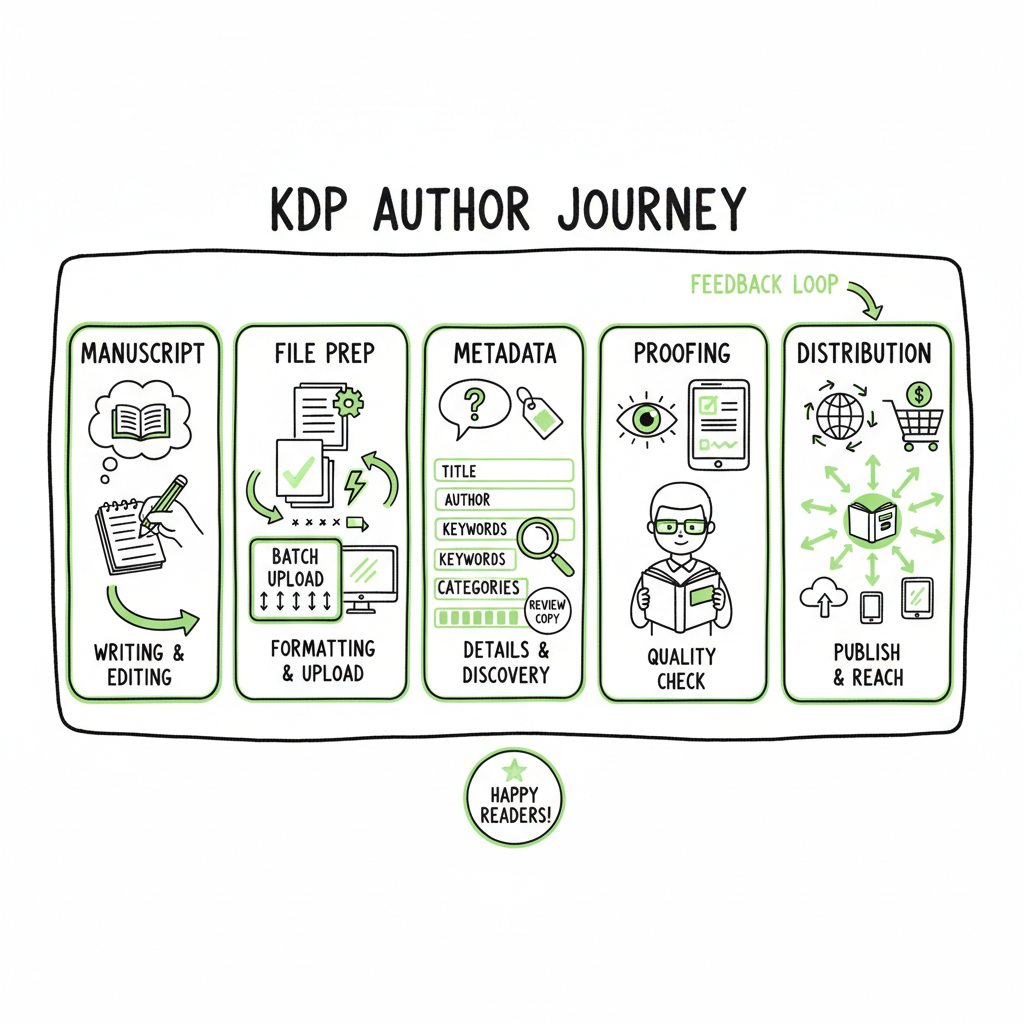
- A repeatable kdp author process breaks the process into manuscript, files, metadata, proofing, and distribution—so you can scale without redoing work each time.
- Batch uploads, CSV-driven metadata, and platform-aware formatting cut busy work; tools reduce errors and save roughly 90% of manual upload time.
- Multi-platform publishing (Amazon KDP plus Kobo, Apple Books, Draft2Digital, Ingram) becomes practical when you standardize files and use a single automation layer.
Table of Contents
- kdp author process: core steps
- Organize, batch, and automate publishing tasks
- Formatting, distribution, and platform quirks
- FAQ
kdp author process: core steps
A kdp author process is the repeatable path you follow from manuscript to sales page on Amazon and beyond. When you boil it down, successful processes cover five practical areas: manuscript preparation, cover and interior files, metadata and categories, platform uploads and proofs, and post-live housekeeping. Get those five parts reliable and you stop firefighting every title.
Start with the manuscript as deliverable, not a draft. That means a clean, final file, basic copyedits done, and a target trim size and distribution type chosen. From here the process branches into two parallel tasks: produce marketing assets (cover, description, categories, keywords) and produce deliverables (ebook EPUB, print PDF, sample pages). Treat metadata like a file: it should live in a CSV or template that you can reuse across projects.
If you’re new to this, check practical guides such as Amazon KDP’s publishing basics. When you’re ready to scale past one or two titles, it helps to see how this connects to wider distribution. For example, a focused article on Amazon KDP for Authors explains KDP’s upload fields and how they map to other platforms; keeping that mapping in a template saves hours per title. This is where a centralized process matters: once you standardize fields, you can reuse them across platforms without retyping everything.
Practical sequence (what you do, in order)
-
Finalize manuscript and select trim/format targets.
-
Create a cover specifically sized for print and a variant for the ebook.
-
Convert and validate EPUB for ebook stores; create a print-ready PDF for paperbacks.
-
Compile metadata into a single spreadsheet you can reuse.
-
Upload and proof on each platform; resolve errors and publish.
-
Set up reporting, catalog entries, and promotional tracking.
Every step has repeatable checks. For manuscript files, validate fonts and widows/orphans. For EPUB, check navigation and look at a handful of reader apps. For metadata, use consistent title casing and brand wording. Make the checks simple so they’re fast to execute.
Organize, batch, and automate publishing tasks
Once the core steps are reliable, the biggest gains come from batching and automation. Doing the same small tasks one book at a time is slow and error-prone. Group titles, reuse templates, and use CSV-driven uploads where possible. At scale, a CSV with one row per title becomes your single source of truth.
Why batch work matters
- Consistency: When one person or a system fills the same fields for ten books, the output looks and reads the same.
- Speed: Filling a CSV or using a batch upload trims repetitive typing.
- Fewer errors: Automation can validate field lengths, required fields, and ISBNs before any platform rejects them.
How to build a batching routine
-
1. Template the metadata. Include title, subtitle, series, contributor roles, language, primary and secondary categories, up to the allowed number of keywords, price, territories, ISBN, and short and long descriptions. Store it in CSV so you can filter, sort, and bulk edit.
-
2. Standardize file naming. Use a consistent structure: ISBN_trim_size_role (e.g., 9781234567890_6x9_interior.pdf). That reduces upload confusion when you work with multiple platforms.
-
3. Use a staging checklist. For each title, mark manuscript done, cover done, EPUB validated, print PDF validated, metadata complete. You can manage this in a spreadsheet or a lightweight project board.
-
4. Batch the uploads. Group titles by the platform and requirements. Upload all KDP titles in one session; then move to Kobo, Apple, Draft2Digital, and Ingram. Platform-specific intelligence in automation tools handles differences so you don’t repeat manual fixes.
When to automate vs. manual
- Automate: repetitive uploads, metadata mapping, and file distribution across platforms.
- Manual: creative tasks and final proofing—human judgment still matters for cover appeal, blurbs, and editorial decisions.
Why automation wins at scale
Automation reduces repetitive clicks and normalizes platform differences. Tools built for wide distribution read your CSV, apply platform rules (cover sizes, metadata field names, pricing rules), and surface only the issues that need human attention. A practical result: teams report roughly 90% time savings compared with hand uploads when they move to a well-designed automation layer. This makes publishing ten or a hundred titles a practical choice rather than a full-time job.
Tip: When you automate, keep one source CSV and a small set of templates. If a pricing rule changes, edit one field and regenerate uploads. That single point of truth prevents drift.
Formatting, distribution, and platform quirks
Files and formats are where most launch delays happen. Here’s how to make them predictable.
Ebook and paperback basics
– Ebook: EPUB is the standard for most stores. Validate on multiple readers. If you still need MOBI for legacy reasons, generate MOBI from a validated EPUB rather than converting from a Word file.
– Paperback: A print-ready PDF with embedded fonts, correct bleeds, and the spine correctly sized by page count. Use industry-standard templates for interior and cover.
If you need a reliable conversion tool for EPUB, use a dedicated converter that preserves navigation and CSS cleanly. A single clean EPUB will map to Apple Books, Kobo, and D2D without rework. For authors handling dozens of titles, consider a conversion service that integrates into your workflow so you don’t convert files manually for each platform. EPUB converter
Cover and marketing files
Covers are not one-size-fits-all. Ebook covers and print covers need different dimensions and bleed. Use a cover process that produces:
– A high-resolution printable cover (with bleeds and spine).
– A flattened ebook cover image sized for bookstore thumbnails.
– A square or banner image for marketing assets.
If you use a cover generator or need high-volume processing, use a tool that can output all the required sizes and safe-area crops in one pass. That saves design time and reduces mistakes when stores reject uploads for wrong dimensions. Cover processing tool
Platform quirks that matter
- Amazon KDP: Allows KDP Select exclusivity options and supports print and ebook. KDP’s categorization and keyword fields matter for discoverability.
- Apple Books: Prefers EPUB with specific navigation and CSS handling; metadata handling is stricter about contributors and roles.
- Kobo: Similar to Apple, but category maps differ.
- Draft2Digital: Useful for wider distribution where you want easy exports to multiple stores—note their metadata mapping rules.
- Ingram: Critical for print distribution into libraries and bookstores; their metadata standards (ONIX, BISAC) can be stricter.
Practical fixes for common errors
- Fonts not embedded in PDFs: Embed them during export.
- Broken EPUB toc or navigation: Rebuild the toc and check spine ordering.
- Rejected cover dimensions: Use the exact pixel specs from a reliable template generator.
- Incorrect pricing or royalty setup: Keep a price matrix in your CSV that maps price tiers to currencies and territories.
A note on ISBNs and distribution
Decide early whether you’ll use free platform ISBNs (e.g., KDP) or your own. Platform-issued ISBNs tie the book to that platform for certain retail operations. If you want the same ISBN across platforms and full catalog control, buy and use your own.
Making wide distribution practical
Wide distribution becomes practical only after you standardize and automate the file and metadata side. For many authors and small publishers, that moment is when a single process can push the same validated EPUB and metadata to KDP, Apple Books, and Kobo without reformatting. That’s the operational goal: one validated set of deliverables that adapt to platform rules.
When you mention creating a paperback or ebook as part of the process, it’s helpful to use tools that generate both output types from the same source files so you don’t hand-edit multiple deliverables. Using a book creation process that supports both formats reduces human error and saves time.
Practical tool suggestions in the file pipeline
- A cover workflow that can batch process sizes and export print-ready and web-ready images.
- A conversion tool that produces validated EPUBs and flags issues early.
- A CSV management approach for metadata and pricing, which feeds your batch uploads.
Automation details that catch mistakes
- Field validation: ensure descriptions don’t exceed platform limits and keywords are within allowed character counts.
- Image checks: verify color profiles and DPI for print covers.
- Territory checks: map prices and rights consistently.
FAQ
FAQ
Q: What is the minimum process a new author should follow?
A: Finalize a clean manuscript, make one ebook EPUB and one print-ready PDF, create a cover for both formats, and prepare a single metadata sheet. Upload to KDP first to get comfortable, then use the same files for wide distribution.
Q: How do I handle metadata for multiple platforms?
A: Keep a single CSV with distinct columns for platform-specific fields. Use normalized fields (title, subtitle, contributors) and add mapping columns for platforms that use different category or keyword formats.
Q: Can I publish the same ISBN on KDP and other stores?
A: You can use your own ISBN across platforms. Platform-issued ISBNs (free from KDP) will typically tie that product record to the issuing platform, which can complicate cross-platform catalog management.
Q: How do I reduce upload errors across stores?
A: Validate files locally—embed fonts, check bleeds, validate EPUBs. Use templates for metadata and a single source CSV. Tools that apply platform-specific intelligence will catch common rejections before upload.
Q: When should you consider batching uploads?
A: Once you publish more than a handful of titles or expect to publish regularly. If you find yourself repeating the same upload steps, try a batch approach to reduce repetition.
Q: What’s the biggest time-saver in a publishing process?
A: Centralizing metadata and using batch uploads. A single change to a CSV that feeds multiple platforms is far faster than editing each store page manually.
Final thoughts
If you’re serious about publishing more than one or two titles, streamline the kdp author process so you can focus on writing and marketing, not repetitive uploads. Own the distribution.
Notes: Consider tools that support CSV batch uploads and multi-platform publishing to scale efficiently.
Sources
- https://blog.bookuploadpro.com/amazon-kdp-for-authors
- https://kdp.amazon.com/help
- https://www.apple.com/apple-books/
- https://www.kobo.com
- https://www.draft2digital.com
- https://www.ingramspark.com
- https://www.bookautoai.com/book-cover-generator-processing
- https://www.bookautoai.com/epub-converter
- https://www.bookautoai.com
kdp author process: a practical multi-platform process for self-publishers Estimated reading time: 15 minutes Key takeaways A repeatable kdp author process breaks the process into manuscript, files, metadata, proofing, and distribution—so you can scale without redoing work each time. Batch uploads, CSV-driven metadata, and platform-aware formatting cut busy work; tools reduce errors and save roughly…