How Long Does Amazon KDP Take to Publish a Book Explained
How Long Does Amazon KDP Take
Estimated reading time: 9 minutes
Key takeaways
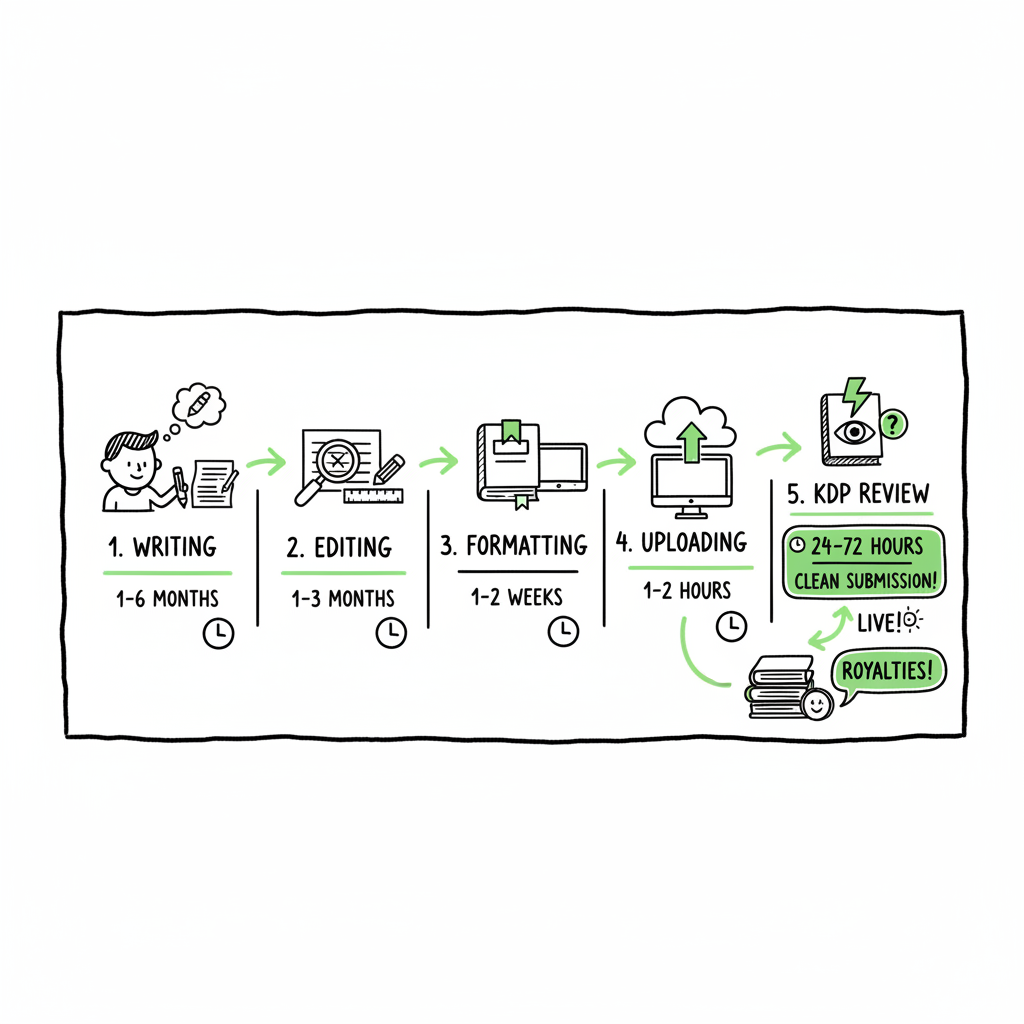
- Amazon KDP’s official window is 3–10 business days, but many clean submissions appear in 24–72 hours.
- The full self-publishing timeline (writing, editing, formatting, upload) is usually weeks to months; KDP review is just a part of that process.
- Proper formatting, complete metadata, and good cover and file preparation reduce KDP approval wait time and the chance of extra review cycles.
Table of Contents
- Quick answer
- KDP publishing timeline explained
- How to minimize KDP approval wait time
- How BookUploadPro helps authors publish faster
- FAQ
Quick answer
If you submit a fully formatted, correctly prepared file, how long does Amazon KDP take to get your book live? Officially, Amazon allows 3–10 business days for books and updates to appear, but many ebooks and paperbacks show up in 24–72 hours. The KDP system has multiple processing steps, and items like thumbnails, the “Look Inside” preview, or marketplace propagation can take longer. For more detail on why reviews slow down and how to avoid common stalls, read our post on Amazon Kdp Review Delays.
A short, clear expectation: plan for up to 10 business days when scheduling a launch, but expect many clean submissions to appear much sooner. Treat the official window as the safe planning boundary and faster times as the typical outcome when everything is correct.
KDP publishing timeline explained
What the official numbers mean
Amazon’s KDP documentation states a general allowance of 3–10 business days from the time you click Publish until the title is fully available. That is a broad guideline that covers ebooks, paperbacks, and situations where a review flags an issue. The timeline includes time for content review, file verification, and distribution across marketplace endpoints.
Typical practical experience
Authors and publishers who upload well-formatted files usually see faster turnarounds. For ebooks, 24–72 hours is common. For paperbacks and hardcovers, the product detail page and cover thumbnail can appear within 72 hours on Amazon.com, though other marketplaces can take longer. Low-content books and unusual formats sometimes take longer—Amazon notes that variability exists.
What happens during the review window
KDP’s review process is not a single step. Typical actions include:
– Content and policy checks. Amazon runs automated checks for prohibited content, metadata issues, and obvious formatting problems.
– File processing. The uploaded manuscript is converted into internal ebook or print formats, thumbnails are generated, and print proofs (where requested) are queued.
– Marketplace propagation. Even after a title is marked “live,” it can take time to show in search results, category pages, and international storefronts.
– Feature setup. Elements like “Look Inside” or editorial reviews may take extra time to appear.
Why the official range is conservative
Amazon needs to cover many edge cases: copyright flags, metadata mismatches, and files that need reprocessing. The 3–10 business day window gives them room to re-review and handle problems without misleading authors who expect instant publication.
Ebook vs. print timing
– Ebook: Often fastest. If your EPUB or Kindle-ready file follows guidelines, the book commonly appears in 24–72 hours.
– Paperback/hardcover: Detail pages and thumbnails may appear within 72 hours on Amazon.com but can take longer on other marketplaces. Printing-ready checks and dimensional validations add time.
– Low-content books: These sometimes trigger extra checks and can take up to 10 business days.
A realistic project timeline
Remember that KDP review is only one piece of a publish plan. A quality self-publishing project typically includes writing, editing, proofreading, formatting, cover creation, metadata, and marketing assets. Those stages push a typical timeline to weeks or months. If you compress those stages, the KDP review may still finish fast, but the risk of rejections or rework increases.
Common causes of added review time
– Poorly formatted files (incorrect margins, fonts, or corrupted EPUBs)
– Missing or inconsistent metadata (author name variants, ISBN confusion)
– Covers that don’t meet size or bleed specs
– Duplicate titles or marketplace conflicts
– Content flagged by automated checks
Tools and checks that shorten the wait
Invest in quality formatting and validation tools before upload. Converting a manuscript to a clean EPUB, checking the print PDF against KDP’s templates, and ensuring your cover meets specs reduce the chance of reprocessing.
If you need EPUB conversion handled as part of file prep
consider purpose-built tools for reliable output.
How to minimize KDP approval wait time
Focus on three areas: files, metadata, and expectations. Each has practical steps that reduce delays and the chance of re-review.
-
1) Prepare clean manuscript files
For ebooks: use validated EPUB or well-structured Word-to-Kindle conversions. Avoid exotic fonts or embedded scripts. Validate EPUBs with a standard tool and check on a local reader. For print: export a print-ready PDF using KDP page templates and ensure bleed and margins match KDP’s specs. Use a PDF/X standard if your layout tool supports it. -
If you need a quick, reliable EPUB conversion, using a dedicated EPUB conversion tool will often eliminate common pitfalls and speed the process. EPUB conversion
-
2) Get the cover right the first time
A cover that does not meet KDP size, bleed, or spine specs will trigger rework. Use a tool that outputs KDP-compliant covers and thumbnails. A clean, properly sized cover reduces thumbnail and detail page delays. cover generator -
3) Lock down metadata before upload
– Keep author name consistent.
– Use the exact title and subtitle you intend.
– Choose categories and keywords deliberately.
Incomplete or mismatched metadata often forces corrections that lead to extra review cycles. -
4) Avoid known trigger conditions
-
5) Use batch and automation carefully
-
6) Pre-flight checks and previews
-
7) Timing and marketplace considerations
-
8) When something stalls
-
9) Practical checklist before clicking Publish
When you handle those items up front, the book often clears the pipeline in the faster 24–72 hour window.
4) Avoid known trigger conditions
– Don’t submit multiple near-identical versions at once.
– Avoid questionable content that might invoke manual review.
– Don’t change rights or ISBN details mid-process unless necessary.
5) Use batch and automation carefully
If you publish frequently, a batch workflow makes sense. Bulk CSV uploads or automated pipelines let you push many titles but also amplify mistakes if a template is incorrect. Validate one record before bulk submission.
6) Pre-flight checks and previews
7) Timing and marketplace considerations
8) When something stalls
9) Practical checklist before clicking Publish
When you handle those items up front, the book often clears the pipeline in the faster 24–72 hour window.
Practical checklist before clicking Publish
– Validated manuscript file (EPUB or print-ready PDF)
– KDP-compliant cover (thumbnail, spine, bleed)
– Consistent metadata (title, author, ISBN)
– Pricing and territories set
– Categories and keywords chosen
– Preview checked on devices and print proof ordered if unsure
Timing and extra notes
Remember that international storefronts can lag behind Amazon.com. If your launch is time-sensitive, schedule with the full 10 business days in mind so all markets stabilize.
Internal links and tools
For a quick, reliable cover solution, consider a dedicated cover generator to ensure KDP-compliant covers. Also, when creating a paperback or ebook, a complete book creation workflow can reduce errors. book creation workflow
How BookUploadPro helps authors publish faster
When authors ask how long does Amazon KDP take for their project to go live, the answer depends on preparedness. That’s where BookUploadPro fits. We automate the repetitive, technical parts of multi-platform publishing so you can avoid the common causes of delay.
What BookUploadPro does
- Unified multi-platform publishing: we prepare upload-ready packages for Amazon KDP, Kobo, Apple Books, Draft2Digital, and Ingram.
- CSV batch uploads: publish many titles at once with validated CSV templates that match each platform’s requirements.
- Platform-specific intelligence: outputs are tailored to KDP’s formatting, thumbnail, and metadata expectations.
- File and cover preparation: deliver properly sized covers and validated manuscript files to avoid reprocessing.
- Error reduction: automated checks and human-reviewed outputs lower the chance of a KDP hold or re-review.
Why that shortens timelines
Most extended waits come from rework. By producing upload-ready assets, BookUploadPro reduces the number of cycles between you and KDP, which moves your project into the usual 24–72 hour success zone more often than not. It’s not a guarantee—Amazon controls review—but it removes the common avoidable causes of delay.
Who benefits most
– Authors publishing at scale or running frequent launches.
– Authors who prefer to outsource technical formatting.
– Small presses that need consistent, validated output across platforms.
How it fits into your workflow
Use BookUploadPro to generate the finalized files and metadata. Then validate once internally and submit to KDP. If you publish several books, the time savings compound: expect roughly 90% time savings on repetitive upload tasks compared with doing them manually.
Practical service highlights
– Humanized files that read well and meet KDP rules.
– Templates aligned to KDP timelines and technical checks.
– Affordable pricing with a free trial so you can test the outputs on a single title.
Related tools and tasks
– If your workflow includes converting a manuscript to EPUB, a dedicated EPUB conversion service can make that step reliable.
– If you need a quick, KDP-compliant cover, using a cover generator that follows KDP specs speeds approvals and thumbnail generation.
– If you create paperbacks or ebooks frequently, automating the book creation workflow reduces mistakes and keeps your launch schedule accurate.
Automate the upload. Own the distribution. BookUploadPro is an obvious upgrade once authors start publishing seriously.
FAQ
Q: How long does Amazon KDP take for updates, like changing the manuscript or price?
A: Updates often follow the same review window. Expect 3–10 business days for full propagation, though many updates appear within 24–72 hours. Price updates can sometimes appear faster, but allow up to a week for all storefronts.
Q: My ebook went live in 48 hours but the “Look Inside” is missing. Is that normal?
A: Yes. Features like “Look Inside” and thumbnails can lag. They may take several additional days to process after the book detail page is live.
Q: Do ISBNs affect KDP timing?
A: Using KDP’s free ISBN doesn’t usually add time. However, inconsistent metadata related to ISBNs—such as changing ISBNs mid-process—can cause delays.
Q: What should I do if KDP rejects my file?
A: Check the rejection message in your KDP dashboard, correct the specific issue (formatting, cover size, etc.), and resubmit. Use validation tools locally before re-uploading to avoid repeated cycles.
Q: I publish many titles. How can I avoid repeating the same mistakes?
A: Build validated templates for manuscript files, cover sizes, and metadata. Use batch CSV uploads once templates are proven. Consider a service that automates and human-reviews output for consistency.
Q: Can BookUploadPro guarantee a faster KDP publishing timeline?
A: No service can control Amazon’s review process. BookUploadPro reduces preventable errors—formatting and metadata mistakes—that commonly cause extra review cycles, improving the likelihood of faster publication.
Final thoughts
Visit BookUploadPro.com to see how we can automate your uploads and try the free trial.
Sources
- Book Status – Kindle Direct Publishing (official)
- Timelines – Kindle Direct Publishing (official)
- How Long Does KDP Take to Publish a Book? (Publishing.com blog)
- How Long Does It Take to Publish a Book on Amazon? (Woodbridge Publishers)
- How to Self Publish on Amazon in Simple Steps (beBold Digital)
- FAQs About Publishing New Books Using KDP; Timelines, Problem Solving (AuthorImprints)
How Long Does Amazon KDP Take Estimated reading time: 9 minutes Key takeaways Amazon KDP’s official window is 3–10 business days, but many clean submissions appear in 24–72 hours. The full self-publishing timeline (writing, editing, formatting, upload) is usually weeks to months; KDP review is just a part of that process. Proper formatting, complete metadata,…