Beginner KDP Author Practical Guide to Your First Book
Beginner KDP Author: A Practical Guide to Publish Your First Book
Estimated reading time: 14 minutes
Key takeaways
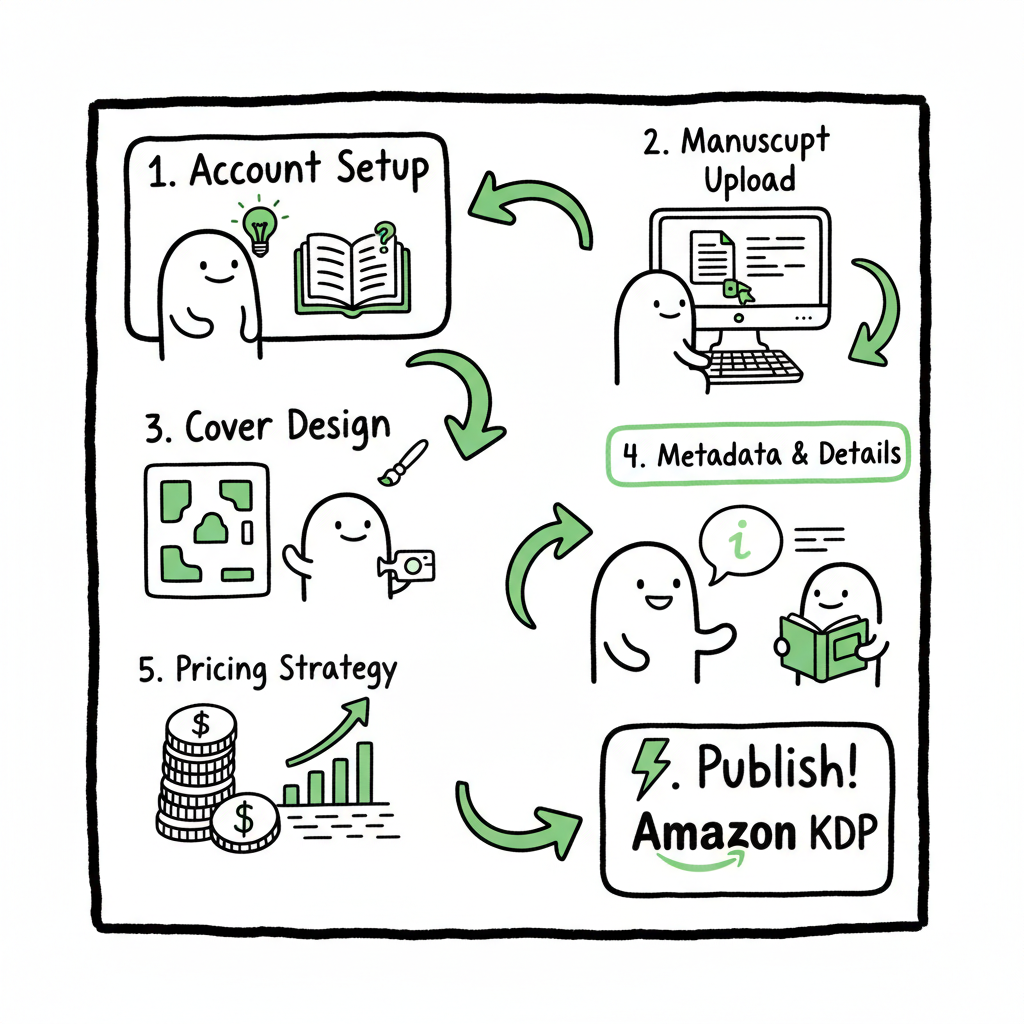
- Publishing your first book on Amazon KDP is a sequence: account → manuscript → cover → upload → metadata → pricing → publish.
- Good formatting, a clean cover, and correct metadata matter more than complicated marketing for your first title.
- When you need scale, automated multi‑platform upload tools make wide distribution practical and save serious time.
Table of Contents
- Why KDP first — what to expect
- Step-by-step: account, manuscript, cover, and upload
- Metadata, pricing, and launch checklist
- Scale and multi-platform distribution
- Final thoughts
- FAQ
Why KDP first — what to expect
If you’re searching “beginner kdp author,” you want a clear path that removes friction and gets a readable, correctly formatted book live on Amazon. KDP is friendly to first-time publishers because it costs nothing to set up and offers both ebook and print options. The platform does require attention to details that commonly trip new authors: file formatting, metadata accuracy, and image requirements for covers.
A practical starting point is to use a straightforward checklist and reliable tools so you avoid rejections or poor-looking files. If you want the official dashboard walkthrough while you work, see Amazon KDP for Authors for a detailed reference to KDP’s own pages. Those official resources explain what KDP expects for file sizes, margins, and metadata fields — and that knowledge reduces surprise delays during upload.
What most beginner KDP author guides miss is scale: once you’ve published one title, you’ll likely want to publish more or distribute beyond Amazon. Planning for that now saves headaches later. This guide focuses on the practical steps you’ll follow for your first book and points out where automation and simple tools can save time.
Step-by-step: account, manuscript, cover, and upload
1) Create your KDP account and verify payments
Start with a KDP account (you’ll use your Amazon credentials). Complete tax and payment information accurately — royalty payments won’t flow if tax IDs or bank details are missing or mismatched. Use the same author name and contact email you plan to use publicly to avoid confusion.
2) Prepare your manuscript: simple formatting rules
The most common upload problems are formatting issues. For Kindle ebooks, use a clean Word file (DOCX) or a properly generated EPUB. Keep these rules in mind:
- Use consistent paragraph styles. Avoid manual tabs for indents; use the paragraph indent setting.
- Use real page breaks between front matter, chapters, and back matter.
- Don’t use headers/footers in reflowable ebooks; they can break in various Kindle devices.
- Choose a standard font (serif for long reads, sans-serif for short non-fiction lists) and avoid excessive embedded fonts.
- For print, set the correct trim size, margins, and gutter. KDP provides templates for common sizes.
If you don’t want to wrestle with formatting or need a fast conversion, there are trusted tools that convert manuscripts to EPUB automatically. A reliable EPUB converter can make the difference between a messy file and a ready-to-upload ebook. For one-click EPUB conversion tools, see an EPUB converter that handles the common pitfalls while keeping your layout intact.
3) Create a cover that sells and fits technical specs
A clean, readable cover is non-negotiable. You can hire a designer, use a template, or generate a cover with an automated tool. If you’re doing it yourself, confirm the pixel dimensions and DPI required for Kindle and the bleed specifications for print. If you need a quick option for covers, a book cover generator can automate sizing and export in the right formats for ebook and paperback. Simple covers that read well at thumbnail size often outperform overly complex art.
4) Produce files for paperback and ebook
If you’re publishing both formats, create:
- A reflowable EPUB (for Kindle and many ebook retailers)
- A print-ready PDF with embedded fonts and correct bleed (for paperback)
Many authors treat the ebook and print files as separate deliverables. If you want to avoid hand-editing PDFs or layouts, a one-stop book creation workflow can prepare both ebook and print files from your manuscript.
5) Upload and preview
On KDP, upload your manuscript and cover in the Create a New Title section. Use the online previewer to check:
- Paragraph spacing and chapter breaks
- Images (that they are high enough resolution)
- Table of contents links (for ebooks)
For print, use the print preview to check margins and the gutter. Look at the preview on multiple device types if possible (phone, tablet, and Kindle preview). Fix issues in your source files and re-upload; previewing catches most errors that cause customer complaints after publication.
Metadata, pricing, and launch checklist
Metadata is discoverability. Poor metadata is what keeps good books invisible; good metadata is what helps them be found.
1) Title, subtitle, and author name
Choose a clear title and subtitle that describe the book. Use the author name consistently across books — minor variations (middle initials, punctuation) can split reviews and sales data.
2) Book description and editorial blurb
Write a short, benefit-driven description. Use the first paragraph to hook readers and show the promise of your book. Consider including a short author bio that establishes credibility.
3) Keywords and categories
KDP gives you a limited set of keyword slots and category selections. Think like a reader: what search terms would they use? Use phrases rather than single words in keyword boxes when appropriate. For categories, choose the most relevant niches where your book can realistically rank. You can request specific BISAC categories via KDP, and those choices matter when shoppers browse.
4) ISBNs and identifiers
For paperbacks you can use a free KDP ISBN or supply your own. If you plan to expand distribution through other retailers or print-on-demand services, owning your ISBN gives you more control.
5) Pricing and royalties
KDP offers royalty tiers that depend on price and distribution rights. Price competitively for your genre and length. If you enroll in KDP Select for exclusivity benefits, be aware of the distribution trade-offs: exclusivity restricts ebooks to Amazon but can increase visibility within Amazon’s ecosystem.
6) Territory rights and distribution
Choose the correct rights (worldwide or specific territories). For wide distribution, plan a separate workflow to distribute beyond Amazon to Kobo, Apple, Ingram, and aggregators. These platforms often have different file requirements and metadata fields.
Launch checklist (before you hit Publish)
- Final proofread and formatting check completed
- Cover checked at thumbnail size and print-ready preview
- Metadata filled: title, subtitle, description, keywords, categories
- Pricing and royalty options decided
- Territories confirmed and ISBN assigned or accepted
- Previewed files in KDP’s online reader and print previewer
- Backup copies of final manuscript and cover saved offline
After publish, monitor the KDP Bookshelf for status and check the title page on Amazon to confirm everything looks correct. Many metadata changes can be made after publication, but some details (like certain identifiers) are less flexible — so aim to be accurate at launch.
Scale and multi-platform distribution
Once you publish one book, you’ll learn that the hard part isn’t the first upload — it’s repeating the work with consistent quality across multiple titles and platforms. That’s where automation and batch processes matter.
Why scale matters
– Publishing multiple titles increases discovery and gives you marketing options (series, bundling).
– Repeating manual uploads wastes time on the same tedious steps: metadata entry, file uploads, price setting, and category selection.
– Different stores have different requirements; keeping each version consistent is error-prone without a system.
Automation benefits for serious self-publishers
If you’re beyond a one-off experiment and want to build a catalog, a multi-platform publishing tool is an obvious upgrade. A sensible automation service offers:
- Unified multi-platform publishing (Amazon KDP, Kobo, Apple Books, Draft2Digital, Ingram)
- CSV batch uploads so you can publish dozens or hundreds of titles without re-entering metadata
- Platform-specific intelligence that maps your metadata to each store’s fields and requirements
- Error reduction by validating files and metadata before upload
- Significant time savings — often quoted at ~90% compared to manual uploads
- Practical pricing and a free trial so you can test the workflow
When to move to automation
If you plan to publish several titles in a year or to distribute to multiple retailers, automation makes sense. It’s not for every hobby author, but for anyone who wants predictable scaling and fewer mistakes, it’s an operational improvement. Automate the upload. Own the distribution.
Practical tips for multi-platform publishing
– Standardize your metadata in a simple CSV or spreadsheet: one row per title with columns for title, subtitle, description, keywords, categories, price, and file paths.
– Keep a single master file for your manuscript and generate format-specific files from that source.
– Maintain a library of covers sized for each platform’s cover requirements, or use a tool that produces platform-ready exports automatically.
– Test with a small batch before you commit to a full catalog push.
Tools that help
For conversions and file preparation, you’ll often need specialized tools:
- If your workflow includes creating print-ready PDFs and ebook files from one manuscript, look for services that support that book creation workflow.
- When you need a fast, accurate cover ready for multiple marketplaces, a book cover generator can produce correctly sized cover files.
- For EPUB creation, a dedicated EPUB converter reduces common errors and speeds publishing.
These tools won’t replace quality editing and design decisions, but they remove friction so you can focus on writing and building your catalog. When combined with a platform that automates uploads, you begin to move from one-off publishing into real distribution work without reinventing the process each time.
Final thoughts
As a beginner KDP author, your immediate goals should be clarity and completion: finish a readable manuscript, prepare clean files, and publish with accurate metadata. That first title teaches you the most valuable lessons—how KDP accepts files, what looks good on Amazon, and how metadata affects discoverability.
Once you plan beyond a single book, think about workflow efficiency. Automating repetitive tasks across Amazon, Kobo, Apple, Draft2Digital, and Ingram reduces errors and saves time that you can put back into writing, editing, and marketing. Services that offer CSV batch uploads and platform-specific intelligence make multi-platform distribution practical and affordable.
Practical steps to take today
- Finish the manuscript and run a formatting checklist.
- Generate or obtain a cover that reads well at thumbnail size.
- Prepare both ebook and print files and preview them on multiple devices.
- Complete metadata thoughtfully—keywords, categories, description.
- Publish on KDP and, if you plan to expand, evaluate an automation service that supports multi-platform distribution.
Publishing isn’t one perfect action; it’s a repeatable system. With the right tools and a straightforward process, a beginner KDP author can publish a first book and then scale to many more without redoing the same work.
FAQ
Q: How long does it take to publish a book on KDP?
A: The technical process of uploading files and filling metadata can be done in a few hours if your files are ready. Amazon may take up to 72 hours to make the book live. The real time investment is in editing, formatting, and cover preparation.
Q: Do I need an ISBN for Kindle ebooks?
A: No. Kindle ebooks do not require an ISBN. Print books usually do, and KDP can provide a free ISBN for paperbacks if you don’t have your own.
Q: Can I change my book price after publishing?
A: Yes. Pricing changes can be made after publication, but royalty tiers and marketplace rules will affect how pricing behaves across regions.
Q: Should I distribute to other platforms besides Amazon?
A: For many authors, yes. Audiobooks and Kobo/Apple Books can reach different readers. If you want the widest reach, plan a distribution workflow that handles different file requirements and metadata mapping.
Q: If my book is rejected by KDP, what should I do?
A: Check the rejection reason in KDP, fix the specific issue (formatting, cover size, metadata), and re-upload. KDP’s preview tools catch most issues before final submission.
Sources
- https://www.publishing.com/blog/amazon-kdp-for-beginners
- https://kdp.amazon.com/help/topic/G202172740
- https://kdp.amazon.com/help/topic/GHKDSCW2KQ3K4UU4
- https://kdp.amazon.com/help/topic/G200645680
- https://damyantiwrites.com/kindle-direct-publishing/
- https://reedsy.com/blog/guide/kdp/
- https://www.youtube.com/watch?v=klnIsGHa2kQ
Beginner KDP Author: A Practical Guide to Publish Your First Book Estimated reading time: 14 minutes Key takeaways Publishing your first book on Amazon KDP is a sequence: account → manuscript → cover → upload → metadata → pricing → publish. Good formatting, a clean cover, and correct metadata matter more than complicated marketing for…