Beginner KDP Author Practical Guide to Your First Book
Beginner KDP Author: A Practical Guide to Your First Book
Estimated reading time: 9 minutes
Key takeaways
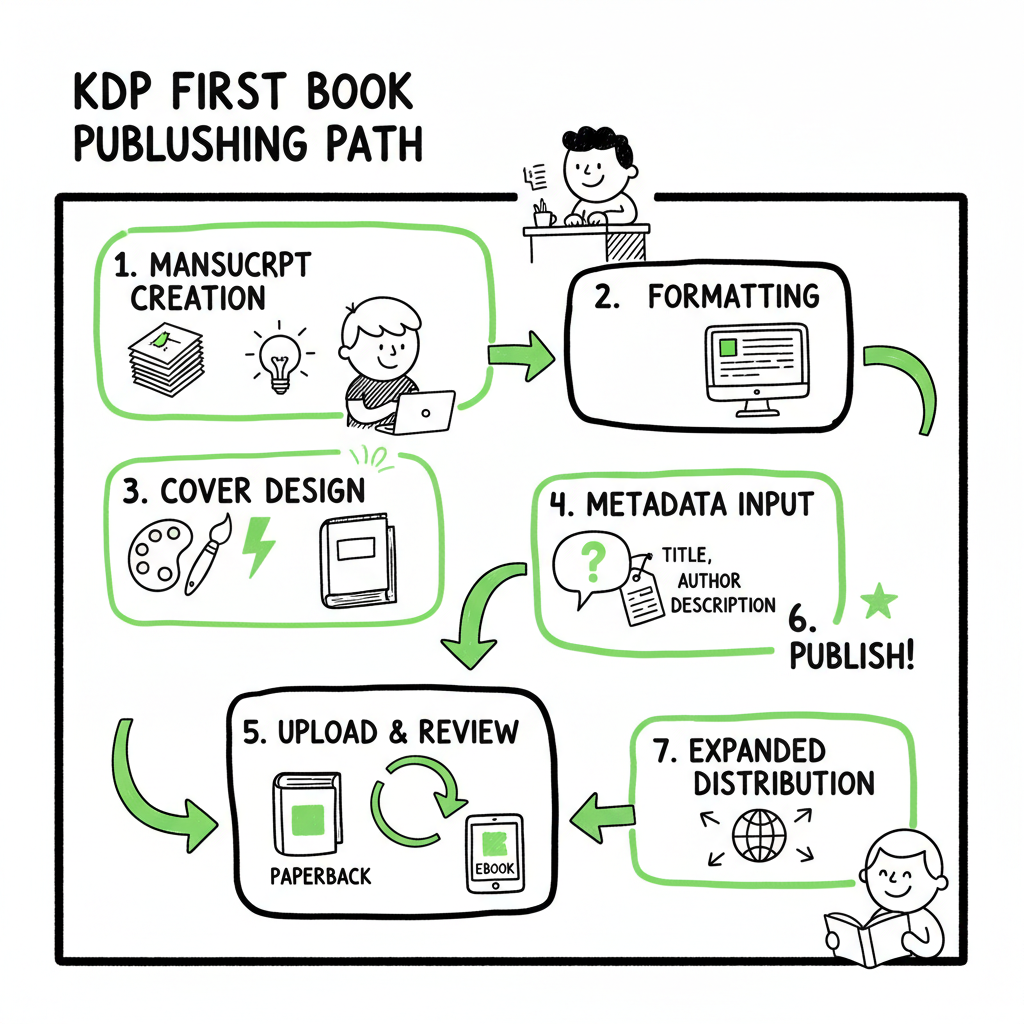
- Publishing a first book through KDP is a repeatable workflow: manuscript, format, cover, metadata, and upload.
- Focus on formats and distribution from the start—paperback, ebook, and expanded retail channels change your delivery steps.
- When you scale beyond one title, automation tools that handle batch uploads and platform-specific rules save ~90% of time and reduce errors.
Table of Contents
- Getting started: what a beginner KDP author needs to know
- From manuscript to marketplaces: files, covers, and distribution
- FAQ
- Sources
Getting started: what a beginner KDP author needs to know
As a beginner KDP author you’re learning two things at once: the craft of finishing a book, and the mechanics of getting it into readers’ hands. Those mechanics are straightforward, but they have enough detail that a single mistake—wrong trim size, incorrect EPUB flow, or a mismatched cover—can cause delays or rework. Treat the publishing steps as a small production line. Do each step well once, and you’ll repeat it faster and cleaner the next time.
KDP itself is a reliable on-ramp to Amazon’s store, but it’s only one channel. If your goal is wide reach or to build a sustainable small-press operation, consider your distribution plan before you upload. Many authors use KDP for Amazon, then add Kobo, Apple Books, Draft2Digital, and Ingram for libraries and bookstores. If you want a targeted walkthrough on the KDP workflow, see Amazon KDP for Authors for practical guidance tailored to the platform.
What counts as “done” for your first KDP book
- A clean, proofread manuscript in the correct format
- A print-ready PDF for paperback (if you choose print), and an EPUB for ebook
- A cover that fits bleed and trim rules
- Metadata: title, subtitle, series, description, keywords, categories, and rights
- Pricing strategy and rollout plan
Keep the scope for your first book simple. Complicated formatting, a long front matter, or multiple editions can wait. Launching a readable, well-formatted book is the priority.
From manuscript to marketplaces: files, covers, and distribution
Manuscript preparation: the backbone of a smooth upload
Start with a single, clean manuscript file. For most fiction and simple non-fiction, a single Word document is fine. Use styles (Heading 1, Heading 2, Normal) instead of manual font sizes. That keeps structure intact when you convert to EPUB or PDF.
Trim sizes and page counts matter. Paperback dimensions and interior margins affect page count and formatting. Before finalizing pagination, pick a trim size (for example, 6″ x 9″) and set your manuscript layout accordingly. KDP provides calculators and templates, but if you plan to distribute off Amazon as well, match common sizes supported by other platforms.
File formats:
- Ebook: EPUB is the standard. Convert your manuscript to EPUB early and test it in multiple readers.
- Paperback: a print-ready PDF with embedded fonts and correct bleed and margins.
If you need a reliable EPUB conversion, use a tested tool rather than exporting blind from Word—an automated EPUB converter will catch common issues like missing image alt text, incorrect table of contents, and bad CSS. A dependable EPUB converter saves hours and prevents rejections from stores that enforce strict EPUB rules.
Formatting checklist (practical)
- Use consistent paragraph styles and avoid manual tabs or multiple spaces.
- Insert page breaks between chapters.
- Optimize images: 300 DPI for print, lower for ebook with careful compression.
- Generate a clean table of contents for EPUB readers.
- Proof the final EPUB in an app like Apple Books or Thorium Reader.
Cover design: first impression and technical requirements
A cover is the single most visible asset for your book. It needs to read at thumbnail size and meet technical specs for each channel. For paperback, the cover often needs a single PDF that includes back cover and spine dimensions based on page count. For ebook, you need a high-resolution JPEG or PNG for the jacket image.
If you’re creating a cover yourself, use a processing tool that outputs print-ready files and checks spine width and bleed automatically. A reliable book cover generator takes the guessing out of size and bleed, letting you focus on design. For many authors, a fast, correct cover generator is the difference between a missed deadline and a timely upload.
Metadata and discoverability
Metadata is what makes your book findable. Spend time on these fields:
- Title and subtitle: clear, searchable, and honest.
- Author name and contributors: consistent across platforms.
- Book description: write for readers, not search engines. A clear, scannable blurb helps conversions.
- Categories and keywords: choose categories where you can compete; use keywords that match reader searches.
Pricing and royalty strategies
KDP’s royalty tiers and delivery fees matter for kindle pricing; paperback royalties are calculated differently. For your first book, pick a launch price that feels comfortable and gives you room to run promotions. Track results and be ready to change price—pricing is a marketing tool, not a permanent statement.
Distribution beyond KDP: practical options
Publishing on multiple platforms widens reach but introduces platform-specific rules. Different stores accept different file specs, and availability in libraries or wider distribution through Ingram requires specific settings. If you want broad distribution without managing multiple dashboards, consider a multi-platform pipeline that handles the differences for you. Automation removes repetitive uploads and keeps platform-specific intelligence centralized.
Scaling and automation: why it matters once you publish more than one book
If you plan to publish more than a few titles, manual uploads become a time sink. At that volume you’ll want:
- CSV batch uploads for metadata and pricing
- A single place to manage cover files and interior files
- Platform-specific intelligence: automatic checks for KDP, Kobo, Apple Books, Draft2Digital, and Ingram rules
- Error reports that point to the exact field to fix
A tool that automates uploads across Amazon KDP and other retailers typically saves about 90% of the time you’d spend repeating the same tasks and reduces typos and formatting errors. For authors stepping up from hobby publishing to a small press model, automation is an obvious upgrade—Automate the upload. Own the distribution.
Practical workflow for your first upload
- Finalize and proofread manuscript.
- Convert and test EPUB; generate print-ready PDF for paperback.
- Design or generate a cover that meets channel specs.
- Gather metadata and write a clean description.
- Upload to KDP and preview both ebook and print proofs.
- Roll out pricing and distribution; consider enrolling in optional programs later.
Tools and resources that reduce friction
- EPUB converter tools catch common conversion issues before upload and create valid EPUB files that pass validation.
- Book cover processors generate print-ready jackets and ebook covers to the correct dimensions.
- Multi-platform publishing services allow you to push one CSV to distribute to several stores, preserving platform-specific rules.
If you work with tools that handle EPUB conversion, cover processing, and multi-platform uploads, you remove the most error-prone steps from your day and free time for writing, promotion, and learning craft.
Common problems and how to fix them
- Rejected EPUB: Check for malformed HTML, missing TOC, or images with incompatible formats. Run a validator and fix flagged issues.
- Mis-sized cover: Recalculate spine width after the final page count and regenerate the jacket PDF.
- Wrong interior margins: Re-export the print PDF with correct trim size; test proof on an actual printed proof copy.
- Metadata mistakes: Keep a master CSV with consistent titles, author names, and ISBNs to avoid duplication across platforms.
Why authors move to multi-platform automation
Manual uploads are fine for a single book. But if you publish quarterly or want complete coverage across stores, repeating the same steps by hand is costly and fragile. Automation with platform-specific intelligence preserves your settings across retailers, prevents common errors, and offers CSV batch uploads that fit a publishing schedule at scale. These tools don’t replace judgment; they remove tedium and let you focus on quality and marketing.
FAQ
Q: Do I need ISBNs for KDP?
Amazon can assign a free ISBN for paperbacks, but you can also provide your own if you want to control publisher name or distribution. For ebooks, ISBNs are not required on KDP.
Q: What file format should I upload for ebooks?
EPUB is the standard. Convert your manuscript to a validated EPUB and test it in multiple readers before upload.
Q: How do I check the paperback proof?
Order a printed proof through KDP and review margins, gutters, and cover alignment. Don’t skip this step.
Q: Can I distribute the same book to Apple Books, Kobo, and Ingram?
Yes, but each platform has its own file requirements and metadata rules. Many authors use a distributor or a multi-platform automation tool to handle differences and push the same files and metadata consistently.
Q: How do I price my first book?
Start with a price that matches category norms and gives you flexibility for promotions. Track sales and be ready to change price based on demand and audience response.
Q: Where can I get a quick, platform-ready cover?
Use a good cover processor that outputs both ebook and print-ready files; that ensures correct bleed and spine sizes for paperback and proper resolution for ebooks.
Final thoughts
Becoming an effective beginner KDP author means treating publishing as a repeatable operation. Nail the manuscript, format it correctly, produce a cover that meets retailer specs, and set metadata intentionally. For one book, manual uploads will teach you the rules. For a growing catalog, automation with CSV batch uploads and platform-specific intelligence makes wider distribution practical, cuts time by roughly 90%, and reduces errors.
If your workflow includes converting to EPUB, using a trusted EPUB converter early will avoid common rework and speed time-to-market. When you need a reliable cover that meets both ebook and print specs, a book cover generator that processes output to print-ready standards keeps you moving. And if you aim to create both paperback and ebook editions, consider book creation tools that manage both formats from a single source file.
Automate the upload. Own the distribution.
Visit BookUploadPro.com and try the free trial.
Sources
- https://kdp.amazon.com/help
- https://www.bookautoai.com/epub-converter
- https://www.bookautoai.com/book-cover-generator-processing
- https://www.bookautoai.com
- https://blog.bookuploadpro.com/amazon-kdp-for-authors
Beginner KDP Author: A Practical Guide to Your First Book Estimated reading time: 9 minutes Key takeaways Publishing a first book through KDP is a repeatable workflow: manuscript, format, cover, metadata, and upload. Focus on formats and distribution from the start—paperback, ebook, and expanded retail channels change your delivery steps. When you scale beyond one…