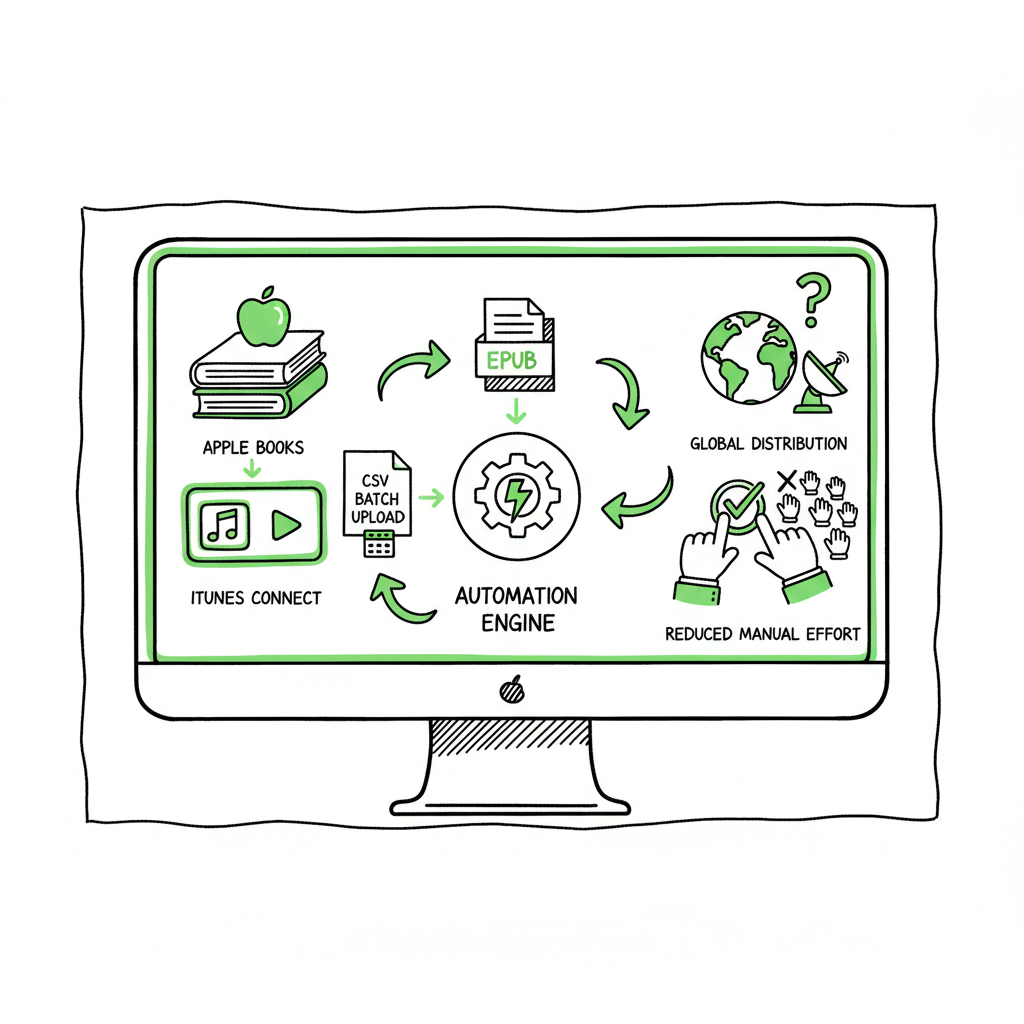
Apple Books Publishing Automation for iTunes Connect
Apple Books Publishing Automation: Simplify iTunes Connect Workflows
Estimated reading time: 15 minutes
Key takeaways
- Apple Books Publishing Automation: Simplify iTunes Connect Workflows reduces repetitive metadata entry and EPUB uploads for multi-book authors.
- Aggregators and platform-aware tools cut errors, speed global distribution, and save roughly 90% of manual effort when combined with CSV batch uploads.
- BookUploadPro streamlines multi-platform publishing with platform-specific intelligence, making wide distribution practical and affordable.
Table of Contents
- Why Apple Books automation matters
- Setting up automated Apple Books submissions
- Scaling multi-platform publishing with BookUploadPro
- Practical tips and next steps
Why Apple Books automation matters
Apple Books Publishing Automation: Simplify iTunes Connect Workflows is not a slogan — it describes a real bottleneck authors hit as soon as they publish more than a handful of titles. Apple’s portal (previously iTunes Connect, now Apple Books for Authors) works well for one-off uploads: create an EPUB, type metadata, choose territories and pricing, and click publish. That workflow breaks down when you need to submit dozens or hundreds of books, or when you publish to Apple plus Amazon, Kobo, and Ingram.
Manual work creates three predictable problems for growing publishers:
- Time sink. Every book requires repeated field entry: title variants, BISAC/subject codes, descriptions, series data, contributor roles, and pricing per territory.
- Error risk. Typos, mismatched metadata, and wrong file versions proliferate when you copy/paste across dashboards.
- Scale limits. Platforms like Apple don’t offer a native bulk-upload API that fits most indie workflows; third-party aggregators and automation tools become necessary.
What automation actually does
Automation targets the repeatable steps and enforces checks. It converts spreadsheets or CSVs of metadata into platform-ready bundles, validates EPUBs for compatibility, maps BISAC codes and categories, and pushes files where the platform allows. Where Apple’s portal requires manual upload, automation prepares everything so you either import using an aggregator or a minimal web upload. For EPUB validation and conversion workflows, many teams rely on a dedicated EPUB converter to guarantee compliance and reduce rejections — for those needs, an EPUB converter can automate the technical cleanup and file packaging step before distribution.
Why that matters for authors
If you publish a series, translations, or a catalog of backlist titles, automation converts a months-long administrative slog into a predictable, repeatable process. That’s why authors who publish seriously view automation as an obvious upgrade: it reduces time spent on form-filling, cuts royalty delays caused by rejected uploads, and makes multi-store distribution achievable without hiring a full-time assistant.
Setting up automated Apple Books submissions
Automation isn’t magic. It’s a set of practical steps and decisions that let you minimize manual work while preserving control over pricing, territories, and edition management.
- Decide between direct publishing and using an aggregator
Direct publishing to Apple Books via Apple Books for Authors avoids aggregator fees, so you keep more royalties. It requires clean EPUBs and manual uploads for many of the field entries. Aggregators like PublishDrive or Draft2Digital take a fee or revenue share but handle metadata mapping, cover and EPUB checks, and distribution to Apple plus many other stores. Choose direct only if you want maximum royalty and have a robust internal QA process for EPUBs and metadata. - Standardize your metadata in CSVs
Automated workflows run on structured inputs. Build one master CSV that holds every field you’ll need: ISBN/ASIN where relevant, title/subtitle, series and number, BISAC codes, publication date, language, contributor roles, publisher name, price per territory, and description variations. A single source of truth avoids inconsistent entries across stores. - Prepare EPUBs and assets at scale
A compliant EPUB removes the biggest friction in Apple uploads. Consistency matters: matching title pages, consistent casing, embedded fonts where necessary, and correct internal metadata tags. For teams that batch-convert manuscripts into ebook files, a reliable EPUB conversion tool streamlines the process and reduces rejections. If you need a robust conversion step, using an EPUB converter early in the pipeline saves manual fixes later. - Use platform-aware intelligence
Apple Books has platform-specific quirks: particular metadata fields, asset size limits, and rules for pre-orders. Automation systems that understand these rules can automatically adapt CSV fields during export. That reduces back-and-forth caused by rejected uploads and keeps your catalog moving. - Validate before submission
Automated validation runs a checklist: EPUB syntax and structure, cover dimensions, spine and bleed for print editions, correct ISBN usage for paperbacks, and category/BISAC alignment. Validation should produce human-readable reports so you can fix issues quickly or let the system auto-correct non-destructive problems. - Batch submit where possible
Aggregators accept bulk imports. If you use direct publishing, prepare one tidy package per book that’s ready to upload to Apple Books for Authors. Either way, the goal is to minimize manual inputs to a last-mile confirmation step.
Practical example: a 10-book rollout
Imagine a nonfiction author releasing ten short books in a single quarter. With standardized CSVs, automated EPUB conversion, and platform-specific checks, you can prepare all ten books in a few hours instead of days. Uploads to an aggregator or your internal portal become an approval step rather than a data-entry marathon.
Tools that play nicely with Apple Books
Not all tools are equal. Choose systems that:
– Understand BISAC and Apple’s categories
– Offer CSV or spreadsheet import/export
– Validate EPUBs against Apple’s requirements
– Support rights and territory mapping
– Offer per-platform pricing rules
If your pipeline creates EPUBs and ebooks at scale, pairing conversion tools with a distribution automation platform shortens time to live and cuts error rates. For ebook generation and broader book creation workflows you can use dedicated services that turn manuscripts into store-ready files and automate routine checks.
Scaling multi-platform publishing with BookUploadPro
When your catalog grows, you stop thinking in single-store terms. You need unified multi-platform publishing: one source of truth, one upload process, and predictable outcomes across Amazon KDP, Apple Books, Kobo, Ingram, and others.
What BookUploadPro does differently
- Unified multi-platform publishing: one dashboard, one CSV, one place to manage metadata and files for every platform you target.
- Platform-specific intelligence: BookUploadPro applies platform rules so your metadata and files adapt automatically for Apple Books, KDP, Kobo, and others.
- CSV batch uploads: prepare a spreadsheet and push a batch of titles in minutes.
- Error reduction: preflight checks and platform-aware validation catch common mistakes before uploads.
- Time savings: authors report roughly 90% time savings when switching from manual uploads to a batch-automation workflow.
- Affordable pricing + free trial: built for authors and small publishers, so automation is accessible without enterprise budgets.
BookUploadPro BookUploadPro doesn’t replace the need to interact with Apple Books for certain manual confirmations, but it shrinks that interaction to a brief verification. The system prepares platform-ready metadata bundles and compliant EPUBs (or points out fixes), so the Apple Books for Authors portal is mostly a final review. That’s the difference between hours of data entry per book and minutes.
CSV-driven workflows in practice
- Create a master CSV: titles, contributors, BISAC, territory prices, ISBNs.
- Point BookUploadPro at the manuscript and cover files.
- Run preflight checks; correct any flagged issues.
- Choose target stores (Apple Books among them) and push a batch.
- Review platform dashboards only for exceptions.
This approach makes wide distribution practical. It also reduces repetitive cognitive load, so you can focus on writing, marketing, and higher-value tasks.
Managing different edition types
Paperbacks, hardbacks, and ebooks have different packaging and requirements. BookUploadPro keeps each edition as a variant and applies the right exports and validations automatically. For paperback creation and ebook generation, integrating a tool that handles book file creation centralizes the process and eliminates format mismatches between platforms.
Where BookUploadPro fits with aggregators
Some authors prefer aggregators for distribution to Apple Books. BookUploadPro can act upstream of aggregators: prepare clean, validated packages and feed them to your chosen distributor. That way you get automated catalog management even if you use PublishDrive, Draft2Digital, or another service for the final distribution leg.
Real-world benefits
- Faster updates: corrected metadata or updated editions propagate across stores faster.
- Fewer rejections: validation reduces the number of rejected uploads due to EPUB or metadata errors.
- Consistent catalog: series, descriptions, and pricing remain synchronized across platforms.
Practical tips and next steps
Immediate actions you can take today
– Build one master CSV template that includes every metadata field you’ll need for Apple and other platforms. Keep consistent naming conventions and document accepted BISAC codes.
– Run a batch EPUB check on your catalog to find the most common fixes: cover linking, toc navigation, and embedded fonts. If you don’t already have a cleaning step, add an EPUB converter early in the pipeline so file issues don’t block distribution.
– Start small: try automation with a subset of titles or one series. Measure time saved and error reduction, then scale.
– Choose an automation partner that supports multi-platform exports and batch workflows. Look for support for CSV batch uploads and platform-aware validations.
Practical editing and formatting controls
Automated systems can’t fix editorial problems. They accelerate delivery of technically correct files. Keep editorial and design workflows upstream:
– Finalize content and proofread before conversion.
– Use consistent templates for series covers and interior design.
– Keep versioning disciplined so the automation platform always sees the right file.
Avoid common pitfalls
– Don’t skip EPUB validation. It’s the most frequent reason for delays in Apple Books.
– Don’t treat all platforms the same. A price or description that works on Amazon might need adjustments on Apple Books for discoverability.
– Don’t assume automation is hands-off. It reduces work but still requires human review at scale, especially for metadata nuances and marketing copy.
How to measure success
Key metrics to track:
– Time per book from final manuscript to live in store
– Number of rejected uploads or technical errors
– Revenue per store (to weigh direct publishing vs aggregator fees)
– Catalog consistency score (manual sample checks for metadata parity)
A note on book covers and file creation
Design assets are part of the pipeline. If you need automated assistance with ebook and paperback creation, consider tools that handle the entire file generation step so the automation layer only needs to validate and export. For example, teams often combine a conversion tool with their automation platform to produce store-ready EPUBs and print files in one pass.
Final thoughts
Automation is an operational decision. For authors who publish a handful of titles as a hobby, manual uploads work. For authors who publish seriously — multiple series, translations, versions, or catalogs — automation is an obvious upgrade. BookUploadPro sits at the operational layer: it handles CSV batch uploads, platform-specific intelligence, and multi-store exports so you can own distribution without rewriting your workflows every release.
Automate the upload. Own the distribution.
FAQ
Can I publish directly to Apple Books and still benefit from automation?
Yes. Automation helps you prepare compliant EPUBs and complete metadata so direct uploads require minimal manual work. If you want to avoid aggregator fees, automation reduces the time and error risk of direct publishing.
Will automation change my royalties or payment process?
Automation itself doesn’t affect royalty rates. Aggregators may take a fee or revenue share; direct publishing preserves full royalties but requires you to manage payments through Apple Books for Authors. Automation just streamlines the file and metadata preparation.
Is EPUB conversion necessary?
Yes for Apple Books. A clean, validated EPUB is the minimum requirement. An EPUB converter automates the technical formatting and reduces rejections.
How does BookUploadPro handle platform-specific rules?
BookUploadPro applies platform-aware validation and fields mapping so metadata and files are formatted per store requirements. That minimizes manual fixes after exports.
Will automation remove the need for human review?
No. Automation reduces repetitive tasks and errors, but human review remains essential for editorial quality, cover checks, and marketing copy.
Sources
- Distribute to Apple Books with PublishDrive
- Publish a book to Apple Books in Pages for iCloud
- How to Publish (and Sell) on Apple Books in 2025
- Transition from iBooks Author to Pages
- Publish your book from the web
- Writing your book with Pages
- Vellum | Create Beautiful Books
Apple Books Publishing Automation: Simplify iTunes Connect Workflows Estimated reading time: 15 minutes Key takeaways Apple Books Publishing Automation: Simplify iTunes Connect Workflows reduces repetitive metadata entry and EPUB uploads for multi-book authors. Aggregators and platform-aware tools cut errors, speed global distribution, and save roughly 90% of manual effort when combined with CSV batch uploads.…