Amazon KDP Select Explained Exclusive vs Wide Options
Amazon KDP Select Explained (Exclusive vs Wide)
Estimated reading time: 9 minutes
Key takeaways
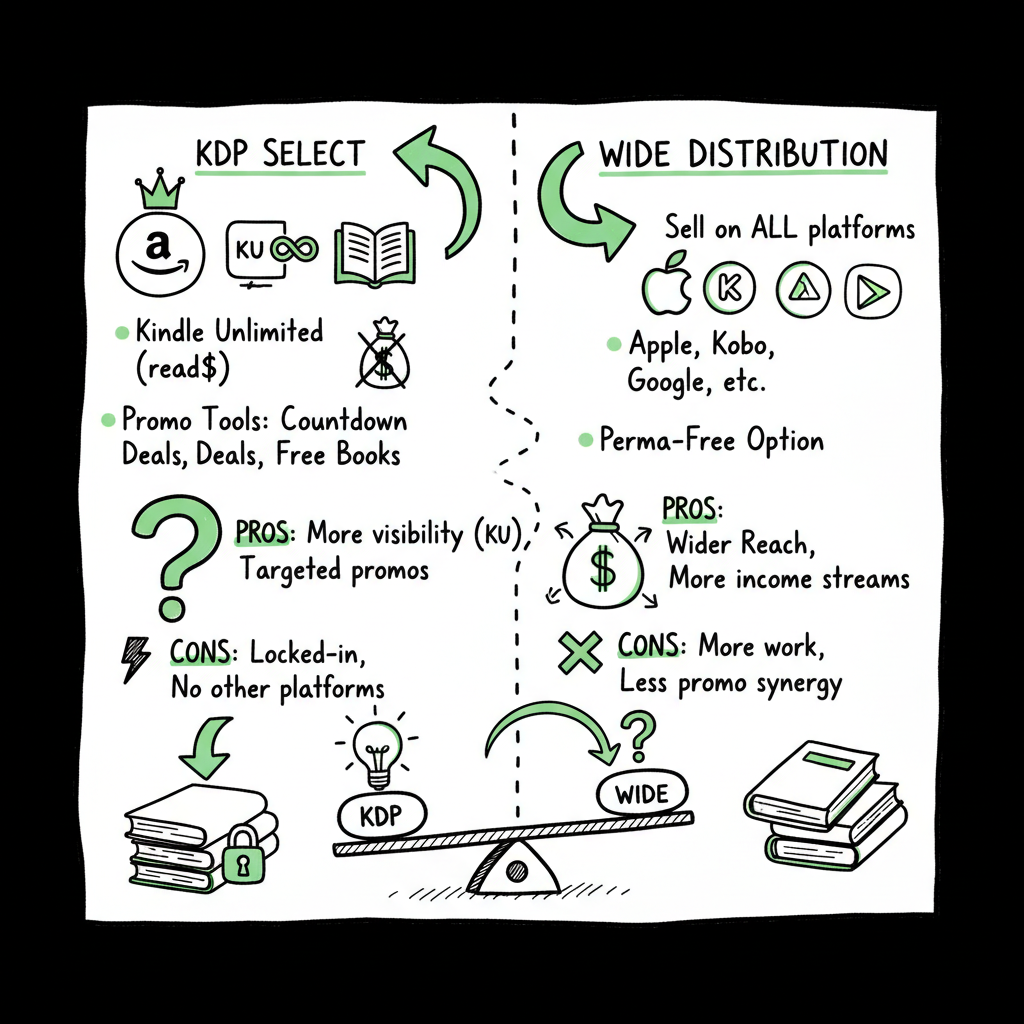
- KDP Select is a 90‑day ebook exclusivity program that trades platform exclusivity for Kindle Unlimited page‑read income and Amazon promo tools.
- Going wide distributes your ebook beyond Amazon (Apple, Kobo, Google Play, libraries), which diversifies income and reach but forgoes KU earnings.
- Many authors use a hybrid approach: test in KDP Select for high‑consumption genres, go wide for long‑term catalog growth, and use automation tools to scale uploads across platforms.
Table of Contents
- How KDP Select works: the mechanics
- Why authors enroll
- How payment works
- Operational rules that matter
- Advantages of KDP Select
- Drawbacks of KDP Select
- Advantages of going wide
- Drawbacks of going wide
- Which wins depends
- Choosing a strategy and practical workflow
- Publishing wide at scale: practical steps and tools
- FAQ
- Final thoughts
- Sources
How KDP Select works: the mechanics
Amazon KDP Select is an optional program for ebooks published through Kindle Direct Publishing. The basic trade is simple and strict: enroll an ebook and its digital edition must remain exclusive to Amazon for a 90‑day period. That exclusivity is renewable automatically unless you opt out.
Why authors enroll
When a book is in KDP Select it becomes eligible for Kindle Unlimited (KU) and the Kindle Owners’ Lending Library. Instead of only earning a royalty on individual sales, enrolled ebooks can earn money from page reads within KU. Amazon also gives Select titles access to promotional tools that don’t apply to wide books: Free Book Promotions and Kindle Countdown Deals. Those tools can drive spikes in downloads and visibility inside Amazon’s ecosystem.
How payment works
KU pays from a monthly global fund. Authors receive a share based on pages read, not on a fixed per‑read price. That means a long, bingeable title in a KU‑friendly genre (romance, certain sci‑fi and fantasy) can earn substantially from page reads, especially if readers move quickly through a series. But KU returns fluctuate with the overall fund and reading patterns, so KU income is less predictable than a one‑time sale.
Operational rules that matter
- Exclusivity is for the ebook. You can still sell print and audio elsewhere while the ebook is exclusive.
- Enrollments last 90 days and auto‑renew. You must actively opt out before renewal if you want to go wide.
- If you enroll, you cannot list the ebook on other retailers, give it away from your own site, or distribute the file during the exclusive period.
- Switching from exclusive to wide is straightforward at the end of a 90‑day term; moving back to exclusive is a separate choice and restarts the exclusivity window.
For authors, the choice is a platform tradeoff: concentrated exposure and promotional levers on Amazon versus broad distribution and diversified long‑term reach.
Why authors enroll
When a book is in KDP Select it becomes eligible for Kindle Unlimited (KU) and the Kindle Owners’ Lending Library. Instead of only earning a royalty on individual sales, enrolled ebooks can earn money from page reads within KU. Amazon also gives Select titles access to promotional tools that don’t apply to wide books: Free Book Promotions and Kindle Countdown Deals. Those tools can drive spikes in downloads and visibility inside Amazon’s ecosystem.
How payment works
KU pays from a monthly global fund. Authors receive a share based on pages read, not on a fixed per‑read price. That means a long, bingeable title in a KU‑friendly genre (romance, certain sci‑fi and fantasy) can earn substantially from page reads, especially if readers move quickly through a series. But KU returns fluctuate with the overall fund and reading patterns, so KU income is less predictable than a one‑time sale.
Operational rules that matter
- Exclusivity is for the ebook. You can still sell print and audio elsewhere while the ebook is exclusive.
- Enrollments last 90 days and auto‑renew. You must actively opt out before renewal if you want to go wide.
- If you enroll, you cannot list the ebook on other retailers, give it away from your own site, or distribute the file during the exclusive period.
- Switching from exclusive to wide is straightforward at the end of a 90‑day term; moving back to exclusive is a separate choice and restarts the exclusivity window.
Advantages of KDP Select
- Kindle Unlimited and page reads: For certain genres, KU can produce steady, repeatable income tied to reader consumption rather than single purchases.
- Amazon‑only promos: Free book days and Countdown Deals can drive large numbers of downloads and give algorithmic visibility inside Amazon.
- Simpler operations: Managing a single retailer for the ebook reduces administrative tasks and centralizes reporting.
Drawbacks of KDP Select
- Locked‑in ebook: You can’t sell the ebook elsewhere for the exclusivity period.
- Platform dependence: Relying on one retailer means algorithm changes or policy shifts at Amazon directly affect your income.
- Reader distribution: You miss readers who buy primarily through Apple, Kobo, or local stores.
Advantages of going wide
- Reach and diversification: Listing on Apple Books, Kobo, Google Play, and others opens markets that Amazon doesn’t dominate, including different international footprints.
- Pricing and promotional control: Other retailers often have different promotional calendars and allow pricing experiments that Amazon may not.
- Libraries and aggregators: Wide distribution usually opens library channels and can lead to steady, slower‑burn income.
Drawbacks of going wide
- No KU income: You lose access to Kindle Unlimited’s page‑read model for that ebook.
- More moving parts: Multiple platforms mean more metadata, royalty reports, and occasional platform‑specific formatting quirks.
- Slower algorithmic lift: Visibility can be lower on any single platform compared to concentrated effort on Amazon.
Which wins depends
Which wins depends on the book, genre, and your business plan. High‑velocity genre series often do better in KDP Select; standalone literary works and most non‑fiction frequently benefit from a wide approach.
Choosing a strategy and practical workflow
A practical approach starts with one question: what does success look like for this title?
Match strategy to objectives
- Short‑form serials and series builders: If you plan frequent releases and expect binge reading, KDP Select can accelerate discovery inside Amazon.
- Evergreen non‑fiction or higher‑priced single titles: Wide distribution unlocks specific reader segments and pricing control that often matter more for non‑fiction.
- International reach targets: Kobo and Apple have stronger footholds in some markets. Going wide makes those readers available.
- Risk management: If you don’t want all your eggs in Amazon, going wide spreads risk across platforms.
A sensible testing plan
- Start small and measure. Consider enrolling one new series title in KDP Select for one or two 90‑day terms to measure KU performance and how Amazon promos affect your funnel.
- Track comparable metrics. Look at page‑reads, sales velocity, and reader acquisition costs (ads, promos) for Select vs wide titles.
- Move titles based on evidence. Many authors release initial titles in KDP Select to build audience quickly, then go wide with later books (or vice versa) based on what the data shows.
Hybrid catalog
A hybrid approach is common and practical. Authors often keep fast‑series entries in Select while publishing standalone or backlist titles wide. Another hybrid tactic: enroll the ebook in Select while distributing print and audio widely. That balance captures KU readers while maintaining broader format distribution.
Operational tips
- Keep clean metadata: Good category, keyword, and description choices matter on every platform.
- Plan release cadence: Fast releases favor KU; slower, higher‑quality releases favor wide.
- Monitor income channels separately: KU income behaves differently than wide sales; treat them as separate funnels.
Choosing a strategy and practical workflow (continued)
A practical approach starts with one question: what does success look like for this title?
Publishing wide at scale: practical steps and tools
If you decide to go wide—or to manage a hybrid catalog—the operational challenge is scale. Listing multiple titles across Apple Books, Kobo, Google Play, Barnes & Noble, and library channels is repetitive and error‑prone if done manually.
Use automation to reduce work
Automated publishing tools consolidate metadata, cover files, interior files, and pricing into a single upload flow that distributes to multiple platforms. That saves time and reduces mistakes on fields that must match across retailers.
Create assets correctly the first time
When you prepare for wide distribution you need:
- Clean manuscript files formatted for EPUB and MOBI where required.
- Print files and templates for paperback or hardcover.
- Covers that meet each retailer’s technical requirements.
If you need fast cover options, a dedicated cover generator can speed iterations and enforce specs.
EPUB is the standard for most non‑Amazon retailers and libraries. Converting your manuscript into a clean EPUB converter file avoids errors during distribution and ensures a good reading experience on devices.
If you’re creating both ebook and paperback editions, choose a workflow that outputs both formats from the same source files and enforces print‑ready margins and spine math; that reduces rework and mismatch issues. Many authors find it efficient to use book creation tools for manuscript and print setup.
Platform intelligence and CSV batch uploads
- CSV batch uploads for metadata and pricing: Upload dozens or hundreds of titles from a spreadsheet.
- Platform‑specific intelligence: The tool should adapt file formats, sizing, and promo options for each retailer.
- Error reduction and validation: Automated checks catch missing ISBNs, invalid formats, or out‑of‑range prices before submission.
Why automation matters
- ~90% time savings for multi‑platform uploads when set up correctly.
- Far fewer errors that cause rejected uploads or bad reader experiences.
- Practical ability to maintain a wide distribution strategy without ballooning operational costs.
BookUploadPro’s role
When authors begin publishing at scale, a service that automates repetitive uploads becomes an obvious upgrade. BookUploadPro centralizes multi‑platform publishing—Amazon KDP, Kobo, Apple Books, Draft2Digital, and Ingram—using CSV batch uploads and platform‑aware intelligence. The result: faster releases, fewer errors, and practical wide distribution that previously felt too complex for a single author to manage. Automate the upload. Own the distribution.
Pricing and trial
Good automation is affordable and should offer a free trial so you can test the workflow on a small batch of titles. If you publish seriously—multiple books per year or a growing backlist—automation pays for itself in time and reduced mistakes.
Practical checklist for going wide
- Prepare a retailer‑ready EPUB and validate it.
- Create a print file and check trim/spine settings.
- Produce a cover that meets each platform’s requirements.
- Consolidate metadata in a CSV for batch uploads.
- Use an automated publisher or aggregator to distribute and monitor accounts.
- Track royalties from each retailer and compare to KU performance to refine strategy.
FAQ
Q: Can I enroll some books in KDP Select and publish others wide?
A: Yes. The exclusivity requirement applies per ebook. Many authors use a hybrid catalog strategy where some ebooks are exclusive to Amazon while others are distributed wide.
Q: If I enroll in KDP Select, can I still sell print and audio elsewhere?
A: Yes. KDP Select’s exclusivity covers only the ebook. Print and audio formats can be sold on other platforms while the ebook is in Select.
Q: How long is a KDP Select enrollment?
A: Enrollments are 90 days. They auto‑renew unless you opt out before the term ends.
Q: Does going wide mean I can’t use aggregators?
A: No. Aggregators like Draft2Digital or PublishDrive are designed to help authors distribute wide. They can push your ebook to multiple retailers and library channels, often handling formatting and reporting for a fee or percentage.
Q: Is KU income predictable?
A: KU pays from a global fund and varies month to month. While KU can be lucrative for bingeable series, it’s less predictable than direct sales income.
Q: Will Amazon punish me if I go wide after being in KDP Select?
A: No. You can remove a book from KDP Select at the end of the 90‑day term and then distribute it wide. The reverse—moving a widely distributed ebook into KDP Select—requires ensuring it is not available elsewhere, which can be more work.
Q: How do I track the right metrics to choose between Select and wide?
A: Track page reads and KU income for Select titles, plus sales, returns, library performance, and reader acquisition cost for wide titles. Compare lifetime value per reader across channels and use that to inform decisions for future releases.
Final thoughts
Choosing between KDP Select and wide distribution is a practical business decision, not a moral one. It depends on genre, release cadence, audience behavior, and how much operational overhead you are willing to carry. For authors publishing at scale, automation removes the friction of going wide and makes diversification practical. If you publish multiple titles or formats, centralizing uploads and validating files saves time and reduces costly mistakes.
Visit BookUploadPro.com and try the free trial.
Sources
- Amazon KDP Select vs Wide: Which is Better for Authors?
- KDP Select vs Wide Distribution: Which Strategy Earns More in 2026?
- Kindle Unlimited Publishing vs. Publishing Wide
- KDP Select vs Going Wide: Complete Guide for New Authors 2025
- Has anyone switched to extended distribution and seen an increase in sales? (KDP Community Thread)
- KDP Select or Wide? Decoding the Distribution Dilemma for Self‑Published Authors
- Amazon KDP Select vs. Publishing Wide: Pros, Cons & Real Numbers (video)
Amazon KDP Select Explained (Exclusive vs Wide) Estimated reading time: 9 minutes Key takeaways KDP Select is a 90‑day ebook exclusivity program that trades platform exclusivity for Kindle Unlimited page‑read income and Amazon promo tools. Going wide distributes your ebook beyond Amazon (Apple, Kobo, Google Play, libraries), which diversifies income and reach but forgoes KU…