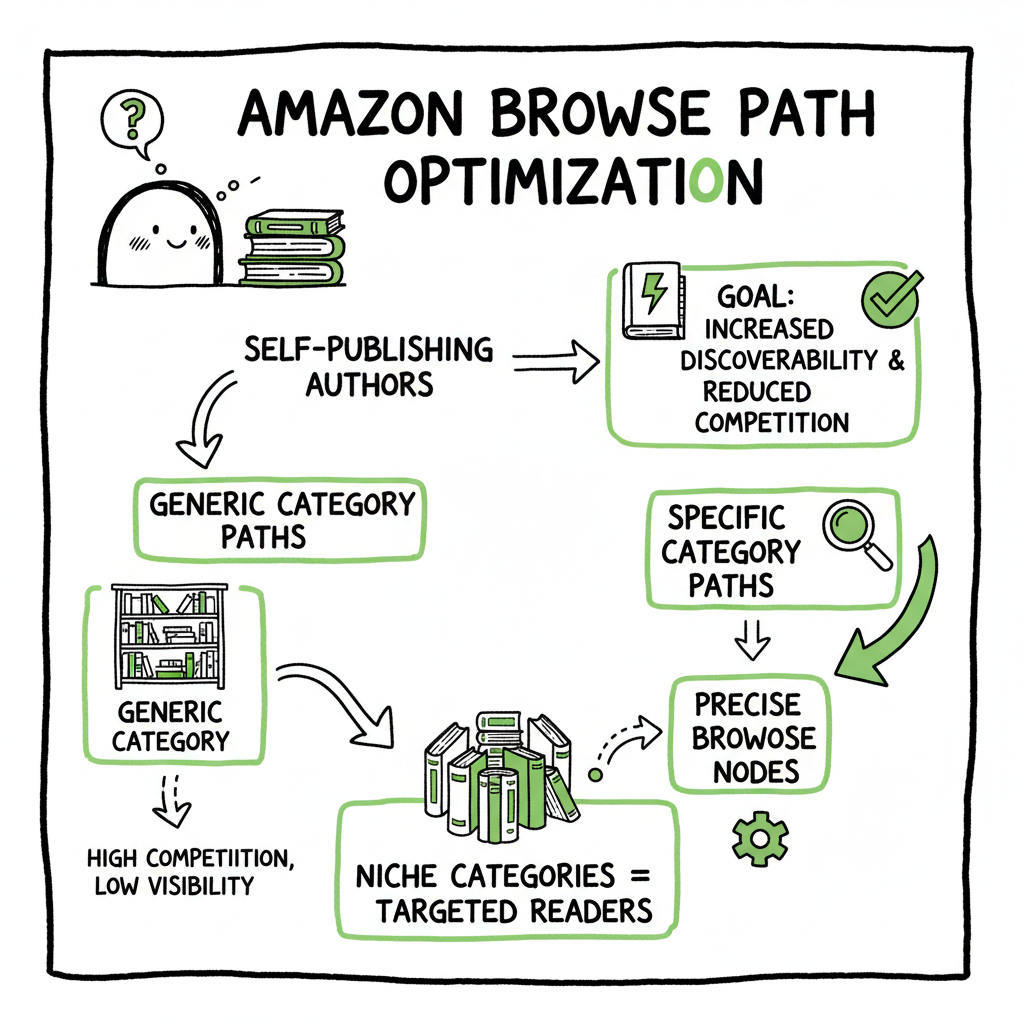
Amazon Browse Path Optimization for Self-Publishing Authors
Amazon Browse Path Optimization: A Practical Guide for Self-Publishing Authors
Estimated reading time: 6 minutes
Key takeaways
- Amazon browse path optimization helps your book appear in the right category paths so readers can find it more easily.
- Small, correct category choices often beat broad placements; precise Browse Nodes reduce competition and boost discoverability.
- Use a repeatable workflow and automation to scale category choices across multiple platforms and formats without costly errors.
Table of Contents
- Amazon Browse Path Optimization: A Practical Guide for Self-Publishing Authors
- What Amazon browse path optimization is and why it matters
- How authors optimize browse paths and scale with automation
- FAQ
- Sources
What is Amazon browse path optimization and why it matters
Amazon browse path optimization is the practice of choosing the most accurate category paths (Browse Nodes) for a product listing so the item sits in the right hierarchical categories on Amazon. For books this means picking the subcategories that match your topic, audience, and format rather than leaving the system to guess.
Why that matters for authors:
- Categories guide browsing behavior. Many readers find books by navigating categories and subcategories instead of typing search queries. The right path increases impressions from targeted browsers.
- Niche placement reduces competition. A focused subcategory often has fewer active titles, making it easier to hit higher rank positions and earn visibility signals like bestseller badges.
- Backend impact without visible changes. Browse Nodes are backend fields. They don’t change the cover or description, but they change where Amazon places your book in lists and menus.
For authors who treat publishing as a repeating operation—multiple titles, different formats, or regular releases—getting browse paths right each time moves the needle. If you want background on book-level SEO practice and how browse path work fits alongside metadata, see Amazon Book SEO for Authors.
Browse Nodes are numeric IDs that form hierarchical paths (for example: Fiction → Mystery → Cozy Mystery). Amazon’s Browse Tree Guide (BTG) and marketplace-specific category lists are the source of truth. When you assign the most precise node available, you reduce irrelevant competition and improve discoverability for customers who are already in the right buying mindset.
How authors optimize browse paths and scale with automation
A practical process for a single title
- Start with the reader and the shelf. Identify the one or two subcategories a reader would browse to find your book. Think like a store planner: where would this live on a shelf?
- Consult the marketplace BTG. Use Amazon’s Browse Tree Guide for the marketplace you’re selling in to find the exact numeric Browse Node IDs for those subcategories.
- Match content to node. Confirm the subcategory fully fits your content—format, age group, theme—and pick the node that matches closest.
- Test and measure. After launch, monitor impressions, rank, and sales for those categories. If performance is weak after normalization (four to six weeks), consider a closely related node instead of a broad category swap.
- Keep records. Capture the node IDs, the reasoning, and early performance in a CSV for reuse.
Scale: repeatable rules that work at volume
- Create a category matrix: map common genres, themes, series, and formats to preferred Browse Node IDs. This becomes a lookup table you can apply to every new book.
- Validate with a small sample: change nodes for 1–3 titles and measure. If results match expectations, apply the mapping across your catalog.
- Log and audit: maintain a single CSV that tracks all node assignments, dates, and results. That makes it simple to revert or reassign if needed.
Common measurement signals
- Category-specific sales rank: higher rank in a focused node usually indicates correct placement.
- Impressions and click-throughs from browse pages: these sometimes rise when you’re in a less crowded, more relevant node.
- Conversion rate: if browse traffic converts poorly, the node may bring the wrong target audience.
Mistakes to avoid
- Don’t pick a niche node that misrepresents the book just to chase a bestseller label. That confuses buyers and triggers returns.
- Don’t assume more categories equals more visibility. Amazon’s policies and catalog structure change; focus matters.
- Avoid manual inconsistency. If you handle dozens of titles manually, you’ll make errors that add up. Automation and CSV-driven workflows reduce those mistakes.
Scaling across formats and platforms
Authors today publish in paperback, ebook, and distribute across multiple stores. If you’re generating an ebook or publishing paperback versions, that step is part of the process—consider using a reliable tool when you need repeatable outputs like interior files and metadata. For creating a paperback or ebook, a single point of automation makes batch tasks predictable and consistent.
How automation helps
- CSV batch uploads apply the same, validated Browse Node selections across many titles at once.
- Platform-specific intelligence—knowing how Amazon’s BTG differs by marketplace—prevents incorrect assignments that cost visibility.
- Error reduction: autopopulating validated nodes reduces typos and mismatched entries.
- Time savings: authors and small publishers report dramatic time savings when uploads are automated; once the process is stable, publishing multiple formats and marketplaces becomes practical.
To explore repeatable rules for scaling across formats, see Optimize and Scale.
Why BookUploadPro fits here
BookUploadPro automates multi-platform publishing across Amazon KDP, Kobo, Apple Books, Draft2Digital, and Ingram. It applies platform-specific rules, supports CSV batch uploads, and enforces consistent metadata—including Browse Node choices—so you don’t repeat manual errors. For authors who publish seriously, automation becomes an obvious upgrade: it reduces repetitive work, prevents catalog mistakes, and speeds time to market. Automate the upload. Own the distribution.
Practical example
- Setup: You assemble a CSV with title, author, BISAC, ISBN, format, and your chosen Browse Node ID.
- Validation: The system checks the node against the marketplace BTG and warns about mismatches.
- Upload: One command publishes consistent metadata and files to targeted stores.
- Measure: Results are tracked and compared to previous manual uploads.
Notes on other tools and assets
- If you also produce covers or run extra formatting steps, streamline those earlier in the pipeline. For example, when you need reliable cover production or batch ebook/paperback files, connect those outputs into the same CSV-driven upload system to keep metadata and assets aligned. If you’re producing many covers or need automated file conversion as part of the pipeline, tie that step to your batch upload workflow for fewer handoffs.
- If you need a simple place to generate distribution-ready book files before upload, consider tools that export EPUB and paperback-ready files and then channel those into your batch upload process.
Final operational tip
Treat Browse Nodes as one part of a larger metadata strategy. They work best when paired with accurate BISAC, targeted backend keywords, and consistent edition identifiers across platforms. When those elements line up, the small lift of precise browse path optimization multiplies across catalogs.
FAQ
Q: How soon will I see results after changing Browse Nodes?
A: Expect to see category rank changes in days, but reliable sales and impression trends need four to six weeks. Give a node time to settle before changing it again.
Q: Can I assign multiple Browse Nodes to one book?
A: Currently, assignments are limited by platform rules and may vary. Focus on one or two highly relevant nodes rather than scattering choices; this reduces confusion and keeps tracking simple.
Q: Does browse path optimization replace keyword optimization?
A: No. Browse Nodes and keywords complement each other. Nodes guide browsing placement and competition; backend keywords help search relevance. Use both.
Q: Will assigning a niche node risk lower overall visibility?
A: A niche node may reduce exposure in a very broad list but raises relevance for targeted browsers. For most niche or midlist titles, targeted placement beats broad competition.
Q: Can automation misapply nodes?
A: Automation only repeats rules. The risk is in bad rules, not in automation itself. Validate your mapping tables and run small tests before scaling.
Sources
- Amazon Browse Nodes: Definition, Explanation & Best Practice — remazing.eu (2022-03-30)
- Amazon SEO: 7 ways to improve your product’s search rankings — sell.amazon.com
- Amazon Listing Optimization: Expert Hacks Revealed — myamazonguy.com
- Amazon SEO 2025: A Full Guide on Amazon Search Optimization — sellerise.com
- Amazon Listing Optimization The COMPLETE Guide [EXAMPLES] — sourceapproach.com
Amazon Browse Path Optimization: A Practical Guide for Self-Publishing Authors Estimated reading time: 6 minutes Key takeaways Amazon browse path optimization helps your book appear in the right category paths so readers can find it more easily. Small, correct category choices often beat broad placements; precise Browse Nodes reduce competition and boost discoverability. Use a…