KDP Author Workflow for Faster, Repeatable Publishing
What a practical kdp author workflow looks like
Estimated reading time: 18 minutes
Key takeaways
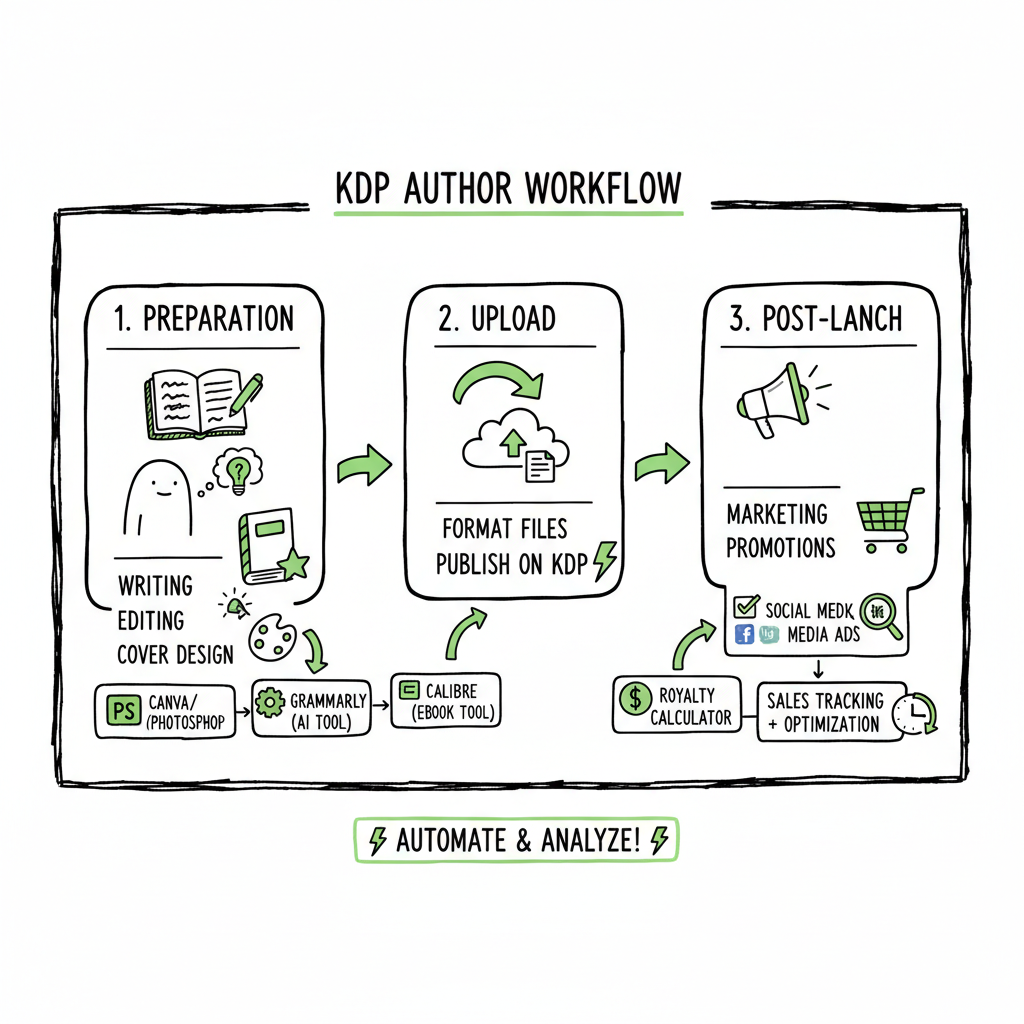
- A simple, repeatable kdp author workflow breaks publishing into preparation, upload, and post-launch phases to save time and reduce errors.
- Batch tasks, templates, and the right tools let you publish more titles without more work.
- Multi-platform automation, CSV batch uploads, and platform-aware checks make wide distribution practical; once you publish seriously, automation is the obvious upgrade.
Table of Contents
- What a practical kdp author workflow looks like
- Tools, batching, and templates to streamline the kdp author process
- Automated multi-platform uploads and scaling your output
- Post-launch routine: monitoring, pricing, and fixes
- FAQ
- Sources
What a practical kdp author workflow looks like
Self-publishing is mostly a sequence of repeatable steps. If you treat each book the same way, you make fewer mistakes and work faster. The phrase kdp author workflow names that set of steps specifically for Kindle Direct Publishing. Start by separating work into three phases: prepare, upload, and maintain.
Prepare: finish the manuscript, format the interior, create a cover, and write metadata. This is the time to lock content and assets so uploads go smoothly. If you need a fast cover option, use a reliable cover generator to make a clean, platform-ready design. If you need to convert your manuscript to EPUB, use a vetted EPUB converter so the file passes each platform’s checks.
Upload: log in to the platform, enter book details, upload files, preview, and choose rights and pricing. Inside KDP the three core screens are details, content, and rights & pricing. The work you do before you open those screens determines how long the upload takes.
Maintain: after the book is live, schedule reviews of sales, pricing, keywords, and promotions. Treat marketing and updates as recurring tasks, not one-off activities.
A practical workflow is about standardizing what you do before you touch KDP’s dashboard. Think of KDP itself as a locked three-stage process: metadata, file upload, rights and pricing. The optimization comes from how you prepare the pieces that fit into those stages. Authors who publish multiple titles quickly find they spend most of their time repeating the same four tasks: formatting interiors, making covers, writing descriptions and keywords, and entering metadata. The smart move is to systematize those tasks so uploads are frictionless.
Inside this article you’ll see how to build those systems. If you want a focused guide for Amazon specifically, one useful resource is Amazon KDP for Authors which explains the dashboard flow and field requirements in plain terms. Use that reference alongside your prepared files so you never paste the wrong text into the wrong field.
Tools, batching, and templates to streamline the kdp author process
The biggest gains come from two places: batching similar work and using tools that output platform-ready files.
Batching
Batching means doing the same kind of task for several books at once. Do all keyword research for a group of titles on one day. Create descriptions for a series in one session. Prepare covers that share a template so you can swap text and art quickly. Batching reduces context-switching and speeds execution.
Templates and checklists
Create a set of templates that match the KDP fields: title, subtitle, short description, long description, seven keyword slots, BISAC categories, interior format notes, trim size, and ISBN handling. Keep a master document for each series or genre containing your preferred categories and keywords. When you start a new book, copy the template and modify only what needs to change.
Formatting and file preparation
Formatting tools like Kindle Create are helpful, but they are only part of the story. Convert your manuscript into clean DOCX or EPUB files that pass preview checks. If you plan to distribute beyond Amazon, you will often need EPUB files. A reliable EPUB converter reduces the back-and-forth rework that happens when platforms reject a file for a missing asset or bad markup.
Covers and layouts
Cover design follows the same logic. Keep a library of genre-specific cover templates and save front and back layouts keyed to trim sizes and spine widths. That lets you export correct-sized print covers without recalculating measurements each time. When you need to create a cover fast, look for a trusted cover generator that produces print- and ebook-ready files.
Metadata and descriptions
Write descriptions that fit KDP limits and read like a book blurb. Use a master template for descriptions with slots for setup, conflict, stakes, and a call to action. Keep a list of keyword combinations you’ve tested and update it when you see what’s working. Avoid stuffing keywords; pick focused phrases that match reader intent.
Tools that reduce manual entry
The more you can generate in a structured format the easier uploads become. Export metadata as a CSV with columns for title, subtitle, description, keywords, categories, publisher imprint, ISBN, and trim sizes. That CSV becomes the single source of truth for batch uploads. Even when you must paste fields into a web form, having each value in a column saves time.
Automated multi-platform uploads and scaling your output
If you publish more than a handful of titles, manual uploads become a time sink. That’s where multi-platform automation and batch upload tools show real ROI. A good system lets you map one set of assets—manuscript files, cover files, and structured metadata—to multiple storefronts, and it handles the platform-specific quirks for you. For example, a tool can map a single metadata CSV for many books, convert and validate interior files for each platform, resize and export cover files for both ebook and print requirements, fill platform fields correctly, log errors with actionable fixes, and export audit trails or receipts so you can confirm each upload.
BookUploadPro and the practical gains
For authors publishing at scale, BookUploadPro removes routine friction. It automates CSV batch uploads, respects platform-specific rules, and cuts repetitive data entry. The product focuses on platform intelligence, error reduction, and making wide distribution practical. Users routinely report large time savings—around 90% on repetitive uploads—because the system consolidates tasks that once took hours for each platform into a single, guided process.
A sensible automation workflow uses the same preparatory steps described earlier, but hands off the repetitive, platform-specific tasks to the tool. When you reach the upload phase, you provide the master CSV and final files. The platform then maps those assets to each store and reports back. That leaves you to focus on creative work and strategy, not copy-paste chores.
Practical automation tips
- Keep a clean master CSV and version it. One corrupted cell can break a batch.
- Use platform-specific templates inside your tool if available. They reduce guesswork.
- Always preview the first upload manually. Automation is powerful but it’s still software; confirm the results before publishing large batches.
- Keep a separate column for platform notes so you can flag special cases (e.g., retailer-exclusive content, different price points, or territory restrictions).
If you produce both ebooks and print, make sure your automation pipeline handles paperback dimensions and spine calculations. For creating print-ready files, having a service that understands trim sizes and bleeds removes a major source of upload errors. And if your workflow touches EPUB conversion or cover generation, use the right helper tools: an EPUB converter ensures your ebook files meet format rules, while a good cover generator produces files that won’t fail platform checks.
Automated multi-platform uploads and scaling your output
If you publish more than a handful of titles, manual uploads become a time sink. That’s where multi-platform automation and batch upload tools show real ROI. A good system lets you map one set of assets—manuscript files, cover files, and structured metadata—to multiple storefronts, and it handles the platform-specific quirks for you.
Why multi-platform matters
Publishing wide (Amazon, Kobo, Apple Books, Draft2Digital, Ingram) makes your books easier to find and buys you access to different readers. Manually repeating uploads across five platforms is slow and error-prone. Platform rules differ: file formats, image resolutions, category taxonomies, and field limits vary. A platform-aware tool applies the right checks and transformations automatically.
What automation should do for you
- Accept a single metadata CSV for many books.
- Convert and validate interior files for each platform.
- Resize and export cover files for both ebook and print requirements.
- Fill platform fields correctly, avoiding misplaced keywords or descriptions.
- Log errors and provide clear, actionable fixes instead of cryptic rejection messages.
- Export audit trails or receipts so you can confirm each upload.
BookUploadPro and the practical gains
For authors publishing at scale, BookUploadPro removes routine friction. It automates CSV batch uploads, respects platform-specific rules, and cuts repetitive data entry. The product focuses on platform intelligence, error reduction, and making wide distribution practical. Users routinely report large time savings—around 90% on repetitive uploads—because the system consolidates tasks that once took hours for each platform into a single, guided process.
A sensible automation workflow uses the same preparatory steps described earlier, but hands off the repetitive, platform-specific tasks to the tool. When you reach the upload phase, you provide the master CSV and final files. The platform then maps those assets to each store and reports back. That leaves you to focus on creative work and strategy, not copy-paste chores.
Practical automation tips
- Keep a clean master CSV and version it. One corrupted cell can break a batch.
- Use platform-specific templates inside your tool if available. They reduce guesswork.
- Always preview the first upload manually. Automation is powerful but it’s still software; confirm the results before publishing large batches.
- Keep a separate column for platform notes so you can flag special cases (e.g., retailer-exclusive content, different price points, or territory restrictions).
If you produce both ebooks and print, make sure your automation pipeline handles paperback dimensions and spine calculations. For creating print-ready files, having a service that understands trim sizes and bleeds removes a major source of upload errors. And if your workflow touches EPUB conversion or cover generation, use the right helper tools: an EPUB converter ensures your ebook files meet format rules, while a good cover generator produces files that won’t fail platform checks.
Post-launch routine: monitoring, pricing, and fixes
Publishing isn’t finished when the live button is clicked. A steady post-launch routine keeps your books visible and healthy.
Monitor performance
Check sales, page reads, and other platform metrics on a weekly or monthly cadence. Look for signals that tell you whether a description, cover, or price needs changing. Keep a simple tracker with columns for date, metric, action, and results.
Scheduled updates
Make updates predictable. For example:
– Week 1 after launch: confirm listing and preview; correct any display issues.
– Week 2: review sales and ad performance; tweak keywords if needed.
– Month 1: test a price change or short promo.
– Quarterly: refresh description or cover if trends show a drop in conversion.
Error handling
When a platform rejects a file or flags an issue, log the error and note the fix. Treat these as process improvements. If the same problem occurs across multiple books, update the template or your conversion settings so it doesn’t happen again.
Series management
If you publish series, maintain a separate series spreadsheet with consistent metadata and order numbers. Platforms use series order for sorting; inconsistent entries confuse readers and reduce discoverability.
Rights and pricing
Keep a standard pricing matrix. Decide upfront what price ranges you will use for new releases, backlist titles, and promotions. When pricing, remember KDP’s royalty tiers and delivery costs for different file sizes; store those rules in your pricing template to avoid surprises.
When to automate more
Automation becomes clearly worthwhile when you:
– Publish more than a few titles a year
– Manage multiple formats (ebook, paperback, audiobook)
– Need distribution beyond Amazon
– Want to remove manual errors that cost sales or time
BookUploadPro is positioned to be the tool you reach for at that point. It automates repetitive uploads across Amazon KDP, Kobo, Apple Books, Draft2Digital, and Ingram. Its CSV batch uploads, platform-aware checks, and error reporting make wide distribution practical and affordable. It’s an obvious upgrade once authors start publishing seriously—Automate the upload. Own the distribution.
FAQ
Q: How do I start turning my current process into a kdp author workflow?
A: List each step you currently take to publish a book. Group similar steps, create templates for metadata and covers, and identify which tasks you can batch. Then pick one tool to handle repetitive work and run a single test upload.
Q: Do I need special files for paperback and ebook?
A: Yes. Paperbacks need print-ready covers sized to trim and spine width and interior files set to the right page size with margins and bleed. Ebooks usually require EPUB or a correctly formatted DOCX. Use a trusted EPUB converter for ebook files and export print-ready PDFs for print.
Q: Will automation replace my final quality control?
A: No. Automation removes manual data entry and reduces errors, but you still need to review final listings, covers, and sample previews. Treat automated uploads as an efficiency layer, not a full replacement for editorial oversight.
Q: Can I publish to Amazon and other stores at the same time?
A: Yes. Multi-platform tools map your single metadata set and files to each store’s requirements and publish or schedule uploads across retailers. This saves hours compared to logging into each store separately.
Q: What’s the simplest way to handle covers for many books?
A: Use cover templates that fit the genre and series. Swap titles and author names inside the template, then export files sized for each format. If you prefer a fast generation option, try a cover generator that produces both ebook and print-ready outputs.
Q: How do I scale automation across multiple titles?
A: Build a system that uses a master CSV for metadata, templates for each platform, and a single upload job that maps those assets to every store. Then review a small batch before full deployment.
Q: Is there a recommended best practice for pricing?
A: Keep a standard pricing matrix that accounts for new releases, backlist titles, and promotions, while considering royalty and delivery costs per format. Document the rules and adjust as market conditions shift.
Q: How often should I revisit descriptions and keywords?
A: Review them quarterly or when you notice a drop in conversions. Refresh keywords and descriptions to align with reader intent and current market terms.
Sources
- https://livingwriter.com
- https://diybookcovers.com
- https://kdp.amazon.com
- https://kdp.amazon.com
- https://reedsy.com
- https://selfpublishing.com
- https://kdp.amazon.com
Estimated reading time: 18 minutes
What a practical kdp author workflow looks like Estimated reading time: 18 minutes Key takeaways A simple, repeatable kdp author workflow breaks publishing into preparation, upload, and post-launch phases to save time and reduce errors. Batch tasks, templates, and the right tools let you publish more titles without more work. Multi-platform automation, CSV batch uploads,…