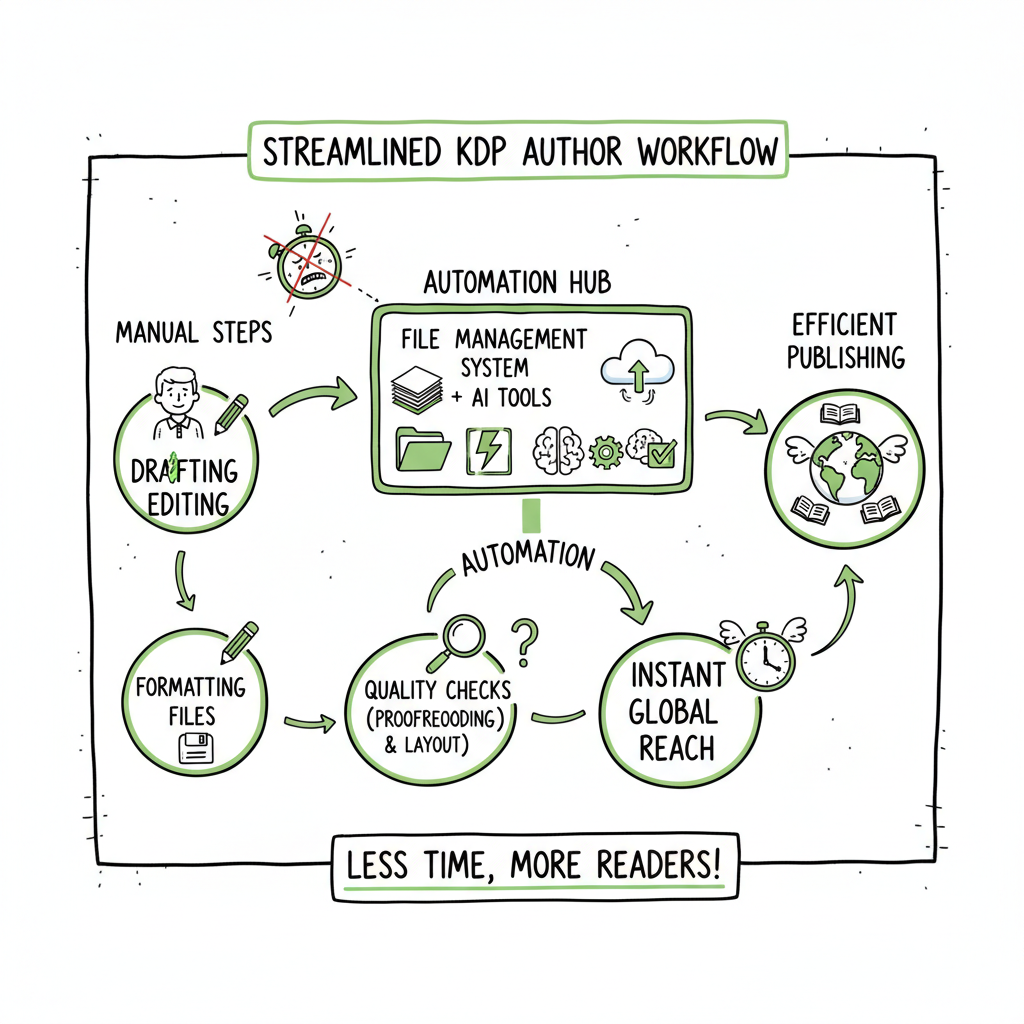
KDP author workflow to build a repeatable publishing system
kdp author workflow: Build a repeatable, low‑friction system for steady publishing
Estimated reading time: 14 minutes
Key takeaways
- A clear kdp author workflow turns one-off uploads into repeatable, verifiable steps that reduce errors and speed time to live.
- Automate repetitive, file‑handling tasks while keeping final checks manual; this preserves quality and saves roughly 70–90% of repetitive time for frequent publishers.
- Use consistent templates for interiors, covers, and metadata, and adopt a multi‑platform approach to make wide distribution practical.
Table of Contents
- What a kdp author workflow looks like
- How to streamline the KDP author workflow
- When to scale with multi-platform publishing tools
- FAQs
What a kdp author workflow looks like
A kdp author workflow is the sequence of steps an author follows from a finished manuscript to a live Kindle listing. At its simplest it reflects KDP’s own structure: prepare files, enter metadata, upload and preview, then set rights and pricing. Real efficiency comes when you extend that basic flow into a repeatable system: reusable files, clear naming conventions, and a steady place to keep your metadata patterns.
Most friction points happen before you ever click “Publish.” Proofreading, formatting to KDP specs, and sizing a cover correctly create delays if they’re handled ad hoc. A practical workflow front‑loads these checks with templates and a small set of quality‑control steps that you run the same way every time.
For an operational reference that covers the KDP interface and required steps, see Amazon KDP for Authors. This resource is useful when you want to map your internal process to KDP’s fields and expectations.
Why workflows matter
A repeatable workflow saves two things that matter more than money: time and attention. Time because the same tasks don’t need reinvention; attention because you reduce the mental load of deciding which step comes next. For authors who publish more than one title a year, that combination makes publishing predictable and reduces the error rate significantly.
Typical phases you’ll see in a mature workflow
- Manuscript readiness: final proofread, page numbering, front/back matter standardized to a template.
- File preparation: export to the right file types and trim sizes; check images and fonts.
- Cover preparation: produce a correctly sized cover file for paperback or a cover image for ebook distribution.
- Metadata and assets: title, subtitle, series info, keywords, categories, and blurb saved to a reusable template.
- Upload and preview: manual inspection in KDP’s previewer and other platform previews.
- Rights, pricing, and distribution: set territories, select KDP Select if applicable, and choose pricing tiers.
- Post‑publish tasks: Author Central updates, launch promotions, and performance tracking.
The bulk of author time is often spent on formatting and cover sizing. Instead of redoing these steps, establish a short preflight checklist that you and any collaborators follow. If you work with contractors, give them the templates and a short spec sheet so every asset arrives ready to go.
How to streamline the KDP author workflow
Streamlining the KDP author workflow means deciding which tasks you will always do by hand, and which you will systemize or automate. The sensible division is: keep creative and policy decisions manual, automate repetitive and mechanical tasks.
Standardize the inputs
Start by locking down the building blocks you use most:
- Interior templates: Create one or two formatted interiors for each trim size and genre. Consistent margins, fonts, and chapter styles prevent last‑minute formatting edits.
- Cover presets: Keep a set of cover dimensions for the trim sizes you use. If you generate covers in batches, a reliable preset prevents mismatched spine calculations.
- Metadata sheets: Maintain a CSV or simple spreadsheet with recurring data: series names, author name formats, ISBNs, price tiers, and preferred keywords. When you publish the next book, copy the row and edit the differences.
If you are producing multiple titles in a series or niche, these templates will shave hours off each upload. They also lower the chance you’ll forget a key field or misname a file.
Automate file and metadata handling
Automation here doesn’t mean removing the author’s control. It means using small scripts, batch tools, or services to handle repetitive chores:
- Standard file names: Build a consistent naming convention (Author_Title_trim_ISBN.ext). Renaming files manually is error prone; automating it keeps cataloging clean.
- Batch conversions: Turning your manuscript into the exact file type KDP prefers is a repeated task. Use tools that convert to clean EPUB or print‑ready PDFs with consistent settings.
- Metadata injection: If you keep your metadata in a spreadsheet, you can auto‑fill the title, subtitle, keywords, and description into a web form or upload it to services that accept CSVs for multiple platforms.
When you automate these steps, reserve a short manual verification for previews and rights. KDP’s previewer can catch layout issues automation misses.
Practical tools that increase throughput
- You don’t need expensive software to get efficient, but specialized tools help when you scale. For example, if you regularly need a correctly sized cover image, a book cover generator that processes bulk images will remove a common bottleneck. If EPUB is part of your distribution plan, a reliable epub converter will make creating a clean ebook file straightforward. When you are assembling multiple formats—ebook and paperback—tools that can generate both from one source reduce repetitive exports and mistakes.
Keep the human checks where they matter
Automate conversions and file handling. Keep decisions about blurb wording, categories, pricing strategy, and KDP Select enrollment in human hands. Those choices are strategic and should be reviewed for each book, not copied across blindly.
Quality control checklist (short, actionable)
- Before you hit upload:
- Filename and trim size match.
- Front matter and ISBN/ASIN placeholders correct.
- Cover dimensions verified and bleed accounted for.
- Keywords and categories reviewed against a recent market snapshot.
- Previewed on KDP and another EPUB previewer if distributing wide.
When a checklist is consistent, it becomes part of your publishing rhythm rather than a chore.
When to scale with multi‑platform publishing tools
Scaling beyond one or two titles a year changes your priorities. The marginal time cost of each new title becomes a real expense, and distribution complexity increases. That’s the point where a unified multi‑platform publishing approach becomes an obvious upgrade.
Why multi‑platform publishing matters
Publishing wide—Amazon KDP, Kobo, Apple Books, Draft2Digital, and Ingram—means reaching readers in different ecosystems. It also multiplies the number of fields and formats you must manage. A single system that coordinates file formats, metadata, and uploads turns what would be dozens of repetitive tasks into a one‑time operation per title.
What automation should and shouldn’t do
Do:
- Produce properly formatted files for each platform.
- Batch‑upload metadata and assets where APIs or CSV imports allow it.
- Apply platform‑specific intelligence (trim sizes, image specs, region pricing patterns).
- Track versions, ISBNs, and marketplace identifiers.
Don’t:
- Choose categories or pricing without human review.
- Skip preview checks on each platform; previews differ and errors can be platform specific.
- Assume one metadata set fits every store; tweak descriptions and keywords for store conventions.
How BookUploadPro fits operationally
BookUploadPro automates the mechanical parts of wide publishing: it exports platform‑correct files, supports CSV batch uploads, and applies platform‑specific checks that reduce common errors. For authors who publish seriously and repeatedly, this is the operational leap that turns publishing from a messy task into a predictable production line.
Key operational benefits you can expect
- Unified multi‑platform publishing: one source of truth for files and metadata, pushed to several stores.
- ~90% time savings on repetitive upload tasks for teams that publish multiple titles.
- CSV batch uploads and standardized naming that keep catalogs consistent.
- Platform‑specific intelligence that reduces rejection and layout errors.
- Lower error rates through preflight checks and consistent templates.
An obvious upgrade once authors start publishing seriously
If you publish a book a year, the manual approach works. When you move to a book every quarter—or run multiple series—the time savings and error reduction from automation add up fast. For many authors, that’s when BookUploadPro becomes an obvious upgrade: automate the upload. Own the distribution.
Practical examples
- A mystery author publishes eight novellas a year. With templates and batch metadata, uploads that once took two hours each drop to 15 minutes per title.
- A small press managing multiple authors centralizes assets and uses CSV-driven uploads to keep the publishing calendar predictable and auditable.
- An indie with two series uses platform intelligence to set pricing tiers automatically for different territories, then verifies final prices in KDP’s console.
Operational checklist before adopting a multi‑platform tool
- Confirm you still require manual sign-offs for rights and pricing.
- Decide which parts of the process you want automated (file prep, metadata injection, uploads).
- Test the tool on one title to confirm previews and outputs.
- Keep a rollback plan to update listings manually if a platform requires it.
Handling covers, EPUBs, and print files
Covers and EPUBs are common failure points because specifications change and previews differ by reader app. If your workflow includes cover batches or repeated EPUB conversions, use a reliable, repeatable service for both. For cover work, a book cover generator that handles batch processing reduces re‑work and keeps spine math consistent. For EPUBs, a solid epub converter produces cleaner files and fewer validation errors across stores. If you publish both ebooks and paperbacks from the same source, prioritize tools that support creating paperbacks and ebooks from a single project to lower version drift.
FAQ
Q: What is the single most important change to make in my KDP workflow?
A: Stop treating each upload as a unique project. Create templates for interiors, covers, and metadata, and use a short preflight checklist before upload. That one change prevents most common errors.
Q: Which tasks should I automate and which should remain manual?
A: Automate file naming, format conversions, and metadata injection. Keep creative choices and final previews manual—those require a human eye.
Q: Can I use a single file to publish both paperback and ebook?
A: You can reuse content, but formats and dimensions differ. Use a workflow that exports platform‑specific files from a single source so content remains consistent while outputs match each store’s requirements.
Q: How much time will automation save me?
A: It depends on volume. For repeat publishers, automation commonly reduces repetitive upload time by 70–90%, freeing authors to focus on writing, editing, and marketing.
Q: Do automation tools replace KDP’s preview and rights checks?
A: No. Tools prepare and push files, but KDP requires authors to confirm previews, rights, and pricing. Automation reduces friction; it doesn’t remove author responsibility.
Final thoughts
A predictable, repeatable kdp author workflow makes publishing faster, cleaner, and more consistent. Start by formalizing your templates and metadata, then add selective automation for file handling and batch uploads. When your output grows, use a multi‑platform tool that coordinates files and metadata across stores while leaving policy and creative decisions in your hands. That balance—automation for repetitive work, human checks for judgment calls—is the operational approach that keeps quality high while you scale.
Visit BookUploadPro.com and try the free trial.
Sources
- https://kdp.amazon.com/help/topic/G202172740
- https://kdp.amazon.com/en_US/help/topic/G202187740
- https://diybookcovers.com/the-ultimate-guide-to-publishing-on-kindle-direct-publishing-kdp-step-by-step-instructions-for-preparing-your-manuscript-and-book-cover/
- https://rubenstomdesign.com/blogs/news/getting-started-with-self-publishing-a-comprehensive-guide-to-kindle-direct-publishing-kdp
- https://kdp.amazon.com/help/topic/GHKDSCW2KQ3K4UU4
kdp author workflow: Build a repeatable, low‑friction system for steady publishing Estimated reading time: 14 minutes Key takeaways A clear kdp author workflow turns one-off uploads into repeatable, verifiable steps that reduce errors and speed time to live. Automate repetitive, file‑handling tasks while keeping final checks manual; this preserves quality and saves roughly 70–90% of…