Publishing Many Books Quickly with a Repeatable System
Publishing Many Books Quickly
Estimated reading time: 12 minutes
Key takeaways
- Publishing many books quickly is a repeatable system, not a one-off sprint; success depends on quality controls and predictable distribution.
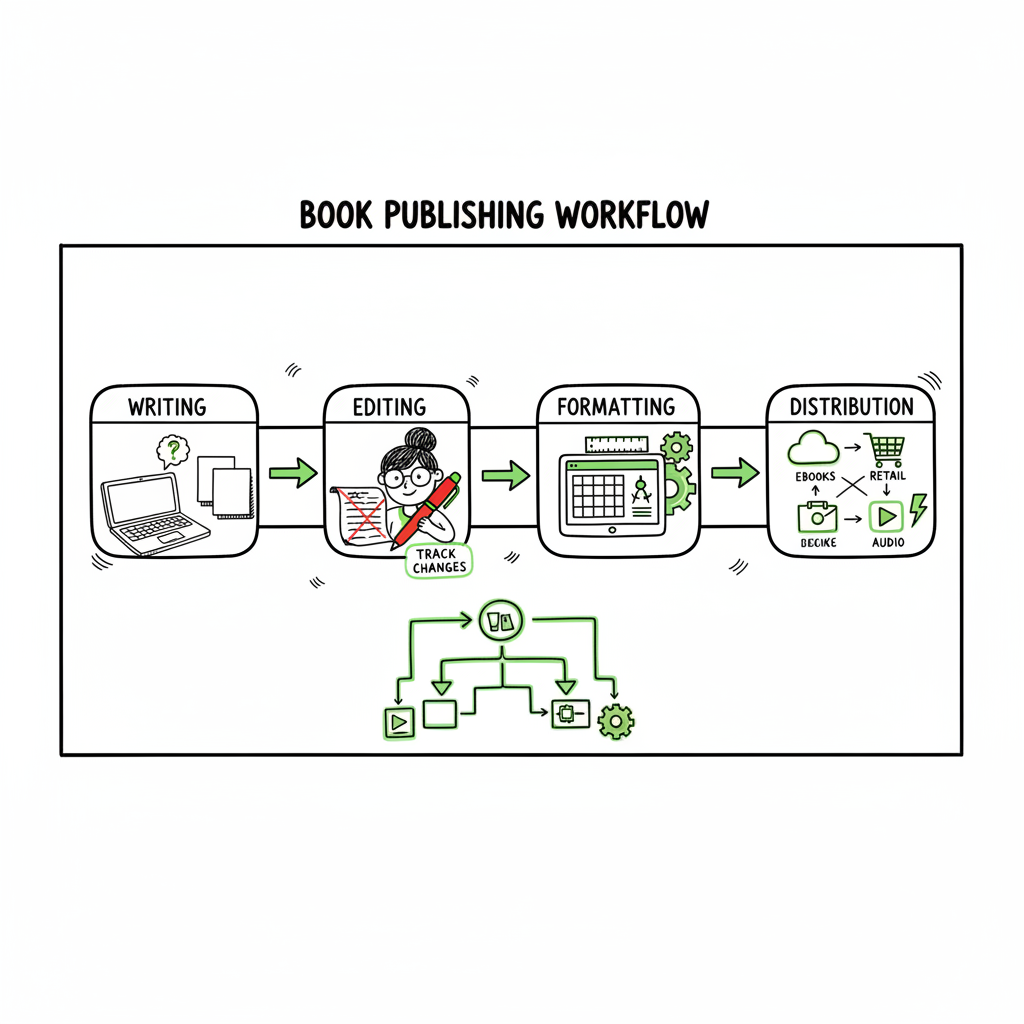
- Build a pipeline that separates writing, editing, formatting, and distribution so tasks can be batched and automated.
- Multi-platform automation, CSV batch uploads, and platform-specific checks cut time and errors — BookUploadPro makes wide distribution practical once you publish seriously.
Table of Contents
- Introduction: what “publishing many books quickly” really means (#intro)
- The fast-publishing system: production, covers, and formatting (#system)
- Distribution, platforms, and scaling with automation (#distribution)
- FAQ — quick answers for common concerns (#faq)
Introduction: what “publishing many books quickly” really means
When people say they want to start publishing many books quickly they often imagine a factory line of titles hitting stores every week. That’s the idea, but the reality that works is a reliable, repeatable system that keeps quality high while reducing manual work and platform friction. A fast multi book rollout is not just faster writing; it’s batching, templates, platform-specific intelligence, and an engine for uploads and checks.
If you plan to scale output, you’ll need to treat publishing like an operational pipeline. Early on you work through a handful of books to refine templates, editorial checklists, and distribution rules. Once those elements are predictable you can ramp output without multiplying mistakes or costs. For deeper reading on growing catalog operations, see our guide to Scaling An Amazon Kdp Business for how operational patterns change once you produce more titles than you can manage manually.
This article walks through a practical system for publishing many books quickly, the tradeoffs to watch, and how automation tools make wide distribution affordable and reliable.
The fast-publishing system: production, covers, and formatting
At scale, publishing is a pipeline. Each book moves through discrete stations: concept, manuscript, editing, design, format, metadata, and distribution. The faster you want to move, the more each stage must be predictable and partially automated.
Concept and planning
- Plan series or theme clusters. Series make rapid-release strategies more effective because readers expect sequels and search algorithms favor consistent metadata.
- Map content scope per book so writers and editors know the target length and deliverables. This prevents scope creep that stalls rollouts.
Writing and assembly
- Use consistent briefs and templates for writers (internal or contractors). Briefs should include word target, POV, voice, required scenes or sections, and keyword/metadata notes.
- If you use AI to accelerate drafts, treat those drafts as pre-edits — human editing is still essential to avoid tone drift and factual errors.
Editing and quality control
- Standardize a two-step editing sequence: developmental (structure and plot/argument) and line edit/copyedit (grammar, style, consistency).
- Create a lightweight checklist for each stage. At scale, checklists reduce back-and-forth and keep contractors aligned.
Covers and design
A fast rollout needs repeatable cover systems. Templates and style guides keep covers consistent across a series and speed production. When you need to generate many covers quickly, a cover process that supports batch-processing and predictable export sizes matters — and if you’re producing multiple formats (ebook and paperback) you need assets sized for both.
If you handle lots of covers, consider using a fast cover workflow such as the automated processing used by modern cover systems to create print-ready files quickly. For scalable cover generation and processing, explore tools that handle batch creation and export for stores. (link to book cover processing)
Formatting and ebook creation
- Use structured source files: a single master manuscript in Word or Markdown from which you produce EPUB, MOBI, and print-ready PDFs.
- Automate conversion to EPUB where possible, but always validate the output in multiple readers. A single malformed EPUB can ruin an automated rollout.
- If epub conversion is a recurring bottleneck, use a dedicated converter that supports batch jobs and integrated validation. (link to epub converter)
Create formats for every store
Producing both paperback and ebook editions is routine at scale. Pack operations so one master file outputs the ebook files and the paperback print files with the correct margins, bleeds, and spine calculation. If you plan to create paperback and ebook versions for multiple stores, a unified book-creation workflow reduces repetitive formatting tasks. (link to book creation workflow)
Metadata and templates
- Create metadata templates per series and per niche: title patterns, subtitle formulas, backend keywords, and category choices. Templates let you populate store forms quickly and consistently.
- Keep a single metadata source (CSV or spreadsheet) that feeds upload automation. The fewer places metadata lives, the lower the risk of mismatched descriptions or pricing.
Batching and parallel work
A practical rapid book publishing system relies on batching similar work: one editor handles final passes on many files in sequence, one designer exports covers for a batch of titles, and production staff convert and validate several EPUBs at once. Batching creates economies of scale and predictable throughput.
Testing and sampling
- Before a large rollout, release a small batch (3–5 titles) to validate your pipeline end-to-end: covers, EPUBs, paperback proofs, and store metadata. Use the test results to adjust templates, fix recurring errors, and update checklists.
Risk management: what speed breaks
Speed increases exposure to errors: metadata mismatches, cover text errors, broken table of contents, formatting glitches, and even policy violations. At scale, an error on one title can be replicated across dozens if your templates or automation are wrong. Build checks early and add automated validations where possible.
Distribution, platforms, and scaling with automation
The distribution layer is where a fast multi book rollout runs into friction. Stores have different requirements and interfaces. Doing distribution manually across Amazon KDP, Kobo, Apple Books, Draft2Digital, and Ingram quickly becomes the bottleneck. Three levers make multi-platform publishing practical: centralized uploads, platform-specific intelligence, and batch operations.
Why multi-platform matters
Covering multiple storefronts increases discoverability and reduces dependency on any single algorithm. Print-on-demand across several distributors also improves global availability without inventory risk. But each platform has its quirks: KDP accepts some image and layout choices other stores reject; Apple Books has specific EPUB validation rules; Ingram requires particular print specs.
Centralized uploads and CSV batch processing
Centralized upload tools let you prepare one master CSV with title, author, price, descriptions, categories, languages, and file links. The CSV becomes the single source feeding each platform. Batch uploads eliminate repeating form entry dozens of times and reduce manual errors.
This is where automation yields the biggest time savings. A tool that maps your CSV fields into platform-specific fields, manages file uploads, and runs per-platform checks transforms a manual week of work into hours.
Platform-specific intelligence and error reduction
Good automation has platform-specific intelligence: it knows how KDP handles keywords, what Apple requires in EPUB metadata, and how Ingram handles print specifications. That intelligence prevents rejections and reduces back-and-forth corrections — critical when you’re rolling out many titles.
Why BookUploadPro matters operationally
When authors move from single-title publishing to regular rollouts, manual uploads become a scaling tax. BookUploadPro automates repetitive uploads across Amazon KDP, Kobo, Apple Books, Draft2Digital, and Ingram. That automation delivers roughly ~90% time savings on distribution tasks, supports CSV batch uploads, and includes platform-specific checks to cut errors dramatically. For teams or solo authors moving to a fast multi book rollout, it’s an operational upgrade: automate the upload. Own the distribution.
Proofing, proofs, and pre-release checks
Even with automation, never skip manual proofing for the first few copies. Order a paperback proof for print checks and open EPUBs in several readers. Automate validation steps that can be automated (file integrity, embedded fonts, cover size checks) and reserve human review for narrative quality and design.
Pricing, territories, and release timing
Batch tools let you set pricing and territories consistently. Think strategically about release cadence: releasing too many titles at once can cannibalize your own sales unless they serve readers who want immediate follow-ups (series). A staggered cadence backed by consistent metadata and series labeling tends to perform better for new audiences.
Scaling operations
As your catalog grows, add roles and responsibilities: a dedicated production manager, a metadata specialist, and a QA editor. Documentation and playbooks matter more than any single tool — tools speed work, but documented decisions keep the system predictable. When your rollout becomes a pipeline rather than a project, BookUploadPro becomes the obvious upgrade to avoid spending time on repetitive uploads and manual troubleshooting.
Operational example: 30-books-per-year plan
- Quarter 1: Build templates for covers, metadata, and formatting; test 3 pilot titles.
- Quarter 2: Refine checklists and onboard a small team or contractors; begin batch uploads for 6–8 titles.
- Quarter 3–4: Ramp to 20–30 titles using CSV batch jobs and platform checks; automate recurring tasks with BookUploadPro.
Tradeoffs and ethical considerations
Rapid publishing can be profitable when done with standards. Avoid shortcuts that harm readers: poor editing, recycled content, or misleading metadata. At scale, brand integrity becomes more valuable than short-term gains. Quality control and human oversight are not optional.
FAQ — quick answers for common concerns
Q: Will publishing many books quickly lower my quality?
A: It can if you skip necessary editing or QA. The antidote is standardized checklists, batch reviews, and a staged rollout that tests the pipeline before full scale.
Q: How much time can automation save?
A: For distribution tasks, automation often saves around 80–90% of manual time — especially when you use CSV batch uploads and platform-specific mapping. That’s the core efficiency BookUploadPro delivers.
Q: Should I use AI to write multiple books fast?
A: AI can accelerate drafts, but use human editors for structure, voice, and factual accuracy. Treat AI output as a starting point, not a final product.
Q: How do I avoid platform rejections when rolling out fast?
A: Use automated validation for file formats and platform-specific fields, maintain a single metadata source, and validate a small pilot batch before full rollout.
Q: Is a rapid-release marketing strategy right for new authors?
A: Rapid-release works best for authors with an existing audience, email list, or proven paid acquisition. For new authors the risk is higher; start smaller to validate demand.
Final thoughts
Publishing many books quickly is achievable with a disciplined production pipeline and the right automation. Focus on predictable templates, clear quality gates, and centralized distribution. When you reach the point where uploads and platform checks consume your time, multi-platform publishing automation is the operational upgrade that enables sustainable scale.
Sources
- Fast-Track Publishing: The Pros and Cons of Expediting the Publishing Process
- The Benefits and Challenges of the Adoption of Digital Publishing
- Self-Publishing Your Ebook vs Print Book? The Pros and Cons
- The Pros & Cons of Publishing with Amazon’s KDP
- Why Rapid Release is a Risky Book Launch Strategy
- Rapid Release Strategy for Books
Publishing Many Books Quickly Estimated reading time: 12 minutes Key takeaways Publishing many books quickly is a repeatable system, not a one-off sprint; success depends on quality controls and predictable distribution. Build a pipeline that separates writing, editing, formatting, and distribution so tasks can be batched and automated. Multi-platform automation, CSV batch uploads, and platform-specific…