KDP author business guide to repeatable publishing
kdp author business: How to build a repeatable, scalable publishing operation
Estimated reading time: 18 minutes
Key takeaways
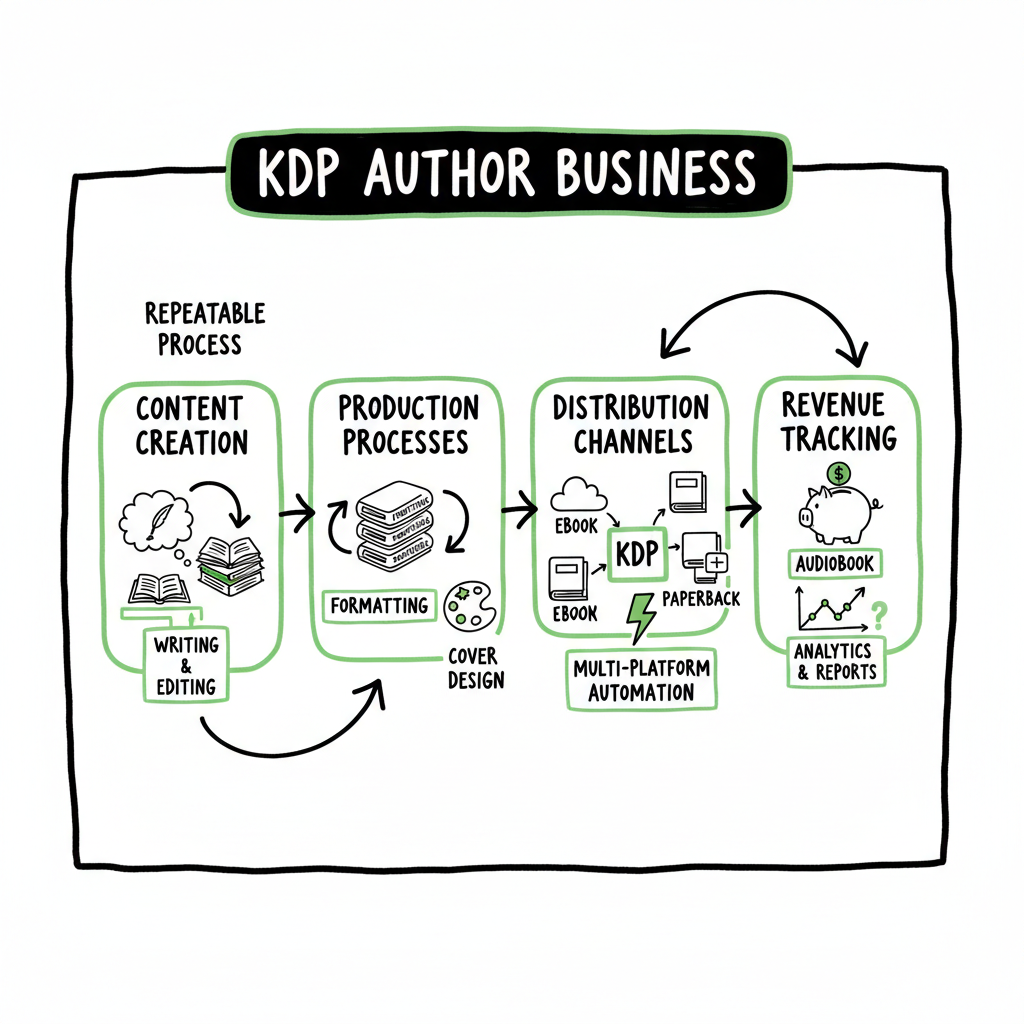
- A kdp author business is an operational system: content, production, distribution, and revenue tracking—not just one book.
- Focus on repeatable processes: consistent formatting, cover production, and platform-aware uploads to reduce errors and save time.
- Multi-platform automation makes scaling practical; BookUploadPro cuts repetitive upload work and reduces distribution friction.
- Track revenue streams separately: direct sales, Kindle Unlimited page reads, and expanded distribution; optimize pricing and programs by book type.
- Start small, measure unit economics, then automate the parts that repeat every book.
Table of Contents
- What a kdp author business looks like
- Building repeatable author operations and revenue systems
- Scaling distribution and automation with multi-platform publishing
- FAQ
- Sources
What a kdp author business looks like
When people say “kdp author business,” they often mean more than uploading a single title to Amazon. At scale, a kdp author business is a system that reliably turns ideas into sales: a content pipeline, a production checklist, a distribution plan, and a simple way to count money and costs.
KDP gives high royalties and zero inventory risk. That’s why authors use it as the revenue engine. But a business depends on systems. You need predictable procedures for manuscript cleaning, ebook and paperback generation, cover creation, formatting, metadata, and the upload process. Even basic choices—KDP Select enrollment, KU availability, or wide distribution—change how your revenue flows.
If you’re new to platform specifics, a concise reference can speed learning. For the Amazon details that matter when you scale, see Amazon KDP for Authors. That guide covers the account, royalty tiers, KU mechanics, and the upload fields that often trip teams up.
Why treat publishing as a business
Treating publishing as a business changes priorities. Instead of hoping one book “takes off,” you measure unit economics. How much does it cost to produce and publish one title? How many copies or how many KU page reads do you need to break even? When you run the numbers across multiple titles, you see where to improve: cheaper production, faster formatting, better targeted marketing, or smarter distribution.
Common kdp author business models
- Solo author model: One creator writes, edits, and handles production. Growth is steady but limited by time.
- Small team model: The author outsources editing and covers, keeps creative control, and focuses on marketing plus quality.
- Scalable content studio (book factory): Roles split among writers, editors, cover designers, and operations. The goal is volume with systemized quality control.
- Hybrid models: A mix of original works, repackaged public domain content, and collaboration with contractors.
Royalties and channels
- Direct Amazon sales (ebook and print) with 35% or 70% ebook royalty options and print royalties after printing costs.
- Kindle Unlimited (KU) page-read payments from a global fund; valuable for longer works and series.
- Expanded distribution and third-party retailers when you publish wide.
Each channel requires different tactics. KU can favor frequent releases and series, while wide distribution needs clean metadata and consistent files for multiple stores.
Building repeatable author operations and revenue systems
A business runs on repeatable steps. For publishing, standardize the tasks you’ll do for every title. This reduces mistakes, cuts time, and makes costs predictable.
Core operational steps — Manuscript prep and version control
- Keep a single source document and use a clean naming convention. Track revisions and freeze the file before formatting.
- Use simple style rules for headings, chapter breaks, and image handling so converters don’t err.
Core operational steps — Formatting and file generation
- Turn your master manuscript into EPUB and print-ready PDF files. EPUB is the standard for ebooks; PDF must match trim size for print.
- Automated conversion tools reduce time, but you must proof the output on multiple devices.
If you use a cover workflow or need EPUB conversion tools, it’s practical to integrate a processing service that handles these steps reliably; for covers, a dedicated cover generation pipeline can save hours, and for EPUB conversion, a reliable converter reduces formatting errors.
Core operational steps — Covers and packaging
- Covers sell. Use consistent branding across a series and create templates for crop-safe designs and readable typography at thumbnail size.
- If you use automated cover tools for batch production, make sure they output files that meet platform bleed and resolution specs.
Core operational steps — Metadata and categories
- Titles, subtitles, keywords, series fields, and BISAC categories are critical. Test a few keyword sets and observe which combinations surface in Amazon searches.
- Keep a metadata spreadsheet per title; it’s the single source of truth during uploads.
Core operational steps — Pricing and enrollment decisions
- Decide whether each title benefits from KDP Select (KU) exclusivity or wider distribution.
- Track price elasticity: small price changes can affect rank and revenue. For paperbacks, factor printing cost into net.
Core operational steps — Upload and distribution
- Platform uploads are a mechanical but error-prone step. Doing the same fields every time invites mistakes.
- Batch uploads and platform-aware tools reduce repeated manual entry and errors.
Operational tooling and batch work
Most successful small publishing businesses automate the repeatable work. CSV batch uploads, template-driven cover production, and platform-specific checks are worth the investment once you publish multiple books. These systems cut manual steps and free creative time for the author or production team.
Book creation links (tools to consider)
- When you generate paperbacks or ebooks as repeatable outputs, consider a central production service that manages file formats and metadata reliably. For a book creation workflow, see BookAutoAI.
Scaling distribution and automation with multi-platform publishing
Once you’ve proven your unit economics on a handful of books, scaling is about two things: increasing throughput and controlling error rates. Multi-platform distribution matters because KDP exclusivity (KDP Select) gets you KU benefits but limits reach. If your goal is long-term revenue and discoverability, you’ll likely publish wide to Kobo, Apple Books, Draft2Digital, and Ingram in addition to KDP.
Why automate multi-platform uploads
Repeating manual uploads across platforms multiplies time and errors. Each store has slightly different metadata fields, file requirements, and cover constraints. A single source of truth that adapts files and metadata per platform changes scaling from impractical to routine.
What automation should handle
- File conversion: produce platform-specific ePub or EPUB variants and print-ready files from the same master manuscript.
- Metadata mapping: map your core metadata to each store’s field structure automatically.
- Platform intelligence: apply store-specific rules like allowed characters, category mappings, and region pricing.
- Batch submission: submit multiple titles with a single CSV or upload package, and track status.
What automation does for the bottom line
- Save time: automation can cut 70–90% of the manual upload and configuration time for recurring titles.
- Reduce errors: programs prevent common mistakes that lead to delistings or poor presentation.
- Make wide distribution practical: instead of deciding exclusively for simplicity, you can publish everywhere and collect all streams of revenue.
BookUploadPro in a kdp author business
If you choose to scale, BookUploadPro fits into the operations layer. It automates repetitive uploads across Amazon KDP, Kobo, Apple Books, Draft2Digital, and Ingram. Key benefits authors report include dramatic time savings, fewer platform errors, and predictable CSV batch uploads that keep metadata consistent.
Think of BookUploadPro as the operational upgrade you use once publishing becomes a repeatable part of your business: unified multi-platform publishing, platform-specific intelligence, and error reduction. For many authors who publish seriously, it’s an obvious upgrade—automate the upload. Own the distribution.
Monitoring revenue systems: what to track
- Revenue by channel: KDP sales vs KU page reads vs other stores.
- Unit economics per title: production cost, promotion cost, and lifetime revenue.
- Conversion signals: category rank, review velocity, and price performance.
- Error reports: failed uploads, rejected files, and metadata warnings.
Set monthly checks and automate reporting where possible. When you spot a title that deviates from expected performance, investigate fast: a bad file or a metadata issue can mute discoverability quickly.
Operational priorities as you scale
- Format and file generation (EPUB, print PDF)
- Cover templates and version control
- Metadata spreadsheets and CSV import/export
- Batch uploads to stores
- Revenue reconciliation
Tools to support those priorities include conversion services, cover processing systems, and multi-platform upload tools. When you consistently publish multiple titles per quarter, the time and error savings multiply.
FAQ
Q: What makes a kdp author business different from casual self-publishing?
A: A kdp author business treats publishing like any other product line. It standardizes production, measures costs and revenue, and invests in automation for repeatable tasks. Casual self-publishing treats each book as a one-off project.
Q: Should I enroll every book in KDP Select?
A: It depends. KDP Select gives KU visibility and potential page-read revenue, which works well for serialized or longer works that perform in KU. If you want wide distribution and access to other platforms and audiences, stay wide. Test with a subset of titles and compare revenue.
Q: How do I control costs when using freelancers?
A: Track cost per task and cost per title. Use standard briefs and templates to reduce revision rounds. Batch similar tasks (covers, formatting) and negotiate per-batch pricing rather than per-book when volume justifies it.
Q: Will automation reduce quality?
A: Not if you maintain quality checkpoints. Automation handles repetitive, mechanical work—file conversion, metadata mapping, and uploads—while human review focuses on copy, design, and editorial quality. Build checks into the workflow.
Q: What metrics should I watch weekly?
A: Sales and KU page reads, ad spend performance, new reviews, and any upload errors or delistings. Monthly, reconcile revenues across channels.
Q: How do I handle differences in platform requirements?
A: Keep a platform-specific rules sheet. Automation tools should do the heavy lifting: map your core metadata into required fields and adjust cover and file specs automatically.
Q: Do I need ISBNs for ebooks and paperbacks?
A: Ebooks don’t require ISBNs on most platforms, but some stores accept them. Print editions almost always need ISBNs for distribution through retailers and wholesalers. Decide per title whether you’ll use a free ISBN (platform-assigned) or buy your own for publisher control.
Q: How does BookUploadPro fit into an existing workflow?
A: BookUploadPro replaces the manual upload task. You keep creative control—manuscript, cover, and metadata—then send standardized files and CSVs to BookUploadPro for multi-platform distribution. The goal is to cut repetitive work and reduce mistakes so your team can focus on creation and marketing.
Sources
- Amazon KDP: A Writer’s Guide to Kindle Direct Publishing – Reedsy
- The Kindle Publishing Business Model Explained: Is It Worth It?
- The Kindle Publishing Business Model Explained – Empire Flippers
- Self Publishing | Amazon Kindle Direct Publishing
- Earn more with us – Kindle Direct Publishing – Amazon.com
- The Hidden Challenges of Self-Publishing on Amazon
- Hidden Costs of Amazon KDP Publishing – BookBaby Blog
Final call to action
Visit BookUploadPro.com to see how multi-platform automation can free up your time and reduce upload errors. Try the free trial.
kdp author business: How to build a repeatable, scalable publishing operation Estimated reading time: 18 minutes Key takeaways A kdp author business is an operational system: content, production, distribution, and revenue tracking—not just one book. Focus on repeatable processes: consistent formatting, cover production, and platform-aware uploads to reduce errors and save time. Multi-platform automation makes…