Wide Publishing Workflow Practical Guide for Authors
Wide publishing workflow: A practical guide for self-publishing authors
Estimated reading time: 8 minutes
Key takeaways
- A repeatable wide publishing workflow turns one-off uploads into a predictable, low-error production line for ebook and print distribution.
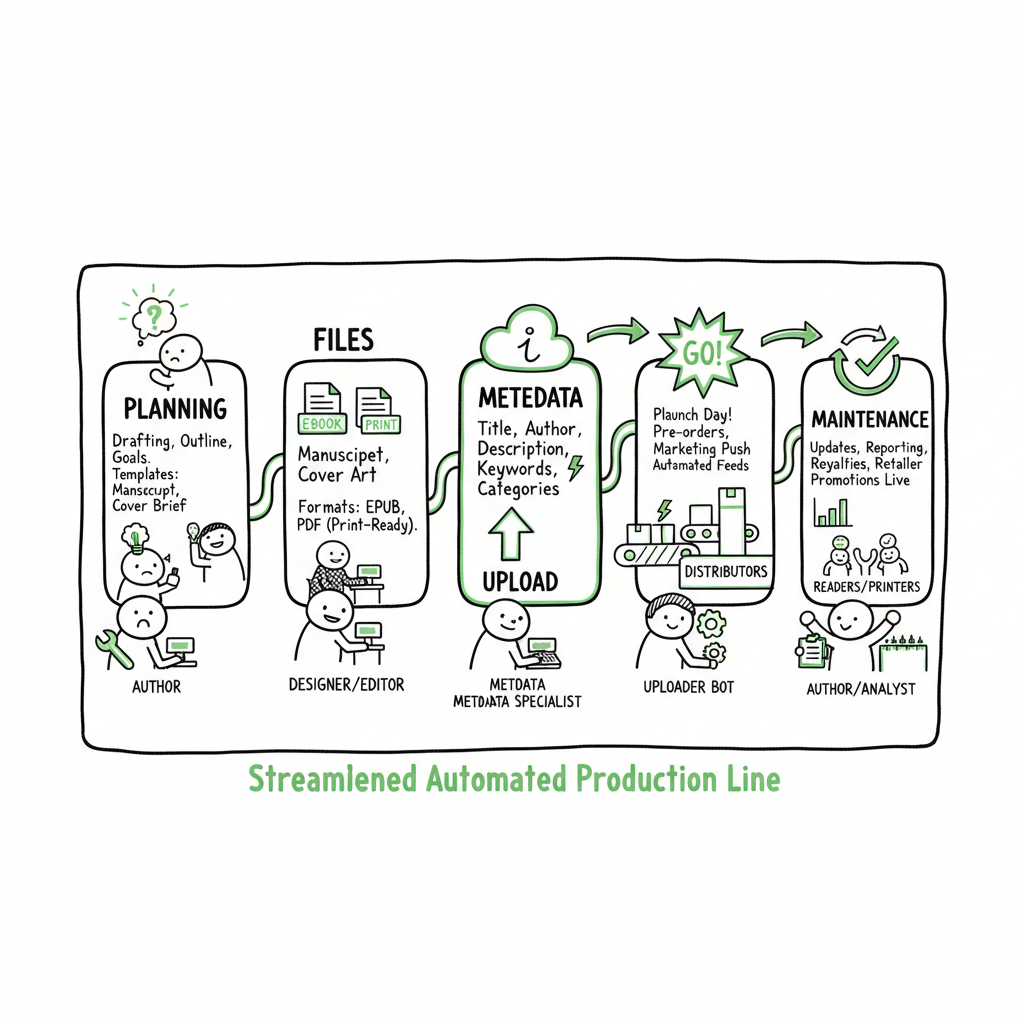
- Map stages (planning, files, metadata, upload, release, maintenance), standardize templates, and assign roles so the work scales without rework.
- Automation and batch tools—CSV uploads, platform-specific checks, and multi-retailer intelligence—cut time and mistakes, making wide distribution practical for serious authors.
- A single source of truth for metadata and assets helps keep dozens or hundreds of titles in sync and reduces last-minute mismatches.
Table of Contents
- What a wide publishing workflow looks like
- Step-by-step: the wide publishing process steps that matter
- Tools, templates, and scaling a multi retailer workflow
- FAQ
- Final thoughts
- Sources
What a wide publishing workflow looks like
A wide publishing workflow is the set of repeatable steps you follow to take a finished manuscript and publish it everywhere you want it to sell — not just one store. It covers the technical production and channel tasks: formatting files, creating covers, preparing metadata, running retailer checks, scheduling launches, and maintaining listings over time. Saying it another way: a wide publishing workflow turns publishing into a process you can run the same way every time so you don’t waste hours troubleshooting platform quirks.
If you’re considering whether to sell only on one store or spread to many, you’ll want a clear comparison. Our piece on Publish Wide Vs Amazon Exclusive explains the trade-offs between exclusivity and wide distribution and helps authors decide which path fits their goals. That comparison is the next reading step for authors who need strategy guidance before building an operational process.
Why this matters now
Authors who treat publishing like a one-off task run into the same problems repeatedly: files that fail checks, metadata entered incorrectly on one platform, or differing ISBN and price setups across stores. A structured wide publishing workflow reduces those errors, speeds delivery, and makes it possible to keep dozens or hundreds of titles in sync without hiring a full team.
The rest of this article walks through practical process steps, the templates and tools that save the most time, and how to scale without losing control of quality.
Step-by-step: the wide publishing process steps that matter
This section walks through the stages you will actually use. Keep sentences short, decide what “done” means for each step, and give each step an owner—these three habits cut errors fast.
-
1. Plan the release before final files exist
Start with a simple release plan. For each title, record title variants, formats (ebook, paperback, hardcover), target retailers, planned release date, pricing strategy, and primary categories. Use a single spreadsheet or project card where every field has a rule: “If paperback, upload file A; if ebook only, skip ISBN assignment.” Planning upfront avoids last-minute swaps that create mismatches across stores.Why categories and keywords now? Retailers index books differently. Decide primary and secondary categories early and lock them before uploads. Changing categories after publication is possible but messy and time-consuming.
-
2. Lock the manuscript and generate delivery files
Lock the manuscript and create the platform files: clean EPUB for ebook stores, print-ready PDF for paperbacks, and a high-resolution cover. Treat the creation of these artifacts as a technical step with acceptance criteria: no validation errors in EPUB checks, bleeds correct in print PDF, and cover meets retailer size and spine rules.If you don’t have an EPUB generator or need consistent formatting, convert and validate the file with a reliable tool. For instance, an EPUB converter from BookAutoAI can help streamline this step.
-
3. Prepare metadata and assets in a single source of truth
Create a single metadata file or spreadsheet that becomes the source of truth for every retailer upload. Include:- Title, subtitle, series name and number
- Author name formats (display vs contributor)
- Blurbs (short and long)
- Categories, BISAC codes, and keywords
- Language, age ranges, and grade levels if needed
- ISBNs and imprint details
- Price per retailer and territories
Standardize how fields are written. Use a title-case rule, a subtitle format, and a single blurb for store sync. When each retailer needs a slightly different field (e.g., Apple Books has specific subtitle length rules), note the variation as a comment in your source file rather than creating separate systems.
-
4. Format covers and upload-ready art
Covers are one of the primary fail points because different stores require different sizes, spine rules, and file formats. Keep a master high-resolution cover and export retailer-specific versions from that master file. If you need a cover solution that creates retailer-ready exports and processes files automatically, try a cover generator from BookAutoAI. -
5. Run platform-specific checks and adapt files
Each retailer has its own validation rules. Before you upload, check:- EPUB validation (no CSS or zipping errors)
- Image formats and DPI in covers
- Print file bleed, margins, and trim size
- Metadata fields that exceed character limits
Fix issues in your master files. Don’t rely on manual edits inside each retailer portal if you can avoid it—those edits are error-prone. Use a single corrected source file that you export for each store.
-
6. Upload, configure, and schedule
When you upload, follow a consistent order of operations for every retailer. For example:- Upload files (EPUB/PDF/cover)
- Paste metadata from your source of truth
- Set price and territories
- Configure DRM or KDP Select options as needed
- Schedule release or publish immediately
If you’re coordinating multiple retailers, a book creation workflow helps manage and automate the process.
-
7. Post-publish verification and record keeping
After release, verify every store for:- Correct cover and description
- Accurate categories and keywords
- Right price and territory permissions
- Working “Look inside” or preview, if applicable
Record the live ISBN, ASIN, or retailer IDs in your master file along with the publish date. This makes later updates and reporting straightforward.
-
8. Maintain, update, and promote
A wide publishing workflow includes maintenance. When you change price, cover, or metadata, apply the change to your source master and then push updates across stores. Track which changes require new files (e.g., a cover change for print) and which do not (e.g., blurb tweak).
Tools, templates, and scaling a multi retailer workflow
When you move from single-title publishing to publishing multiple books, the overhead grows nonlinearly. A few specific tools and templates reduce that overhead.
Standard templates and a source-of-truth sheet
A central CSV or spreadsheet that contains every field for every retailer is the backbone of a scalable process. The tighter your template, the less cleaning you’ll do later. Include columns for retailer-specific deviations so you don’t lose platform quirks inside free-form notes.
Batch uploads and CSVs
Many retailers support batch uploads via CSV or API. When you standardize CSV columns to match retailer formats, you can update dozens of listings with a single upload instead of manual edits. Batch uploads are especially valuable for price changes, territory edits, or publishing a series.
Platform-specific intelligence and checks
Treat each retailer’s requirements as part of your process. Keep a short checklist of red flags per store: Apple Books character limits, Kobo cover size limits, or Ingram print bleed tolerances. Incorporate those checks into your file validation step so you don’t reach the upload portal with a file that will be rejected.
File versioning and naming standards
Use consistent file names and version numbers. For example: Title_v1_epub.epub, Title_v1_pdf_print.pdf, Title_v1_cover_master.psd. Store previous versions and record who approved which version and when. This reduces confusion when a later update needs to revert to an earlier, approved file.
Automating repetitive steps
Automation doesn’t mean removing human checks. It means using tools that copy metadata into retailer formats, export retailer-ready files from a single master, and queue batch uploads. When you automate the repetitive technical steps, you reduce errors and free time for creative work or marketing.
BookUploadPro’s approach
For authors moving from occasional publishing to regular releases, tools that automate the technical upload steps make a real difference. BookUploadPro focuses on unified multi-platform publishing: CSV batch uploads, platform-specific intelligence, and processes that cut task time by about 90% for frequent publishers. It standardizes the platform sequence for Amazon KDP, Kobo, Apple Books, Draft2Digital, and Ingram, reducing errors and making wide distribution practical. For authors publishing seriously, BookUploadPro becomes an obvious upgrade. Automate the upload. Own the distribution.
Handling cover, EPUB, and print production at scale
Three production areas often create bottlenecks: cover art, EPUB conversion, and print files. Address these as distinct tasks with their own acceptance criteria.
- Covers: Keep a master source file and export retailer-ready versions. If you want a tool to process covers into required store sizes and formats automatically, you can use a cover generator that prepares images to retailer specs.
- EPUB conversion: Convert from your manuscript to EPUB using a reliable converter, then run validation. If you need a conversion tool that removes common errors and produces compliant EPUB files, a dedicated EPUB converter will save time and reduce rework.
- Print files: Verify bleed, margins, and spine calculations. For paperbacks and hardcovers, create a print-ready PDF from the print template and keep a checklist for final proofs.
If your workflow includes creating paperbacks or ebooks, integrate a book creation workflow that outputs both print and ebook formats from the same source to keep front and back matter consistent and avoid mismatched versions. A book creation workflow helps keep everything synchronized.
Scaling to catalogs and multiple formats
When you have many titles, move from manual portals to batch processes. Group titles by shared attributes (same price, same imprint, same categories) and prepare grouped CSVs. Use file naming conventions and a central registry of retailer IDs to track what’s live and where.
Common pitfalls and how to avoid them
- Mistake: Multiple master files for the same title. Fix: One source of truth for metadata and files.
- Mistake: Uploading different file versions to different retailers. Fix: Version control and naming conventions.
- Mistake: Waiting until release week to test retailer validations. Fix: Run checks during the production window and correct early.
- Mistake: Treating retailers as identical. Fix: Maintain a lightweight retailer guide for quirks and limits.
FAQ
Q: How long does it take to set up a repeatable wide publishing workflow?
A: Basic setup takes a few iterations—expect to spend time mapping steps, creating templates, and running three or four titles through the process before it runs smoothly. After that, the repeat process is hours instead of days.
Q: Do I need a separate ISBN for ebook and paperback?
A: Yes. Most retailers require separate IDs for each format. Keep a simple inventory of ISBNs tied to formats in your source-of-truth sheet.
Q: What’s the fastest way to produce a compliant EPUB?
A: Use a conversion tool that creates a clean, validated EPUB from your manuscript and run it through a validator. For recurring publishing, a consistent converter prevents platform-specific rejects and saves time.
Q: Can I change categories and keywords after publishing?
A: Yes, but it’s better to get them right at launch. Changes are possible but may take time to propagate and can impact discoverability actively.
Q: How do I manage covers across retailers?
A: Keep a single master cover and export retailer-specific files. If you want automated processing to produce compliant cover files, specialized cover processors remove guesswork and speed uploads.
Final thoughts
A wide publishing workflow is not a theoretical checklist. It’s a practical, repeatable production line that turns a finished manuscript into consistent listings across multiple retailers. Map your stages, create a single source of truth for metadata, standardize file generation, and use batch or processing tools to reduce manual work. Over time, these changes move publishing from a slow, error-prone task into a predictable system.
If you need tools for specific production steps: for automated cover processing and retailer-ready cover exports, there are services that handle cover generation and conversion; for producing clean EPUBs, use a dedicated EPUB converter; and for generating paperback and ebook files from a single source, a book creation workflow tool will keep files synchronized. These production helpers plug into a wider process and reduce the most common friction points.
BookUploadPro is built for authors who publish regularly and want to stop juggling portals. It combines unified multi-platform publishing with CSV batch uploads, platform-specific intelligence, and processes that reduce manual work and errors by a large margin. For authors who publish seriously, the time savings and error reduction make wide distribution practical and sustainable.
Visit BookUploadPro.com to learn more and try the free trial.
Sources
- https://www.activepieces.com/blog/content-publishing-workflow
- https://kontent.ai/blog/4-step-guide-to-effective-editorial-workflow/
- https://www.multicollab.com/blog/guide-editorial-workflow/
- https://publishone.com/5-tips-for-the-perfect-publishing-process/
- https://www.epublishing.com/news/2025/apr/23/editorial-workflow-design/
- https://www.stateofdigitalpublishing.com/digital-publishing/editorial-workflows/
Wide publishing workflow: A practical guide for self-publishing authors Estimated reading time: 8 minutes Key takeaways A repeatable wide publishing workflow turns one-off uploads into a predictable, low-error production line for ebook and print distribution. Map stages (planning, files, metadata, upload, release, maintenance), standardize templates, and assign roles so the work scales without rework. Automation…