Amazon KDP Content Guidelines Practical Guide
amazon kdp content guidelines: a practical guide for self-publishers
Estimated reading time: 12 minutes
Key takeaways
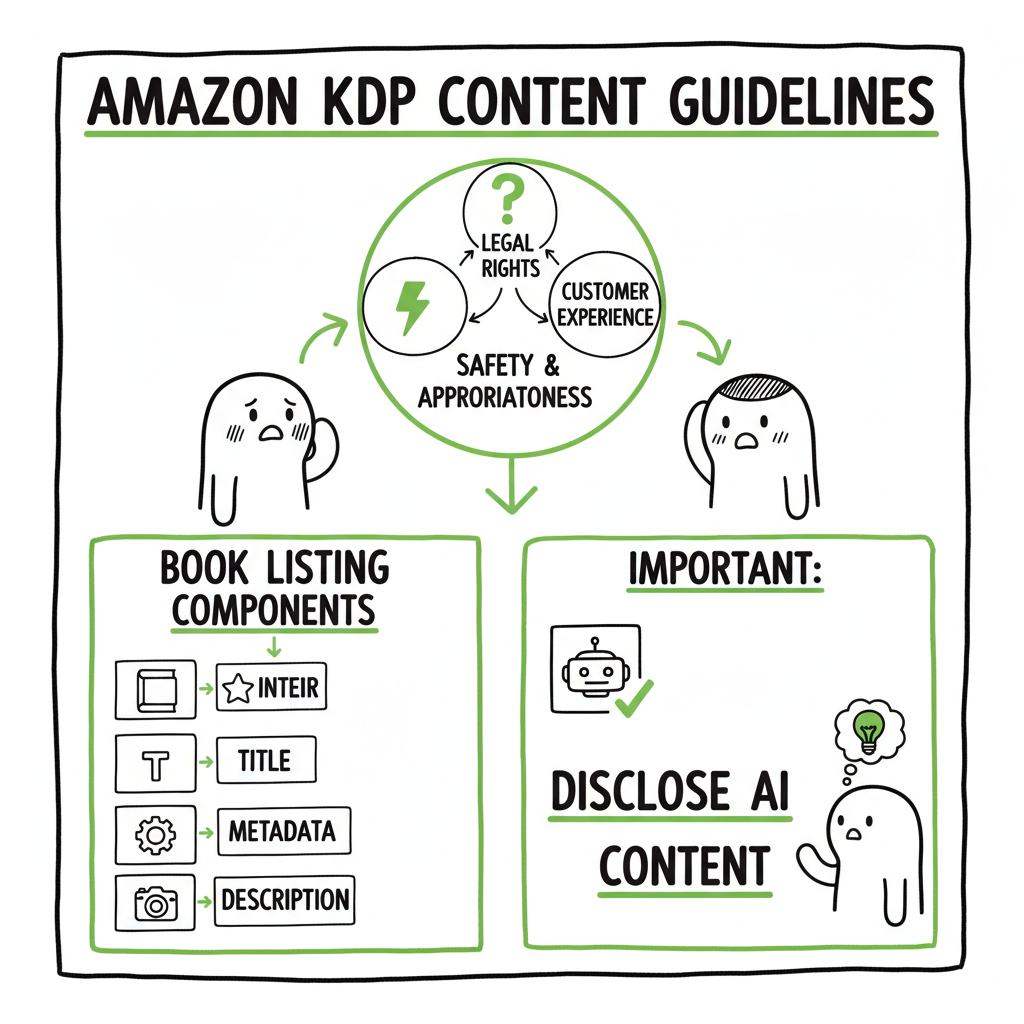
- Amazon KDP content guidelines cover every part of a book listing: interior, cover, title, metadata, description, and images.
- Follow three pillars: legal rights, safety/appropriateness, and customer experience; disclose AI content when required.
- Prepare KDP‑ready files, clear IP, and accurate metadata to avoid rejections or takedowns; tools can save time at scale.
Table of Contents
- Understanding the rules and why they matter
- Preparing KDP‑ready files, listings, and AI disclosure
- Common rejection reasons and practical fixes
- Frequently asked questions
- Final thoughts and next steps
Understanding the rules and why they matter
Amazon KDP content guidelines set the baseline for what you can publish and how you must describe it. Those rules apply to everything customers see: the interior manuscript, the cover, the title and subtitle, keywords, categories, the product description, and any images or A+ content you attach. Put simply, Amazon will check your whole listing for legal, safety, and quality problems. If something breaks the rules, your book can be rejected at upload, taken down after publishing, or trigger account reviews.
Why this matters in practice: a single overlooked item — a trademark in a subtitle, an image without rights, or a description that claims medical benefits — can lead to removal. The guidelines are enforced with a mix of automated checks and human review. That means many issues are caught automatically, but Amazon can also act after a human review if a customer flags a problem or a pattern shows low quality.
Three pillars of KDP compliance
- Legality and IP rights. You must own or control rights to all text and images. Don’t use trademarked names in a way that misleads customers. If you quote or include copyrighted material, secure permissions or rely on clear fair use (careful and narrow).
- Safety and appropriateness. KDP bans illegal content, hate speech, sexual exploitation of minors, pornography, and material Amazon deems exploitative or glorifying of violence or terrorism.
- Customer experience and quality. Amazon removes listings that are misleading, nonsensical, or low quality. That includes poor formatting, inaccurate descriptions, sloppily generated content, and marketing claims that can’t be substantiated.
Changes in recent years put a special focus on AI. KDP requires publishers to indicate whether text, images, or translations are AI‑generated. Disclosure is mandatory at upload or when you republish. Disclosure does not mean AI content is forbidden; it simply must meet the same legal and quality tests as human content. You remain responsible for IP clearance and the final quality of what goes live.
The practical consequence: treat KDP’s content rules as a checklist you must clear for every asset — cover, interior, metadata, and marketing content. When you scale publishing, that process becomes repetitive. That’s where reliable, KDP‑aware tooling pays off.
Preparing KDP‑ready files, listings, and AI disclosure
Start with a simple rule: fix your files before you click Publish. The early work reduces the chance of a rejection and protects your account over time.
Manuscript quality
- A clear structure: title page, table of contents, chapters, and proper pagination.
- No excessive spelling or grammar errors that make content unreadable.
- No machine‑generated text that reads like nonsense. If you use AI, edit and humanize outputs so they read naturally.
If you are using AI for drafting, remember the disclosure rule. When you indicate a book contains AI‑generated text or images, you don’t shift responsibility to Amazon. You simply tell Amazon you used AI. BookUploadPro the publisher (you) still must ensure IP rights, factual accuracy, and readability. Many authors use human review and targeted editing to bring AI drafts up to quality.
Formatting and file types
- KDP accepts several file types, but you must meet Kindle and print specs:
- Make ebooks in valid EPUB files or well‑prepared MOBI that meets Kindle’s formatting guidelines. If you need a reliable tool, an EPUB converter can simplify the export and validation process.
- For paperbacks, use print‑ready PDFs with correct trim size, margins, fonts, and image bleed. KDP’s paperback guidelines specify safe zones for text and images.
- Images embedded in interiors or covers must meet resolution and color profile expectations; low‑quality images trigger customer complaints and flags.
A technical tip: validate your EPUB or PDF with standard tools and previewers before upload. A validated file reduces formatting rejections and gives you a more predictable launch.
Covers, images, and rights
- The cover is part of your product. KDP enforces rules on imagery and text claims. Don’t use trademarked logos or images you don’t own. If you commission or generate a cover, confirm you have the necessary rights.
- If you need cover help, consider a dedicated book cover generator that builds KDP‑compliant files and gives you export options sized to KDP trim dimensions. A good cover tool also manages bleed and spine text for print.
Metadata and listing copy
- Metadata is where many avoidable mistakes happen. Title, subtitle, and description must be accurate and not misleading. Avoid keyword stuffing in titles or descriptions. Do not use customer reviews, pricing language, or promotional claims in A+ Content. Descriptions must not promise results you cannot prove.
- When choosing keywords and categories:
- Pick categories that match the book’s content.
- Use keywords that genuinely reflect subject matter and reader search intent.
- Avoid trademarks or brand names that suggest official affiliation unless you have rights.
AI‑generated images and translations: KDP requires disclosure for AI‑generated assets. For images, verify that the source of the generator permits commercial use and does not introduce third‑party copyrighted elements. For translations, review them carefully for accuracy and cultural sensitivity. Automated translations often need human revision to match idiom and nuance.
Scaling uploads and avoiding repetition: If you publish multiple titles, repetitive manual uploads become slow and error‑prone. Batch upload via CSV and platform‑aware tooling can save a lot of time. BookUploadPro automates multi‑platform publishing across Amazon KDP, Kobo, Apple Books, Draft2Digital, and Ingram. It offers CSV batch uploads, platform‑specific intelligence, and error reduction to cut repetitive work by roughly 90%. That makes wide distribution practical for serious authors. For many publishers, an automated workflow is an obvious upgrade once they start publishing at scale — automate the upload. Own the distribution.
A note on responsibility
Tools help, but you remain responsible for compliance. BookUploadPro and similar services reduce mistakes in formatting and metadata, but they do not eliminate the need for IP checks, human review, and careful disclosure of AI content.
Common rejection reasons and practical fixes
Amazon commonly rejects or removes titles for a handful of recurring issues. Addressing these at the source saves time.
1) Copyright and trademark problems
Why it happens: Your book contains text, images, or a title that uses protected content without permission. Sometimes authors reuse images found online or include song lyrics and think short excerpts are safe.
Fix: Keep a rights folder. Track licenses for images and permissions for any third‑party content. Avoid using trademarked names in titles in ways that might confuse customers. When in doubt, remove the suspect material or replace it with original content.
2) Offensive or exploitative material
Why it happens: KDP prohibits pornography, sexual exploitation of minors, hate speech, and content that praises violence or terrorism. Even borderline material can trigger removal.
Fix: Review your manuscript and cover with a clear eye. If your work discusses sensitive or controversial topics, frame it responsibly with context and trigger warnings where appropriate. Avoid gratuitous content that could be construed as exploitative.
3) Misleading or inaccurate descriptions
Why it happens: The product description claims benefits or endorsements that cannot be supported. Or the book is marketed in a way that misrepresents genre or length.
Fix: Be honest in your metadata. If the book is short, state that in the description or use pricing and length that match expectations. Remove unverified endorsements and specific revenue or performance claims.
4) Low quality or nonsensical text
Why it happens: Books that are clearly auto‑generated and not edited often read poorly. KDP flags titles that produce a poor customer experience.
Fix: Edit AI drafts thoroughly. Ensure coherence, consistent voice, correct grammar, and structure. A humanization pass or professional editor can lift a manuscript to acceptable quality quickly.
5) Technical formatting problems
Why it happens: Margins cut into text, images are low resolution, or Ebooks fail EPUB validation. Customers report reading problems, which triggers KDP action.
Fix: Use KDP’s formatting guides and previewer. Validate EPUB files and export print PDFs at correct trim sizes. If you create covers, confirm spine text calculations and bleed are correct.
6) A+ Content and complementary assets
Why it happens: A+ Content includes banned elements like pricing, time-limited offers, customer reviews, or medical claims.
Fix: Use A+ Content to describe the book and author, not to pitch promotions. Keep claims factual and avoid customer-generated content in marketing assets.
Practical workflows that prevent rejections
- Preflight checklist: rights, AI disclosure, formatting validation, metadata accuracy, and cover review.
- Version control: store final upload files and permissions documents in a single place.
- Batch validation: for multiple titles, run automated checks on files and metadata before mass upload.
If you want a walk‑through of preparing a listing and handling the KDP upload step by step, see Self Publish Book Amazon KDP for a practical upload guide that aligns listings with these content rules. This link connects you to a deeper upload procedure so you can match files and metadata to KDP expectations.
Practical examples and quick fixes
- If a cover image has a recognizable brand logo that you don’t have rights to, replace the image or obtain a license.
- If your description reads like a sales pitch, rewrite it to summarize the book’s content and benefits without promises.
- If an ebook shows raw HTML or odd spacing in the previewer, run the EPUB through a converter and validator before uploading. A reliable EPUB converter will fix common export issues.
Tools to consider
- A cover creation tool that outputs KDP‑ready files simplifies print setup and reduces spine/bleed mistakes. Try a book cover generator that targets KDP trim sizes and provides export options for both ebooks and print.
- An EPUB converter that validates and fixes structural issues before upload reduces formatting rejections.
- Batch publishing platforms that manage CSV uploads and map metadata to each retailer prevent field mismatches and speed distribution. For book creation tasks, look for book creation tools that integrate covers, interiors, and metadata preparation.
Frequently asked questions
Q: Do I have to disclose the use of AI on KDP?
A: Yes. KDP requires disclosure when a book contains AI‑generated text, images, or translations at upload or when republishing. Disclosure does not prohibit AI use; it just records that AI was used. You remain responsible for IP clearance and content quality.
Q: Can I use generated images if the generator’s terms are unclear?
A: No. Use only images where commercial rights are explicit. If terms are unclear, replace the image or create an original. When in doubt, source licensed stock or commission a cover and secure written rights.
Q: Will KDP reject a book for being short?
A: KDP doesn’t set fixed length minimums for most categories, but customer expectations matter. If a short book is priced and described honestly and offers clear value, it’s usually fine. Misleading descriptions or pricing can trigger quality flags.
Q: What are the fastest ways to reduce a takedown risk?
A: Remove or replace suspect material, validate all files, correct any misleading metadata, and ensure image and text rights are documented. For multiple titles, use templates and batch validation before upload.
Q: How does A+ Content affect KDP rules?
A: A+ Content must follow additional rules: no pricing, no time‑sensitive promotions, no customer reviews, and no unsubstantiated claims. The usual KDP content rules still apply.
Q: Can tools like BookUploadPro guarantee acceptance on KDP?
A: No tool can guarantee acceptance. BookUploadPro reduces repetitive errors, produces KDP‑oriented files, and speeds multi‑platform distribution, but the publisher remains responsible for legal compliance, IP rights, and final content quality.
Final thoughts and next steps
The Amazon KDP content guidelines are strict because Amazon protects customers and its marketplace. Work with that intent: secure rights, be honest in your metadata, and prioritize readable, well‑formatted books. For authors who publish multiple titles, the manual approach does not scale. Tools and platform‑aware tooling cut repetitive work and reduce simple mistakes. BookUploadPro automates multi‑platform publishing across KDP, Kobo, Apple Books, Draft2Digital, and Ingram, supports CSV batch uploads, applies platform‑specific intelligence, and reduces upload errors—saving time while keeping you in control of rights and disclosures. For cover files, consider tools that export KDP‑ready images from a reliable book cover generator. If you need consistent ebook files, an EPUB converter will help you produce validated EPUBs ready for Kindle and other stores. For end‑to‑end creation, book creation tools can streamline interiors, covers, and metadata so your titles meet platform expectations from the start.
Visit BookUploadPro.com and try the free trial to see how batch uploads and platform intelligence can change repeatable publishing tasks into a predictable workflow.
Sources
- Content Guidelines – Kindle Direct Publishing
- Amazon KDP Terms and Conditions
- Kindle Publishing Guidelines
- Paperback Submission Guidelines – Kindle Direct Publishing
- A+ Content Guidelines – Kindle Direct Publishing
- A+ Content – Kindle Direct Publishing
- KDP Content Guidelines (third‑party explainer)
- Amazon KDP’s ‘AI-Generated’ Book Content Guidelines: Summer 2025 (video)
amazon kdp content guidelines: a practical guide for self-publishers Estimated reading time: 12 minutes Key takeaways Amazon KDP content guidelines cover every part of a book listing: interior, cover, title, metadata, description, and images. Follow three pillars: legal rights, safety/appropriateness, and customer experience; disclose AI content when required. Prepare KDP‑ready files, clear IP, and accurate…