Ebook vs Paperback Workflow for KDP and Self-Publishing
Ebook vs Paperback Workflow: Practical Guide for KDP and Multi-Platform Publishing
Estimated reading time: 14 minutes
Key takeaways
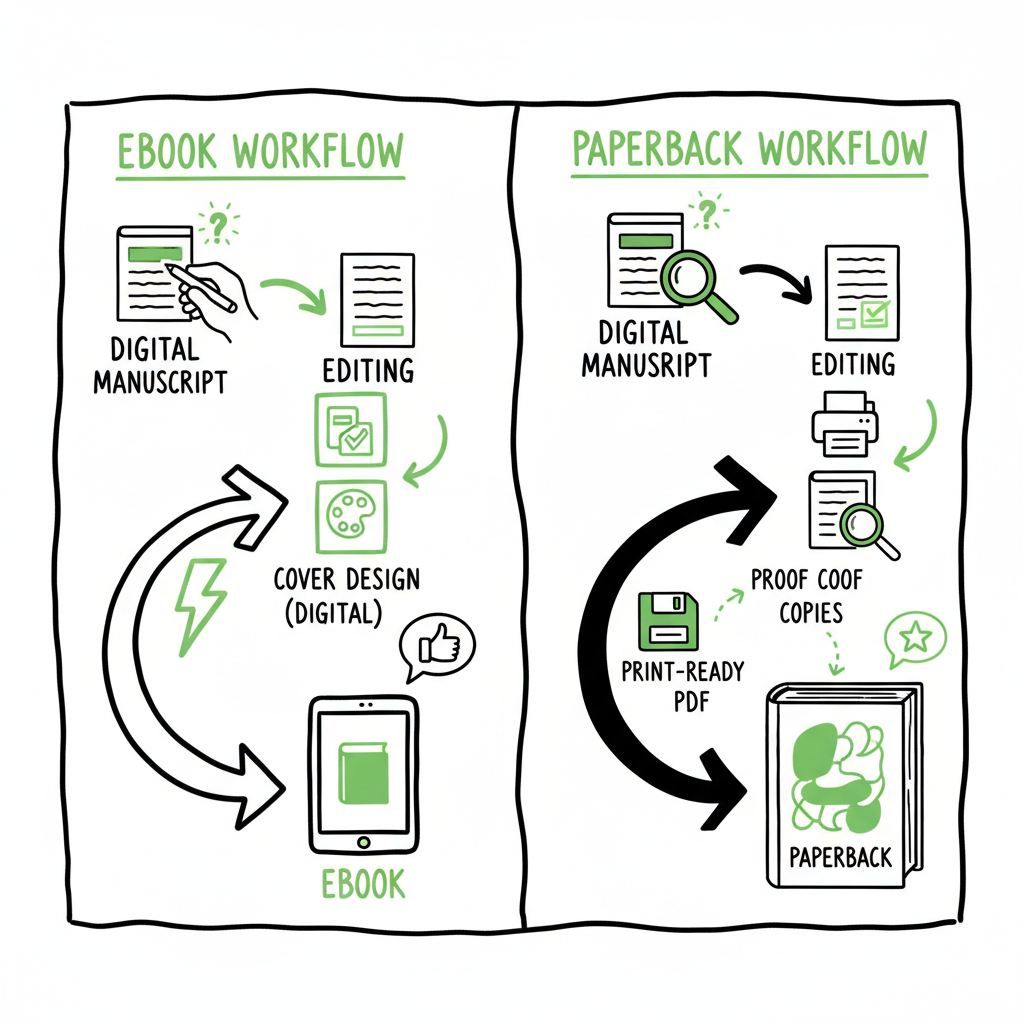
- The ebook vs paperback workflow starts with the same manuscript but splits into two distinct production paths: a reflowable ebook file and a fixed, print-ready PDF with a full-wrap cover.
- Plan for separate assets and proofs—cover specs, file types, and pricing differ—and use tools that remove repetitive steps when you publish at scale.
- For authors publishing widely, a unified pipeline that generates both formats from a single source saves time, cuts errors, and makes multi-platform distribution practical.
Table of Contents
- Why the difference matters
- Preparing manuscript, covers, and assets
- Production: ebook vs paperback workflow on KDP
- Managing uploads, distribution, and pricing
- FAQ
Why the difference matters
The phrase ebook vs paperback workflow describes two related but separate production processes that start from the same manuscript. In the simplest terms, ebooks are reflowable: they adapt to screen size, font choices, and user settings. Paperbacks are static: page counts, margins, trim size, and full-wrap covers are fixed. That difference drives almost every decision you’ll make during production.
Understanding this split early prevents wasted work. If you design the book only for the screen and then try to export straight to print, you’ll spend hours re-typesetting and fixing margins. Conversely, if you lay out a print‑ready interior and expect it to behave as an ebook, you’ll run into issues with images, footnotes, and navigation on smaller devices.
If you want a compact reference on how KDP handles those differences, see KDP Upload Workflows Format — it outlines the platform-specific steps and what files KDP expects at upload. That resource is handy to compare KDP ebook paperback differences in practice and to avoid common upload errors.
Preparing manuscript, covers, and assets
Shared upstream steps
Before the format split, most of the heavy lifting is the same. Editing, developmental and copy editing, a consistent style, and metadata selection (title, subtitle, series fields, keywords, and categories) belong to the shared stage. Make decisions once and apply them to both formats.
Manuscript source
Work from a clean, well-structured source file. Authors commonly use DOCX, but tools that accept markdown or structured XML are also fine. The key is consistent use of heading styles, paragraph styles, and semantic markup for lists, blockquotes, and tables. Semantic markup makes it possible to derive a reflowable ebook while also giving a clear baseline for a print layout.
Covers and images
Covers are non-negotiable format differences. Ebooks require a single cover image—usually a high-quality JPEG or PNG sized according to retailer specs. Paperbacks need a full-wrap cover that accounts for back cover, spine width (based on page count and chosen paper), and bleed. If you plan both formats, design with the paperback spine and bleed in mind; then extract the ebook front cover from the full-wrap file.
If you don’t want to build covers manually, a cover generator can speed work and produce consistent, KDP-compliant images for both formats. That’s useful when you publish multiple titles or series and want predictable results.
Images and interior art
Decide where images belong and how they’ll be handled in each format. High-resolution, print-ready images are required for paperbacks; they must be embedded in the PDF interior. For ebooks, use optimized images (smaller file size, appropriate resolution) and consider that readers can alter font size and line length. Complex layouts with sidebars or multi-column tables often need simplified versions for the ebook.
File types and format choices
– Ebook: KDP accepts EPUB, KPF, and MOBI derivatives. EPUB is the standard, and creating a clean EPUB (semantic structure, navigation, and accessible images) makes distribution across other stores easier.
– Paperback: Provide a print-ready PDF for the interior and a full-wrap PDF for the cover. The interior must match the chosen trim size and include correct margins and bleed.
To explore automation for multi-format publishing, BookAutoAI offers a platform.
Production: ebook vs paperback workflow on KDP
Where the workflows split
After shared prep, the project branches into two paths: one focused on reflow and navigation (ebook) and one focused on fixed layout and proofing (paperback). Treat them as separate deliverables that share content, not identical exports.
Paperback production steps
- Choose trim size and paper
– Select the trim size that fits your genre and reader expectations. This choice affects line length, page count, and spine width. - Typeset the interior
– Convert the manuscript into a fixed-layout PDF. Apply appropriate margins, headers/footers, and page numbering. Watch widows and orphans, and ensure tables and images fit the page width. - Calculate spine and create full-wrap cover
– Use the print calculator for spine width (depends on page count and paper type) and add bleed. The full-wrap cover includes front, spine, and back as a single PDF. - Proof and iterate
– Order a physical proof or use KDP’s previewer to validate margins, color, and spine alignment. Many issues appear only in print, so proofing is critical. - Upload and set pricing
– Upload the interior PDF and full-wrap cover, set distribution options, list price, and territories. Paperbacks incur manufacturing costs and have a minimum list price depending on trim and print options.
Ebook production steps
- Build a semantic source
– Use the same manuscript source but rely on styles and structure instead of fixed pages. Headings create the table of contents; bold and italic must be marked via styles. - Create a clean EPUB
– Export or build a reflowable EPUB with semantic HTML, proper metadata, and a navigation (NCX/table of contents). Include a high-res front cover image packaged with the EPUB.
– If you prefer, KPF or other vendor-specific formats are acceptable for KDP; however, EPUB is the universal standard for multi-platform distribution. - Validate and test
– Test the EPUB on a range of devices and apps (phone, tablet, major ereader apps) and check for image scaling, line breaks, and navigation. - Upload and configure
– Upload the EPUB or KPF to KDP, set digital territories and pricing. Ebooks have flexible pricing and no per-unit manufacturing cost, which affects royalty calculations.
Best practice: print-first, derive ebook
A common professional pattern is to design the print book first and then derive the ebook. That ensures the author locks in the static layout—where typography and page flow matter most—and then restructures content for reflow. This is particularly helpful with complex interiors (nonfiction, textbooks, illustrated books) where print requirements force clearer decisions on images and sidebars.
But don’t expect a straight export to pass without work. Reflowable formats need semantic cleanup: remove hard page breaks, rebuild chapter headings as real H1/H2 elements, and create a functioning table of contents. Converting print PDFs directly to EPUB rarely produces good results without retagging and manual fixes.
Dual-format KDP workflow considerations
- Separate files: KDP treats formats independently. Updating one does not change the other.
- Pricing and royalties: Ebook royalty calculations are different than print. Ebooks allow lower retail price points and higher percentage royalties, while paperbacks include printing costs that affect net royalties.
- Proofing cadence: Paperbacks need a physical proof cycle. Ebooks can be updated instantly but may require republishing in multiple channels.
- Metadata alignment: Keep descriptions, keywords, and categories consistent to avoid confusing readers and retailers.
Managing uploads, distribution, and pricing
Upload sequences and checks
On KDP, you upload formats separately. Start with the format that requires the most work—often the paperback because it needs fixed layout and a full-wrap cover—then publish the ebook. That lets you finalize page counts and spine width before creating the paperback cover, reducing rework.
If you rely on multiple retailers (Kobo, Apple Books, Draft2Digital, Ingram), export an EPUB for wide distribution and a print-ready PDF for POD partners. A well-built EPUB reduces friction across stores; a correct PDF ensures predictable printing from on-demand vendors.
Automating at scale
When you plan to publish several titles or run a series, repetitive tasks become costly. CSV batch uploads and platform-specific intelligence help: they let you push consistent metadata, pricing tiers, and distribution choices across many files without re-entering data manually. This is where unified multi-platform publishing tools shine. BookUploadPro purpose-built automation delivers ~90% time savings for authors publishing seriously.
BookUploadPro’s service is aimed at authors who want the efficiency of a production pipeline: CSV batch uploads, platform-specific packaging, and automated error checks reduce manual steps and time spent on each title. For many authors, it’s a practical upgrade once they publish seriously.
Pricing strategy and distribution choices
Consider reader preference, margins, and visibility when setting prices. Ebooks support promotional pricing and temporary discounts because they don’t incur manufacturing costs. Paperbacks need a price that covers printing and leaves room for retailer discounts while protecting author margins.
- KDP Expanded Distribution vs KDP only: Expanded distribution puts your paperback in retailers and libraries via third‑party wholesalers but at a lower royalty rate. Ebooks go through direct channels like KDP Select if you choose exclusivity for promotional benefits, but that choice blocks other retailers.
- Wide distribution: For ebooks, distributing wide increases reach but adds complexity. For print, using Ingram or other distribution channels alongside KDP helps physical bookstore availability.
Platform-specific upload comparison
Ebook print upload comparison centers on files and steps:
- Ebook upload is faster: upload EPUB/cover, set metadata and price.
- Paperback upload is technical: upload interior PDF, full-wrap cover, choose print options, and request proof.
If you need a reliable EPUB conversion tool, consider an EPUB converter to build standards-compliant files fast. And when you’re creating both paperback and ebook editions together, using a single production engine that outputs both formats reduces mismatched metadata, inconsistent covers, and errors that cause rejections.
FAQ
Q: Can I export a paperback PDF into an ebook file and expect good results?
Not reliably. PDFs encode fixed layout and pagination that don’t translate cleanly to reflowable formats. Converting a print PDF to EPUB usually requires re-tagging and semantic rebuilding.
Q: Which format should I finish first?
For complex books, finish the print layout first and then derive the ebook. For simple text novels, you can prepare both in parallel, but keep separate build steps for each format.
Q: How do royalties differ between ebook and paperback on KDP?
Ebooks often offer higher percentage royalties and lower marginal costs, while paperbacks include manufacturing costs deducted from earnings. Pricing strategy must account for these differences.
Q: Do I need different covers for ebook and paperback?
Yes. Ebooks require a standalone front cover image; paperbacks require a full-wrap cover with accurate spine calculations and bleed.
Q: Is it worth distributing wide or using KDP Select?
It depends on your marketing strategy. KDP Select gives promotional tools but demands exclusivity for ebooks. Wide distribution reaches more stores and readers but requires separate setup.
Q: Can automation tools handle both ebook and paperback creation?
Yes. Modern tools can accept a single manuscript and generate both reflowable ebooks and print-ready packages with platform-specific intelligence, saving time and reducing upload errors.
Wrap-up operational checklist
- Start with a single, well-structured source manuscript.
- Decide on trim size and design the paperback layout first if you have complex interiors.
- Produce separate, format-specific files: EPUB (ebook) and print-ready PDFs with full-wrap cover (paperback).
- Validate and proof: test EPUB across devices and order a physical proof for the paperback.
- Use automation for batch tasks and cross-platform distribution to save time and reduce errors.
Sources
- What Is the Difference Between Ebook and Paperback?
- Ebook Vs Paperback: Which Format Is Better for Reading and Cost
- Ebook vs. Print book: What’s Best for Indie Authors?
- The Pros and Cons of Self-Publishing Your eBook vs Print Book
- EBooks vs. Printed Books: Which Are Better?
Ebook vs Paperback Workflow: Practical Guide for KDP and Multi-Platform Publishing Estimated reading time: 14 minutes Key takeaways The ebook vs paperback workflow starts with the same manuscript but splits into two distinct production paths: a reflowable ebook file and a fixed, print-ready PDF with a full-wrap cover. Plan for separate assets and proofs—cover specs,…