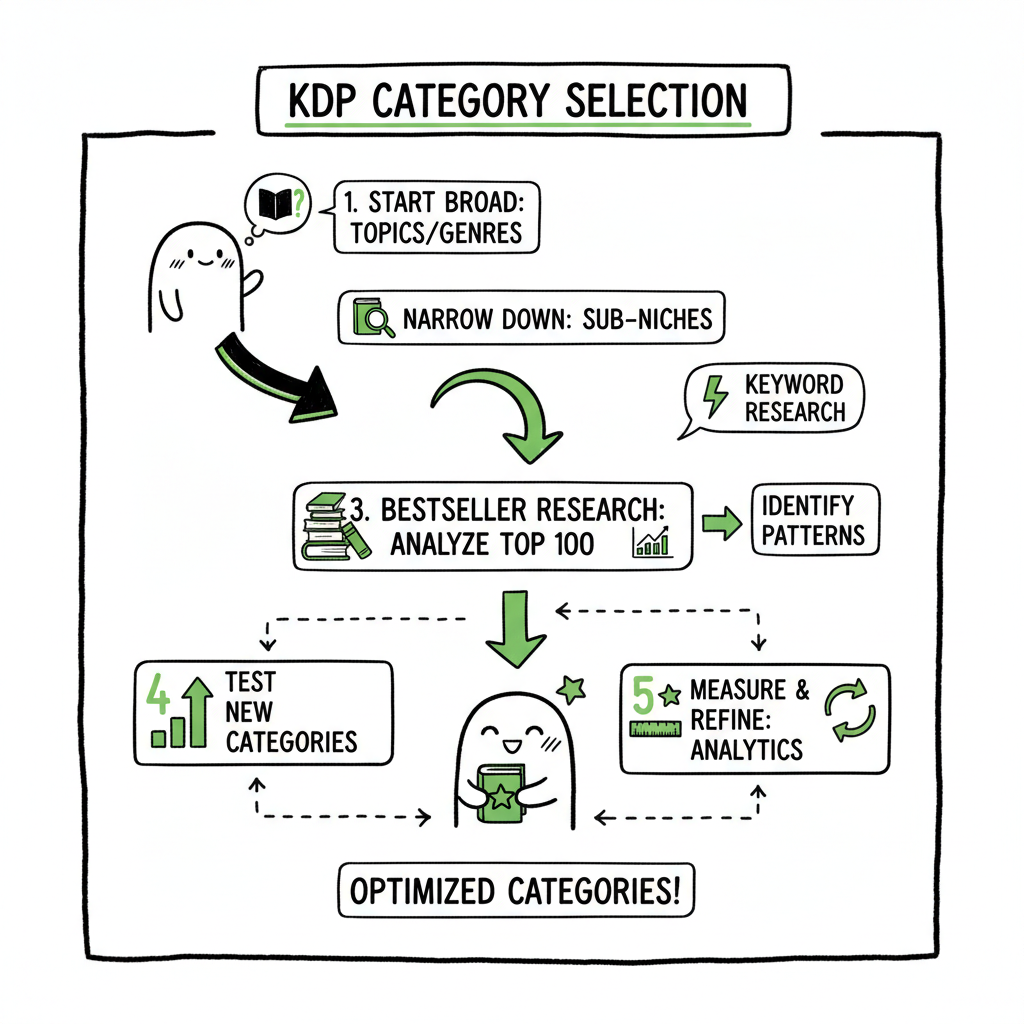
KDP Category Selection Strategy for Better Discoverability
KDP Category Selection Strategy: Practical Steps to Pick Winning Categories
Estimated reading time: 10 minutes
Key takeaways
- Narrow categories to specific subniches to increase discoverability and ranking potential.
- Use a mix of research (bestsellers and tools) and accurate matching to avoid removals and false expectations.
- Treat category selection as an ongoing process: test, measure, and adjust while automating repetitive tasks where possible.
Table of Contents
- Why category selection matters
- A practical KDP category selection strategy
- Tools and tactics for research
- Multi-platform publishing and operational tips
- FAQ
- Final thoughts
- Sources
Why category selection matters
Anchor: #why-it-matters
If you plan to publish more than one book, category choice stops being an academic detail and becomes a performance lever. The phrase kdp category selection strategy matters because it shapes how Amazon surfaces your book to readers searching inside specific niches. Picking the right category moves you from “lost on a long list” to “competing at the top of a small rack.”
Good category selection increases visibility in a two-step way. First, narrower subcategories usually have fewer competing titles, so you can reach a bestseller ranking faster. Second, category choice interacts with keywords and description to influence where Amazon places your book beyond the two categories you choose in KDP. That means the initial pick is a targeted bet that your book will show up where interested readers already shop.
Early on, authors often default to broad categories because they feel safer. That rarely pays off. Broad categories are crowded and reward large-scale promotions. For authors publishing regularly, a deliberate kdp category selection strategy focuses on a handful of niche racks where modest sales can translate into visible rank movement. Later you can expand or shift categories as the book’s performance data comes in.
One final operational point: metadata automation matters when you publish multiple titles. If you want to apply category tactics consistently across a series, consider a repeatable workflow. Services that centralize metadata can reduce errors and speed rollout. For example, Amazon KDP Metadata Optimization Automation can handle repetitive category assignments and keep your listings accurate across updates, which is an obvious benefit once you publish at scale.
A practical KDP category selection strategy
Anchor: #practical-strategy
Start with accuracy, then layer in tactics. The point of a category is to help readers find your book. If your category choice misleads readers, you risk bad reviews or removal. But within accuracy there’s room to be strategic.
Step 1 — Define the true reader and primary use case
Write a one-sentence description of who the book is for. Is it “busy parents learning quick science activities for kids” or “mystery readers who like small-town amateur sleuths”? That single sentence determines the pool of categories that actually fit. If you try to shoehorn a book into a popular but irrelevant category, short-term gains are unlikely and enforcement risk rises.
Step 2 — Niche down to subcategories
Amazon’s category system rewards specificity. A smaller subcategory gives you an achievable target for bestseller ranks. To niche down, browse the top books in a candidate subcategory and ask:
- Do the covers and blurbs match my book’s tone?
- Are top titles selling similar page lengths and formats?
- Is there repeatable demand or a seasonal spike?
Subcategories often inherit parent traffic. Choosing a narrow shelf can still give you exposure in the broader family, but you compete where the field is smaller. That’s the heart of kdp niche selection.
Step 3 — Match category to metadata and content
Your selected categories must align with your book’s keywords, title, subtitle, and description. If you choose a niche about “intermittent fasting” but your manuscript is a general health guide, Amazon may place the book in category slots the metadata doesn’t support. Make sure the manuscript, back matter, and description all signal the same niche.
Step 4 — Use all three category slots wisely
KDP allows up to three categories. Use them to cover the primary niche and two close adjacent niches rather than three loosely related fields. For example, a cozy mystery might use:
- Cozy Mystery > Amateur Sleuths
- Cozy Mystery > Small Town
- Mystery > Series (if it’s book one of a series)
That combination gives multiple discovery paths without diluting relevance.
Step 5 — Monitor rank and adjust
Category selection is not a one-time guess. Track where sales are coming from and how often your book hits visibility thresholds. If your book never breaks the top 100 in any chosen subcategory despite steady promotion, consider testing an adjacent niche where the competition is lighter. Small, frequent adjustments beat large gambles.
Step 6 — Keep it compliant and honest
Amazon moved away from BISAC toward proprietary categories. That change makes accurate labeling even more important. Mislabeling can lead to removal. If you automate category assignments, include a verification step to ensure each book’s category assignments still fit the manuscript.
Putting these steps together gives you a repeatable kdp category selection strategy: identify the real reader, locate the niche shelf, match metadata and content, fill the slots with targeted subcategories, monitor performance, and adjust.
Tools and tactics for research
Step 7 — Putting it all together for testing
You don’t need to guess. Use data and simple checks to validate a category choice.
Step 8 — Practical checks during research
Manual checks that work
- Browse top 20 in the subcategory: Look for signal consistency—cover styles, blurbs, and reader comments that match your book.
- Check rank thresholds: Use public rank pages to estimate how many sales it takes to reach top 10 or top 100 in that subcategory.
- Read customer reviews: Reviews reveal what readers expected and whether the category aligned with that expectation.
Tools that speed the work
- Keyword and category tools provide sales estimates and competition data so you can see which categories are growing. These tools help with kdp category tactics because they show how saturated a niche is and how many actual sales are needed to hit a rank milestone.
- Spreadsheet tracking: Keep a CSV of category experiments per book. Include date, category variants, promotion used, and resulting rank. Over time you’ll see patterns.
Operational shortcuts for scale
When you publish multiple books or series, manual category edits become a bottleneck. Batch upload via CSV and platform-aware systems reduce manual entry and error. Using a centralized process means you can swap category sets across a series quickly and track outcomes with consistent labels.
If your workflow includes formatting and covers, make sure those pieces integrate. For example, a clean EPUB file and an aligned cover improve conversion and reduce friction during marketplace review. If you convert manuscripts to EPUB frequently, use a reliable EPUB converter to standardize output and avoid rejections. If you create covers in-house or at scale, a dedicated book cover generator can speed consistent visual design across a series. Both tools keep the publishing cadence steady and let you focus category testing on performance rather than file preparation.
Integrating category testing into publication cadence
When you launch, pick your primary set of categories and leave them in place for a reasonable test period—typically 30–90 days. Promote the book to get a test signal. If results fall well below projections, use your mapping sheet to move into adjacent niches. With automation, changing and redeploying categories across a store is quick and auditable, which makes thoughtful A/B testing practical.
BookUploadPro automates repetitive uploads across Amazon KDP, Kobo, Apple Books, Draft2Digital, and Ingram. It supports CSV batch uploads, applies platform-specific intelligence, and cuts routine upload time dramatically—making wide distribution practical for authors publishing seriously. BookUploadPro automates the upload. Own the distribution.
Call to action
Visit BookUploadPro.com to explore features and try the free trial.
Sources
– Guide to Choosing KDP Categories for Amazon Self-Publishing
– How to Choose Amazon’s KDP Categories: Two Options
– Amazon Book Categories: My Secret Method to Choose Clear Winners
– How to Select the Right Categories for Your Fiction Book on Amazon KDP
Tools and tactics for research
Anchor: #tools-tactics
You don’t need to guess. Use data and simple checks to validate a category choice.
Manual checks that work
- Browse top 20 in the subcategory: Look for signal consistency—cover styles, blurbs, and reader comments that match your book.
- Check rank thresholds: Use public rank pages to estimate how many sales it takes to reach top 10 or top 100 in that subcategory.
- Read customer reviews: Reviews reveal what readers expected and whether the category aligned with that expectation.
Tools that speed the work
- Keyword and category tools provide sales estimates and competition data so you can see which categories are growing. These tools help with kdp category tactics because they show how saturated a niche is and how many actual sales are needed to hit a rank milestone.
- Spreadsheet tracking: Keep a CSV of category experiments per book. Include date, category variants, promotion used, and resulting rank. Over time you’ll see patterns.
Operational shortcuts for scale
When you publish multiple books or series, manual category edits become a bottleneck. Batch upload via CSV and platform-aware systems reduce manual entry and error. Using a centralized process means you can swap category sets across a series quickly and track outcomes with consistent labels.
If your workflow includes formatting and covers, make sure those pieces integrate. For example, a clean EPUB file and an aligned cover improve conversion and reduce friction during marketplace review. If you convert manuscripts to EPUB frequently, use a reliable EPUB converter to standardize output and avoid rejections. If you create covers in-house or at scale, a dedicated book cover generator can speed consistent visual design across a series. Both tools keep the publishing cadence steady and let you focus category testing on performance rather than file preparation.
Multi-platform publishing and operational tips
Anchor: #multi-platform
Category strategy on Amazon is only part of the story. If you distribute across Kobo, Apple Books, Draft2Digital, and Ingram, you need a consistent approach that respects platform differences while minimizing manual work.
Understand each platform’s category model
Not every storefront uses the same taxonomy. Some platforms accept BISAC, some use their own tags, and some map your categories automatically. Your kdp category selection strategy should start on Amazon—because of volume and visibility—but extend to a multi-platform mapping sheet. For each platform list:
– The equivalent category or tag
– Any special rules or limits
– How your metadata should read for best conversion
Batch uploads and platform intelligence
Publishing many books exposes the cost of manual uploads. CSV batch uploads and platform-specific intelligence reduce repetitive work and prevent simple mistakes like selecting the wrong book type or misplacing a series number. Services built for multi-platform publishing automate these steps and apply platform-aware logic so a single change in your source metadata propagates correctly to KDP, Apple, Kobo, Draft2Digital, and Ingram.
Benefits of centralized automation
- ~90% time savings on routine uploads compared to manual entry.
- Reduced error rates when category and keyword fields are validated against platform rules.
- Unified reporting so you compare category performance across stores.
Practical policy: maintain a category mapping spreadsheet
Keep one authoritative file with your preferred Amazon categories and the mapped categories for each platform. When you update a category on Amazon, update the mapping file and run your batch process. This keeps distribution consistent and ensures readers find the right book on each storefront.
Consider series and re-releases differently
Series entries often benefit from consistent category placement to funnel readers from one book to the next. Re-releases or revised editions should inherit the original category set unless the content shift justifies a new placement. If you are re-targeting the audience, treat the book as a new experiment but keep the core metadata aligned.
Cover, formatting, and creation fit into the workflow
Categories work best when the rest of the customer experience matches the niche. If your book targets a design-driven fiction niche, the cover needs to read like those competitors. If you publish ebooks and paperbacks, standardize creation steps. Using a reliable EPUB converter keeps the ebook file consistent across uploads, and a scalable book creation workflow keeps paperback interiors and print specs consistent. These steps reduce friction when you change categories or run promotions.
Integrating category testing into publication cadence
When you launch, pick your primary set of categories and leave them in place for a reasonable test period—typically 30–90 days. Promote the book to get a test signal. If results fall well below projections, use your mapping sheet to move into adjacent niches. With automation, changing and redeploying categories across a store is quick and auditable, which makes thoughtful A/B testing practical.
FAQ
Anchor: #faq
Q: How many categories can I choose on KDP?
A: KDP lets you choose up to three categories during the publishing process. Use them to cover the primary niche and close adjacent niches rather than three unrelated categories.
Q: Should I pick broad or narrow categories?
A: Narrow categories usually offer faster rank gains and better discoverability for most indie authors. Broad categories are competitive and favor large-scale promotion. Balance specificity and relevance.
Q: How long should I keep a category set before changing it?
A: Give a category change 30–90 days with steady promotion. Track rank movement and sales. Quick flips make it hard to know what worked.
Q: Can KDP remove my book for the wrong category?
A: Yes. Mislabeling can result in removal. Prioritize accuracy and avoid misleading category choices.
Q: Does category selection work the same on other platforms?
A: No. Each platform has its own taxonomy and mapping. Keep a category mapping spreadsheet and use automation to apply consistent choices across stores.
Q: How do I know which category will give me the best chance?
A: Look for niches where the top 10–20 books have consistent signals with your title (cover, description, length). Tools that estimate sales and competition help you choose the best kdp categories objectively.
Final thoughts
Category selection is a small decision with outsized effects when you publish at scale. The right process reduces guesswork: define your reader, pick precise subcategories, make sure your metadata and content align, and treat category choice as an experiment you can measure and refine.
Operational discipline makes the difference. When your workflow includes batch CSV uploads, platform-aware mapping, and automated metadata checks, you can test categories across multiple titles without crippling manual work. That’s where a publishing automation service becomes valuable: it gives you repeatability, reduces errors, and frees time to iterate on the books themselves.
BookUploadPro automates repetitive uploads across Amazon KDP, Kobo, Apple Books, Draft2Digital, and Ingram. It supports CSV batch uploads, applies platform-specific intelligence, and cuts routine upload time dramatically—making wide distribution practical for authors publishing seriously. Automate the upload. Own the distribution.
Call to action
Visit BookUploadPro.com to explore features and try the free trial.
Sources
- Guide to Choosing KDP Categories for Amazon Self-Publishing
- How to Choose Amazon’s KDP Categories: Two Options
- Amazon Book Categories: My Secret Method to Choose Clear Winners
- How to Select the Right Categories for Your Fiction Book on Amazon KDP
- KDP Categories – Amazon.com
KDP Category Selection Strategy: Practical Steps to Pick Winning Categories Estimated reading time: 10 minutes Key takeaways Narrow categories to specific subniches to increase discoverability and ranking potential. Use a mix of research (bestsellers and tools) and accurate matching to avoid removals and false expectations. Treat category selection as an ongoing process: test, measure, and…