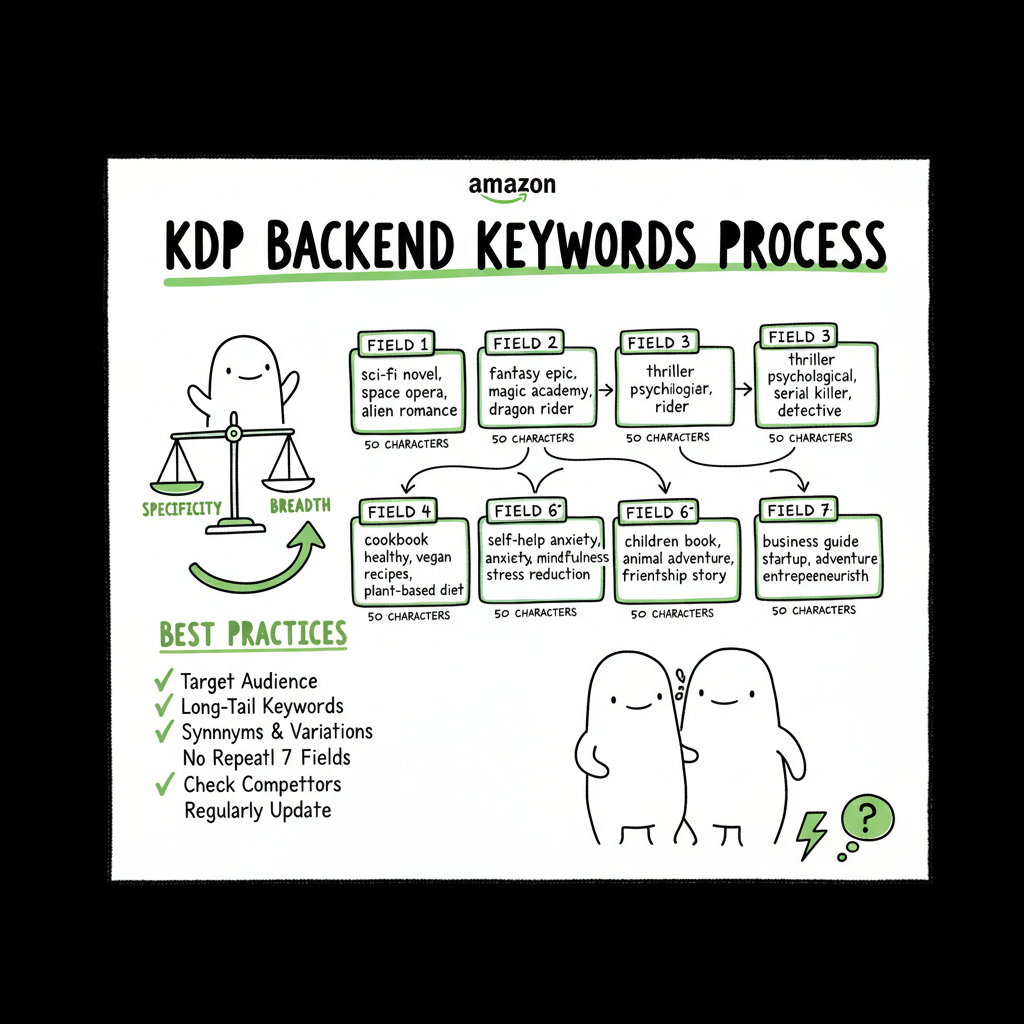
KDP backend keywords explained for self-publishers
kdp backend keywords explained
Estimated reading time: 12–14 minutes
Key takeaways
- KDP backend keywords are seven 50-character fields that expand Amazon’s indexing beyond title and description — use them to reach specific search queries without repeating text already on the product page.
- Balance specificity and breadth: use targeted reader phrases first, then fill remaining boxes with niche terms, synonyms, demographics, and pain points while avoiding banned words.
- When you publish multiple books, automation and batch CSV uploads make applying consistent keyword strategy practical and safe, reducing errors and saving up to ~90% of time.
Table of Contents
- What backend keywords are and why they matter
- How KDP keywords work and best practices
- Publishing at scale with batch uploads
- FAQ
- Sources
What backend keywords are and why they matter
Amazon’s KDP backend keywords are the hidden search inputs you fill when you publish a Kindle or paperback. They are seven separate fields. Each box accepts up to 50 characters. These entries don’t show on the product page, but they tell Amazon’s search system what to index beyond your title, subtitle, and description.
Think of them as an extension of your product metadata. Readers rarely search exact titles. They type phrases, mix words, and try many combinations. Backend keywords let you cover variants and phrases that don’t fit naturally into visible text. For example, a fantasy author might use “gaslamp supernatural romance” where that exact phrase wouldn’t read well in a subtitle.
Why they matter
- Extra indexing: Amazon reads these fields and associates your book with more search queries.
- Cost-free experimentation: You can change them any time and test different word mixes over weeks.
- Non-visible tuning: You can add genre terms, reader pain points, and synonyms without cluttering public copy.
Limits and guardrails
- Seven fields, 50 characters each. Count carefully. Spaces and punctuation consume characters.
- No quotes. Using quotation marks forces exact matches and is discouraged by Amazon.
- No competitor titles, program names (like “KDP” or “Kindle Unlimited”), or generic words like “book” or “ebook.”
- Avoid deliberate misspellings or trademark misuse. Amazon enforces content rules.
These rules make the fields useful and also risky if authors guess without checking. Use them to extend relevance, not to trick the algorithm.
How KDP keywords work and best practices
This section covers how KDP keyword indexing really operates, the meaning behind each keyword field, and a practical workflow for filling them. If you manage many titles, it helps to standardize the process with repeatable tools — for example, Amazon KDP Metadata Optimization Automation is a practical way to make sure metadata changes stay consistent across dozens of listings.
How KDP keywords work
Amazon’s search indexes consider multiple inputs: title, subtitle, description, categories, and backend keywords. Backend fields are indexed differently than visible text. They can match words in any order, and Amazon often finds permutations and close variations rather than requiring exact phrase order. That means “dragon war mage” can help surface searches for “war dragon mage” or “mage dragon,” but the strength of ranking depends on other signals like sales, conversion rate, and reviews.
Key implications
Order matters less than relevance. Use natural phrases but don’t expect exact ordering to be necessary.
Repetition across fields doesn’t increase power. Avoid duplicating the same words across every box.
Breadth vs. strength: longer multi-word strings increase index coverage, but very long, unfocused entries dilute rank for core search phrases.
What each field is for (practical meaning)
– Field 1–3: Use for your primary, high-intent phrases. These are the combinations readers are most likely to type, like “gaslamp supernatural romance” or “intermittent fasting cookbook.”
– Field 4–5: Use for niche angles, reader pain points, and sub-genre phrases. Examples: “found family vampire romance,” “21 day meal plans.”
– Field 6–7: Use for synonyms, common misspellings you are allowed to use, or demographic terms (e.g., “cozy mystery for seniors”). Avoid deliberate misspellings that violate guidelines.
A simple prioritization rule
- Put 1–3 targeted phrases that match how buyers search.
- Use remaining boxes for supporting phrases (synonyms, settings, sub-genre).
- Reserve one box for broader category or audience terms if you need more reach.
Filling the seven fields: step-by-step strategy
- Research the query patterns. Look at Amazon’s search suggestions, category pages, and similar listings.
- Write targeted phrases first. Keep them natural and buyer-focused.
- Add long-tail and niche phrases next — these have lower competition and show intent.
- Use related but distinct words in remaining boxes. Avoid repeating the same root across multiple fields.
- Check character counts and remove punctuation that wastes space.
- Save a master CSV or metadata template so you can reuse effective strings across similar titles.
Avoid common mistakes
- Don’t paste the entire book title or subtitle into backend fields. That is wasted space because Amazon already indexes that content.
- Don’t use commas as separators like a list; treat each 50-character box as its own set of words. Amazon ignores punctuation, so a comma doesn’t buy you extra indexing.
- Don’t use category names you haven’t filed for. Categories are chosen separately; stuffing category words in keywords does not substitute for correct category selection.
Practical example
Imagine a psychological thriller: primary phrases might be “domestic suspense thriller,” “twisty domestic thriller,” and “female protagonist suspense.” Support boxes could include “small town noir,” “missing sister mystery,” and “book club thriller.” These choices balance intent and niche detail.
Tools and measurement
Track the impact. Change keywords for one title at a time and measure organic discoverability over several weeks. Look at impressions and sales changes, not overnight rank swings. The experiment approach helps you avoid overoptimizing based on short-term noise.
Publishing at scale with batch uploads
Once an author publishes multiple books, manual entry becomes a bottleneck and a risk. Copy-paste errors, inconsistent phrasing, or accidental repetition waste time and reduce discoverability. That’s where batch-based publishing pays off.
Why batch-based publishing matters
- Time savings: For writers publishing frequently, CSV batch uploads and platform-specific intelligence can cut repetitive work by roughly 90%.
- Consistency: A single metadata template applied across a series keeps keyword strategies uniform and easier to test.
- Error reduction: The system validates character limits, flags banned words, and prevents accidental copy of title text into backend boxes.
How a batch publishing workflow looks in practice
- Prepare a CSV with columns for title, subtitle, seven backend keyword fields, categories, BISAC, and other required data.
- Use platform-aware rules: Amazon, Kobo, Apple Books, Draft2Digital, and Ingram have small differences in allowed metadata. The workflow maps fields to the correct platform input and applies platform-specific intelligence so you don’t accidentally use forbidden phrases on one store.
- Run a validation pass that checks 50-character limits, disallowed terms, and common mistakes.
- Upload in batches. The system reports per-book errors so you fix only the outliers.
BookUploadPro connects your metadata templates to KDP, Kobo, Apple Books, Draft2Digital, and Ingram, reducing repetitive work, catching errors, and making wide distribution realistic.
BookUploadPro
Packaging other production steps
When you scale, other production tasks come up. For example, you’ll need clean EPUB files, consistent covers, and paperback interiors. Rather than patchwork tools, use services that handle each step reliably:
- If you convert manuscripts to EPUB, an EPUB converter streamlines that step so uploads are clean and retail-ready.
- If you produce many covers, a book cover generator helps create consistent templates and processes them at scale.
- For paperback and ebook creation, a dedicated book creation workflow makes batch production repeatable.
These elements integrate with an automated upload pipeline. A practical sequence: format manuscript to EPUB, generate or standardize the cover, compile metadata in a CSV, validate, and then publish to multiple platforms with a single batch job. That reduces manual errors and speeds distribution.
Note: For related production tools, consider a dedicated EPUB converter and batch cover processing solutions to keep your files consistent and retail-ready. For example, an EPUB converter, a book cover generator, and centralized book creation workflows streamline scaling from manuscript to retail.
Compliance and safety when using batch-upload keywords
Automation can paste the same keyword sets across many books. Do this only when the sets are accurate for each title. Platform-specific intelligence can help: it warns when keywords are disallowed on one store or when a keyword duplicates visible text. Always keep a human review step for edge cases.
How to test and iterate
- Use staggered deployments. Update keywords on one title and monitor for a 2–6 week period.
- Keep an experimental log in your spreadsheet with dates, the change applied, and observed results.
- Use consistent metrics: impressions, clicks, and conversion rate. Sales are the final judge, but early signals help you spot big wins or problems.
FAQ
Q: What exactly does “kdp backend keyword meaning” refer to?
A: It refers to what each backend field represents: a 50-character slot that helps Amazon index the book for search terms not plainly visible on the product page. Together, the seven slots increase the range of queries that can include your book.
Q: How quickly do keyword changes take effect?
A: Changes can take a few hours to a few days to show in search results, but meaningful shifts in discoverability usually appear over multiple weeks as Amazon reindexes and user behavior responds.
Q: How should I use the seven KDP keyword fields without overlap?
A: Prioritize high-value phrases in the first boxes, then use later boxes for niche terms, synonyms, and audience descriptors. Avoid repeating visible text (title, subtitle) and don’t duplicate the same words across boxes.
Q: Are commas or other punctuation necessary in keyword boxes?
A: No. Amazon ignores most punctuation. Use spaces and natural phrases. Punctuation wastes character space and can make you hit the 50-character limit sooner.
Q: Do keyword fields affect category selection?
A: No. Categories are chosen in a separate part of the KDP setup. Backend keywords influence search indexing, not the categories you file.
Q: Can I use automated tools to fill backend keywords?
A: Yes — and at scale, you should. Automation helps keep character limits correct and avoids banned terms. Just ensure your automation applies the right keyword set for each title and that there is a human review step.
Final thoughts
KDP backend keywords explained simply: they’re a compact, powerful tool for increasing discoverability. Use them to extend the reach of title and description with targeted phrases and niche terms. Balance specificity and breadth, prioritize high-intent searches, and avoid banned or generic words.
When you publish multiple titles per year, batch CSV uploads and platform-aware processes make the approach practical and repeatable. BookUploadPro supports multi-platform publishing across KDP, Kobo, Apple Books, Draft2Digital, and Ingram, helping reduce repetitive work, catch mistakes, and enable wide distribution.
Next steps
Explore your metadata strategy and plan a batch-upload schedule that fits your publishing cadence.
Sources
- How to Choose Keywords for Your Amazon KDP Book – Reedsy
- How to Fill in Your 7 KDP Keyword Boxes: Secret Tactic (2025) – Kindlepreneur
- Make Your Book More Discoverable with Keywords – KDP Help
- YouTube: 7 Backend Keywords for Amazon KDP – Various videos on KDP keyword strategy
kdp backend keywords explained Estimated reading time: 12–14 minutes Key takeaways KDP backend keywords are seven 50-character fields that expand Amazon’s indexing beyond title and description — use them to reach specific search queries without repeating text already on the product page. Balance specificity and breadth: use targeted reader phrases first, then fill remaining boxes…