Amazon KDP Royalties, Pricing and Profit Optimization
Amazon KDP Royalties, Pricing & Profit Optimization
Estimated reading time: 14 minutes
Key takeaways
- KDP royalties depend on format, price bands, file size (ebooks), and printing costs (print); small price moves around thresholds can change your royalty rate dramatically.
- For ebooks, aim for the 70% royalty band when the market allows and keep file size low; for print, price just above regional thresholds so you earn the higher royalty share after printing costs.
- Use tools and repeatable workflows to model royalties across marketplaces, minimize avoidable costs, and scale distribution without manual uploads.
Table of Contents
- Understanding KDP royalties and pricing mechanics
- Pricing strategies for ebooks and print
- Practical profit levers and scaling distribution
- FAQ
Understanding KDP royalties and pricing mechanics
Amazon KDP royalties, pricing & profit optimization starts with a clear map of how money flows from a sale to your pocket. The rules differ by ebook versus print and vary by marketplace. Read this section first—knowing the math stops price guessing and lets you make decisions that actually move the needle.
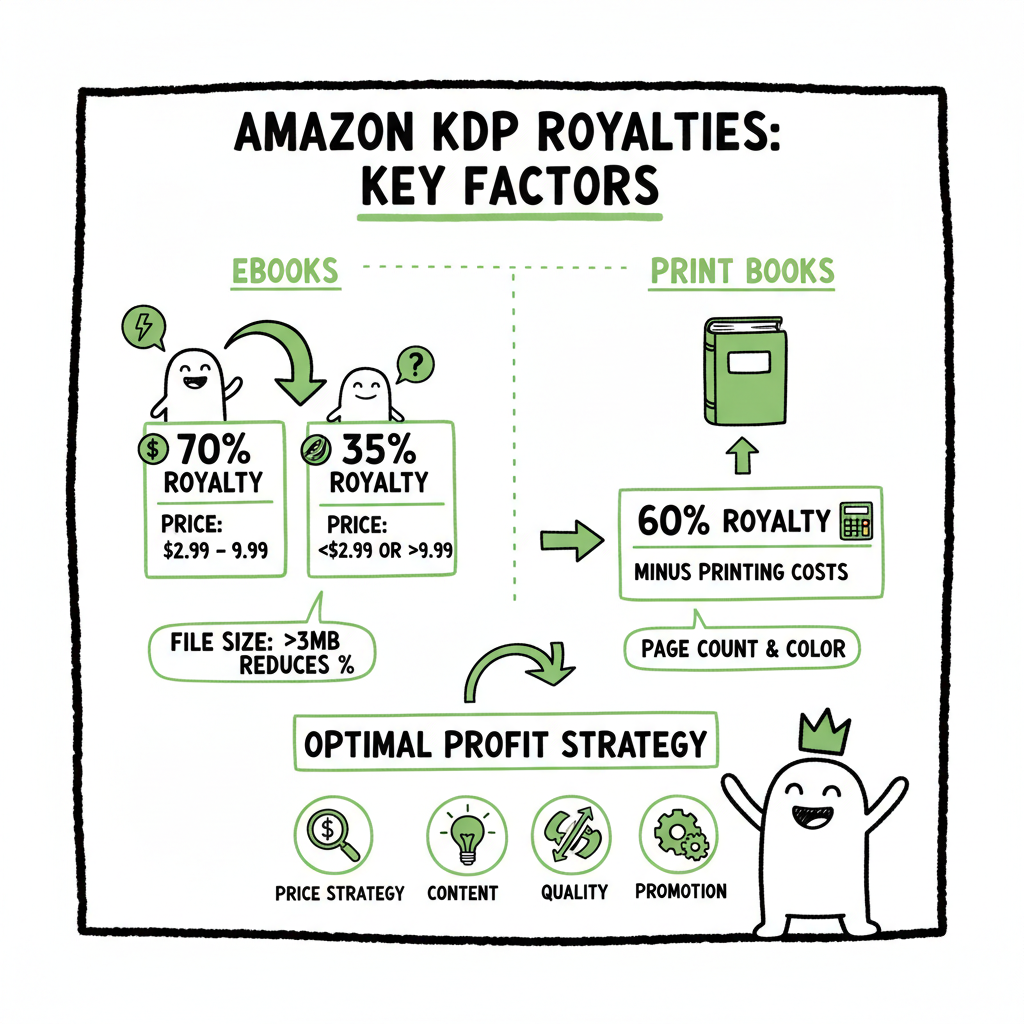
Ebook royalties: two common bands
- 35% royalty: available broadly but applies when your ebook falls outside Amazon’s qualification range for the 70% option or if you choose expanded distribution in some cases.
- 70% royalty: the better band for most trade books, but Amazon only allows it when the ebook is priced within a qualifying range in each marketplace (in major markets, typically between about $2.99 and $9.99). The 70% is applied to the list price after VAT (where VAT applies) and after a per‑unit delivery charge tied to file size.
Why file size matters
The 70% royalty is applied after the delivery fee is subtracted. For text-first books, the delivery fee is small. For illustrated books, workbooks, or image-heavy layouts, delivery fees can cut the royalty by a noticeable amount. That makes EPUB workflows and careful file construction a real profit lever for ebooks.
Print royalties: new breakpoints (since 2025)
Amazon changed print royalties and introduced a tiered approach. A simplified view:
– Books priced at or below a regional threshold (for US this has been $9.98) pay a lower royalty share (for example, 50% of list price before printing costs).
– Books priced above the threshold pay a higher share (for example, 60% before printing costs).
Printing costs (page count, trim size, color vs. black & white, and marketplace) are then deducted from that share. The result: a book priced $9.98 might leave you materially less per sale than the same book at $10.49 because of the percentage breakpoint.
Market-by-market differences
Those thresholds and the qualifying price ranges are region-specific. A price that triggers the higher royalty in the US may fall below the threshold in the UK, Canada, or Australia. That’s why modeling price and profit per marketplace is critical when you sell widely.
Tools Amazon gives you
KDP’s royalty and printing-cost calculator lets you test list prices, trim sizes, page counts, and ink choices to see the net royalty per sale. Use it early in the planning stage and re-run it when you update interior design or change formats.
How this affects decisions
Deciding list price is not just about perceived value. It’s an economic decision: will a small price increase produce a larger net per‑sale royalty that offsets any potential drop in unit sales? For many titles, pricing an ebook inside the 70% band and setting the paperback just above the print threshold is a predictable way to improve net revenue.
Pricing strategies for ebooks and print
Pricing is both an art and a spreadsheet. This section breaks the choices down into tactical steps you can apply immediately.
Start with market context
Look at comparable books in your category for price norms. Genre matters: romance readers expect lower per‑book prices and higher volume; specialist nonfiction can often command a higher price. Don’t copy exact prices, but use them as anchor points.
Ebook tactics
- Target the 70% band when possible. For many titles, a sweet spot is $2.99–$5.99. This range balances buyer expectations and per‑unit money.
- Keep file size minimal. Compress images, remove unnecessary assets, and use CSS/HTML‑only formatting where practical to reduce delivery fees.
- Use psychological pricing—$3.99 looks lower than $4.00—and test a few points. Small moves can change perception without losing a lot of margin.
- If your book must be priced outside the 70% band (for example, very cheap promo pricing), accept the 35% band but plan for volume or bundled offers to keep revenue acceptable.
Print tactics
- Model print royalties against the regional threshold. If your book can reasonably bear an extra $0.50–$1.00 and still compete, price it above the threshold to get the higher royalty share. Often the incremental list price increases your net profit more than you’d lose in sales.
- Trim size and page count matter. Choosing a slightly smaller trim or editing for brevity reduces pages and print costs. For black‑and‑white interiors, aim to keep page count and margins efficient.
- Use black & white unless your content absolutely requires color. Color print costs are high and can sink royalties for low-priced books.
- Remember marketplaces: set prices per marketplace rather than a single global price. A $10 paperback in the US may need a different nominal price in the UK or Canada to hit the same royalty breakpoint.
Promotion and temporary price changes
Promos (free days, countdown deals, price drops) are useful, especially for building readers in a series. But when you drop price, know whether Amazon moves you out of the 70% band for ebooks or under the print threshold for paperback. If a discount sacrifices a royalty band, it may not be worth the short‑term increase in units.
Practical example (ebook)
Imagine an ebook at $3.99 on the 70% plan. Suppose delivery is $0.12 because of images. Net before royalty = $3.99 − $0.12 = $3.87. Royalty = 70% × $3.87 ≈ $2.71 per sale. Compare that to a $2.99 ebook with small delivery cost: $2.99 − $0.06 = $2.93; royalty at 70% ≈ $2.05. The higher price earns more per sale and may be worth a slightly smaller conversion rate.
Practical example (paperback)
A paperback at $9.98 might be in the lower royalty band. If the print cost is $3.00 and the royalty share is 50% before print, royalty = 50% × $9.98 − $3.00 = $1.99. Increase price above the threshold to $10.49 and the share moves to 60%: 60% × $10.49 − $3.00 = $3.29. That extra $1.30 per sale often more than offsets a small loss in conversion.
Rule of thumb
Model in every major marketplace you sell in. Small percentage changes compound when you sell thousands of copies.
Practical profit levers and scaling distribution
This is the operator’s section: specific things you can change immediately, and how to run a repeatable process when you publish multiple titles.
Levers that cost almost nothing but help a lot
- Trim unnecessary images and compress the ones you keep. For ebooks, delivery fees shrink. For print, fewer pages reduce printing cost.
- Tighten interior design to reduce page count without hurting readability. A small trim or margin tweak reduces pages for every copy sold.
- Choose black & white interior unless content requires color. Color dramatically increases per‑unit print costs.
- Price strategically around thresholds rather than at a round number that sits below a breakpoint.
Model before you publish
Make a simple spreadsheet that pulls these variables together: format, list price, marketplace, delivery cost (ebooks), print cost (print), and final royalty. Use the official KDP calculator to fill the numbers when you need accuracy. If you publish multiple titles, reuse the sheet as a template.
Batch publishing and why it matters
When you publish more than a handful of books, a manual upload process becomes a bottleneck and an error risk. That’s where unified multi-platform publishing makes a difference. Automating uploads across Amazon KDP, Kobo, Apple Books, Draft2Digital, and Ingram saves time and reduces mistakes. With CSV batch uploads and platform‑specific intelligence, you can:
- Push the same title to multiple stores with correct pricing per marketplace.
- Avoid manual entry errors that can change metadata or pricing.
- Reprice multiple titles when a new pricing tactic or market change is needed.
Automate the upload. Own the distribution. If you need to create a paperback or ebook quickly from the same manuscript and reuse assets across stores, it’s worth using tools built for scale to keep your process repeatable and auditable.
When to use a price test versus structural changes
- Test price when you want to learn demand elasticity. A/B tests or short promotion windows can provide data.
- Make structural changes (file size, trim size, interior ink) when the profit math justifies it for long-term sales. Structural changes require rebuilding files, so do the modeling first.
Formatting and conversion considerations
Proper ebook formatting keeps delivery costs low and compatibility high. Converting to EPUB correctly ensures your book looks right across stores. If you need a clean conversion workflow, using a dedicated EPUB converter avoids common mistakes like embedded fonts that inflate file size or images that don’t scale on small screens. For cover work, a predictable, printable file from a book cover generator prevents rejections and extra formatting rounds.
Design and assets: where to spend and where to save
- Spend on a cover that performs in your genre. The cover is the primary marketing asset.
- Save on interior bells that drive cost but add little value for the reader (unnecessary color art, heavy paper choices).
- Invest in efficient templates that minimize rework for multiple books.
Platform differences and distribution strategy
Selling widely matters for discoverability and long-term sales. But each store has its own rules for pricing and royalties. A multi-platform approach should balance direct store advantages and the complexity of managing marketplace-specific pricing. That’s why platform intelligence—logic that knows the price band in each, the print thresholds, and what file types each requires—saves hours and prevents mistakes.
Workflows that scale
- Centralize metadata in a CSV: ISBN, title, subtitle, price per marketplace, distribution choices, keywords, and categories.
- Use a repeatable conversion and cover step: export final EPUB and print-ready PDF, store them in a versioned folder.
- Run a pricing model step before upload: feed each marketplace’s price into your calculator and flag any that cross unfavorable thresholds.
- Batch upload and verify: use automation to push files and metadata, then do a quick verification pass to catch obvious mistakes.
When you publish seriously, this becomes obvious: manual uploads don’t scale. Tools that offer CSV batch uploads and platform-specific rules can reduce your upload time by roughly 90%, cut errors, and make wide distribution practical and affordable.
FAQ
Q1
Q: What’s the most important single change an indie author can make to improve profit?
A: Price strategically around Amazon’s royalty breakpoints and keep ebook file size low. Those two moves often increase net royalty per sale more than any other single change.
Q: How do I know if I should price my paperback above the regional threshold?
A: Model the net royalty per sale with two prices: one below and one above the threshold. If the increase in net royalty is larger than the projected loss in unit sales at the higher price, price above the threshold.
Q: Will adding images to my ebook always hurt royalties?
A: Not always, but images increase file size and therefore delivery fees on the 70% ebook plan. If images are essential to the content, optimize them (compress, use correct formats) and model the effect on per‑sale royalty.
Q: Should I use color for print interiors?
A: Only if the content requires color. The jump in printing cost for color often destroys margins at low list prices. For most trade books, black & white or greyscale is the practical choice.
Q: What does platform-specific intelligence mean and why does it matter?
A: It’s automation that knows each store’s rules—price bands, file requirements, print costs—and applies them so you don’t need to mimic one marketplace’s price across all others. That reduces errors and improves profit per market.
Q: Are conversion tools necessary?
A: They’re not mandatory, but a good EPUB converter reduces time spent fixing files and avoids inflated delivery fees. A consistent conversion tool helps maintain quality across multiple titles.
Q: How do I evaluate whether to use a publishing automation service?
A: Start by measuring how much time you spend uploading and fixing errors. If you publish more than a few titles a year, automation typically saves time, reduces mistakes, and makes global pricing and distribution practical.
Final thoughts
Pricing and royalties are a product of rules and reader behavior. Know the rules, measure the effects, and build workflows that let you iterate quickly. Small technical fixes—file-size reductions, page-count efficiency, and correct pricing around thresholds—compound into meaningful per‑sale gains. At scale, use batch workflows and platform-aware uploads to keep control of prices and metadata.
If you want to test a workflow that reduces manual uploads and applies platform rules at scale, visit BookUploadPro.com and try the free trial.
Sources
Sources
- eBook Royalties – Kindle Direct Publishing Help
- 2025 Guide to Amazon Fees and Royalties for Kindle eBooks and Print Books
- Paperback Royalty – Kindle Direct Publishing Help
- Printing Costs and Royalty Calculator – Kindle Direct Publishing
- Amazon KDP Royalty Changes 2025: What to Know and Do
- Amazon KDP is Cutting Royalties. Here’s what Self-Publishing Authors Can Do About It.
- KDP’s Royalty Rates Change for the First Time in 20 Years!
- KDP’s Royalty Cut Isn’t the Whole Story
- Changes to royalty rates for print books and color printing costs starting June 10, 2025 (KDP Community)
Amazon KDP Royalties, Pricing & Profit Optimization Estimated reading time: 14 minutes Key takeaways KDP royalties depend on format, price bands, file size (ebooks), and printing costs (print); small price moves around thresholds can change your royalty rate dramatically. For ebooks, aim for the 70% royalty band when the market allows and keep file size…