KDP 70% Royalty Requirements for Price, Delivery, Territories
kdp 70% royalty requirements
Estimated reading time: 11 minutes
Key takeaways
- The KDP 70% royalty option pays more per sale, but only when specific price, territory, rights, and delivery-fee rules are met.
- File size, list price band, and where a buyer is located matter — large files or wrong territories can push you to 35% instead.
- For authors publishing at scale, automate pricing and uploads so you hit the requirements consistently and avoid royalty surprises.
Table of Contents
- How kdp 70% royalty requirements work
- Practical steps: pricing, files, and publishing decisions
- FAQ
- Sources
How kdp 70% royalty requirements work
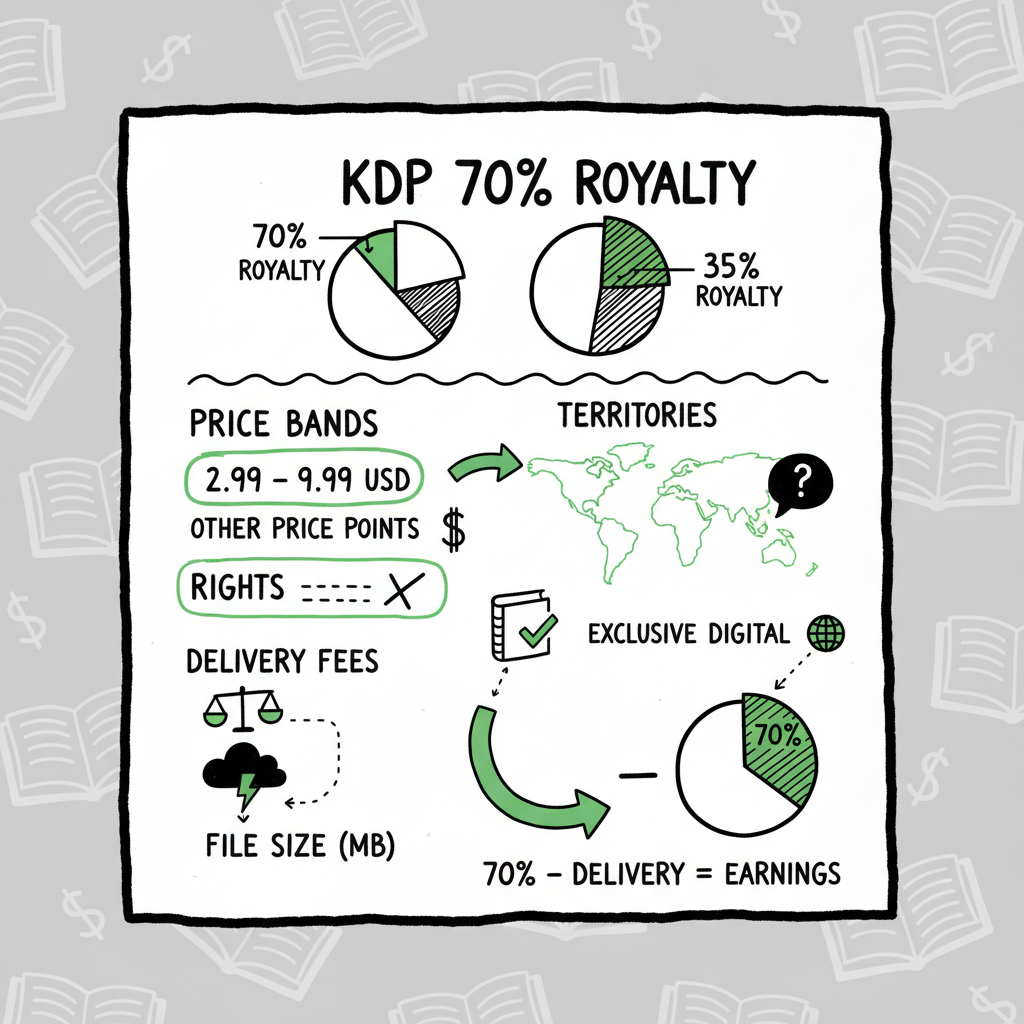
If you sell Kindle ebooks through KDP, the platform offers two royalty plans: 35% and 70%. The phrase kdp 70% royalty requirements describes the set of rules Amazon uses to decide whether a sale is paid at 70% or at the lower 35% rate. Those rules cover list price bands, eligible territories, rights status, and a delivery fee based on file size. Get any of those wrong and Amazon will pay 35% instead — sometimes retroactively.
- Two plans, not a negotiation. You can select the 70% option when you enroll a title, but Amazon only pays it when the sale meets their eligibility checks. Otherwise the sale is treated as 35%.
- List price band. In many stores the ebook must be priced within a required range (commonly about $2.99 to $9.99 in the US) and obey KDP’s list-price rules for each marketplace.
- Territorial limits. The 70% rate applies only to sales made in specific “70% territories.” Sales to customers outside those territories are paid at 35%, even when you chose 70%.
- Delivery fee. Amazon subtracts a per‑sale delivery fee based on the ebook file size when paying 70% royalties. Larger files mean higher delivery fees and lower net income per sale.
- Rights and public domain. Only in‑copyright works are eligible for 70%. Titles that are public domain or composed mainly of public‑domain content are limited to 35%.
Why this matters for authors
If you publish one book and forget the file size or price rules, the impact is small. If you publish dozens, inconsistent pricing or oversized files can cost real revenue and create accounting headaches. For authors who publish at scale, those operational details are a business problem — you want predictable, repeatable uploads that meet the 70% rules where it makes sense.
If you want a short walkthrough on handling KDP uploads at scale, see Self Publish Book Amazon KDP — it shows practical steps for streamlining multiple uploads and keeping prices and metadata consistent.
Practical steps: pricing, files, and publishing decisions
1) Set list prices with the 70% band in mind
The simplest blocker for 70% is price. On many Amazon stores, ebooks must fall within a specified range (often $2.99–$9.99 in the U.S.). Make sure your list prices on KDP meet those threshold rules for each marketplace where you want 70%. If you set a price outside the allowed band, Amazon will pay 35% on those sales.
A small but critical detail: Amazon evaluates the list price per marketplace and per currency. That means you need to manage localized pricing, not just a single number. Treat price localization as part of the publishing workflow.
2) Watch the delivery fee — optimize file size
When the 70% option applies, Amazon deducts a delivery fee that scales with file size. That fee can be a few cents per sale for text-heavy books and higher for image-heavy files. At low list prices, delivery fees can eat a meaningful share of your gross royalty.
What to do:
- Reduce unnecessary file weight: strip unused fonts, optimize images, and prefer EPUB flowable layouts for text books.
- Convert and validate EPUBs so they are clean and compact. If you need a straightforward EPUB tool, use an EPUB converter that keeps file size small and preserves layout.
- For illustrated books or children’s picture books, compare total royalty after delivery for 70% versus the guaranteed 35% (which has no delivery fee). Sometimes the 35% option yields similar or better net revenue for very large files.
3) Know the territory rules and KDP Select exceptions
Amazon maintains a defined set of territories where 70% applies. Sales outside those territories default to 35%, even if you picked 70% in your KDP settings. Additionally, in some countries (for example, Brazil, India, Japan, and Mexico) Amazon requires KDP Select enrollment plus compliant pricing to pay 70% on sales to local customers. If you need 70% income in those marketplaces, check the KDP Select rules and enroll where it makes sense.
4) Confirm rights and content eligibility
Only works that are in copyright and for which you hold distribution rights can qualify for 70%. If your title is public domain or mostly public-domain text, the 70% option will be disallowed. Make rights checks part of your release checklist.
5) Automate and batch where possible
If you publish multiple books, keep pricing, rights, and file optimization consistent by batching uploads and automating routine checks. Using CSV batch uploads and platform-specific intelligence reduces manual errors and saves time. Automation helps you:
- Apply consistent localized pricing that hits the 70% bands.
- Ensure EPUBs meet file-size targets before upload.
- Track which territories will pay 70% versus 35%.
BookUploadPro automates repetitive uploads across Amazon KDP, Kobo, Apple Books, Draft2Digital, and Ingram. At scale, this kind of automation is the obvious upgrade — it can cut author upload time by roughly 90%, reduce errors, and make wide distribution practical. Automate the upload. Own the distribution.
6) Cover, interior, and format notes
A clean, market-ready book increases the chance your listings are accepted without flagged issues. You will typically create or order a cover, convert your manuscript to EPUB, and generate paperback files. If you need tools:
- For cover creation, consider a cover generator that produces print- and ebook-ready art.
- Use a reliable EPUB converter to create compact, validated EPUB files.
- When generating paperback files or ebook files, follow platform-specific sizing and margin rules to avoid rejections.
If you’re creating paperback or ebook files at scale, a streamlined book creation workflow speeds things up and reduces mistakes. For cover needs, a book cover generator can simplify production. For EPUB work, use a validated EPUB converter to keep files lean.
7) Track royalties and re-price strategically
Amazon can retroactively apply 35% instead of 70% when rules are violated. Monitor your KDP royalty reports regularly. If you see unexpected 35% payments, identify which rule failed (price band, territory, file size, rights) and fix it for future sales. Where retroactive adjustments occur, you may need to reconcile statements.
Practical examples
- Text-focused novella at $3.99, small EPUB file, sold in US and EU: typically earns 70% minus delivery fee — net per-sale is healthy.
- Illustrated children’s book at $4.99 with many images and large file size: delivery fee may reduce the 70% net so much that 35% looks comparable. Test both scenarios before committing.
- Backlist public-domain compilation: not eligible for 70% — price decisions should reflect the 35% rate.
How multi-platform publishing affects the 70% decision
When you publish beyond Amazon, the 70% question changes shape. Other retailers have different royalty models and technical requirements. A typical workflow for multi-platform publishing:
- Use Amazon KDP for Kindle sales and consider 70% where it applies.
- Distribute the same ebook to Apple Books, Kobo, and Ingram using files optimized for each platform.
- For non-Kindle stores, the 70% rule is irrelevant — focus instead on each store’s pricing and commission model.
You should optimize a single master manuscript and generate platform-specific files. That means producing a compact EPUB for Kindle (to help with KDP delivery fees), and separate assets for other stores when needed. Tools that create platform-aware files remove friction and prevent mistakes that cost royalties.
If your process includes creating multiple formats — ebook, paperback, and maybe large-print or audio metadata — consider a unified approach that keeps metadata, pricing, and rights consistent. For paperbacks and ebooks, using a single service that helps generate files for retail plus distribution can save hours. If you generate a lot of covers or need fast conversion, look into reliable tools discussed above.
FAQ
Q: What price range typically qualifies for the 70% royalty?
A: In many Amazon marketplaces the qualifying band is about $2.99 to $9.99 in the U.S. equivalent. Exact ranges and currency conversions vary by marketplace; KDP’s list-price rules spell out allowed minimums and maximums per store.
Q: Does file size always reduce my 70% royalty a lot?
A: No. For text-heavy books, the delivery fee is often a few cents and the 70% plan still pays significantly more than 35%. For image-rich books the delivery fee grows, so you should compare net royalties on a per-book basis.
Q: Can I force Amazon to pay 70% everywhere?
A: No. 70% applies only in specific territories defined by Amazon. Sales to customers in other regions earn 35% regardless of your selected setting. In some countries 70% also requires KDP Select enrollment plus compliant pricing.
Q: My book was public domain. Can I earn 70%?
A: No. Public-domain or primarily public-domain works are restricted to the 35% royalty plan.
Q: How should I approach pricing across multiple stores?
A: Localize prices for each marketplace so they fall into the desired range on Amazon where you want 70%. For other platforms, set prices based on local market expectations. Automating localized pricing reduces errors and keeps your listings compliant.
Final steps
Before you upload at scale, optimize EPUBs, prepare covers and paperback files, and set localized pricing that aligns with Amazon’s 70% rules where appropriate. If you need to create compact EPUBs, generate covers, or produce paperbacks and ebooks reliably, look for tools that automate those steps and validate output. A tight, repeatable process prevents surprises in your royalty reports and keeps more money in your pocket.
Call to action
Visit BookUploadPro.com and try the free trial to see how batch uploads, CSV automation, and platform-aware publishing can reduce work and help you hit royalty rules consistently.
Sources
- Amazon KDP Help – eBook Royalties
- Amazon KDP Help – Price Your Book (eBook pricing and royalty plans)
- Amazon KDP Help – Digital Book Pricing Page / KDP Select 70% rules
- Amazon KDP Help – eBook List Price Requirements
- Kindlepreneur – KDP Royalty Calculator
- 1MK Williams – Should I do the 35% or 70% royalty rate on my eBook with Amazon KDP?
- AuthorImprints – Kindle eBook Royalties: 70% vs. 35% and 6 Essential Things You Need to Know
- BookAutoAI EPUB converter
- BookAutoAI book cover generator
- BookAutoAI (book creation workflow)
kdp 70% royalty requirements Estimated reading time: 11 minutes Key takeaways The KDP 70% royalty option pays more per sale, but only when specific price, territory, rights, and delivery-fee rules are met. File size, list price band, and where a buyer is located matter — large files or wrong territories can push you to 35%…