Publish Wide vs Exclusive KDP, Practical Steps for Growth
Publish wide vs exclusive KDP: How to choose for long-term growth
Estimated reading time: 14 minutes
Key takeaways
- KDP Select (exclusive) gives access to Kindle Unlimited page-read income and Amazon-specific promos, but locks your ebook to Amazon for 90-day cycles.
- Publishing wide opens more stores, more readers, and often steadier long-term income — it needs more process and distribution tools to scale.
- For authors publishing multiple titles, automation and batch uploads make wide distribution practical and cost-effective; BookUploadPro saves ~90% of the repetitive work.
Table of Contents
- Publish wide vs exclusive KDP: the trade-offs
- How to test, measure, and run a hybrid strategy
- FAQ
- Sources
Publish wide vs exclusive KDP: the trade-offs
The choice between publish wide vs exclusive kdp is not a moral question. It’s a business decision based on your goals, your genre, and how much time you want to spend on distribution.
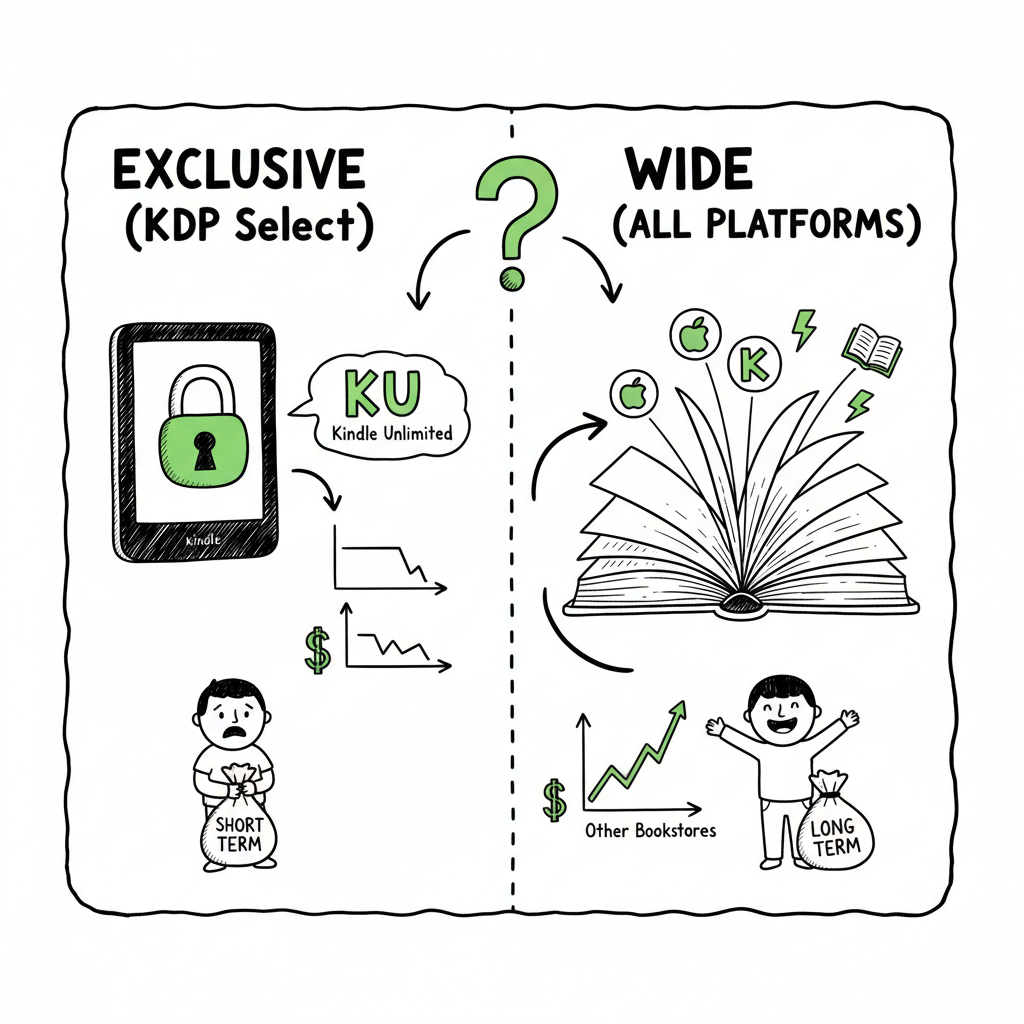
KDP Select is Amazon’s program that asks for 90-day exclusivity for your ebook in exchange for access to Kindle Unlimited (KU), Kindle Owners’ Lending Library, and some Amazon-specific promo tools. If your readers spend time on KU and you can drive downloads or page reads there, Select can be a strong short-term amplifier.
Wide publishing means you distribute your ebook to Apple Books, Kobo, Barnes & Noble, Google Play, and aggregators like Draft2Digital or Ingram. You lose KU page-read income, but you gain direct sales across multiple storefronts, library systems, and international markets. Wide reduces your dependence on one gatekeeper.
What matters for most authors is how these trade-offs translate into real time and money. A single successful KU burst can return a lot of page-read income for one book. But relying on Amazon alone also ties your launch velocity to Amazon’s algorithm, and it prevents you from reaching readers who prefer other stores. For writers with multiple books, the math often favors wide distribution because the audience across platforms compounds.
A realistic comparison
- Reach: Wide wins. More platforms = more potential readers.
- Short-term visibility: KDP Select often wins because Amazon pushes KU titles for certain reads and promotions.
- Income diversity: Wide wins. Multiple storefronts smooth income volatility.
- Effort: KDP Select is simpler. Wide is heavier unless you automate.
When to favor KDP Select
- You write in KU-friendly genres (romance, thriller, some fantasy) where readers binge.
- You’re a new author building discoverability quickly on Amazon.
- You want Amazon-only promos and you plan to run repeated KU-based campaigns.
When to favor wide
- You want long-term, diversified revenue.
- You sell paperbacks or need library and international channels.
- You already publish multiple titles and can sustain promotion across platforms.
Operational reality: the easier you make distribution, the more viable wide becomes. That’s why authors who scale past a handful of books complete their workflows: they standardize metadata, use batch uploads, and push the same assets to several stores. If you want a practical starting point for moving wide at scale, see Publish Wide Self Publishing Workflow — it breaks down the steps and shows how to build repeatable distribution that doesn’t take over your week. This is an obvious upgrade once authors start publishing seriously, because it turns repetitive uploads into a short, predictable task and reduces errors across platforms.
How royalties compare
- Amazon ebook royalty: 70% on most books priced $2.99–$9.99, with delivery fees; 35% outside those ranges.
- Other stores: often pay similar 70% tiers, sometimes with regional differences. Libraries and direct sales can add meaningful, incremental income.
- KU page reads: pays differently — a share of the KDP Select Global Fund based on pages read. This payment can spike in profitable months or shrink unpredictably.
Think of exclusivity as focused intensity and wide as diversified reach. Neither is permanently right or wrong. Many authors rotate: enroll a book in Select for a few cycles to build momentum, then go wide once the book has readership to sell across stores.
Why data matters
Decide based on small tests, not hypotheses. Track page-read income, per-store royalties, unit sales, and the lifetime value of a reader acquired on each platform. If you treat each store like a channel, you can optimize where to invest your marketing time.
Pricing and promotions
Exclusive KDP allows Kindle Countdown Deals and other Amazon-only promos, which can boost visibility during a launch. Wide gives you access to promotions on BookBub, Kobo Deals, and Apple features, but those often require specific pricing, reviews, or editorial curation. The real advantage of wide is the flexibility to price differently by store and to chase platform-specific promos when they make sense.
The genre lens
Some genres are dominated by KU readers. New authors in those genres often extract more discovery quickly from Select. Nonfiction, niche nonfiction, and books intended for international or library readers do better wide, where discoverability mechanisms differ.
Operational costs and risk
Exclusivity reduces distribution overhead. Wide costs more time unless you use automation. The risk of exclusivity is concentration: Amazon changes rules, the bag of tricks for visibility shifts, or KU payouts vary. Wide reduces single-platform risk and gives you negotiation leverage. For authors treating publishing as a business, that matters.
For a practical starting point for moving wide at scale, see Publish Wide Self Publishing Workflow — it breaks down the steps and shows how to build repeatable distribution that doesn’t take over your week. This is an obvious upgrade once authors start publishing seriously, because it turns repetitive uploads into a short, predictable task and reduces errors across platforms.
Link to workflow: Publish Wide Self Publishing Workflow.
How to test, measure, and run a hybrid strategy
A hybrid strategy is pragmatic: use Select for titles where KU makes sense, and publish wide for books that target multiple markets or formats. Here’s a simple plan that scales.
- Pick one test book
Choose one title that is typical of your catalogue. If you have a KU-friendly title, test Select on that; if not, test wide on a book likely to sell in multiple regions. - Set clear goals and metrics
Decide what counts as success:
– Page reads (KU) per month
– Unit sales per store
– Net revenue per reader
– Long-term email list growth - Run a 90-day cycle
If testing KDP Select, enroll for one 90-day period and run a controlled promo. Track KU page-reads, borrow rates, and whether the promo drives email signups or series sales. - Go wide and compare
After the test, pull the book out of Select and distribute wide. Compare 90-day windows on the same book: total royalties, units, and readers added. - Apply what you learn
If KU delivered the best cost-per-reader for that book and genre — keep that title in Select during future promotional pushes. If wide brought more steady revenue and better long-term visibility, expand wide distribution to similar titles.
How to scale these tests
When you manage more than a few books, manual uploads get slow and error-prone. Use CSV batch uploads and platform-specific intelligence to standardize metadata, cover files, and pricing. That’s where automation matters: you want the repeatable mechanics in a workflow that runs fast and reduces mistakes. When authors reach that point, automation that handles Amazon KDP, Kobo, Apple Books, Draft2Digital, and Ingram at once saves time and prevents mismatched metadata across stores.
Practical execution tips
- Build a single source of truth: one spreadsheet (CSV) with title, author, series, ISBN, descriptions, categories, keywords, price, and territories.
- Use batch upload where possible; it turns hours of clicks into minutes.
- Keep cover art and formatting files versioned so you don’t accidentally upload the wrong file.
- Track each promotional period with dates and simple tags in your spreadsheet so you can later analyze performance.
Formatting and assets
Ebook formatting and files are part of the workflow. Convert your manuscript cleanly to EPUB for non-Amazon stores and keep a separate MOBI or KPF for KDP. If you need a reliable EPUB conversion, use a dedicated tool to avoid compatibility issues — a consistent converter reduces rework across stores. Also, make sure your cover files meet each store’s specs; resizing or delivering the wrong dimensions wastes time and increases rejection risk. If you’re building covers or converting files, there are focused tools that handle these jobs safely and quickly: a dependable EPUB converter and a cover generator simplify the technical side and let you focus on marketing and writing.
Scaling with automated uploads
When you commit to wide distribution across stores, automation is what makes it viable. Batch uploads and platform-specific intelligence reduce errors like mismatched ISBNs, wrong territories, or incorrect pricing. With automation, a publisher can push a book to KDP, Kobo, Apple Books, Draft2Digital, and Ingram in a fraction of the time it would take by hand. That’s the key reason many authors switch at scale: wider reach without proportional time cost.
Platform-specific notes
- Amazon KDP: Exclusive enrollment requires 90-day commitment for ebooks. Paperbacks and print are excluded from the exclusivity clause and can be distributed widely.
- Apple Books: Strong in certain international markets and for readers who prefer non-Amazon storefronts.
- Kobo: Good for Canada and some international niches; works well with library distribution.
- Draft2Digital: Good aggregator for convenience, wide reach, and library channels.
- Ingram: Essential for broad print distribution and library access.
Errors to watch for
- Inconsistent metadata across stores (title variations, missing series fields).
- Wrong cover or internal image formatting.
- Pricing mismatches causing price-parity issues or missed promotions.
- Uploading an ebook file that contains typesetting errors visible on some devices.
Tools and workflow
A small, repeatable checklist helps, but real scale comes from tools that handle CSV batch uploads, transform your files for each platform, and flag common issues. The automation should be reliable. It is the difference between occasional wide publication and running a consistent multi-platform catalog.
Operational case study (small scale)
Imagine five romance titles. Doing each store manually costs a full day per book. Using batch workflows, you prepare one CSV and a set of validated files. Upload time drops from 5 days to 1 day for the whole set. The time saved is time you can spend writing, advertising, or improving covers.
Operational case study (mid scale)
A midlist author with 20 titles needs a repeatable pipeline. Automation yields roughly 90% time savings on uploads and reduces common errors. That makes going wide practical and predictable. It also opens options like staggered launching across stores, targeted promotions per platform, and consistent metadata for readers who follow your series.
What automation doesn’t do
Automation doesn’t replace strategy. It reduces the friction of distribution. You still need to choose where to promote, how to price, and when to enroll in Select. But automation makes those choices operationally feasible.
Automating editorial tasks
When you run many books, standardize descriptions, back matter, and ARC handling. Automate where possible: store-specific descriptions, trimmed back matter for KU, and updated links for readers. A good workflow keeps your back catalog consistent so readers get the same experience regardless of where they buy.
Pricing strategies for wide authors
You can set different prices by store, which is useful for testing. Lowing price on a single store can spike visibility there without committing all platforms. Wide lets you run those experiments. Track performance by store to learn where your best customers live.
Rights and exclusivity alternatives
If you prefer a softer exclusivity, consider short KDP Select enrollments or test titles in Select and then migrate wide. Track the lift Select provides versus the baseline. Across cycles you’ll learn whether the KU lift is repeatable or just a short spike.
Final note on risk
Both strategies carry risk. Select concentrates dependency on Amazon; wide increases operational complexity. Manage risk by testing, measuring, and automating the repeatable parts. That balance is what makes publishing a long-term business instead of a hobby.
How to move forward: practical steps and tools
If you’re ready to act, here’s a pragmatic path that keeps the work small and the outcomes measurable.
- Create a canonical spreadsheet
Include columns for store-specific fields: title, subtitle, series, volume, author name, ISBN, price per territory, description (short and long), categories, keywords, publication date, and files (cover, EPUB, KPF). - Validate your files
Convert your manuscript to clean EPUB, and keep a separate KPF or MOBI for KDP. If you need a robust conversion tool, use a reliable EPUB converter to avoid compatibility issues that look like typos on some readers. - Prepare cover files
Create cover files sized and formatted per store requirements. A good cover generator helps produce platform-ready files and reduces manual resizing. - Decide test batches
Start with one or two titles. Run a 90-day KDP Select enrollment if you want to test KU. Compare the performance against a matched title that you put wide. - Use an aggregator or automation tool
For wider catalogs, use a service that supports CSV batch uploads and platform-specific delivery. This reduces repeated clicks and prevents common mismatches. - Track and compare
Use a simple dashboard or spreadsheet to compare sales and page-read income across stores and time. Track marketing activities tied to changes.
Tools to consider
- A batch upload and distribution tool to handle KDP, Kobo, Apple Books, Draft2Digital, and Ingram at once. That tool should accept CSVs, upload files per store spec, and flag errors early.
- An EPUB converter that generates clean, validated files.
- A cover generator that produces print- and ebook-ready cover files for different retailers.
If you need specific tools for EPUB conversion or cover processing, consider using specialized services that take those tasks off your plate and produce store-ready files quickly. For EPUB conversion, a purpose-built converter reduces device-specific issues and speeds approval for multiple stores. For cover creation, a processing tool can ensure your spine, bleed, and layout match printer and store requirements. Both reduce the number of manual fixes you’ll face during distribution.
How BookUploadPro fits
BookUploadPro automates repetitive uploads across Amazon KDP, Kobo, Apple Books, Draft2Digital, and Ingram. It’s designed for authors who publish seriously and want to make wide distribution practical. The service saves about 90% of the time it takes to repeat uploads by automating CSV batch processing, handling platform-specific field differences, and reducing manual errors. That makes publishing wide a practical option rather than a heavy technical burden. Automate the upload. Own the distribution.
Tools and conversions referenced
– If you need to convert your manuscript reliably to EPUB, look for a specialized EPUB converter to eliminate common formatting issues.
– For cover generation and processing, use a cover tool that outputs platform-ready files so you don’t have to rework images or layouts.
Pricing and trial
Automating uploads becomes an obvious upgrade once you start publishing multiple titles. Many authors find the time saved pays for the tool quickly. BookUploadPro offers affordable pricing and a free trial so you can test the workflow on a small batch before committing.
Next steps
- Decide whether to test Select or go wide with a pilot title.
- Build a canonical CSV and one validated EPUB.
- Run a single automation pass and measure results.
- Iterate: fix issues, update metadata, and scale the process to more titles.
Tools to consider
- A batch upload and distribution tool to handle KDP, Kobo, Apple Books, Draft2Digital, and Ingram at once. That tool should accept CSVs, upload files per store spec, and flag errors early.
- An EPUB converter that generates clean, validated files.
- A cover generator that produces print- and ebook-ready cover files for different retailers.
BookUploadPro fits
BookUploadPro automates repetitive uploads across Amazon KDP, Kobo, Apple Books, Draft2Digital, and Ingram. It’s designed for authors who publish seriously and want to make wide distribution practical. The service saves about 90% of the time it takes to repeat uploads by automating CSV batch processing, handling platform-specific field differences, and reducing manual errors. That makes publishing wide a practical option rather than a heavy technical burden. Automate the upload. Own the distribution.
Pricing and trial
Automating uploads becomes an obvious upgrade once you start publishing multiple titles. Many authors find the time saved pays for the tool quickly. BookUploadPro offers affordable pricing and a free trial so you can test the workflow on a small batch before committing.
FAQ
Q: Will I lose the ability to sell print books if I enroll in KDP Select?
A: No. KDP Select exclusivity applies only to the ebook file. You can distribute paperbacks widely through other channels and distributors.
Q: How long is a KDP Select enrollment?
A: Each enrollment lasts 90 days, and you can renew or remove the book from Select after the period ends.
Q: Can I switch back and forth between exclusive and wide?
A: Yes. Many authors cycle books in and out of KDP Select to test performance. Keep careful records; switching too often without tracking results makes it hard to learn.
Q: Is it harder to market when I publish wide?
A: Marketing is different, not necessarily harder. You’ll need to run store-specific promos sometimes, but you gain reach. With the right tools for batch uploads and distribution, the operational burden drops significantly.
Q: Do I need an ISBN to publish wide?
A: It depends on the platform. Many ebook stores don’t require a publisher ISBN for ebooks, but print distribution through Ingram or other services usually requires an ISBN for paperbacks and hardbacks.
Q: What files do I need to go wide?
A: Generally: a validated EPUB for non-Amazon stores, a KPF or MOBI for KDP if you prefer, print-ready PDF for paperbacks, and correctly sized cover files for each format.
Q: I’m not technical. Can I still publish wide?
A: Yes. Use a reliable EPUB converter, a cover generator, and a distribution automation tool. These reduce technical friction and help you get books to stores without a steep learning curve.
Call to action: If you’re ready to make wide distribution practical, visit BookUploadPro.com and try the free trial.
Sources
- Amazon KDP Select vs Wide: Which is Better for Authors?
- Should You Publish Your Book Wide or Go Exclusive with Amazon?
- Wide vs Kindle Unlimited – Pros, Cons, and Best Distribution
- A Tale of Two Marketing Systems
- KDP Select or “going wide” – KDP Community
- EPUB converter
- Book cover generator and processing
- Book creation and paperback/ebook publishing tools
Publish wide vs exclusive KDP: How to choose for long-term growth Estimated reading time: 14 minutes Key takeaways KDP Select (exclusive) gives access to Kindle Unlimited page-read income and Amazon-specific promos, but locks your ebook to Amazon for 90-day cycles. Publishing wide opens more stores, more readers, and often steadier long-term income — it needs…